
1. Rematadoview
The Xiaomi Redmi Note 15 Pro 5G is a high-performance smartphone designed for robust daily use. It features a massive 6580 mAh battery, IP66/IP68 dust and water resistance, a 200 MP camera, and a 6.83-inch 1.5K AMOLED display. This manual provides essential information for setting up, operating, and maintaining your device.

Imaxe: Múltiple views of the Xiaomi Redmi Note 15 Pro 5G smartphone, showcasino seu deseño e o módulo de cámara.
2. Que hai na caixa
Upon unboxing your Xiaomi Redmi Note 15 Pro 5G, you should find the following items:
- Smartphone Xiaomi Redmi Note 15 Pro 5G
- Cable USB (USB tipo C)
- Ferramenta de expulsión de SIM
- Funda protectora
- Holding Ring (Keyring)
Note: A power adapter is not included with this device.
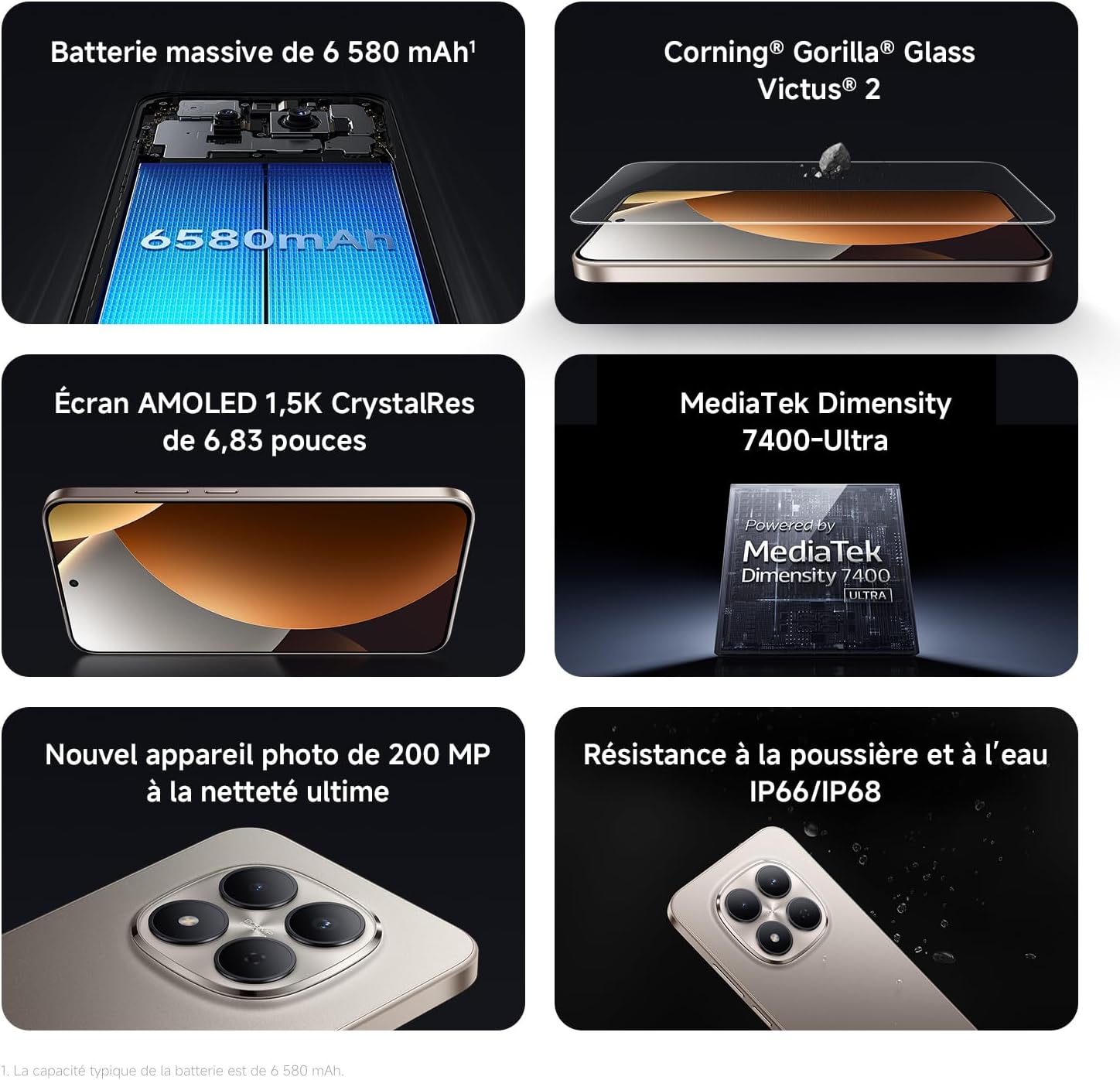
Image: Contents of the Xiaomi Redmi Note 15 Pro 5G box, showing the smartphone, USB-C cable, SIM ejection tool, protective case, and holding ring.
3. Características clave
- Massive 6580 mAh Battery with 45W Turbo Charging: Equipped with an ultra-large silicon-carbon battery for extended usage while maintaining a slim and light design. Supports 45W turbo charging and up to 22.5W reverse charging.
- IP66 / IP68 Dust and Water Resistance: The device has successfully passed 2-meter water resistance tests for 24 hours. It is designed to withstand daily splashes, accidental immersion, or drops in water without affecting performance.
- New 200 MP Ultra-Clear Camera System: Features a 4th generation 200 MP main sensor combined with a large 1/1.4-inch sensor, offering unprecedented image detail.
- Immersive 6.83-inch 1.5K Eye-Care AMOLED Display: Utilizes flagship-level luminous materials for reduced power consumption and a peak brightness of 3200 nits, ensuring clear visibility even in bright sunlight.
- Asistente de IA: Intelligent optimization with a single gesture, enhancing imaging capabilities and creative efficiency.
- Corning Gorilla Glass Victus 2: Reinforced front glass for enhanced shock and scratch resistance, ensuring long-term durability.
- MediaTek Dimensity 7400-Ultra Processor: Built on a 4nm TSMC process with an octa-core architecture up to 2.6 GHz, providing powerful multitasking, smooth gaming, and stable performance.
- Xiaomi HyperOS 2: Offers a faster, smarter, and smoother user experience with 6 years of security updates.

Image: Diagram illustrating the 6580 mAh battery capacity of the Redmi Note 15 Pro 5G.

Image: The Redmi Note 15 Pro 5G with water droplets, demonstrating its IP66/IP68 dust and water resistance.

Imaxe: Primeiro plano view of the 200 MP camera module on the Redmi Note 15 Pro 5G.

Image: The 6.83-inch 1.5K AMOLED display of the Redmi Note 15 Pro 5G with its specifications.

Image: Before and after images demonstrating AI photo optimization on the Redmi Note 15 Pro 5G.

Image: Illustration of Corning Gorilla Glass Victus 2 durability on the Redmi Note 15 Pro 5G.

Image: Technical image showing RAM chips, indicating up to 24GB RAM with memory extension on the Redmi Note 15 Pro 5G.

Image: Screenshot of the Xiaomi HyperOS 2 interface on the Redmi Note 15 Pro 5G.
4. Configuración
4.1. Inserir a tarxeta SIM
- Localiza a bandexa da tarxeta SIM no lateral do teu dispositivo.
- Insert the SIM ejection tool into the small hole next to the tray and press firmly until the tray pops out.
- Coloca a(s) tarxeta(s) nano-SIM na bandexa cos contactos dourados cara abaixo. Asegúrate de que estean aliñadas correctamente.
- Carefully push the SIM card tray back into the device until it clicks into place.
4.2. Acendido e configuración iniciais
- Mantén premido o botón de acendido (normalmente no lado dereito) ata que apareza o logotipo de Xiaomi.
- Sigue as instrucións en pantalla para seleccionar o teu idioma e rexión e conectarte a unha rede wifi.
- Inicia sesión coa túa conta de Google ou crea unha nova para acceder aos servizos de Google e a Play Store.
- Set up your screen lock (PIN, pattern, password, fingerprint, or face unlock) for security.
- Review e acepta os termos e condicións para completar o proceso de configuración.
5. Instrucións de funcionamento
5.1. Navegación básica
- Pantalla de inicio: Desliza o dedo cara á esquerda ou á dereita para navegar entre as pantallas de inicio.
- Caixón de aplicacións: Desliza o dedo cara arriba desde a parte inferior da pantalla para acceder a todas as aplicacións instaladas.
- Notificacións e configuración rápida: Pasa o dedo cara abaixo desde a parte superior da pantalla ata view notificacións e acceso rápido á configuración.
- Aplicacións recentes: Swipe up from the bottom and hold, or tap the square navigation button (if enabled) to see recently used applications.
5.2. Uso da cámara
The 200 MP camera system offers various modes for capturing photos and videos.
- Abre a aplicación da Cámara desde a pantalla de inicio ou o caixón de aplicacións.
- Swipe left or right on the screen to switch between modes like Photo, Video, Portrait, Pro, and more.
- Toca o botón do obturador para sacar unha foto ou o botón de gravación para iniciar/deter a gravación de vídeo.
- Use the zoom options (e.g., 0.6x, 1x, 2x) or pinch to zoom for different perspectives.
- Access settings (gear icon) for advanced options like resolution, aspect ratio, and AI enhancements.

Image: A hand holding the Redmi Note 15 Pro 5G, displaying the camera interface with various modes and controls.
5.3. Configuración da pantalla
Customize your display for optimal viewing e confort.
- Ir a Configuración > Pantalla.
- Adjust brightness, enable Adaptive brightness, or activate Reading mode for eye comfort.
- Change the Refresh rate (up to 120Hz) for smoother scrolling and animations.
- Select Color scheme and adjust color temperature to your preference.
5.4. Xestión da batería
Optimize your battery life and utilize charging features.
- Acceso Axustes> Batería a view usage statistics and enable Battery Saver modes.
- Use the provided USB Type-C cable with a compatible 45W charger for turbo charging.
- To use reverse charging, connect a compatible device to your smartphone via a USB-C to USB-C cable.
6. Integración de medios
6.1. Produto rematadoview Vídeo
Video: A seller-provided overview of the Redmi Note 15 Pro, showcasing its design, interface, and camera features. This video highlights the device's smooth operation and aesthetic appeal.
7. Mantemento
7.1. Limpeza do dispositivo
- Usa un pano suave e sen fiapos para limpar a pantalla e a carcasa do teléfono.
- Evite o uso de produtos químicos agresivos ou materiais abrasivos.
- For speaker and port cleaning, the device features a function to expel water and dust. Access this feature through the settings or a dedicated app.

Image: Screenshot of the Redmi Note 15 Pro 5G showing a speaker cleaning function on the screen, which uses high-frequency vibration to expel residual water and dust.
7.2. Actualizacións de software
Comprobe e instale regularmente actualizacións de software para garantir un rendemento, unha seguridade e un acceso a novas funcións óptimos.
- Ir a Configuración > Acerca do teléfono > Versión MIUI (or HyperOS version) to check for updates.
8 Solución de problemas
8.1. O dispositivo non responde
- Mantén premido o botón de acendido/apagado durante uns 10-15 segundos para forzar un reinicio.
- If the issue persists, ensure the device is charged. Connect it to a charger and wait a few minutes before attempting to power it on again.
8.2. Problemas de conectividade de rede
- Toggle Airplane mode on and off from Quick Settings.
- Reinicia o teu dispositivo.
- Comprobe se a súa tarxeta SIM está inserida correctamente.
- Ir a Configuración > Tarxetas SIM e redes móbiles to ensure your mobile data is enabled and the correct network type is selected.
8.3. As aplicacións fallan ou conxélanse
- Clear the cache and data of the problematic app (Configuración > Aplicacións > Xestionar aplicacións > [Nome da aplicación] > Borrar datos).
- Desinstale e reinstale a aplicación.
- Asegúrate de que o software do teu dispositivo estea actualizado.
8.4. Restablecemento de fábrica
If you encounter persistent issues, a factory reset may be necessary. Aviso: Isto borrará todos os datos do teu dispositivo. Fai unha copia de seguridade dos datos importantes antes de continuar.
- Ir a Configuración > Acerca do teléfono > Restablecemento de fábrica.
- Siga as instrucións en pantalla para confirmar o restablecemento.
9. Especificacións
| Característica | Detalle |
|---|---|
| Marca | XIAOMI |
| Nome do modelo | Redmi Note 15 Pro 5G |
| Sistema Operativo | Hipersistema operativo |
| RAM | 12 GB |
| Capacidade de almacenamento | 512 GB |
| Modelo CPU | Mediatek Dimensity 7400 |
| Tamaño da pantalla | 6.83 polgadas |
| Resolución de visualización | 1560 x 720 |
| Taxa de actualización | 120 Hz |
| Tipo de visualización | AMOLED |
| Portador sen fíos | Desbloqueado |
| Cor | Negro |
| Ranuras para tarxetas SIM | SIM dual |
| interface de entrada | USB tipo C |
| Nivel de resistencia á auga | Waterproof (IP66/IP68) |
| Resolución cámara frontal | 20 MP |
| Resolución da cámara traseira | 200 megapíxeles |
| Capacidade da batería | 6580 mAh |
| Tecnoloxía Celular | 5G |
| Tecnoloxía de conectividade | Bluetooth, NFC, USB, Wi-Fi |
| Ano modelo | 2026 |

Image: Technical specifications and feature legends for the Redmi Note 15 Pro 5G.
10. Garantía e soporte
Your Xiaomi Redmi Note 15 Pro 5G comes with a 2 anos de garantía do fabricante. Esta garantía cobre os defectos nos materiais e na fabricación no uso normal.
For warranty claims, technical support, or service inquiries, please contact Xiaomi customer service or visit the official Xiaomi support websitio. Garda o comprobante de compra para validar a garantía.