
Introdución
This manual provides detailed instructions for the Saitake Wireless Arcade Fight Stick Joystick. It covers product features, setup, operation, connection methods, and troubleshooting to ensure optimal performance across various platforms including PC, Android, iOS, Nintendo Switch, PS3, and PS4.
Produto rematadoview
Vídeo: Un overview of the Saitake Arcade Fight Stick, showcasing its design, joystick, buttons, and key features.
Características clave
- Compatibilidade multiplataforma: Compatible with Windows PC, Android, iOS, Nintendo Switch 1/2, PS3, and PS4.
- Three Connection Methods: Supports Bluetooth, 2.4GHz wireless (with included receiver), and wired (Type-C) connections.
- Integrated Display Screen: A 1.9-inch functional display screen shows function options, volume, lighting effects, brightness, and language settings.
- Conector para auriculares de 3.5 mm: For audio output and communication.
- Función TURBO: Equipped with standard turbo and upgraded auto turbo modes for rapid input execution.
- Función macro: Customize button mappings and create macro commands with up to 18 keystrokes, including trigger timestamps.
- Joystick de alta precisión: Features an adjustable RGB light ring with 4 modes and 7 colors.
- Low-Profile Interruptores vermellos: Buttons utilize low-profile red switches for light pressure and quick response.
- Deseño ergonómico: Designed for comfortable and extended gaming sessions.
Product Layout and Button Functions
Familiarize yourself with the layout and functions of the arcade fight stick's buttons and controls.

Image: Detailed diagram of the Saitake Arcade Fight Stick showing the location and labels of all buttons and features.
- A: Opción de menú
- B: Joystick Function Option
- C: Joystick
- D: Pantalla de visualización
- E: Botón Turbo
- F: Botón SELECCIONAR
- G: Botón INICIO
- H: Botón HOME
- I: Opción de conexión
- J: Touch Panel (for PS4 platform)
- K: Earphone & Microphone Option
- L: LSB Button
- M: RSB Button
- N: Botón LB
- O: Botón LT
- P: Enchufe para auriculares
- Q: MACRO Button
- R: Un botón
- S: Botón X
- T: Botón B.
- U: Botón Y
- V: Botón RT
- W: Botón RB
Configuración e conexión
Cargando o dispositivo
The arcade stick has a built-in 1000mAh rechargeable lithium battery. Connect the included USB Type-C cable to the device and a power source (e.g., computer USB port, USB wall adapter) to charge. The display screen will indicate charging status.
Métodos de conexión
The Saitake Arcade Fight Stick supports three primary connection methods:

Image: Visual representation of the Bluetooth switch, 2.4G receiver, and Type-C wired connection port.
- Conexión Bluetooth:
- Ensure the arcade stick is powered on and in Bluetooth pairing mode (refer to the display screen for status).
- On your device (Android, iOS, Switch, PS3, PS4, PC with Bluetooth), search for available Bluetooth devices.
- Select "Saitake Arcade Stick" to pair.
- Conexión sen fíos de 2.4 GHz:
- Locate the 2.4GHz receiver in the hidden compartment on the back of the arcade stick.
- Plug the 2.4GHz receiver into a USB port on your PC, Switch dock, or PS3/PS4 console.
- The arcade stick should automatically connect to the receiver.
- Conexión por cable:
- Connect the USB Type-C cable from the arcade stick to a USB port on your PC, Switch dock, or PS3/PS4 console.
- The device will automatically detect the wired connection.
Compatibilidade multiplataforma
The Saitake Arcade Fight Stick is designed for broad compatibility. The image below illustrates the supported systems.

Image: Icons representing Android, iOS, PC, Nintendo Switch, PS3, and PS4, indicating multi-system support.
Instrucións de funcionamento
Uso xeral
Once connected, the arcade stick functions as a standard controller for compatible games. Use the joystick for directional input and the action buttons for in-game commands. The 1.9-inch display screen provides real-time information and allows for various adjustments.
Función TURBO
A función TURBO permite premer botóns de forma rápida e repetida. Isto pode ser útil en xogos que requiren premer botóns con rapidez.
- Standard Turbo: Preme o TURBO button and the desired action button simultaneously to activate. The button will now rapidly repeat its input when held down.
- Auto Turbo: Some modes may offer an auto-turbo feature where the button repeats without needing to be held. Refer to the on-screen display for specific settings.
- Velocidade de axuste: The display screen and encoder allow for adjusting the turbo speed settings.
- Deactivating Turbo: Preme o TURBO button and the action button again to deactivate.
Función macro
The MACRO function allows you to record a sequence of up to 18 keystrokes and assign them to a single button for complex command execution.
- Gravación dunha macro:
- Preme o MACRO button to enter recording mode. The display screen will indicate recording status.
- Perform the desired sequence of button presses and joystick movements.
- Preme o MACRO botón de novo para deter a gravación.
- Assign the recorded macro to a specific button by pressing that button.
- Executing a Macro: Press the assigned button to execute the recorded sequence.
- Borrar unha macro: Refer to the display screen options or the full manual for instructions on clearing recorded macros.

Image: Visual explanation of the Turbo and Macro functions, highlighting their benefits for efficient gaming.
Display Screen and Audio Jack
- 1.9-inch Functional Display Screen: Use the encoder and buttons near the screen to navigate menus and adjust settings such as volume, lighting effects, brightness, and language. The screen also provides status updates.
- Conector para auriculares de 3.5 mm: Located on the side of the unit, this jack allows you to connect headphones or a headset for in-game audio and voice chat (if supported by the connected platform).
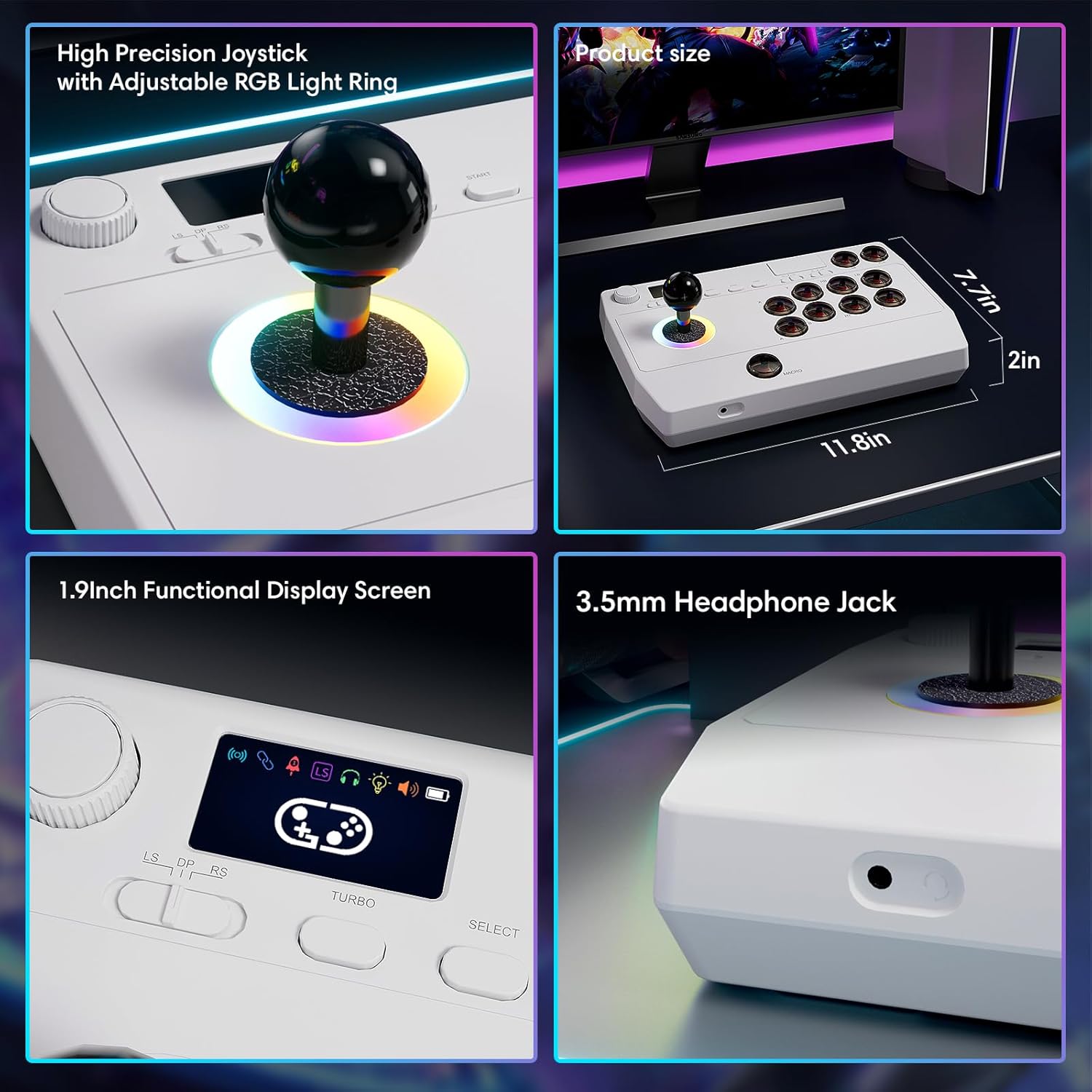
Imaxe: Primeiro plano views of the high-precision joystick with RGB lighting, the 1.9-inch functional display screen, and the 3.5mm headphone jack.
Mantemento
- Manteña o dispositivo limpo limpo cun pano suave e seco.
- Evite expoñer o dispositivo a temperaturas extremas, humidade ou luz solar directa.
- Do not attempt to disassemble the device, as this may void the warranty.
- Store the 2.4GHz receiver in its designated compartment when not in use to prevent loss.
Resolución de problemas
- O dispositivo non se acende:
- Asegúrate de que o dispositivo estea completamente cargado. Conéctao a unha fonte de alimentación mediante o cable USB tipo C.
- Cannot connect wirelessly:
- For Bluetooth, ensure the device is in pairing mode and your host device's Bluetooth is enabled.
- For 2.4GHz, ensure the receiver is securely plugged into a USB port and the arcade stick is in 2.4GHz mode.
- Try restarting both the arcade stick and the host device.
- Buttons or joystick are unresponsive:
- Ensure the device is properly connected (wired or wireless).
- Test the device on a different game or platform to rule out software issues.
- Comprobe se hai algunha obstrución física ou dano nos botóns ou no joystick.
- Audio issues with 3.5mm jack:
- Ensure headphones are fully plugged in.
- Check the volume settings on both the arcade stick's display and the host device.
- Test with a different pair of headphones.
Especificacións
| Nome do modelo | stick de arcade |
| Marca | Saitake |
| Dispositivos compatibles | Android, iOS, Nintendo Switch 1/2, PC, PlayStation 3/4 |
| Tipo de controlador | Joystick |
| Tecnoloxía de conectividade | Bluetooth, USB (2.4GHz wireless, Wired Type-C) |
| Características adicionais | Ergonomic, Headphone Jack, Portable, Wireless, 1.9-inch Display Screen, TURBO Function, Macro Function, RGB Lighting |
| Plataforma de hardware | Desktop, Gaming Console, Laptop, Smartphone, Tablet, Television |
| Fonte de enerxía | Battery Powered (Built-in 1000mAh Lithium Battery) |
| Dimensións do elemento | 11.61 x 0.71 x 7.68 polgadas |
| Cor | Branco |
Garantía e Soporte
The Saitake Wireless Arcade Fight Stick Joystick comes with a 1 ano de garantía desde a data de compra.
For technical support, troubleshooting assistance, or warranty claims, please contact Saitake customer service through their official websitio web ou o vendedor onde se comprou o produto. Teña a man o recibo da compra e a información do modelo do produto.


