
1. Introdución
Thank you for choosing the PETLIBRO PLAF103 Automatic Pet Feeder. This device is designed to provide scheduled and portion-controlled meals for your cats, dogs, and small animals, ensuring they maintain a consistent feeding routine. Featuring dual-band Wi-Fi connectivity (2.4GHz & 5GHz), app control, and freshness preservation, this feeder simplifies pet care. Please read this manual thoroughly before use to ensure proper operation and maintenance.
2. Información de seguridade
- Use only dry kibble with a diameter between 2-15mm. Do not use wet pet food or kibble larger than 15mm.
- Replace the desiccant bag every two weeks to maintain food freshness.
- Do not wash the feeder base. The electronic components are located in the base and can be damaged by water.
- Wipe all detachable parts dry completely before reassembly and use.
- Este produto está pensado só para uso en interiores.
- Keep the feeder out of reach of children and pets to prevent accidental operation or damage.
- Ensure the power adapter is securely connected and use the recommended power source.
3. Contido do paquete
Verifica que todos os elementos estean presentes no paquete:
- Wi-Fi Automatic Pet Feeder x 1
- Cargador x 1
- Bolsa desecante x 1
- Guía rápida x 1
- Manual de usuario x 1
4. Características do produto
- Dual-Band Wi-Fi Connectivity: Supports both 2.4GHz and 5GHz Wi-Fi networks for stable connection and remote control via the PETLIBRO app.
- Alimentación programada: Program up to 10 meals per day with 1-48 portions per meal (1/12 cup each).
- Conservación da frescura: Features a secure twist-lock lid, patented rotor, silicone sealing strip, and a desiccant bag to keep food dry and fresh.
- Chamadas de comidas personalizadas: Record up to 10 custom voice messages (≤10s) to play at meal times.
- Alertas intelixentes: Receive real-time app notifications for low food levels, low battery, or food jams.
- Anti-Stuck Design: An infrared sensor prevents food from jamming the dispenser outlet, ensuring reliable feeding.
- Fonte de enerxía dual: Operates with an adapter and can use battery backup (not included) for uninterrupted feeding during power outages.
- Limpeza fácil: Removable food tank and stainless steel bowl are washable for hygiene.
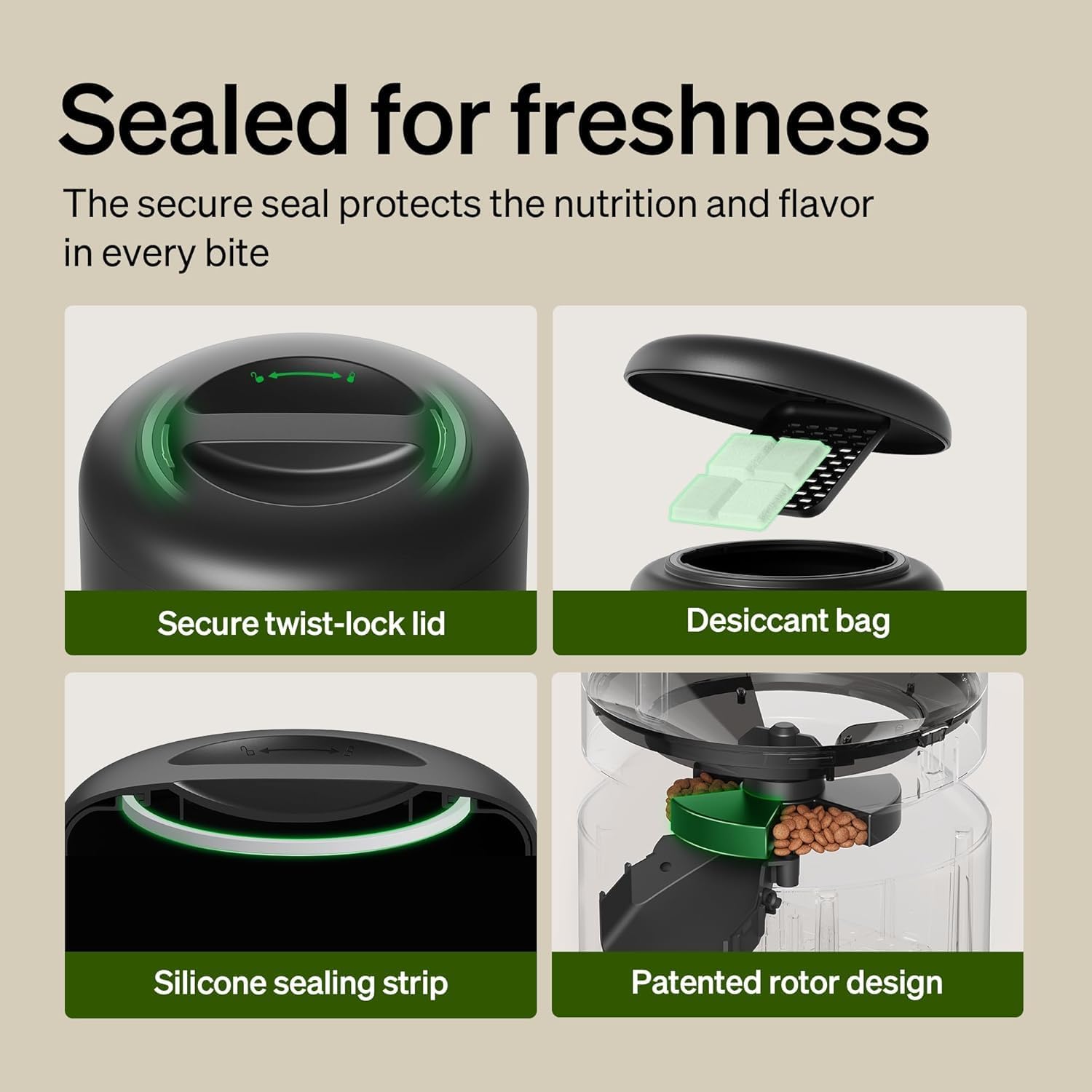
Image: The PETLIBRO PLAF103 feeder displaying support for both 5GHz and 2.4GHz Wi-Fi networks.

Imaxe: Detallada view of the feeder's freshness features, including the secure twist-lock lid, desiccant bag compartment, silicone sealing strip, and patented rotor design.

Image: Illustration of the anti-stuck structure with a 45-degree angular design and a wide food outlet, alongside an app notification indicating a 'Rotor Stuck' alert.

Image: The feeder's control panel showing indicator lights for low food storage level and low battery, accompanied by an app notification for 'Food levels are low'.

Image: The feeder connected to a power adapter with batteries installed, illustrating how food dispensing continues during a power outage. Note: Batteries are not included.

Image: Close-up of the high-quality 304 stainless steel bowl, designed for hygiene and to prevent chin acne. The bowl is detachable for cleaning.
5. Configuración
5.1 Asemblea
- Unpack all components and ensure they are clean and dry.
- Insert the stainless steel bowl into the feeder base.
- Place the food tank onto the base and twist the lid to secure it.
- Open the lid and insert a fresh desiccant bag into its designated compartment. Close the lid securely.
- Fill the food tank with dry kibble (2-15mm diameter).
5.2 Conexión de alimentación
- Conecta o adaptador de corrente ao alimentador e conéctao a unha toma de corrente.
- For battery backup, install 3 D-cell batteries (not included) into the battery compartment at the bottom of the feeder.
5.3 Instalación da aplicación e conexión wifi
- Descarga a aplicación PETLIBRO desde a App Store (iOS) ou Google Play Store (Android).
- Crea unha conta ou inicia sesión.
- Follow the in-app instructions to add your PLAF103 feeder. Ensure your phone is connected to a 2.4GHz or 5GHz Wi-Fi network during setup.
6. Instrucións de funcionamento
6.1 Programación de comidas

Image: A cat eating from the feeder, with a smartphone screen displaying the PETLIBRO app's meal scheduling interface, showing feeding times and amounts.
- Open the PETLIBRO app and select your feeder.
- Navega ata a sección "Programación".
- Tap to add a new meal time. Set the desired time and the number of portions (1-48).
- Save the schedule. The feeder will automatically dispense food at the programmed times.
6.2 Manual Dispensing

Image: A dog eating from the feeder, with a smartphone screen displaying the PETLIBRO app's manual feeding interface, allowing for immediate food dispensing with a tap.
- From the app's main screen, tap the 'Feed Now' button.
- Select the number of portions you wish to dispense immediately.
- Confirme a acción.
6.3 Recording Voice Messages

Image: A puppy approaching the feeder, with a speech bubble showing a personalized voice message, 'Hey, baby, it's time to eat!', indicating the voice recording feature.
- In the PETLIBRO app, go to the 'Voice' or 'Meal Call' section.
- Tap to record a new message (up to 10 seconds).
- You can set the message to play at specific meal times and adjust the volume.
6.4 Viewing Feeding Logs
- The app provides a history of dispensed meals, including time and portion size.
- This allows you to monitor your pet's daily intake and feeding routine.
7. Mantemento
7.1 Limpeza
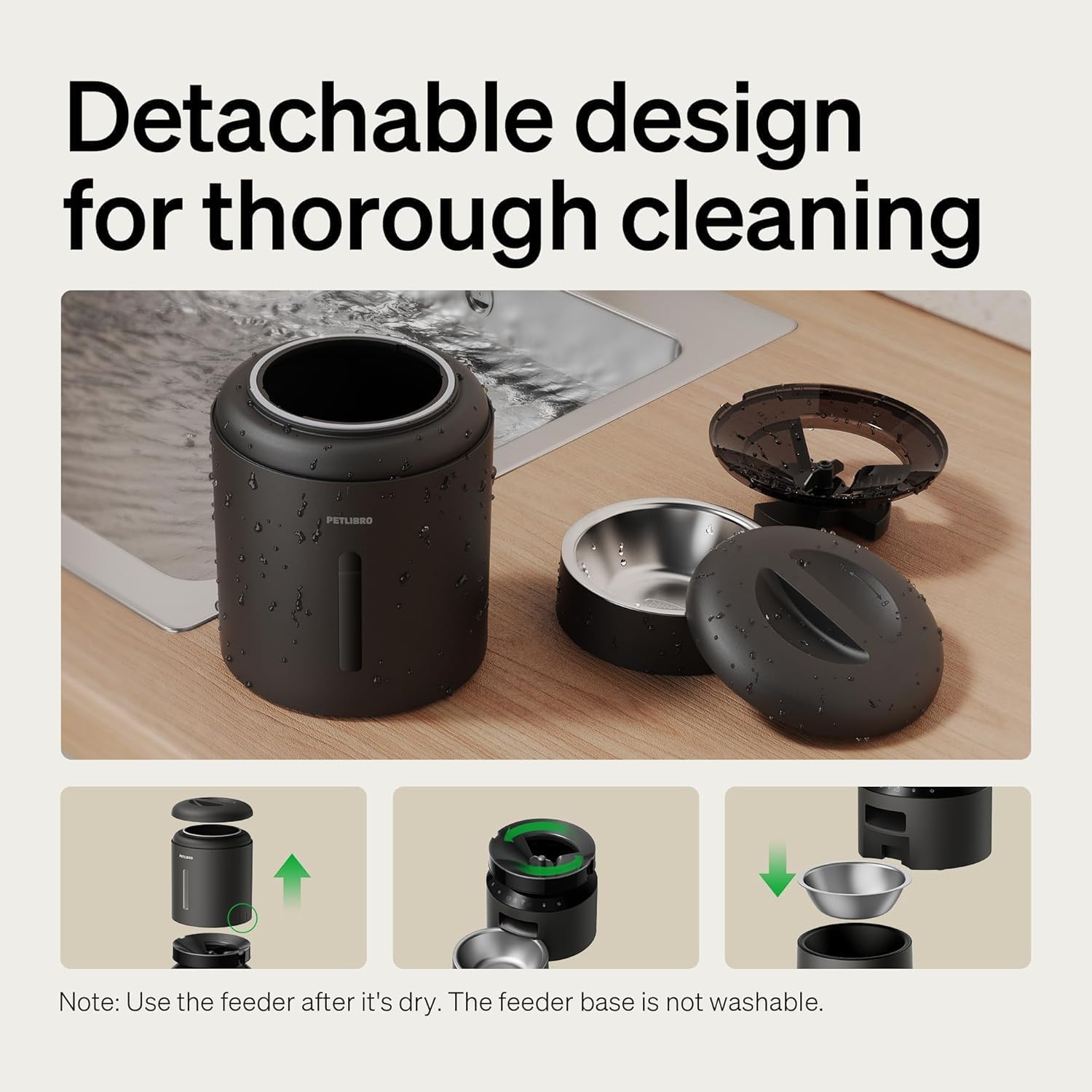
Image: The PETLIBRO PLAF103 feeder disassembled into its detachable components (food tank, lid, bowl, rotor) for thorough cleaning. Note: The feeder base is not washable.
- Desconecte o adaptador de corrente antes de limpar.
- Remove the food tank, lid, and stainless steel bowl.
- Wash these detachable parts with mild soap and water.
- Rinse thoroughly and ensure all parts are completely dry before reassembling.
- Wipe the feeder base with a clean, damp pano. Non mergullo a base na auga.
7.2 Substitución da bolsa desecante
- The desiccant bag helps absorb moisture to keep food fresh.
- It is recommended to replace the desiccant bag every two weeks.
- New desiccant bags can be purchased from PETLIBRO's official channels.
8 Solución de problemas
- O alimentador non dispensa: Check for food jams at the outlet. The infrared sensor will stop dispensing if blocked. Clear any obstructions. Ensure the food tank is not empty.
- Sen enerxía: Verify the power adapter is securely plugged in. If using battery backup, check battery levels and replace if necessary.
- Problemas de conectividade da aplicación: Ensure your Wi-Fi network is stable and within range. Confirm your phone is connected to the correct 2.4GHz or 5GHz network during setup. Restart the app and the feeder if issues persist.
- Food Not Fresh: Ensure the lid is securely twisted and the silicone sealing strip is properly seated. Replace the desiccant bag every two weeks.
9. Especificacións
| Número de modelo | PLAF103 |
| Dimensións (L x W x H) | 15.5" x 15.5" x 14.1" |
| Peso | 9.4 libras |
| Capacidade | 5 litros |
| Material | Acrilonitrilo butadieno estireno, aceiro inoxidable |
| Especie obxectivo | Gatos, Cans, Pequenos Animais |
| Tamaño da croqueta | 2-15mm diameter (dry kibble only) |
| Soporte Wi-Fi | 2.4 GHz e 5 GHz |
| Fonte de enerxía | Adapter (included), 3 x D-cell batteries (not included) |
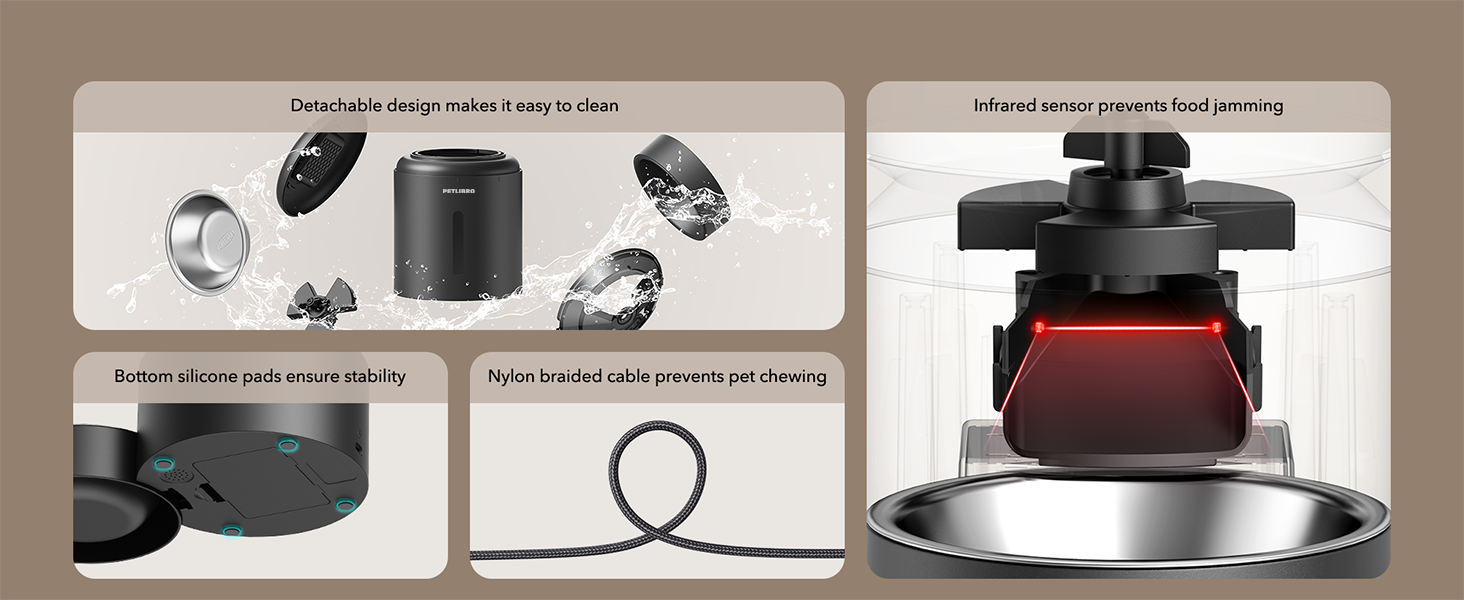
Image: Visual guide for recommended kibble size (2-15mm) and compatible food types including dry food, freeze-dried food, mixed food, and air-dried food.
10. Garantía e soporte
PETLIBRO products come with a standard warranty. For specific warranty details, please refer to the warranty card included in your package or visit the official PETLIBRO website. If you encounter any issues or have questions regarding your PLAF103 Automatic Pet Feeder, please contact PETLIBRO customer support through the app or their official websitio de asistencia.


