
Introdución
Thank you for choosing the MACAP MI40 Luxe On-Demand Espresso Grinder. This manual provides essential information for the safe and efficient operation, maintenance, and care of your new grinder. Please read all instructions carefully before use and retain this manual for future reference.

The MACAP MI40 Luxe On-Demand Espresso Grinder, featuring a sleek black finish and integrated touchscreen display.
Información de seguridade
Siga sempre as precaucións de seguridade básicas ao usar electrodomésticos para reducir o risco de incendio, descarga eléctrica e lesións.
- Read all instructions before operating the grinder.
- Do not immerse the grinder, cord, or plug in water or other liquids.
- Desconécteo da toma de corrente cando non o estea a usar, antes de montar ou desmontar pezas e antes de limpar.
- Evite o contacto coas pezas móbiles.
- Non faga funcionar ningún aparello cun cable ou enchufe danados, ou despois de que o aparello funcione mal ou teña dano dalgún xeito. Póñase en contacto co servizo de atención ao cliente para obter asistencia.
- O uso de accesorios non recomendados ou vendidos polo fabricante pode provocar incendios, descargas eléctricas ou lesións.
- Non use ao aire libre.
- Non deixes que o cable colgue sobre o bordo dunha mesa ou mostrador, nin toque superficies quentes.
- Ensure the hopper lid is securely in place before operating.
- Only grind whole roasted coffee beans. Do not grind other substances such as nuts, spices, or instant coffee.
Configuración
1. Desembalaxe
- Retire coidadosamente todos os compoñentes da embalaxe.
- Inspect the grinder for any signs of damage. If damaged, do not operate and contact your retailer.
- Retire todas as películas protectoras e os materiais de embalaxe.
2. Identificación de compoñentes
Familiarize yourself with the main parts of your MI40 Luxe grinder:
- Tolva: Contén grans de café enteiros.
- Tapa da tolva: Covers the hopper.
- Grind Adjustment Dial: Located below the hopper, used to set grind fineness.
- Pantalla táctil: For programming and selecting dosing options.
- Dosing Spout: Where ground coffee is dispensed.
- Soporte para portafiltros: Supports the portafilter during grinding.
- Interruptor de alimentación: Located on the side of the grinder.
3. Asemblea Inicial
- Instalar a tolva: Place the hopper onto the grinder body, ensuring it seats correctly. Rotate it slightly until it locks into position.
- Install the Hopper Lid: Place the lid securely on top of the hopper.
4 Colocación
Coloque o moedor sobre unha superficie estable, plana e seca. Asegúrese de que haxa unha ventilación axeitada arredor da unidade.
5. Conexión de alimentación
Conecte o cable de alimentación a unha toma de corrente con conexión a terra. Asegúrese de que o volumetage matches the specifications listed on the grinder's rating label.
Instrucións de funcionamento
1. Filling the Hopper
Lift the hopper lid and pour whole roasted coffee beans into the hopper. Do not overfill. Replace the lid securely.
2. Grind Adjustment (Nice Grind Control Dial)
The MI40 Luxe features a stepless grind adjustment dial for precise control. To adjust the grind fineness:
- Turn the grinder ON using the power switch.
- Rotate the grind adjustment dial. Turning it clockwise results in a finer grind, and counter-clockwise results in a coarser grind.
- For espresso, start with a fine setting and adjust incrementally based on extraction time and taste. It is recommended to adjust the grind while the burrs are running to prevent jamming.

Detallado view of the Nice Grind Control Dial for precise grind fineness adjustment.
3. Touchscreen Dosing
The touchscreen allows for programmable dosing for single and double shots.
- Encendido: Ensure the grinder is powered on. The touchscreen will illuminate.
- Select Dose: On the main screen, you will see icons for single and double shot doses. Tap the desired dose icon.
- Adjust Dose Time (if needed): To program the dose time, press and hold the desired dose icon until it enters programming mode. Use the '+' and '-' buttons on the screen to adjust the grinding time in seconds. Tap the icon again to save.
- Place Portafilter: Position your portafilter securely in the portafilter holder beneath the dosing spout.
- Comezar a moer: Tap the selected dose icon once to start grinding. The grinder will automatically stop after the programmed time.
- Moenda manual: Some models may offer a manual grind option, typically by pressing a dedicated button or holding a dose icon briefly. Refer to the on-screen prompts.
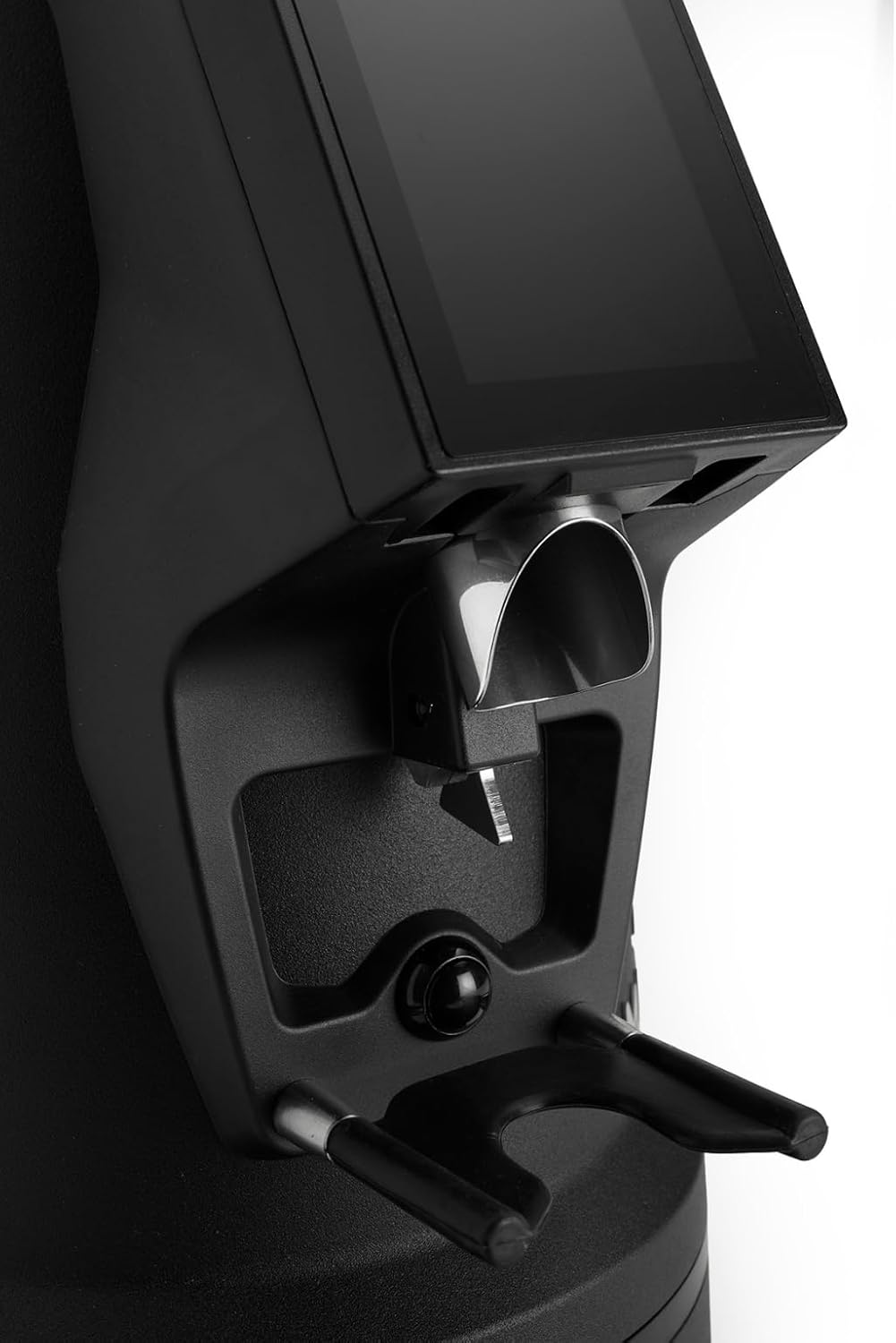
The dosing spout and portafilter holder, designed for efficient and clean coffee dispensing.
Mantemento
Regular cleaning and maintenance ensure optimal performance and longevity of your grinder.
1. Limpeza diaria
- Tolva: Baleira os grans restantes e limpe o interior da tolva cun pano seco.
- Dosing Spout: Use a brush or vacuum cleaner to remove any residual coffee grounds from the dosing spout and portafilter holder area.
- Exterior: Limpe o exterior da moedora con anuncioamp pano. Non empregue produtos de limpeza abrasivos nin mergulle a unidade en auga.
2. Burrs Cleaning (Weekly/Bi-weekly)
To maintain grind consistency, the burrs should be cleaned regularly.
- Desconectar o moedor: Always disconnect the power before cleaning the burrs.
- Remove Hopper: Empty the hopper and remove it from the grinder body.
- Access Burrs: Depending on the model, you may need to unscrew the top burr carrier. Refer to the specific instructions for your MI40 Luxe model.
- Rebabas limpas: Use a stiff brush or a vacuum cleaner to remove all coffee grounds from both the stationary and rotating burrs. Do not use water.
- Remontar: Carefully reassemble the burr carrier and hopper, ensuring all parts are securely in place.
3. Atención xeral
- Almacene o moedor nun lugar fresco e seco.
- Avoid exposing the grinder to direct sunlight or extreme temperatures.
Resolución de problemas
Se tes problemas co teu moedor, consulta os seguintes problemas e solucións comúns:
| Problema | Causa posible | Solución |
|---|---|---|
| O moedor non se acende | No power, power switch off, or safety interlock not engaged. | Check power cord connection, ensure power switch is ON, verify hopper is correctly seated. |
| No coffee grinding / Grinder jams | Beans not feeding, burrs clogged, or grind setting too fine. | Ensure hopper has beans. Unplug, remove hopper, clean burrs. Adjust to a coarser setting. |
| Moenda inconsistente | As rebabas están sucias ou desgastadas. | Clean burrs thoroughly. If problem persists, burrs may need replacement. |
| O moedor é ruidoso | Foreign object in burrs or loose components. | Unplug and inspect burrs for foreign objects. Ensure all parts are securely fastened. |
If the problem persists after attempting these solutions, please contact MACAP customer support or your retailer.
Especificacións
| Característica | Detalle |
|---|---|
| Modelo | MI40 Luxe |
| Marca | Macap |
| Tipo de rebaba | Rebabas planas |
| Tamaño de rebaba | 65 mm |
| Axuste de moenda | Stepless (Nice Grind Control Dial) |
| Dosificación | Touchscreen Programmable On-Demand |
| Capacidade da tolva | 2.6 libras (aprox. 1.2 kg) |
| Material | Aceiro inoxidable |
| Peso do elemento | 19.6 libras (aprox. 8.9 kg) |
| Dimensións (L x W x H) | 12" x 7.6" x 22" (aprox. 30.5 cm x 19.3 cm x 55.9 cm) |
| Motor | High-Torque |
Garantía e soporte
Your MACAP MI40 Luxe Grinder is covered by a manufacturer's warranty. For specific warranty terms and conditions, please refer to the warranty card included with your product or visit the official Macap website. For technical support, spare parts, or service inquiries, please contact your authorized Macap dealer or the customer support team.
Información de contacto:
- Refer to your purchase documentation for retailer contact details.
- Visit the official Macap websitio web para obter información de asistencia global.