
1. Introdución
Grazas pola compraasing the ULTIMEA Aura A60 U2621 7.1ch Dolby Atmos Soundbar System. This manual provides essential information for setting up, operating, and maintaining your new sound system. Please read this manual thoroughly before use to ensure proper functionality and to maximize your audio experience.

Figure 1.1: Immersive audio experience with the ULTIMEA Aura A60 system.
2. Información de seguridade
To reduce the risk of electric shock, fire, or damage to your device, please observe the following safety precautions:
- Non expoña este aparello á choiva nin á humidade.
- Non coloque obxectos cheos de líquidos, como vasos, sobre o aparello.
- Asegúrese de que haxa unha ventilación axeitada. Non bloquee ningunha das aberturas de ventilación.
- Non instale preto de fontes de calor como radiadores, rexistros de calor, cociñas ou outros aparellos (incluíndo amplificadores) que producen calor.
- Protexa o cable de alimentación para evitar que se pise ou se pinche, especialmente nos enchufes, tomas de corrente e no punto de saída do aparello.
- Use só anexos/accesorios especificados polo fabricante.
- Desenchufe este aparello durante tormentas eléctricas ou cando non se use durante longos períodos de tempo.
- Encargue toda a reparación a persoal de servizo cualificado.
3. Contido do paquete
Comprobe que todos os elementos estean presentes e en bo estado:
- ULTIMEA Aura A60 Soundbar
- Wireless Subwoofer (4-inch, BassMX Technology)
- 4 x Surround Speakers (2 front, 2 rear)
- Control remoto
- Cable HDMI
- Power Adapter/Cables
- Manual de usuario (este documento)
4. Produto rematadoview
The ULTIMEA Aura A60 U2621 is a 7.1ch Dolby Atmos soundbar system designed to deliver an immersive home theater audio experience. It features a main soundbar unit, a powerful wireless subwoofer with BassMX technology, and four surround speakers.
4.1 Main Soundbar Unit
The main soundbar unit houses 3 main channels for clear dialogue and primary audio. It serves as the central hub for all audio connections.

Figure 4.1: Main soundbar unit with front surround speakers.
4.2 Subwoofer sen fíos
The dedicated 4-inch wireless subwoofer incorporates BassMX technology to enhance low frequencies, providing deep and resonant bass for a more impactful audio experience.

Figure 4.2: Wireless subwoofer with BassMX technology.
4.3 altofalantes surround
The system includes four surround speakers: two front and two rear. The rear speakers connect wirelessly to the soundbar, minimizing cable clutter and allowing flexible placement to create an expansive acoustic space.

Figure 4.3: Diagram of 7.1ch sound distribution.
4.4 Portos de entrada/saída
The soundbar features multiple input options for versatile connectivity:
- EARC HDMI: For high-quality audio transmission and seamless TV integration.
- Óptica: Entrada de son dixital.
- AUX: Entrada de audio analóxico.
- USB: Para a reprodución de contido multimedia.
- Bluetooth: Wireless audio streaming.

Figure 4.4: Rear panel connections, including HDMI eARC.
5. Configuración
5.1 Colocación física
Optimal placement of your sound system components is crucial for the best audio experience.
- Barra de son: Place the soundbar centrally below your television. Ensure it is not obstructed.
- Subwoofers: Position the wireless subwoofer on the floor near the soundbar. Experiment with placement to find the best bass response for your room.
- Altofalantes envolventes frontais: Place the two wired front surround speakers to the left and right of your TV, ideally at ear level when seated.
- Altofalantes envolventes traseiros: Position the two wireless rear surround speakers behind your primary listening position, to the left and right. These speakers will automatically connect wirelessly to the soundbar once powered on.

Figure 5.1: Recommended speaker placement for Dolby Atmos.
5.2 Conexións
Siga estes pasos para conectar o seu sistema de barra de son:
- Conexión de alimentación: Connect the power cables to the soundbar, subwoofer, and surround speakers, then plug them into a power outlet.
- HDMI eARC (recomendado): Connect one end of the provided HDMI cable to the HDMI eARC port on your soundbar and the other end to the HDMI eARC/ARC port on your TV. This connection supports Dolby Atmos and allows for TV remote control of the soundbar.
- Conexión óptica (alternativa): If your TV does not have an HDMI eARC/ARC port, connect an optical cable (not included) from your TV's optical output to the OPTICAL input on the soundbar.
- AUX Connection (Alternative): For analog audio sources, connect a 3.5mm AUX cable (not included) from your device's audio output to the AUX input on the soundbar.
- Conexión USB: Insert a USB drive into the USB port on the soundbar for direct media playback.
- Emparellamento Bluetooth: To connect a Bluetooth device, select the Bluetooth input on the soundbar. On your device, search for 'ULTIMEA Aura A60' and pair.
6. Instrucións de funcionamento
6.1 Encendido/apagado
Prema o botón de acendido/apagado da barra de son ou do mando a distancia para acender ou apagar o sistema.
6.2 Selección de entrada
Use the 'Input' button on the remote control or the soundbar to cycle through available input sources: HDMI eARC, Optical, AUX, USB, and Bluetooth.

Figure 6.1: Remote control for easy operation.
6.3 Control de volume
Adjust the master volume using the 'Volume Up' and 'Volume Down' buttons on the remote control or the soundbar. You can also adjust subwoofer and surround speaker levels independently.
6.4 Sound Modes and EQ Presets
The Aura A60 offers various sound modes and EQ presets to optimize audio for different content and preferences.
- Dedicated Modes: Select from 6 specialized modes: Movie, Music, Voice, Sports, Game, and Night.
- Preajustes de ecualización: Access 121 professional EQ presets for genres like Bass, Pop, Classical, and Rock via the ULTIMEA app.

Figure 6.2: 121 preset EQ matrix for customized audio.
6.5 Control de aplicacións
Download the ULTIMEA app to your smartphone for advanced control and customization options, including a 10-band EQ and access to all EQ presets.
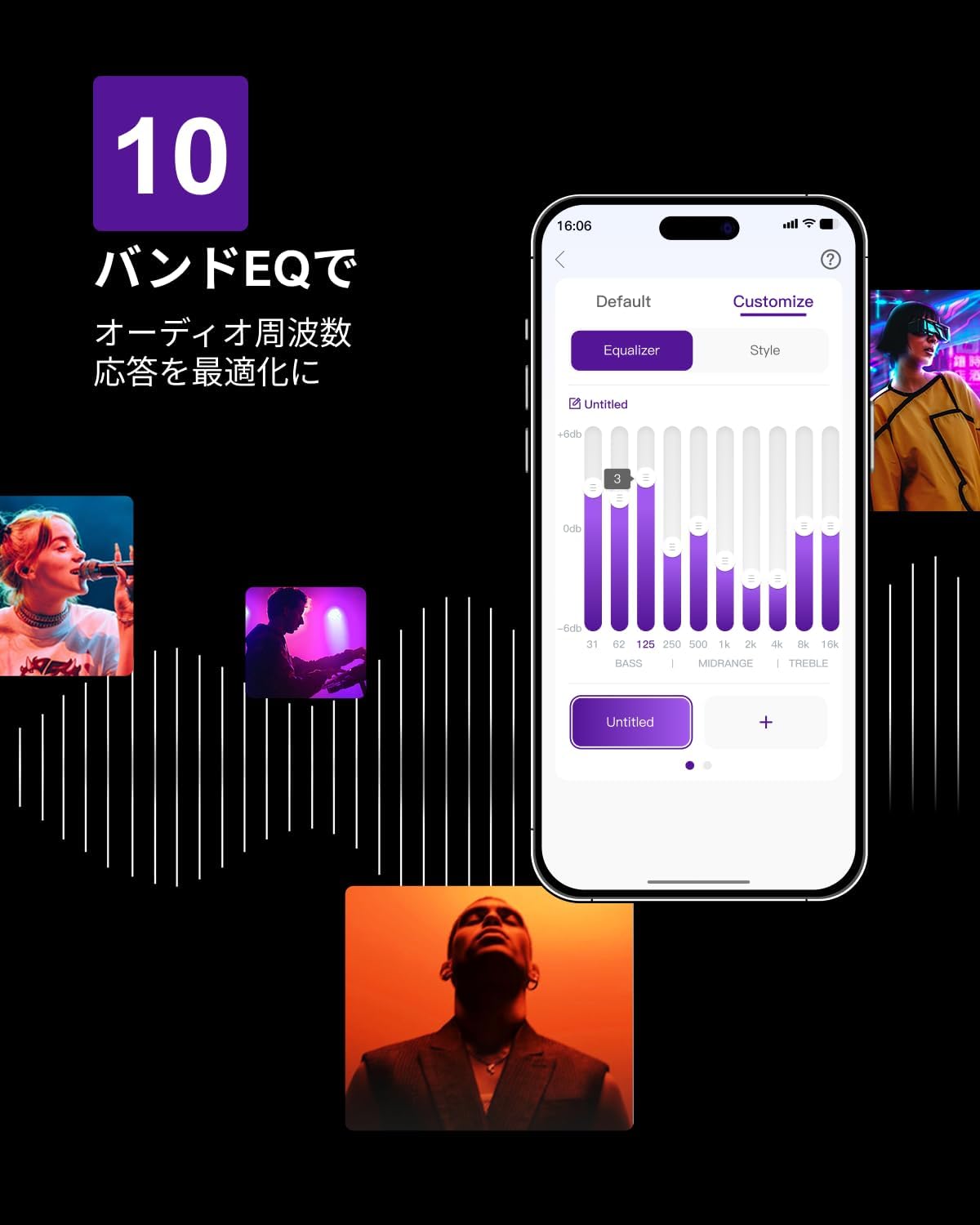
Figure 6.3: ULTIMEA mobile application interface.
7. Mantemento
To ensure the longevity and optimal performance of your ULTIMEA Aura A60 soundbar system, follow these simple maintenance guidelines:
- Limpeza: Use a soft, dry cloth to wipe the surfaces of the soundbar, subwoofer, and speakers. Do not use liquid cleaners or abrasive materials, as they may damage the finish.
- Ventilación: Asegúrate de que todas as aberturas de ventilación estean despexadas e sen obstrucións para evitar o sobrequecemento.
- Almacenamento: Se vai gardar o sistema durante un período prolongado, desconécteo da corrente e gárdeo nun lugar fresco e seco, lonxe da luz solar directa e de temperaturas extremas.
8 Solución de problemas
Se tes problemas co sistema da barra de son, consulta os seguintes problemas e solucións comúns:
| Problema | Causa posible | Solución |
|---|---|---|
| Non hai son da barra de son. | Incorrect input selected, volume too low, cables not connected properly. | Verify the correct input source. Increase volume. Check all cable connections (HDMI, Optical, AUX). Ensure the soundbar is powered on. |
| No sound from subwoofer/surround speakers. | Subwoofer/speakers not paired or powered on, volume too low. | Ensure subwoofer and surround speakers are powered on. They should automatically pair. If not, refer to the pairing instructions in the full manual (if available) or contact support. Increase their individual volume levels. |
| Son distorsionado ou de mala calidade. | Incorrect audio settings, poor source quality, interference. | Adjust EQ settings or try different sound modes. Ensure the audio source is high quality. Check for nearby electronic devices causing interference. |
| Problemas de conexión Bluetooth. | Device out of range, not in pairing mode, interference. | Ensure the soundbar is in Bluetooth pairing mode. Move your device closer to the soundbar. Disconnect and re-pair the device. |
If the problem persists after trying these solutions, please contact ULTIMEA customer support.
9. Especificacións
| Característica | Detalle |
|---|---|
| Marca | ULTIMEA |
| Nome do modelo | Aura A60 |
| Número de modelo | U2621 |
| Tipo de altofalante | Soundbar with 7.1ch Surround Sound |
| Tecnoloxía de audio | Dolby Atmos, BassMX Technology |
| Conectividade | HDMI eARC, Bluetooth, Optical, AUX, USB |
| Subwoofer | 4-inch Wired Subwoofer (integrated BassMX) |
| Altofalantes envolventes | 4 (2 wired front, 2 wireless rear) |
| Control | Remote Control, ULTIMEA App |
| Cor | Negro |
| Dimensións (D x W x H) | 9 cm x 40 cm x 7 cm (Soundbar, approximate) |
| País de Orixe | China |
10. Garantía e soporte
ULTIMEA is committed to providing high-quality products and customer satisfaction. Your Aura A60 U2621 soundbar system comes with comprehensive support.
10.1 Información da garantía
Specific warranty details may vary by region. Please refer to the warranty card included with your product or visit the official ULTIMEA websitio web para consultar os termos e condicións de garantía máis actualizados.
10.2 Atención ao cliente
For any questions, technical assistance, or troubleshooting not covered in this manual, please contact our dedicated support team:
- 365-Day Support: Our expert staff is available year-round to assist you.
- Chat en directo: Instant responses are available via live chat on our websitio.
- Devolucións: We offer a 30-day return policy with free shipping for your peace of mind.

365-Day Expert Support

Instant Live Chat

Devolucións gratuítas de 30 días
Para obter máis axuda, visite o ULTIMEA Brand Store.