
Introdución
This manual provides comprehensive instructions for the installation, operation, and maintenance of your REAKOSOUND 6520-B Single DIN Car Stereo. Please read this manual thoroughly before using the product to ensure proper function and safety. Keep this manual for future reference.
The REAKOSOUND 6520-B is a versatile single DIN car head unit featuring a 6.9-inch IPS touchscreen, wireless Apple CarPlay and Android Auto, Bluetooth 5.2, FM/AM radio, and support for a backup camera. It is designed to enhance your driving experience with modern connectivity and entertainment options.
Produto rematadoview
The REAKOSOUND 6520-B offers a range of features for in-car entertainment and connectivity. Below are some key functionalities and visual representations of the unit.
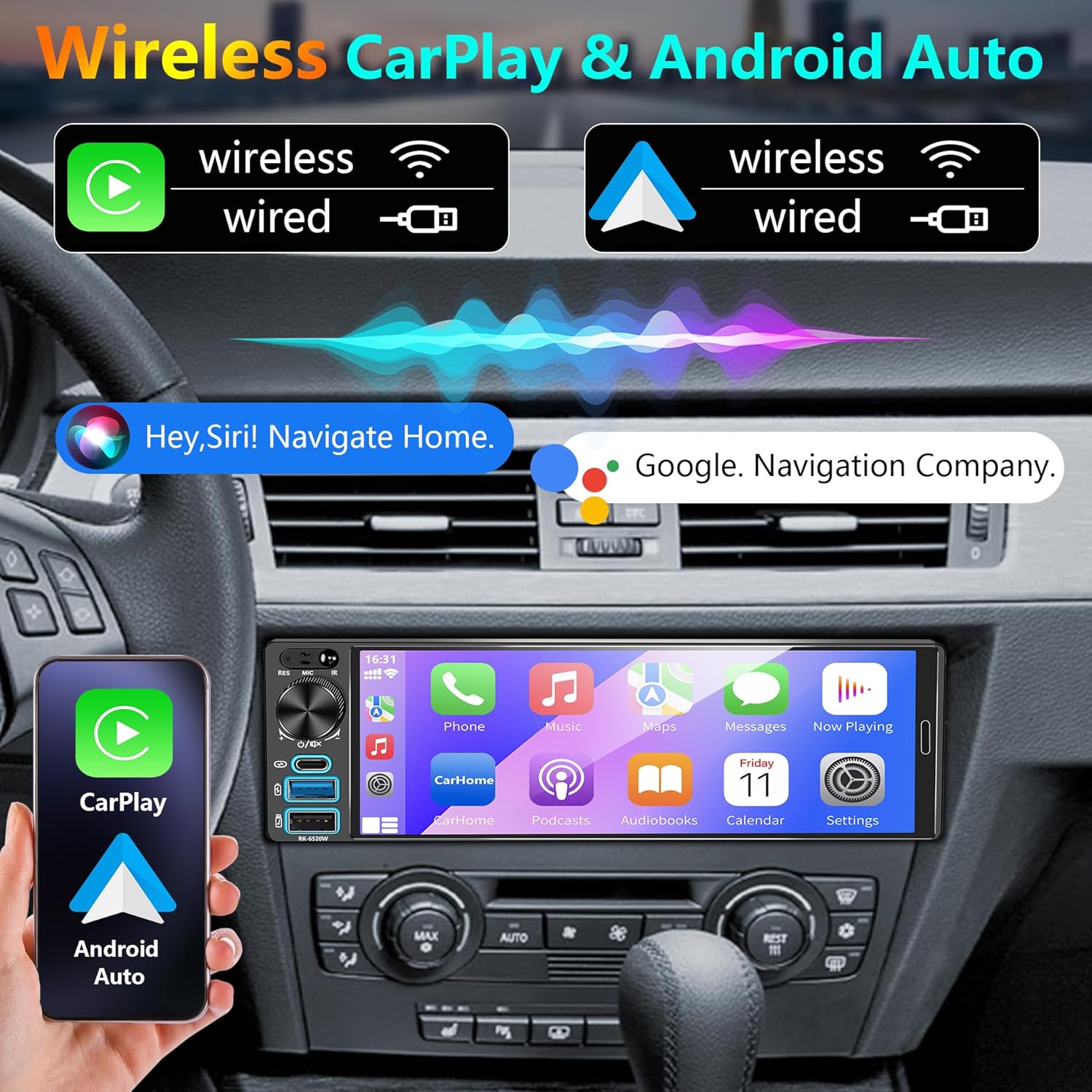
Image: Wireless Apple CarPlay and Android Auto interface on the 6.9-inch IPS touchscreen.

Image: Split-screen display functionality, showing navigation and media playback simultaneously.

Image: Navigation interface demonstrating automatic switching between day and night display modes.
Configuración e instalación
Before installation, ensure your vehicle's dashboard dimensions are compatible with a single DIN unit. Professional installation is highly recommended.
Contido do paquete
Verifique que todos os seguintes elementos estean incluídos no seu paquete:

Image: Product dimensions and a list of included accessories: Rear Camera, Steering Wheel Control, Microphone, Remote Control, Camera Wiring Harness, Power Cable, Mounting Sleeve.
- REAKOSOUND 6520-B Car Stereo Unit
- Cámara traseira
- Steering Wheel Control Remote
- Micrófono externo
- Control remoto por infravermellos
- Camera Wiring Harness
- Cables de alimentación (x2)
- Funda de montaxe
Diagrama de cableado
Carefully follow the wiring instructions to ensure correct and safe installation. Incorrect wiring can damage the unit or your vehicle's electrical system.

Image: Comprehensive wiring diagram illustrating connections for power, speakers, camera input, audio outputs, and other functional interfaces.
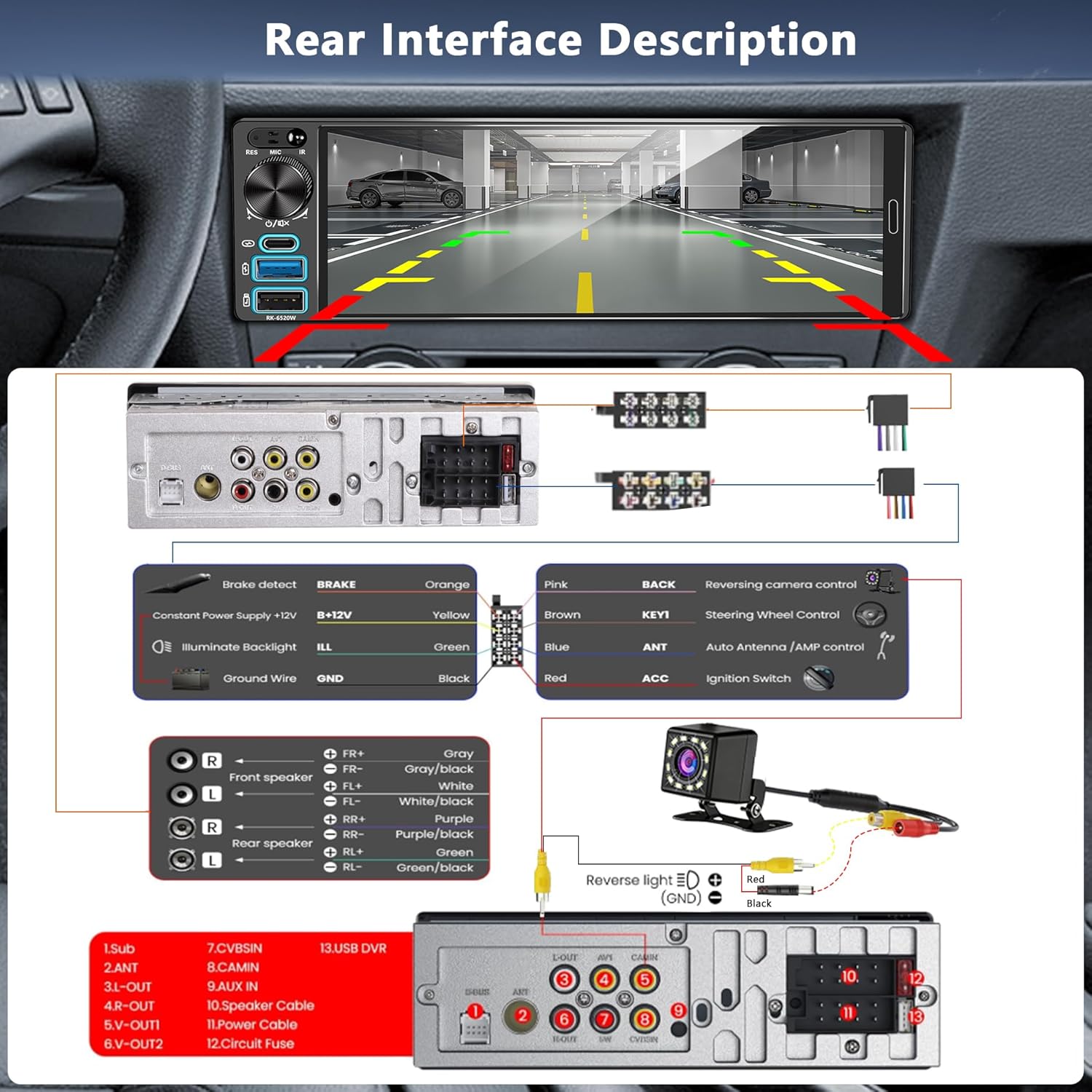
Image: Rear interface description and specific wiring instructions for the backup camera connection, including reverse light trigger.
Encendido inicial
After completing all wiring connections, turn on your vehicle's ignition. The car stereo should power on automatically. If it does not, recheck all power connections and the vehicle's fuse box.
Instrucións de funcionamento
Controis básicos
The unit features a physical volume knob for quick adjustments and a responsive IPS touchscreen for all other functions. Long press the volume knob to turn off the unit. Rotate it left or right to adjust volume.
Apple CarPlay sen fíos e Android Auto
To use Wireless Apple CarPlay or Android Auto:
- Ensure Bluetooth is enabled on your smartphone and the car stereo.
- On your phone, search for and connect to the car stereo's Bluetooth name.
- Once paired, the system will prompt you to enable CarPlay or Android Auto. Confirm the connection.
- Alternatively, connect your phone via a USB or Type-C cable for wired CarPlay/Android Auto.
This allows access to navigation, calls, messages, and music apps directly from the stereo's display, controllable via touch or voice commands (Siri/Google Assistant).
Conectividade Bluetooth 5.2
Bluetooth 5.2 provides stable and high-quality audio streaming and hands-free calling. To pair a device:
- Go to the Bluetooth menu on the car stereo.
- Enable Bluetooth on your mobile device and make it discoverable.
- Select the car stereo's name from your device's Bluetooth list to pair.
- Confirma o código de emparellamento se se che solicita.
Radio FM/AM
Access the FM/AM radio function from the main menu. Use the touchscreen to scan for stations, save presets, and switch between bands. The unit supports a wide range of frequencies for local broadcasts.
Navegación GPS
Real-time GPS navigation is available through Apple CarPlay or Android Auto. Once connected, use your preferred navigation app (e.g., Apple Maps, Google Maps, Waze) for turn-by-turn directions, traffic updates, and point-of-interest searches. Voice control is supported for navigation commands.
Función de ligazón espello
The Mirror Link feature allows you to display your smartphone's screen directly on the car stereo. Connect your iOS or Android phone via a USB cable. Follow the on-screen prompts to establish the connection. This function supports phone charging and USB data transfer.

Image: Mirror Link functionality, illustrating phone charging and USB data transfer capabilities.
Backup Camera Operation
When the vehicle is shifted into reverse gear, the car stereo automatically displays the rear view from the connected HD backup camera. This provides a wide 170° field of view, assisting with safer parking and maneuvering in various conditions.
Audio Equalizer (EQ) Settings
Customize your audio experience using the built-in equalizer. Access the EQ settings from the main menu to adjust frequency bands, select preset sound modes (e.g., Jazz, Classic, Pop), and fine-tune the audio output to your preference.
Steering Wheel Control & Remote Control
The unit supports steering wheel controls for convenient operation without diverting attention from the road. Program your vehicle's steering wheel buttons to control functions like volume, track skipping, and mode switching. An infrared remote control is also included for passenger convenience.

Imaxe: Máis deview of FM Radio interface, EQ settings, Steering Wheel Control configuration, and the included remote control.
Mantemento
To ensure the longevity and optimal performance of your REAKOSOUND 6520-B car stereo, follow these maintenance guidelines:
- Limpeza da pantalla: Use a soft, lint-free cloth to gently wipe the IPS touchscreen. Avoid abrasive cleaners or solvents that could damage the display.
- Limpeza xeral: Keep the unit free from dust and debris. Use a soft, dry cloth for the exterior.
- Temperatura: Evite expoñer a unidade a temperaturas extremas, tanto frías como quentes, durante períodos prolongados.
- Conexións: Comprobe periodicamente todas as conexións do cableado para asegurarse de que estean seguras e libres de corrosión.
Resolución de problemas
If you encounter issues with your car stereo, refer to the following table for common problems and solutions:
| Problema | Causa posible | Solución |
|---|---|---|
| A unidade non se acende. | Incorrect wiring, blown fuse, vehicle ignition off. | Check power connections (ACC, B+), inspect vehicle's fuse, ensure ignition is on. |
| Non hai son dos altofalantes. | Speaker wires disconnected, volume too low, incorrect audio source. | Verify speaker wiring, increase volume, select correct audio source. |
| CarPlay/Android Auto sen fíos non conecta. | Bluetooth not enabled, phone not paired, software glitch. | Ensure Bluetooth is on and paired, restart phone and stereo, try wired connection. |
| Backup camera not displaying. | Camera wiring incorrect, reverse trigger not connected, faulty camera. | Check camera power and video input, verify reverse trigger wire (PINK wire) connection. |
| O dispositivo Bluetooth non se emparella. | Device not in pairing mode, interference, previous pairing issues. | Ensure phone is discoverable, delete previous pairings on both devices, try pairing again. |
| A pantalla táctil non responde. | Temporary software issue, screen damage. | Perform a soft reset (refer to manual for reset button location, usually a small pinhole), if issue persists, contact support. |
Especificacións
Key technical specifications for the REAKOSOUND 6520-B Car Stereo:
- Dimensións do produto: 2.3 x 7.4 x 2.1 polgadas (5.84 x 18.8 x 5.33 cm)
- Peso do artigo: Aproximadamente 12.2 onzas (345 gramos)
- Marca: REACCIÓN
- Tecnoloxía de conectividade: Bluetooth 5.2, USB, Type-C
- Interface de control: Touchscreen, Physical Knob, Steering Wheel Control, Remote Control, Voice Control (via CarPlay/Android Auto)
- Características especiais: Equalizer, Spotify compatibility (via CarPlay/Android Auto), IPS Touchscreen, Wireless Apple CarPlay, Wireless Android Auto, Mirror Link, FM/AM Radio, Backup Camera Support
- Dispositivos compatibles: iPhone, teléfonos intelixentes Android
- Cor: Negro
- Fabricante: REACCIÓN
- Servizos de Internet compatibles: YouTube (via Mirror Link or CarPlay/Android Auto apps)
Garantía e Soporte
Your REAKOSOUND 6520-B Car Stereo comes with 2-Year Platinum online Dealer Support. This support is provided via Amazon.com. For any technical assistance, troubleshooting not covered in this manual, or warranty claims, please contact REAKOSOUND customer service through your Amazon purchase history.
Professional installation is recommended to ensure proper functionality and to avoid potential issues that could void the warranty.