
Información importante de seguridade
Before operating the AIXZGLOBAL AIC45II Plasma Cutter, read and understand all safety warnings and instructions. Failure to follow these instructions may result in electric shock, fire, serious injury, or death. Keep this manual for future reference.
- Risco de descarga eléctrica: Always ensure the machine is properly grounded. Do not operate in wet conditions. Never touch live electrical parts. Disconnect power before servicing.
- Fume Hazard: Plasma cutting produces fumes and gases. Work in a well-ventilated area. Use local exhaust ventilation or respirators if necessary.
- Protección ocular e cutánea: Always wear a welding helmet with appropriate shade, safety glasses, and protective clothing (gloves, long sleeves, heavy pants) to protect against arc rays, sparks, and hot metal.
- Perigo de incendio e explosión: Sparks and hot metal can cause fires. Keep flammable materials away from the cutting area. Have a fire extinguisher readily available. Do not cut containers that have held flammable materials.
- Risco de queimada: Hot metal and equipment can cause severe burns. Allow materials to cool before handling.
- Risco de ruído: Plasma cutting can be noisy. Wear hearing protection.
Produto rematadoview
The AIXZGLOBAL AIC45II Plasma Cutter is a versatile and efficient cutting machine designed for various metal fabrication tasks. It features advanced non-touch pilot arc technology for smooth starts on rough or rusty surfaces, extending consumable life and ensuring cleaner cuts. Equipped with robust IGBT inverter technology, it provides stable and efficient cutting performance with a 60% duty cycle. The machine supports dual voltage input (110V/220V) and includes an XT45 low-frequency cutting gun for reliable arc initiation.
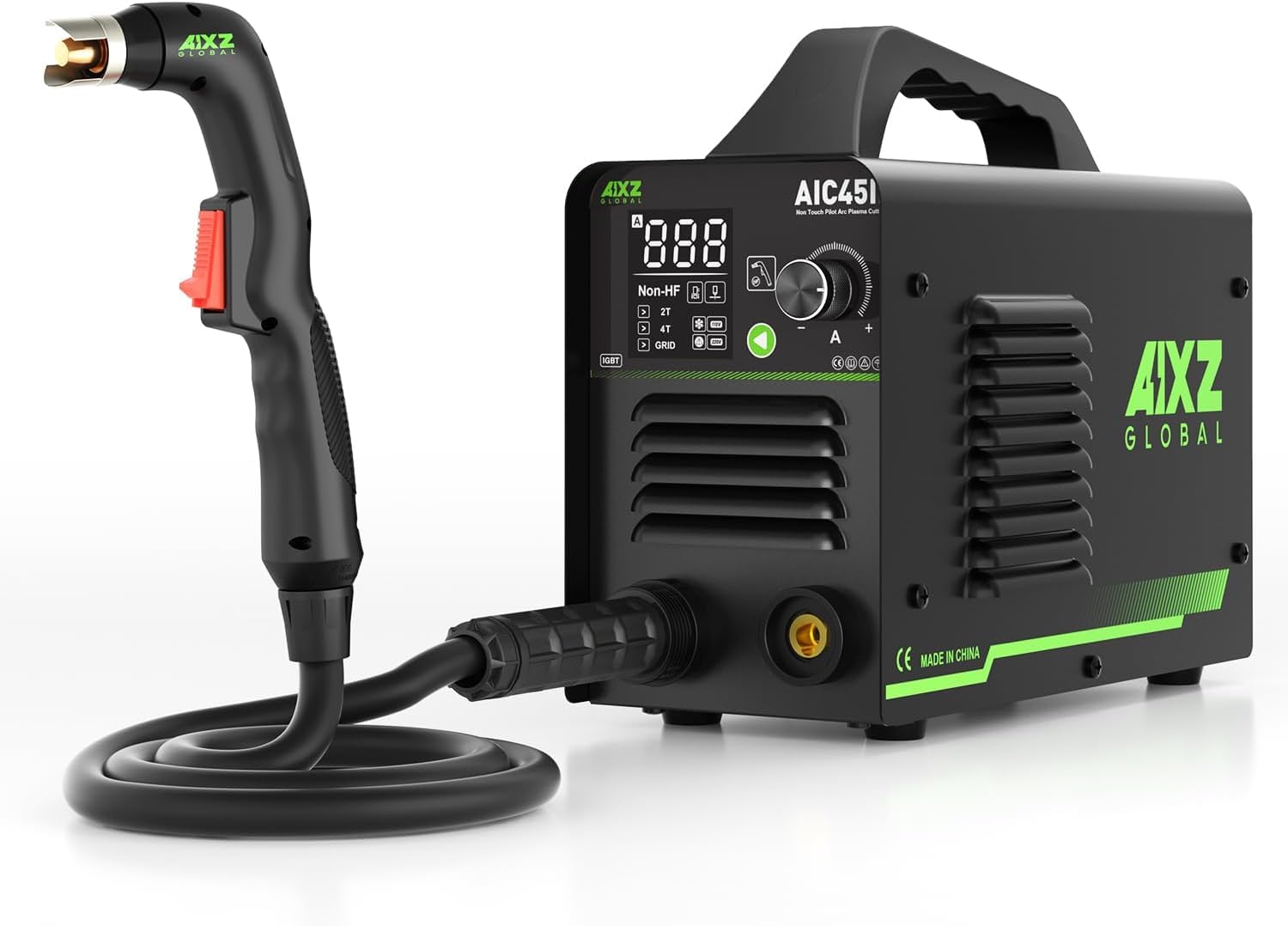
The AIXZGLOBAL AIC45II Plasma Cutter main unit, showcasinpolo seu deseño compacto e o seu panel de control.

Compact and portable design of the AIXZGLOBAL AIC45II Plasma Cutter, showing its dimensions and weight for easy transport.

Diagram illustrating the non-high frequency operation of the plasma cutter, indicating low signal interference, safety for electrical equipment and human health, and low noise output.

Comparison highlighting the AIXZGLOBAL AIC45II's non-HF, lightweight, and non-touch cutting advantages over traditional heavy, HF, and touch-cutting machines.
Contido do paquete
Verify that all items listed below are included in your package. If any items are missing or damaged, contact AIXZGLOBAL customer support immediately.
- AIXZGLOBAL AIC45II Plasma Cutter Unit
- XT45 Cutting Torch
- Cl Claseamp
- Regulador de filtro de aire
- Mangueira de aire
- Torch Accessories (Nozzles, Electrodes)
- Raw Meal Belt
- Aros
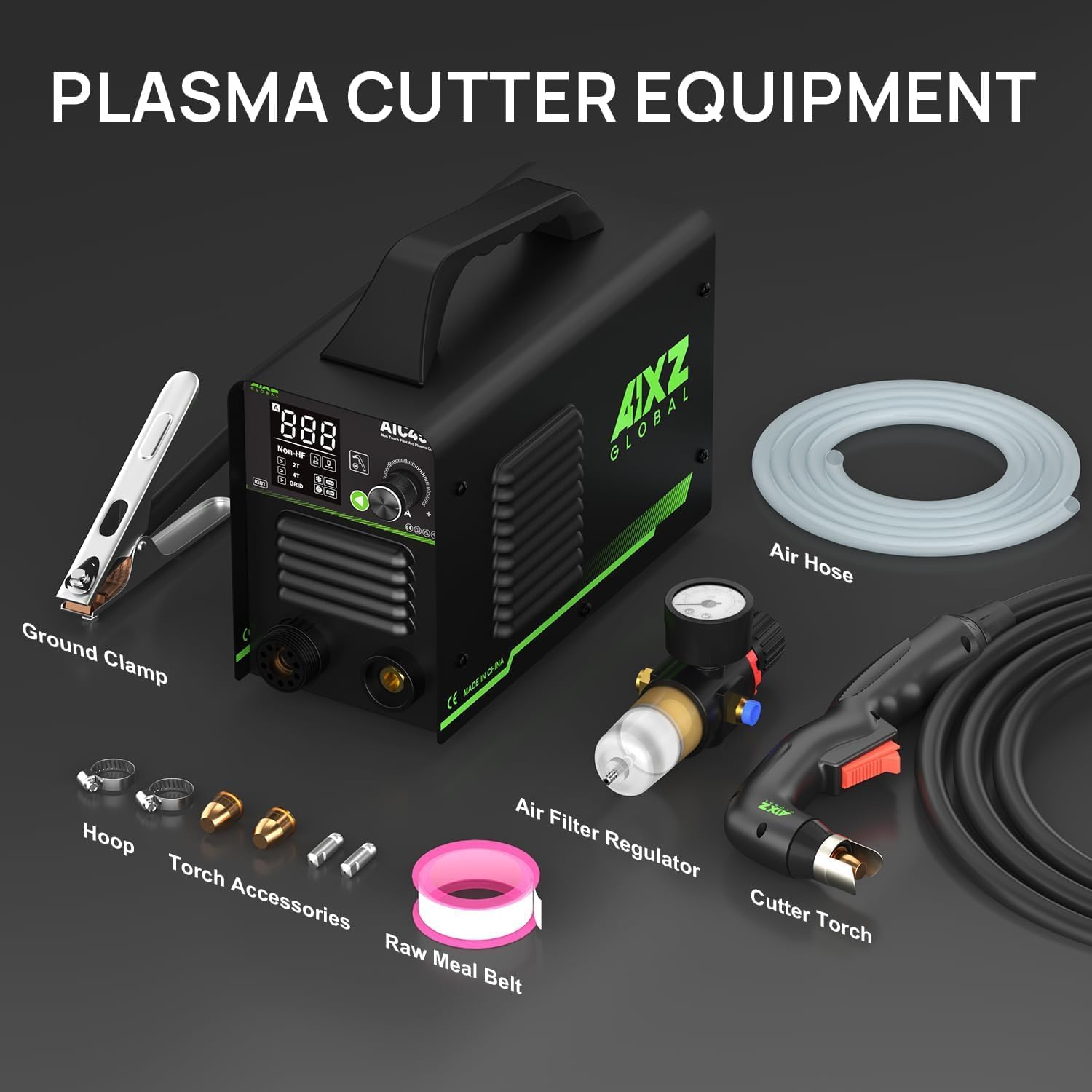
All components included with the AIXZGLOBAL AIC45II Plasma Cutter: the main unit, ground clamp, air hose, air filter regulator, cutter torch, hoop, torch accessories, and raw meal belt.
Instrucións de configuración
1. Desembalaxe
Carefully remove the plasma cutter and all accessories from the packaging. Inspect for any shipping damage. Retain packaging for future transport or storage.
2. Conexión de alimentación
The AIC45II operates on both 110V and 220V power supplies. Ensure your power source matches the machine's requirements and is equipped with an appropriate circuit breaker. Connect the power cord securely to a grounded outlet.
3. Air Compressor and Filter Regulator Connection
A clean, dry air supply is crucial for optimal performance. Connect your air compressor to the air filter regulator. Then, connect the air filter regulator to the plasma cutter's air inlet. Ensure all connections are tight to prevent air leaks. The air filter regulator helps remove moisture and oil from the air supply.
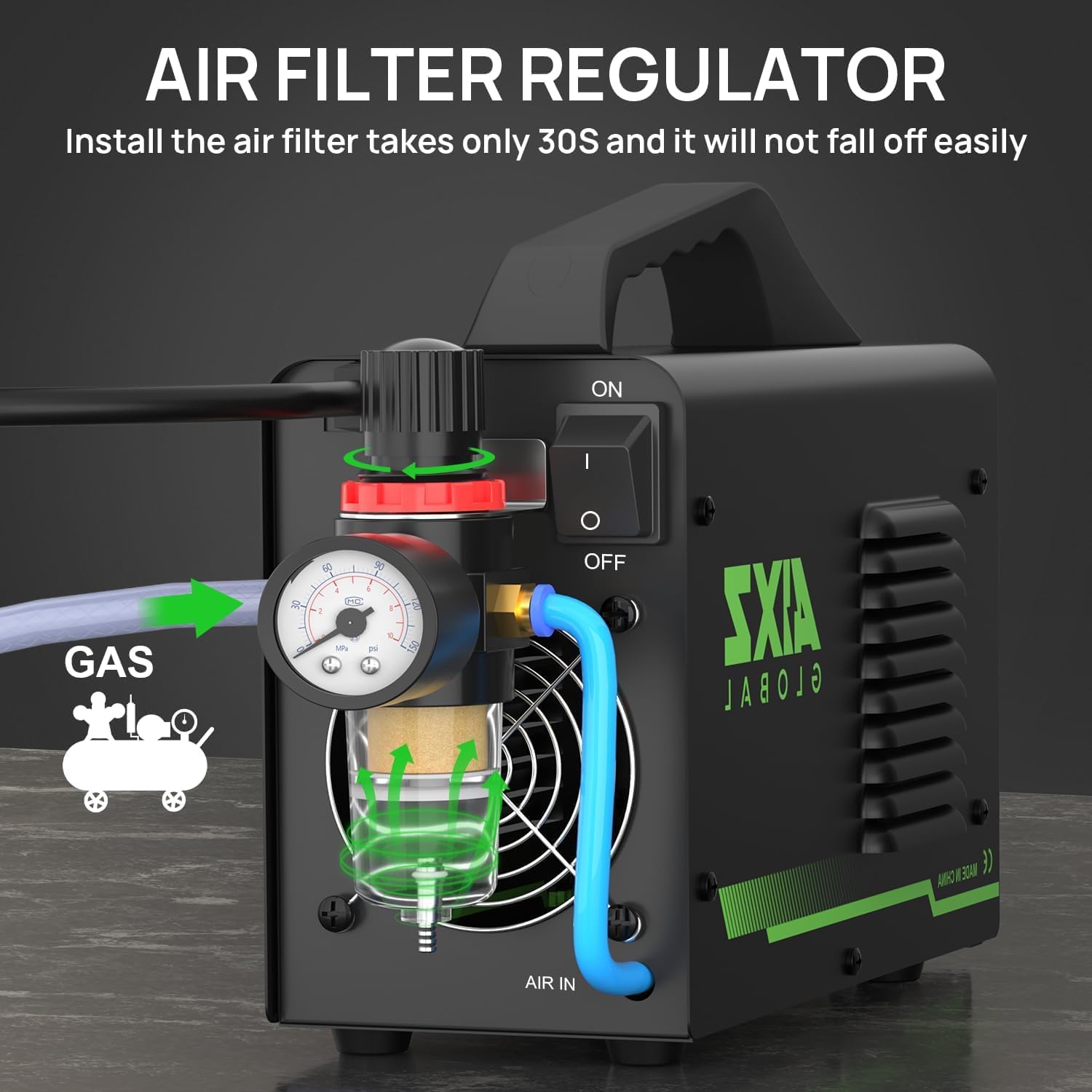
Detallado view of the air filter regulator installation, showing air input, gas connection, and pressure gauge. Installation takes approximately 30 seconds and ensures stable operation.
4. Tocha e terra Clamp Conexión
Connect the XT45 cutting torch to the designated port on the front panel of the plasma cutter. Secure the connection firmly. Attach the ground clamp cable to the appropriate terminal and ensure the clamp is securely fastened to the workpiece or work table, providing a good electrical connection. A poor ground connection can affect cutting performance.
Instrucións de funcionamento
1. Acender
After all connections are made, turn on the main power switch located on the plasma cutter. The digital display will illuminate.
2. Adjusting Cutting Current
Use the control knob on the front panel to adjust the cutting current (Amperage) according to the material type and thickness. The LCD digital display will show the current setting. The AIC45II offers a DC output current range of 15-45A.
3. Selecting 2T/4T Mode
The plasma cutter supports both 2T (Two-Touch) and 4T (Four-Touch) modes. Select the appropriate mode using the switch on the control panel:
- 2T Mode: Press and hold the torch trigger to start the arc and cut. Release the trigger to stop. This mode is suitable for short cuts.
- 4T Mode: Press and release the trigger to start the arc. Press and release again to stop. This mode is ideal for longer cuts, reducing operator fatigue.
4. Non-Touch Pilot Arc Operation
The non-touch pilot arc feature allows for easy arc initiation without direct contact between the torch tip and the workpiece. This is particularly beneficial for cutting painted, rusty, or expanded metals. Position the torch approximately 1/8 inch (3mm) above the material before pressing the trigger.

An operator using the non-touch plasma cutter on a metal surface, demonstrating the pilot arc feature for clean and efficient cutting.
5. Cutting Guidelines
The AIC45II is capable of cutting various metals including stainless steel, carbon steel, aluminum, copper, and titanium. It can achieve clean cuts through 10mm (approximately 3/8 inch) and has a maximum cutting thickness of 16mm (approximately 5/8 inch).
- Para clean cuts up to 8mm, use 110V power with approximately 35A and 60 PSI air pressure.
- Para maximum cuts up to 16mm, use 220V power with approximately 45A and 80 PSI air pressure.
Adjust cutting speed and torch distance from the workpiece to achieve optimal cut quality. Maintain a steady hand and consistent travel speed for best results.

Illustration of the AIXZGLOBAL AIC45II Plasma Cutter's cutting capabilities, showing clean cuts up to 8mm at 110V/35A/60PSI and maximum cuts up to 16mm at 220V/45A/80PSI.
Mantemento
Un mantemento regular garante a lonxevidade e o rendemento óptimo do seu cortador de plasma.
1. Air Filter Regulator Cleaning
Periodically check the air filter regulator for accumulated moisture and debris. Drain any collected water and clean or replace the filter element as needed to ensure a clean and dry air supply to the machine.
2. Consumable Inspection and Replacement
Inspect the torch consumables (nozzle, electrode, swirl ring, shield cup) regularly for wear. Worn consumables can lead to poor cut quality and reduced performance. Replace them as necessary. Always use genuine AIXZGLOBAL replacement parts.
3. Limpeza xeral
Keep the plasma cutter unit clean and free from dust and metal particles. Use compressed air to blow out any debris from the ventilation openings. Ensure all cables and connections are in good condition.
Resolución de problemas
Esta sección ofrece solucións a problemas comúns cos que podes atoparte.
| Problema | Causa posible | Solución |
|---|---|---|
| Sen inicio de arco |
|
|
| Mala calidade de corte (áspero, escoria) |
|
|
| Machine overheats (thermal overload) |
|
|
| Pilot arc fails to ignite |
|
|
If the problem persists after attempting these solutions, contact AIXZGLOBAL customer support for further assistance.
Especificacións
Technical specifications for the AIXZGLOBAL AIC45II Plasma Cutter.
| Especificación | Valor |
|---|---|
| Fabricante | AIXZGLOBAL |
| Número de modelo | AIC45II |
| Peso do elemento | 31.5 libras |
| Dimensións do paquete | 16.93 x 11.02 x 7.48 polgadas |
| Fonte de enerxía | DC (110V/220V compatible) |
| Intervalo de corrente de corte | 15-45A |
| Frecuencia | 50/60 HZ |
| Ciclo de traballo | 60 % |
| Espesor máximo de corte | 16 mm |
| Clean Cutting Thickness | 10 mm |
| Pilot Arc Type | Arco piloto non táctil |
| Compoñentes incluídos | Plasma cutter, XT45 cutting gun, ground clamp, air filter regulator, air hose, torch accessories |
| Requírense baterías? | Non |
Garantía e Soporte
For warranty information, technical support, or to purchase replacement parts, please contact AIXZGLOBAL customer service. Refer to your purchase documentation for specific warranty terms and contact details.
AIXZGLOBAL Customer Support: Please refer to the contact information provided with your product or visit the official AIXZGLOBAL websitio.