
Introdución
This manual provides detailed instructions for the operation and maintenance of your Mesqool CR1031 Portable FM Radio. Please read this manual thoroughly before using the device to ensure proper function and to maximize your listening experience. This radio features FM reception, NOAA weather alerts, Bluetooth connectivity, microSD playback, dual alarms, and a sleep timer.
Produto rematadoview
The Mesqool CR1031 is a versatile portable radio designed for various listening needs. It includes a 2.4-inch color display, an 8W speaker, and multiple input options.
Compoñentes e controis

Imaxe: Fronte e lateral view of the Mesqool CR1031 radio highlighting key components.
- Botón de volume: Axusta o nivel de saída de audio.
- Ranura para tarxetas microSD: Para reproducir audio files from a microSD card (not included).
- Headphone Jack / Reset Hole: 3.5mm audio output for private listening; small hole for device reset.
- Porto USB-C: For charging the internal battery and powering the device.
- Batería integrada de 3000 mAh: Provides portable power.
- Relator: 8W speaker for audio output.
- Botóns de control: Mode, SOS, WX (Weather), Menu, Back, Preset, Enter, Scan, Play/Pause, Next/Previous Track.
- Antena telescópica: For improved FM and NOAA signal reception.
Configuración
Cargando a batería
Before first use, fully charge the radio. Connect the provided USB-C cable to the radio's USB-C port and the other end to a compatible USB power adapter (included) or a computer's USB port. The 2.4-inch color display will indicate charging status. A full charge ensures cordless listening for extended periods.

Image: The radio connected to a laptop via USB-C for charging, illustrating its rechargeable capability.
Encendido inicial
Manteña premido o Poder button to turn the radio on. The display will light up, showing the current time and mode.
Instrucións de funcionamento
Funcionamento da radio FM
- Seleccionar o modo FM: Preme o MODO button until "FM Radio" is displayed.
- Escaneo automático: Preme o ESCANEAR button to automatically search for and save available FM stations. The radio can store up to 40 presets.
- Sintonización manual: Usa o Pista anterior / seguinte botóns para sintonizar manualmente unha frecuencia específica.
- Access Presets: Preme o PRESET botón e, a continuación, use o Pista anterior / seguinte buttons to navigate through saved stations. Press ENTRAR para seleccionar.
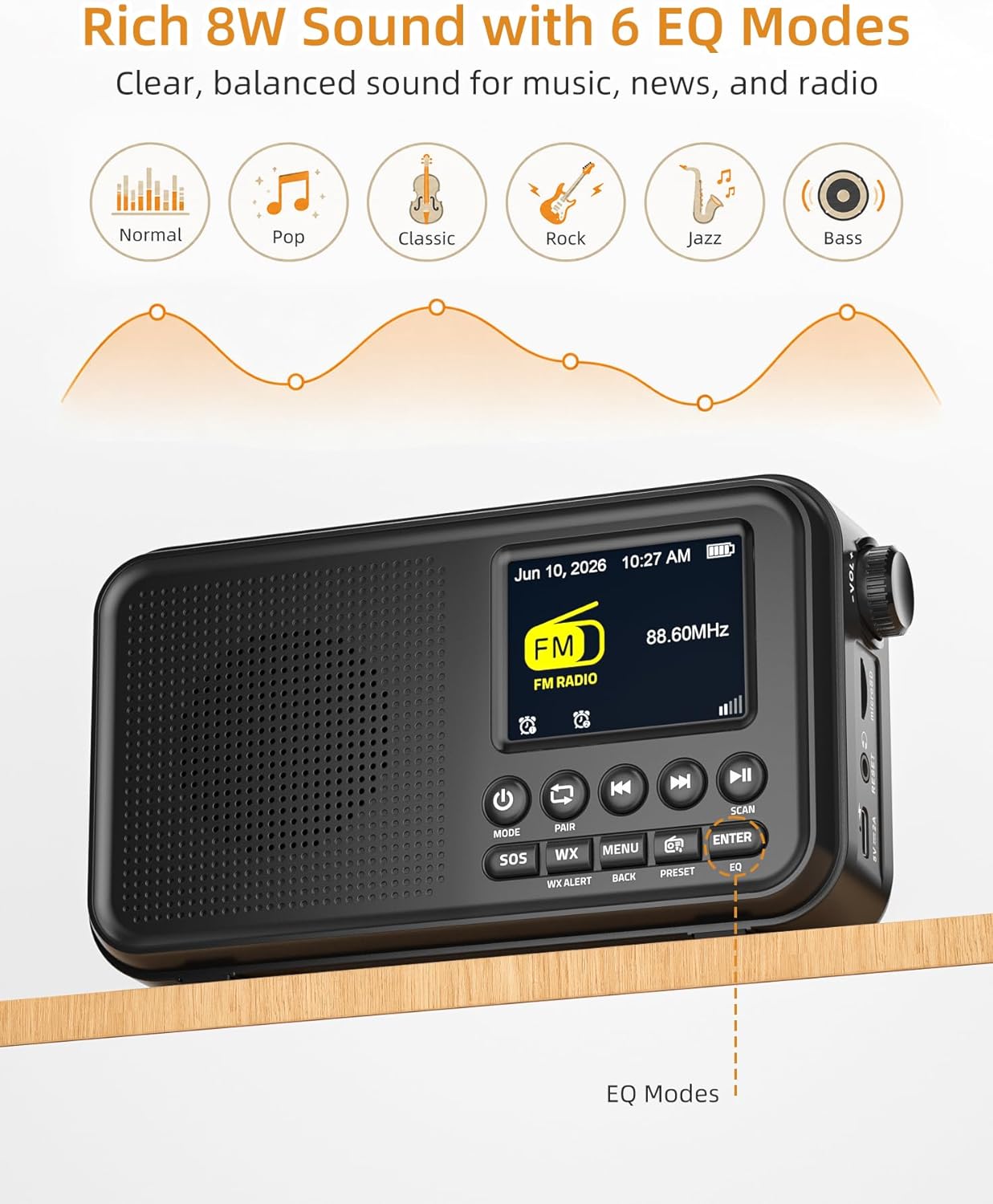
Image: The radio displaying FM mode and options for EQ settings.
Alerta meteorolóxica da NOAA
The radio includes a built-in U.S. NOAA Weather Band for receiving weather alerts.
- Select WX Mode: Preme o WX button to switch to the NOAA Weather Band.
- Selección de canles: The radio will automatically scan for the strongest NOAA channel. You can manually cycle through channels using the Pista anterior / seguinte botóns.
- Activar alertas: Ensure the WX Alert function is enabled (check menu settings if necessary) to receive automatic weather alerts.

Image: The radio displaying NOAA Weather Band information in an outdoor environment.
Conectividade Bluetooth
Stream audio wirelessly from your compatible devices.
- Seleccione o modo Bluetooth: Preme o MODO button until "Bluetooth" is displayed. The radio will enter pairing mode, indicated by a flashing Bluetooth icon.
- Parear dispositivo: On your smartphone, tablet, or laptop, enable Bluetooth and search for "Mesqool CR1031" (or similar device name) in the list of available devices. Select it to pair.
- Reproducir audio: Once paired, you can play audio from your device, and it will stream through the radio's speaker.

Image: A user connecting their smartphone to the radio via Bluetooth, demonstrating wireless audio streaming.
Reprodución microSD
Reproducir audio filedirectamente desde unha tarxeta microSD.
- Insira a tarxeta microSD: Gently insert a microSD card (up to 64GB, not included) into the microSD card slot until it clicks into place.
- Select microSD Mode: Preme o MODO button until "microSD" or "Card Playback" is displayed.
- Control de reprodución: Usa o Reproducir/Pausa e Pista anterior / seguinte botóns para controlar a reprodución.
Alarmas duales
Set two independent alarms to wake up to FM radio or a buzzer.
- Access Alarm Settings: Preme o MENÚ button and navigate to the "Alarm" settings.
- Set Alarm 1/2: Select Alarm 1 or Alarm 2. Set the desired time, alarm source (FM radio or buzzer), and volume.
- Activar alarma: Ensure the alarm is enabled in the settings.
- Repetición: When an alarm sounds, press any button (except Power) to activate snooze for extra rest.

Image: The radio illustrating its dual alarm feature, with one alarm set for a meeting and another for waking up.
Temporizador de suspensión
Fall asleep to your favorite radio station with the sleep timer function.
- Access Sleep Timer: Preme o MENÚ button and navigate to the "Sleep Timer" settings.
- Definir duración: Choose a duration from 15, 30, 45, 60, 90, or 120 minutes. The radio will automatically turn off after the selected time.
Modos de ecualización
Customize your audio experience with 6 equalizer modes.
- Access EQ Settings: Preme o EQ button (or navigate via the MENÚ).
- Seleccionar modo: Choose from Normal, Pop, Classic, Rock, Jazz, or Bass to match your listening preference.
Vídeo oficial do produto
Video: An official product video demonstrating the FM Radio, Bluetooth, and NOAA Weather Alert features of the Mesqool CR1031.
Mantemento
- Limpeza: Usa un pano suave e seco para limpar o exterior da radio. Non empregues produtos de limpeza abrasivos nin solventes.
- Almacenamento: Garde a radio nun lugar fresco e seco, lonxe da luz solar directa e de temperaturas extremas.
- Coidado da batería: For optimal battery life, avoid fully discharging the battery frequently. Recharge regularly, especially if storing for long periods.
- Exposición á auga: Este dispositivo non é impermeable. Evite a exposición á auga ou á humidade elevada.
Resolución de problemas
| Problema | Causa posible | Solución |
|---|---|---|
| Sen electricidade/Non se acende | A batería está esgotada; o adaptador de corrente non está conectado. | Charge the battery using the USB-C cable. Ensure the power adapter is properly connected. |
| Poor FM/NOAA reception | Antena non estendida; Zona de sinal débil. | Estenda completamente a antena telescópica. Tente recolocar a radio para obter un mellor sinal. |
| Bluetooth non se sincroniza | Radio not in pairing mode; Device Bluetooth off. | Ensure the radio is in Bluetooth mode and the icon is flashing. Check Bluetooth settings on your device. |
| microSD card not recognized | Card inserted incorrectly; Incompatible format; Card corrupted. | Reinsert the card correctly. Ensure the card is formatted to FAT32. Try a different microSD card. |
| Sen son | Volume too low; Mute activated; Headphones connected. | Increase volume. Check if headphones are plugged in. Ensure the device is not muted. |
Especificacións
- Marca: Mesqool
- Número de modelo: CR1031
- Cor: Negro
- Dimensións do produto: 6.65 cm de longo x 3.62 cm de ancho x 1.85 cm de alto
- Peso do artigo: 0.77 libras
- Fonte de enerxía: Corded Electric, Battery Powered (3000mAh rechargeable battery included)
- Tecnoloxía de conectividade: USB, Bluetooth 5.0
- Tecnoloxía do sintonizador: Banda FM/Meteo
- Bandas de radio admitidas: NOAA | FM | WB
- Rango de frecuencias FM: 87.5-108 MHz
- NOAA Frequency: 162.400 - 162.550 MHz
- Tipo de visualización: Pantalla a cor de 2.4 polgadas
- Características especiais: Portable, Rechargeable, SOS Alarm, Auto Scan, 40 FM Presets, 8W Sound, microSD Playback, Dual Alarms, Sleep Timer, 6 EQ Modes (Normal, Pop, Classic, Rock, Jazz, Bass)
- Dispositivos compatibles: Teléfono intelixente, tableta, portátil
- Voltage: 5 voltios
- Material: Acrilonitrilo Butadieno Estireno (ABS)
Garantía e Soporte
Información da garantía
The Mesqool CR1031 Portable FM Radio comes with a 2-Year Replacement/Refund Warranty for any quality problems. Please retain your proof of purchase for warranty claims.
Compoñentes incluídos
O paquete do produto inclúe:
- Mesqool CR1031 Portable FM Radio
- Cable de carga USB-C
- Adaptador de alimentación
- Manual do propietario (este documento)

Image: The package contents of the Mesqool CR1031, showing the radio, manual, power adapter, and USB-C cable.
Atención ao cliente
For further assistance or inquiries, please refer to the contact information provided on the product packaging or the official Mesqool websitio.