1. Introdución
This manual provides essential instructions for the proper installation, operation, and maintenance of your CADDXFPV Eclipse Thermal FPV Camera, Model 384CA. This high-resolution thermal imaging camera is designed for integration into RC racing drones, offering advanced aerial observation capabilities. Please read this manual thoroughly before using the product to ensure optimal performance and safety.
2. Características clave
- FPV Thermal Camera: Specifically designed for high-performance aerial imaging and observation in RC racing scenarios.
- Imaxe de alta resolución: Available in 384 resolution, delivering detailed thermal imaging for clear target recognition.
- HD Analog Technology: Utilizes a high-definition analog imaging system for stable and sharp image output during fast-paced FPV flights.
- RC Racing Drone Compatibility: Engineered for seamless integration with compatible RC racing drone models.
- Deseño compacto e lixeiro: Streamlined structure ensures minimal impact on drone speed and performance in competitive racing environments.
3. Contido do paquete
Verifica que todos os elementos estean presentes no teu paquete:
- CADDXFPV Eclipse Thermal FPV Camera (Model 384CA)
- Cable(s) de conexión
- Mounting Hardware (screws, standoffs - quantity may vary)
- Manual de usuario (este documento)
4. Información de seguridade
Observe as seguintes precaucións de seguridade para evitar danos ao produto ou lesións a vostede mesmo:
- Fonte de alimentación: Ensure the camera is connected to a stable power source within the specified voltagRango e. Volumen incorrectotage can cause permanent damage.
- Instalación: Always disconnect power from your drone before installing or removing the camera.
- Manexo: Avoid touching the lens directly. Use a soft, clean cloth for cleaning if necessary.
- Ambiente: Do not expose the camera to extreme temperatures, moisture, or direct sunlight for prolonged periods.
- Modificacións: Non intente desmontar nin modificar a cámara. Isto anulará a garantía e pode causar danos.
5. Compoñentes e diagrama do produto
Familiarize yourself with the main components of your CADDXFPV Eclipse Thermal FPV Camera.
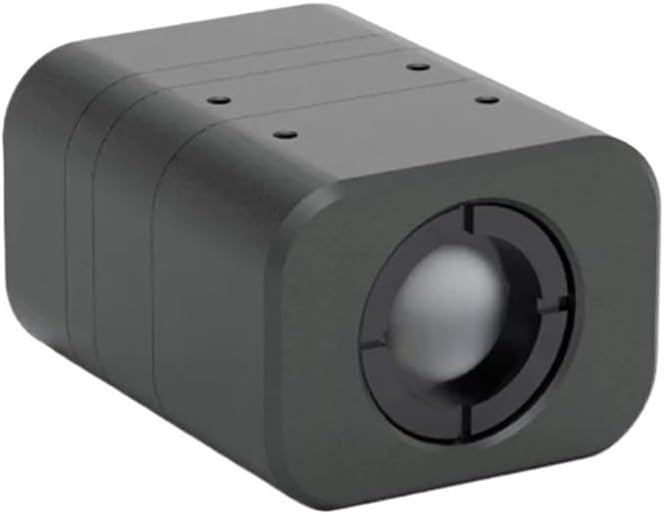
Figura 5.1: Fronte view of the CADDXFPV Eclipse Thermal FPV Camera, showing the thermal lens.

Figura 5.2: Outra fronte view of the camera, highlighting the thermal lens assembly.

Figure 5.3: A slightly different angle of the camera's front, showing the compact housing.
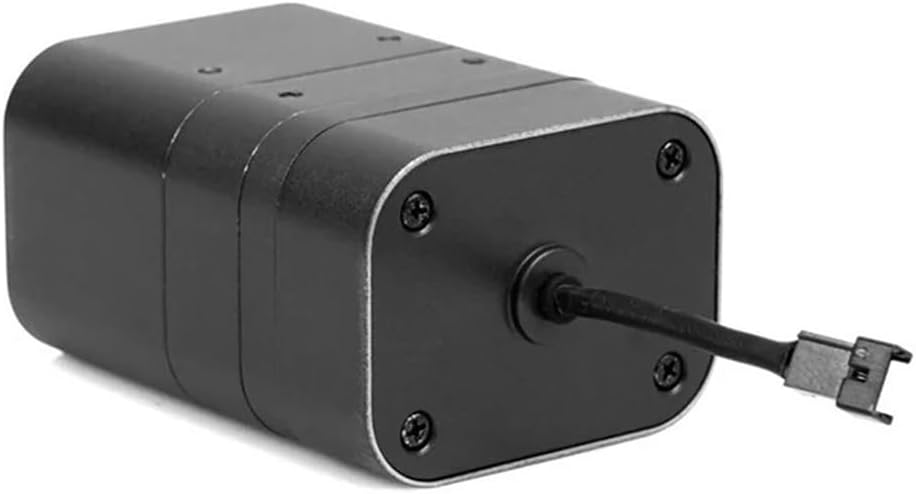
Figura 5.4: Traseira view of the camera, illustrating the connection port and cable for power and video output.
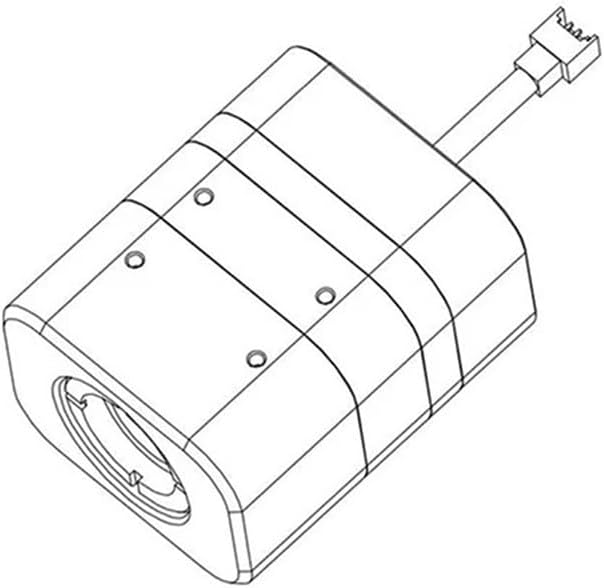
Figure 5.5: Technical line drawing of the camera, useful for understanding dimensions and mounting points.
The camera features a robust, compact housing designed to withstand the rigors of RC racing. The front houses the thermal imaging lens, while the rear provides the necessary connection points for integration into your drone's FPV system.
6. Configuración e instalación
6.1 Montaxe da cámara
- Identify a suitable mounting location on your RC racing drone that provides an unobstructed view and protects the camera from impact.
- Use the provided mounting hardware (screws, standoffs) to securely attach the camera to the drone frame. Refer to Figure 5.5 for potential mounting points.
- Ensure the camera is firmly fixed and does not vibrate, which could affect image quality.
6.2 Conexións de cableado
The CADDXFPV Eclipse Thermal FPV Camera requires power and video signal connections to your drone's flight controller or video transmitter (VTX).
- Entrada de enerxía: Connect the camera's power input wire (typically red) to a stable DC power source on your drone (e.g., 5V or 12V, depending on camera specifications and drone's power distribution board). Ensure polarity is correct.
- Terreo: Connect the camera's ground wire (typically black) to the common ground of your drone's power system.
- Saída de vídeo: Connect the camera's video output wire (typically yellow or white) to the video input of your FPV video transmitter (VTX).
Nota: Always consult your drone's flight controller and VTX manuals for specific wiring diagrams and voltage requirements. Incorrect wiring can damage components.
7. Instrucións de funcionamento
7.1 Encendido inicial
- After completing all wiring and mounting, connect the main battery to your RC racing drone.
- Power on your FPV goggles or monitor.
- The thermal camera should automatically power on and transmit video to your FPV receiver.
- Observe the video feed for clear thermal imagery.
7.2 Thermal Imaging Basics
Thermal cameras detect infrared radiation (heat) emitted by objects, converting it into a visible image. Hotter objects typically appear brighter or in a different color spectrum depending on the camera's palette settings (if configurable). This allows for visibility in low-light conditions or through smoke/fog where traditional cameras struggle.
- Image Interpretation: Learn to interpret the thermal patterns. Different temperatures will be represented by varying shades or colors.
- Factores ambientais: Performance can be affected by extreme environmental conditions, such as heavy rain or direct heat sources.
8. Mantemento
8.1 Limpeza
- Lente: Gently clean the thermal lens with a soft, lint-free cloth. For stubborn dirt, use a lens cleaning solution specifically designed for optics. Avoid abrasive materials.
- Vivenda: Wipe the camera housing with a dry or slightly damp pano. Non use produtos químicos ou disolventes agresivos.
8.2 Almacenamento
When not in use, store the camera in a cool, dry place, away from direct sunlight and extreme temperatures. Protect the lens from scratches.
9 Solución de problemas
| Problema | Causa posible | Solución |
|---|---|---|
| Sen sinal de vídeo |
|
|
| Mala calidade de imaxe / imaxe borrosa |
|
|
| A cámara non se acende |
|
|
10. Especificacións
| Característica | Detalle |
|---|---|
| Modelo | CADDX Eclipse 384CA |
| Resolución | 384 (Thermal) |
| Tecnoloxía de imaxe | Analóxico HD |
| Aplicación | RC Racing FPV Drones |
| Peso do elemento | 1.76 onzas (aprox. 50 g) |
| Dimensións do paquete | 3.94 x 3.94 x 3.94 polgadas (aprox. 10 x 10 x 10 cm) |
11. Garantía e soporte
This product is covered by a standard manufacturer's warranty against defects in materials and workmanship. The specific duration and terms of the warranty may vary by region and retailer. Please retain your proof of purchase for warranty claims.
For technical support, troubleshooting assistance, or warranty inquiries, please contact your retailer or the manufacturer's customer service department. Contact information can typically be found on the product packaging or the manufacturer's official websitio.


