
1. Introdución
Grazas pola compraasing the Sharp PS-916 Bluetooth Party Speaker System. This system includes two identical portable Bluetooth speakers designed to deliver powerful audio with versatile connectivity options. Please read this manual carefully before using the product to ensure proper operation and to maximize your listening experience.
Contido do paquete:
- 2 x Sharp PS-916 Party Speakers
- 1 x cable de carga
- 1 x mando a distancia
- 1 x Manual de usuario

Image: The Sharp PS-916 system includes two speakers for a complete stereo experience.
2. Configuración
2.1 Carga dos altofalantes
The PS-916 speakers are equipped with rechargeable batteries, providing up to 12 hours of playback. Before initial use, fully charge both speakers.
- Connect the charging cable to the DC IN port on the rear of each speaker.
- Plug the other end of the charging cable into a suitable power adapter (not included) or USB power source.
- The charging indicator light will illuminate. It will change color or turn off once charging is complete.
2.2 Acendido/Apagado
To power on or off each speaker, press and hold the ON/STAND BY INPUT botón situado no panel de control.
2.3 Emparellamento Bluetooth (altofalante único)
- Ensure the speaker is powered on and in Bluetooth mode. The Bluetooth indicator will flash, indicating it is ready for pairing.
- No teu dispositivo móbil, activa o Bluetooth e busca os dispositivos dispoñibles.
- Select "Sharp PS-916" from the list of devices.
- Once connected, the Bluetooth indicator will stop flashing and remain solid.
Emparellamento de estéreo sen fíos verdadeiro 2.4 (TWS) (dous altofalantes)
TWS allows you to connect two PS-916 speakers wirelessly for a stereo sound experience.
- Power on both PS-916 speakers.
- Ensure neither speaker is currently connected to a Bluetooth device.
- Nun dos altofalantes (este será o altofalante principal), prema o botón TWS button. The speaker will enter TWS pairing mode.
- The primary speaker will automatically search for the secondary speaker. Once connected, you will hear an audible confirmation, and the TWS indicator lights on both speakers will illuminate.
- Agora, conecta o teu dispositivo móbil ao altofalante principal mediante Bluetooth como se describe na sección 2.3. O son reproducirase a través dos dous altofalantes en estéreo.
3. En funcionamento
3.1 Panel de control rematadoview

Image: Main control panel for the Sharp PS-916 speaker.
- ON/STAND BY INPUT: Power on/off, switch input modes (Bluetooth, USB, TF, AUX, FM).
- PLAY/PAUSE (►/∕∕): Reproducir ou pausar a reprodución de audio.
- PREVIOUS (◀◀): Ir á pista anterior.
- SEGUINTE (▶▶): Ir á seguinte pista.
- POMA DE VOLUME: Xire para axustar o volume principal.
- TWS: Initiate or disconnect True Wireless Stereo pairing.
- IGUALIZADOR: Cycle through preset equalizer modes.
- BAIXO: Activate or deactivate bass boost.
- LUZ: Change or turn off the LED light effects.
- MIC CONTROL: Adjust microphone volume or echo (if applicable).
3.2 portos de entrada
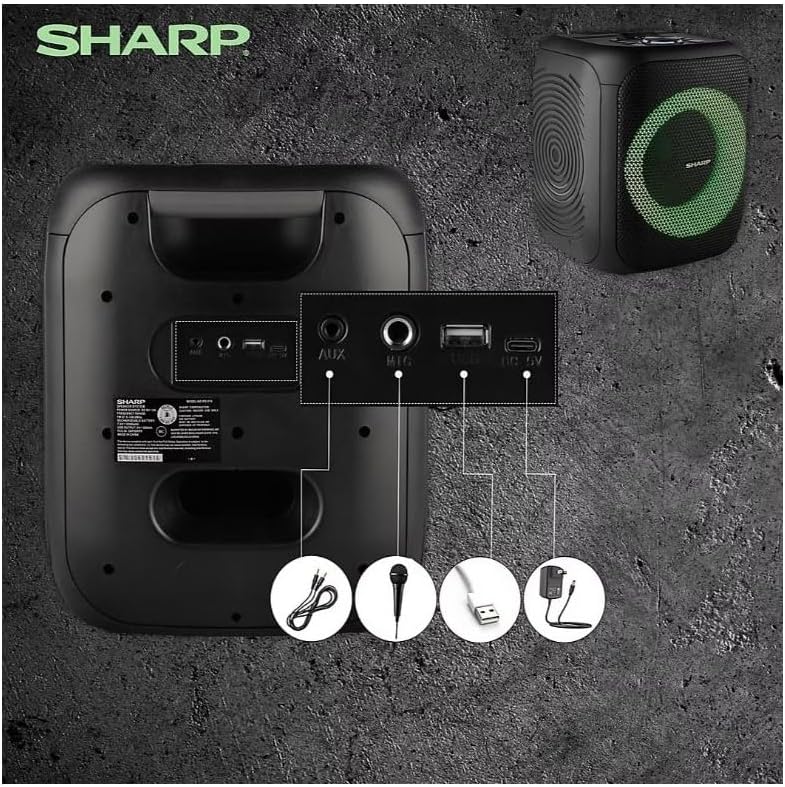
Image: Rear panel with various input and charging ports.
- AUX IN: Conecta dispositivos de son externos cun cable de son de 3.5 mm.
- ENTRADA DE MICROFONO: Connect a microphone (sold separately) for karaoke or announcements.
- USB: Insira unha unidade flash USB para reproducir audio.
- TARXETA TF: Insira unha tarxeta TF (microSD) para reproducir audio.
- DC IN: Connect the charging cable to power and charge the speaker.
3.3 Playing Audio from USB/TF Card
- Insert a USB flash drive or TF card into the corresponding port.
- Preme o ON/STAND BY INPUT button repeatedly until the display shows the USB or TF mode.
- Playback will begin automatically. Use the REPRODUCIR/PAUSA, ANTERIOR, e SEGUINTE botóns para controlar a reprodución.
3.4 Uso da entrada AUX
- Connect one end of a 3.5mm audio cable to the AUX IN port on the speaker.
- Conecta o outro extremo á toma de auriculares ou á saída de audio do teu dispositivo externo.
- Preme o ON/STAND BY INPUT button repeatedly until the display shows AUX mode.
- Controla a reprodución e o volume desde o teu dispositivo externo.
3.5 Funcionamento da radio FM

Image: The PS-916 features an integrated FM Tuner.
- Preme o ON/STAND BY INPUT button repeatedly until the display shows FM mode.
- Manteña premido o REPRODUCIR/PAUSA botón para buscar e gardar automaticamente as emisoras de FM dispoñibles.
- Usa o ANTERIOR e SEGUINTE botóns para navegar polas estacións gardadas.
3.6 Efectos de luz LED
Preme o LUZ button to cycle through different LED light modes or to turn the lights off.
4. Mantemento
4.1 Limpeza
- Always power off the speaker and disconnect it from the power source before cleaning.
- Use un pano suave e seco para limpar as superficies exteriores.
- Non empregue produtos de limpeza líquidos, aerosois nin disolventes, xa que poden danar o acabado ou os compoñentes internos.
4.2 Almacenamento
- Garde os altofalantes nun lugar fresco e seco, lonxe da luz solar directa e de temperaturas extremas.
- Se a gardas durante un período prolongado, cárgaa aproximadamente ao 50 % cada poucos meses para mantela en bo estado.
5 Solución de problemas
If you encounter issues with your Sharp PS-916 speakers, please refer to the following common problems and solutions:
| Problema | Posible Solución |
|---|---|
| O altofalante non se acende. | Asegúrate de que a batería estea cargada. Conecta o cable de carga e inténtao de novo. |
| Non hai son do altofalante. | Comproba o nivel de volume tanto no altofalante como no dispositivo conectado. Asegúrate de que estea seleccionado o modo de entrada correcto. |
| O dispositivo Bluetooth non se pode emparellar. | Ensure the speaker is in Bluetooth pairing mode (indicator flashing). Move your device closer to the speaker. Disconnect from other Bluetooth devices. |
| Fallou o emparellamento de TWS. | Ensure both speakers are powered on and not connected to any other Bluetooth devices. Try initiating TWS pairing again. |
| Son distorsionado. | Reduce the volume on both the speaker and your connected device. Ensure the audio source is not distorted. |
6. Especificacións
| Característica | Detalle |
|---|---|
| Marca | Agudo |
| Nome do modelo | PS-916 |
| Configuración do altofalante | 8" Woofer, 1" Tweeter (per speaker) |
| Potencia máxima de saída | 400 Watts (per speaker) |
| Potencia de saída RMS | 40 Watts (per speaker) |
| Tecnoloxía de conectividade | Bluetooth |
| Entradas adicionais | USB, TF Card, 3.5mm AUX, Microphone Input |
| Duración da batería | Ata 12 horas |
| Características especiais | True Wireless Stereo (TWS) Pairing, Bass Boost, LED Light Effects, FM Tuner |
| Cor | Negro |
| Peso do elemento | 6.5 Pounds (per speaker) |
| UPC | 728434122111 |
| GTIN | 728434122111 |
7. Garantía e soporte
7.1 Información da garantía
This Sharp PS-916 product comes with a 90-day limited warranty. This warranty covers manufacturing defects under normal use. It does not cover damage caused by misuse, accidents, unauthorized modifications, or normal wear and tear.
7.2 Atención ao cliente
For technical assistance, warranty claims, or further inquiries, please refer to the contact information provided with your purchase documentation or visit the official Sharp support websitio.