
Introdución
Thank you for choosing the OMOTON TP02-Pro Magnetic Phone Holder. This versatile accessory is designed to enhance your mobile content creation, vlogging, and hands-free viewing experiences. Crafted from durable aluminum alloy, it features a powerful magnetic base, multi-functional expansion options, and free-angle adjustment for optimal positioning. This manual provides detailed instructions for setup, operation, maintenance, and troubleshooting to ensure you get the most out of your device.
Produto rematadoview
The OMOTON TP02-Pro is a compact and robust magnetic phone holder that transforms into a stand, selfie stick, or mount for various surfaces. Its key features include:
- Powerful Magnetic Base: Equipped with N52 industrial magnets for secure attachment to metal surfaces.
- Multi-functional Expansion: Supports Arca-Swiss standard and 1/4" screw mounts for integration with professional gear.
- Free-Angle Adjustment: Offers 3-axis control and 360° rotation for flexible positioning.
- Deseño duradeiro e portátil: Made from high-strength aluminum alloy, lightweight, and foldable for easy transport.
- Compatibilidade universal: Compatible with iPhone 12-17 series and other smartphones (4.7-6.5 inches) with the included metal ring.
Que hai na caixa:
- OMOTON TP02-Pro Magnetic Phone Holder
- Additional Metal Ring (for non-MagSafe compatible phones/cases)
Configuración
Follow these steps to set up your OMOTON TP02-Pro:
- Unfold the Holder: Gently unfold the device to reveal its various components. The arms and base are designed to articulate smoothly.
- Magnetic Attachment (MagSafe Compatible Phones):
If you have an iPhone 12-17 series or a MagSafe-compatible case, simply align your phone with the magnetic ring on the holder. The strong N52 magnets will securely attach your device.
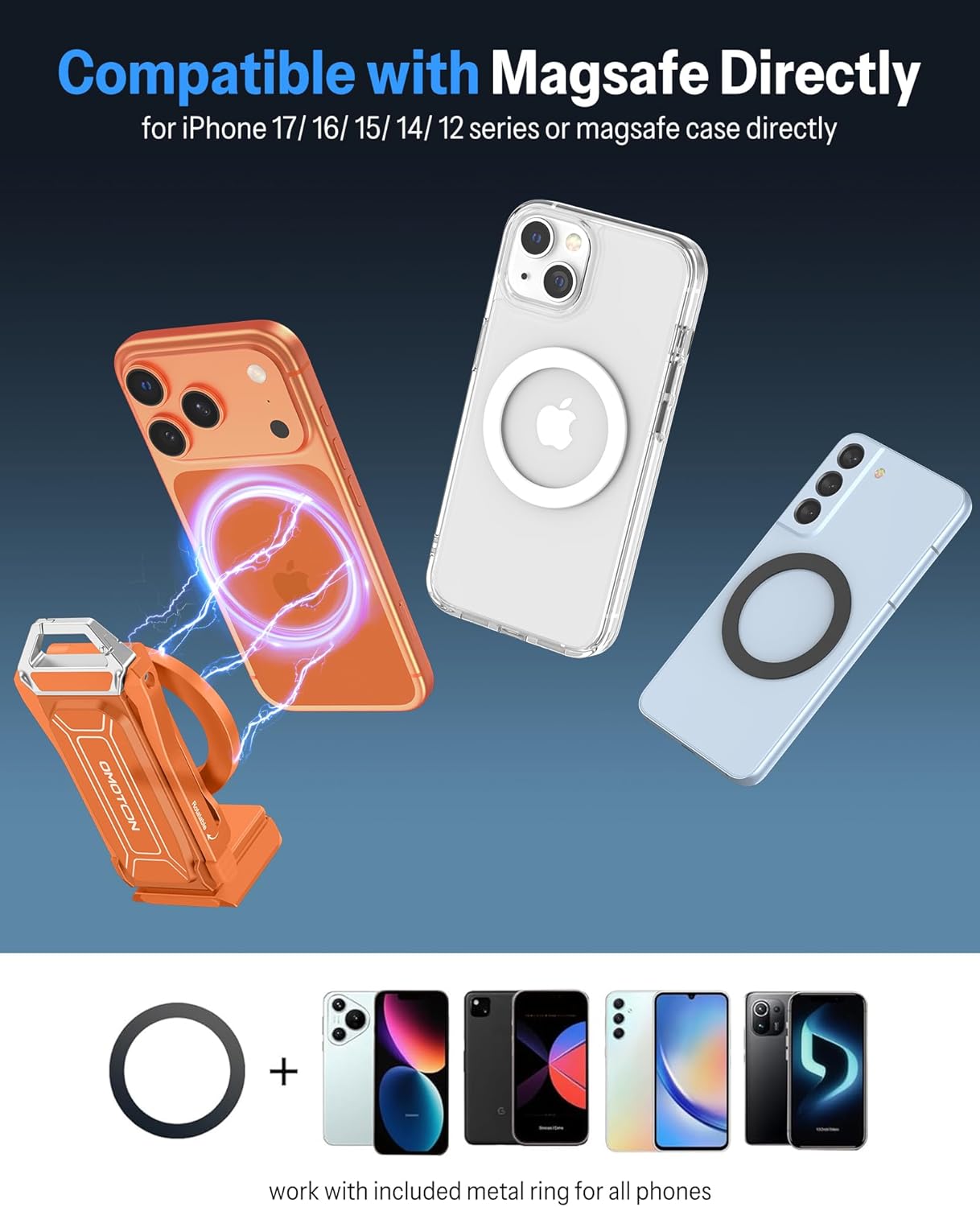
Image: Demonstrates MagSafe compatibility and the use of the included metal ring for non-MagSafe devices.
- Non-MagSafe Compatibility (Using Metal Ring):
For other smartphones (4.7-6.5 inches) or cases without MagSafe, use the included metal ring. Peel off the adhesive backing and carefully center the metal ring on the back of your phone or phone case. Ensure it is firmly pressed for optimal adhesion. Once attached, your phone can be magnetically mounted to the holder.
- Attaching to Tripods/Gear (1/4" Screw & Arca-Swiss):
The base of the holder features a 1/4" screw hole and is Arca-Swiss compatible. This allows you to mount the holder onto standard tripods, monopods, or other photography equipment. Simply align the screw or Arca-Swiss plate with the holder's base and secure it.

Image: Illustrates the 1/4" screw hole and Arca-Swiss plate compatibility for mounting on external gear.
Instrucións de funcionamento
The OMOTON TP02-Pro offers multiple modes of operation:
1. Magnetic Mounting
Utilize the powerful magnetic base to attach your phone holder to any suitable metal surface. This is ideal for hands-free recording or viewing.
- Gym Use: Securely attach the holder to gym equipment (e.g., weight racks, machines) to record workouts or follow exercise routines.
- Uso na cociña: Mount it on a refrigerator, range hood, or other metal surfaces for hands-free recipe viewing or recording cooking tutorials.
- Workshop/Crafting: Attach to a metal pegboard or workbench for top-down shots or hands-free reference.

Image: Magnetic attachment to gym equipment for recording.

Image: Magnetic attachment to a kitchen range hood for cooking.

Image: Magnetic mounting on a pegboard for crafting.
Video: Demonstrates the OMOTON Magnetic Phone Holder's ability to attach to various metal surfaces.
2. Adjustable Phone Stand / Desktop Use
The holder can be unfolded to form a stable desktop stand. Adjust the 3-axis joints and 360° rotation to achieve your desired viewing or recording angle.
- Soporte de escritorio: Place on a flat surface for video calls, watching content, or hands-free interaction.
- Low Angle Shots: Position the stand for unique low-angle perspectives.
- Overhead Shots: Use o clamp feature to attach to a desk edge for overhead recording.
3. Selfie Stick / Handheld Grip
When folded, the device functions as a comfortable handheld grip or selfie stick for stable mobile photography and videography.
- Selfie Grip: Hold the device for steady selfies or vlogging on the go.
- POV Shots: Capture immersive point-of-view footage while moving.
Video: Showcases the OMOTON Mini Selfie Stick functionality for content creators.
4. Multi-Scenario Applications
The TP02-Pro is designed for diverse environments:

Image: Multiple usage scenarios including in-flight, selfie, desktop, and tripod mounting.

Image: Capturing POV shots while shopping by attaching to a cart.
Mantemento
To ensure the longevity and optimal performance of your OMOTON TP02-Pro, follow these maintenance guidelines:
- Limpeza: Wipe the holder with a soft, dry cloth. For stubborn dirt, a slightly damp pódese usar un pano e secar inmediatamente despois. Evitar produtos de limpeza ou solventes abrasivos.
- Almacenamento: When not in use, fold the holder into its compact form and store it in a clean, dry place away from extreme temperatures and direct sunlight.
- Superficies magnéticas: Ensure the metal surfaces you attach the holder to are clean and free of debris to maintain strong magnetic adhesion.
- Articulacións: The joints are designed for smooth operation. Avoid forcing them beyond their intended range of motion. No lubrication is typically required.
Resolución de problemas
If you encounter issues with your OMOTON TP02-Pro, refer to the following common problems and solutions:
| Problema | Causa posible | Solución |
|---|---|---|
| Phone does not attach magnetically or falls off easily. |
|
|
| Holder joints are stiff or difficult to adjust. |
|
|
| Holder feels unstable when used as a stand. |
|
|
Especificacións
| Marca | OMOTON |
| Nome do modelo | TP02-Pro |
| Material | Aluminio |
| Cor | Orange (This specific variant) |
| Dispositivos compatibles | Smartphones 4.7-6.5 inches, including iPhone 12-17 series, Samsung S20/S21/S22, Note series, and others (with included metal ring). |
| Características especiais | 360 Degree Rotation, Adjustable, Foldable, Hand Free, Magnetic Base, 1/4" Screw Mount, Arca-Swiss Compatible |
| Altura máxima | 160 centímetros (aprox. 63 polgadas) |
| Número de unidades | 1.0 Conta |
Información da garantía
The OMOTON TP02-Pro Magnetic Phone Holder comes with a Garantía de 180 días from the date of purchase. This warranty covers manufacturing defects and issues arising from normal use. It does not cover damage caused by misuse, accidents, unauthorized modifications, or improper storage. Please retain your proof of purchase for warranty claims.
Apoio
For further assistance, technical support, or warranty inquiries, please contact OMOTON customer service through the retailer where you purchased the product or visit the official OMOTON website. Please have your product model number (TP02-Pro) and proof of purchase ready when contacting support.
OMOTON Official Store: Visit OMOTON Store on Amazon