
Introdución
This manual provides detailed instructions for the safe and efficient use of your Samvix iBusiness Mehadrin 128 Kosher MP3 Player. Please read this manual thoroughly before operating the device and retain it for future reference.
Características clave
- Massive 128GB Storage: Store thousands of songs, lectures, and audio files without needing an SD card.
- Full MP3 Playback: Features repeat, shuffle, bookmark, Add to Playlist, and adjustable playback speed for a customized listening experience.
- High-Quality Voice Recording: Built-in recorder with noise reduction and voice activity detection (VAD) for clear recordings.
- Secure and Family-Friendly: Three parental password options, plus USB and Bluetooth password protection for safe use.
- Multilingual and Convenient: Supports English, Hebrew, and Yiddish, with auto power-saving shutdown, date/time display, and Type C USB charging.
- No SD Card Slot: Características do dispositivo ample internal storage and does not include an SD card slot.
- No Radio Functionality: This device is designed for dedicated audio playback and does not include a radio tuner.
O que hai na caixa
- Samvix iBusiness Mehadrin 128GB Kosher MP3 Player
- USB Type-C Charging Cable (not explicitly listed but implied for Type C USB charging)
- Manual de usuario (este documento)
Dispositivo rematadoview
Familiarize yourself with the physical components of your Samvix iBusiness Mehadrin MP3 Player.
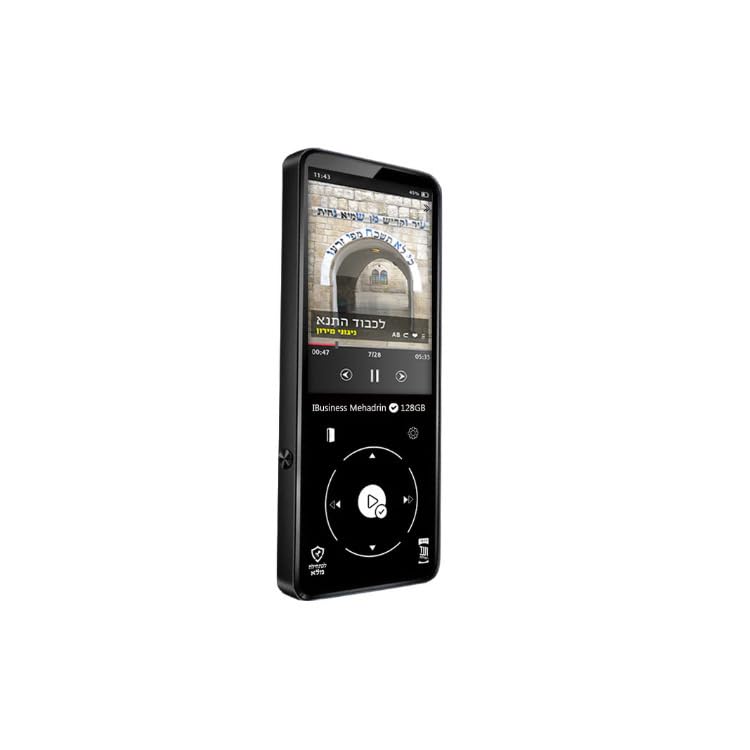
Figure 1: Samvix iBusiness Mehadrin 128 Kosher MP3 Player in its retail packaging.
Panel frontal
- Pantalla LCD de 2.4 polgadas: Displays menus, music information, and settings.
- Roda de desprazamento: Used for navigating through menus and lists.
- Botón Reproducir/Pausa: Initiates or pauses music playback.
- Botón de menú: Accede ao menú principal ou volve á pantalla anterior.
- Botón Anterior/Rebobinar: Skips to the previous track or rewinds the current track.
- Next/Fast-forward Button: Skips to the next track or fast-forwards the current track.
- Botón Atrás: Volve ao menú ou pantalla anterior.
Panel lateral
- Botóns subir / baixar volume: Axusta o volume de saída de audio.
- Ranura para tarxeta Micro SD: Note: This model does not include an SD card slot.
Panel superior/inferior
- Botón de encendido: Acende/apaga o dispositivo ou bloquea/desbloquea a pantalla.
- Porto de auriculares: Conéctase a auriculares con cable.
- Porto USB tipo C: Used for charging the device and transferring files para/desde un ordenador.
- Porto de saída de liña: Provides an audio output for connecting to external amplificadores ou altofalantes.
- Altavoz incorporado: For direct audio playback without headphones.
Configuración
1. Cargando o dispositivo
- Connect the USB Type-C charging cable to the device's USB Type-C port.
- Conecta o outro extremo do cable a un adaptador de corrente USB (non incluído) ou ao porto USB dun ordenador.
- The device will indicate charging status on the screen. Allow sufficient time for a full charge before first use.
2. Transferencia de música Files
To transfer music from your computer to the Samvix iBusiness Mehadrin MP3 Player:
- Connect the MP3 player to your computer using the provided USB Type-C cable.
- On the MP3 player, navigate to Configuración do sistema > Modo USB e selecciona USB (do not select DAC).
- Your computer should recognize the MP3 player as a removable disk or portable device.
- Open the device's drive on your computer. You can create new folders (e.g., "Music 1", "Music 2") to organize your files.
- Arrastra e solta o audio que queiras files (MP3, FLAC, etc.) from your computer into the folders on the MP3 player.
- Unha vez todo filese transfiren os ficheiros, expulse o dispositivo de forma segura do ordenador antes de desconectar o cable USB.
- The device will automatically update its music library after disconnection.
Instrucións de funcionamento
1. Acendido/apagado
- Para acender: Manteña premido o botón de acendido ata que a pantalla se ilumine.
- Para apagar: Manteña premido o botón de acendido/apagado ata que apareza o aviso de apagado e, a seguir, confirme.
- Bloqueo/Desbloqueo da pantalla: Briefly press the Power button to lock or unlock the screen during operation.
2. Navegando polo menú
- Usa o Roda de desprazamento to move through menu options.
- Preme o Botón Reproducir/Pausa (center of the scroll wheel) to select an option.
- Preme o Botón Atrás para volver ao menú anterior.
- Preme o Botón de menú para ir ao menú principal.
3. Reprodución de música
- From the main menu, select "Music" or "Category" to browse your audio files.
- Use the Scroll Wheel to highlight a song, then press the Play/Pause button to start playback.
- Durante a reprodución, use o Anterior/Rebobinar e Seguinte/Avance rápido buttons to change tracks. Press and hold these buttons to fast-forward or rewind within a track.
- Preme o Botón Reproducir/Pausa para pausar ou retomar a reprodución.
- Axuste o volume usando o Botóns Subir / Baixar volume ao lado.
4. Emparellamento Bluetooth
To connect your Samvix iBusiness Mehadrin MP3 Player to Bluetooth headphones or speakers:
- Asegúrate de que o teu dispositivo Bluetooth estea no modo de emparellamento.
- On the MP3 player, navigate to Configuración do sistema > Configuración de Bluetooth.
- Activar Bluetooth On.
- Seleccione Escaneo Bluetooth to search for available devices.
- Once your device appears in the list, select it to initiate pairing.
- Confirm any pairing requests on both devices. Once connected, the Bluetooth icon will appear on the MP3 player's screen.
5. Gravación de voz
The device features a built-in voice recorder:
- From the main menu, select the "Voice Recorder" option.
- Follow the on-screen prompts to start, pause, save, or delete recordings.
- Recordings benefit from noise reduction and Voice Activity Detection (VAD) for clear audio.
Control parental
The Samvix iBusiness Mehadrin MP3 Player offers robust parental control features to ensure a safe listening environment:
- Three Parental Password Options: Configure different password levels to restrict access to certain features or content.
- USB Password Protection: Secure the device with a password to prevent unauthorized file transferencias por USB.
- Bluetooth Password Protection: Implement a password for Bluetooth connections to control which devices can pair with the MP3 player.
Refer to the device's settings menu for detailed configuration of these parental control features.
Mantemento
Limpeza
- Use a soft, dry, lint-free cloth to clean the device.
- Non empregues produtos de limpeza líquidos, aerosois nin produtos químicos agresivos.
Coidado da batería
- Evite expoñer o dispositivo a temperaturas extremas.
- Cargue o dispositivo regularmente, mesmo se non o está a usar, para manter a batería en bo estado.
Almacenamento
- Garda o dispositivo nun lugar fresco e seco lonxe da luz solar directa.
- Keep the device away from magnetic fields.
Resolución de problemas
- O dispositivo non se acende: Asegúrate de que a batería estea cargada. Conéctaa a unha fonte de alimentación e inténtao de novo.
- Non se pode transferir files: Check the USB cable connection. Ensure the device's USB Mode is set to "USB" in System Settings. Try a different USB port or computer.
- Bluetooth non se conecta: Ensure Bluetooth is enabled on both the MP3 player and the target device. Make sure both devices are in pairing mode and within range.
- Mala calidade de audio: Check headphone connections. Ensure the audio files are of good quality. Adjust equalizer settings if available.
- O dispositivo non responde: Press and hold the Power button for about 10-15 seconds to perform a forced restart.
Especificacións
| Marca | SAMVIX |
| Nome do modelo | MP3 |
| Número de modelo | iBusinessMehadrin128 |
| Característica especial | Gravadora de voz |
| Tecnoloxía de conectividade | Bluetooth |
| Capacidade de almacenamento da memoria | 128 GB |
| Tamaño da pantalla | 2.4 polgadas |
| Dispositivos compatibles | Auriculares |
| Tecnoloxía de visualización | LCD |
| Peso do elemento | 9.1 libras |
| Dimensións do artigo D x W x H | 0.39" D x 9.1" W x 9.1" H |
| UPC | 766162175757 |
Garantía e Soporte
For warranty information, technical support, or service inquiries, please refer to the official SAMVIX websitio web ou póñase en contacto directamente co servizo de atención ao cliente. Garde o recibo da compra como proba de compra para reclamacións de garantía.