
1. Produto rematadoview
The ATK N9 Tri-Mode Gaming Headset is designed for gamers requiring flexible connectivity, clear audio, and reliable communication across multiple devices. It supports 3.5 mm wired, 2.4G wireless, and Bluetooth connections, allowing seamless switching between gaming consoles, PC, and mobile devices. Stereo-tuned dynamic drivers deliver balanced sound, enhancing in-game audio cues such as footsteps, gunfire, and environmental effects. The detachable noise-canceling microphone improves voice clarity for team communication, online gaming, and voice calls. Its over-ear design, with soft ear cushions and an adjustable headband, ensures a comfortable fit for extended gaming sessions. The headset is compatible with PS5, PS4, PC, Nintendo Switch, and mobile devices. For Xbox Series X|S, audio and microphone functions are supported via the 3.5 mm wired connection.

2. Contido do paquete
Verifique que todos os elementos que se indican a continuación estean incluídos no seu paquete:
- ATK N9 Pro/White Gaming Headset
- Micrófono con cancelación de ruído extraíble
- Cable de carga USB-C
- Cable de audio de 3.5 mm
- 2.4G Wireless USB Adapter
- Manual de usuario (este documento)

3. Configuración inicial
3.1. Cargando os auriculares
Before first use, fully charge the headset using the provided USB-C charging cable. Connect the USB-C end to the headset's charging port and the USB-A end to a compatible USB power source (e.g., PC, wall adapter). The LED indicator will show charging status.
3.2. Conexión do micrófono
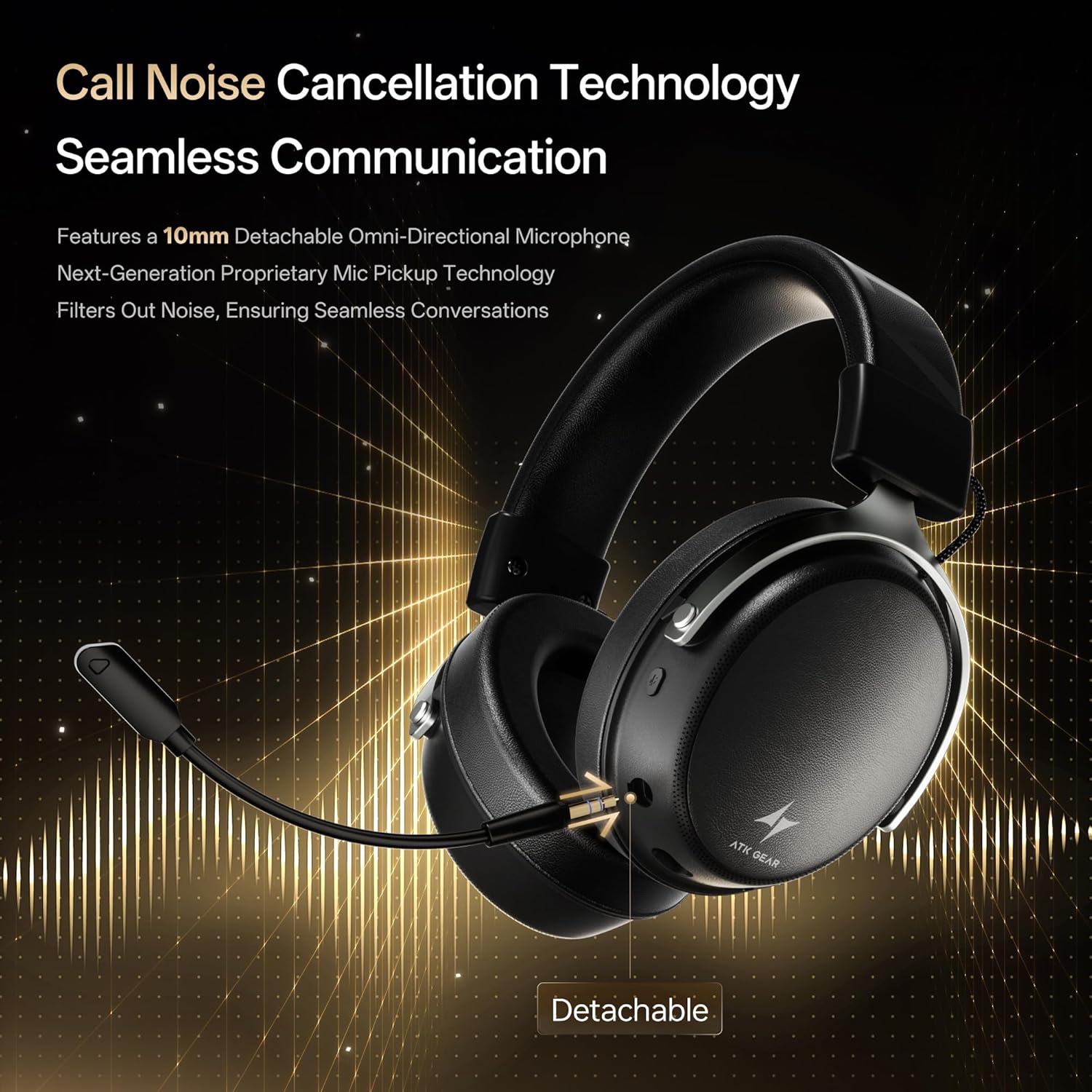
Insert the detachable boom microphone into the microphone port on the left earcup until it clicks into place. Ensure it is securely connected for optimal voice pickup.
3.3. Opcións de conectividade
The ATK N9 Pro/White headset offers three connectivity modes:
- Modo sen fíos 2.4G: For PC, PS4, PS5, and Nintendo Switch (docked mode).
- Plug the 2.4G wireless USB adapter into an available USB port on your device.
- Alimentación dos auriculares.
- Switch the headset to 2.4G mode using the mode switch. The headset will automatically pair with the adapter.
- Adjust audio output settings on your device if necessary to select the headset.
- Modo Bluetooth: For mobile devices, PC, and Nintendo Switch (handheld mode).
- Power on the headset and switch to Bluetooth mode. The LED indicator will flash, indicating pairing mode.
- On your device, go to Bluetooth settings and select "ATK N9 Pro" from the list of available devices.
- Unha vez conectado, o indicador LED amosará unha luz fixa.
- Modo con cable de 3.5 mm: For Xbox Series X|S, PS4, PS5, PC, Nintendo Switch, and mobile devices.
- Conecta un extremo do cable de audio de 3.5 mm á toma de 3.5 mm dos auriculares.
- Connect the other end to the 3.5mm audio port on your device (e.g., controller, PC audio jack).
- The headset will operate in wired mode, bypassing wireless functions.

4. Instrucións de funcionamento
4.1. Controis dos auriculares
The ATK N9 Pro/White headset features intuitive controls located on the earcups:
- Botón de encendido: Press and hold to power on/off. Short press for play/pause (in 2.4G/Bluetooth mode).
- Interruptor de modo: Toggle between 2.4G wireless, Bluetooth, and wired modes.
- Volume Up/Down Wheel: Xire para axustar o volume do son.
- Botón de silencio do micrófono: Prema para silenciar/activar o micrófono.
- Spatial Audio Button: Press to activate/deactivate 3D Spatial Audio.
- Mic Monitoring Button: Press to enable/disable microphone monitoring (sidetone).
4.2. Uso do micrófono
The detachable noise-canceling microphone is designed for clear communication. Position the microphone approximately 1-2 inches from your mouth for optimal voice pickup. Use the microphone mute button on the headset to quickly mute your voice when needed.
4.3. Axuste de axuste
The headset features an adjustable headband and soft ear cushions for comfort. Extend or retract the headband to achieve a snug yet comfortable fit. The earcups are designed to fully enclose your ears for passive noise isolation and comfort during long gaming sessions.
5. Especificacións técnicas
| Característica | Especificación |
|---|---|
| Nome do modelo | ATK N9 Pro |
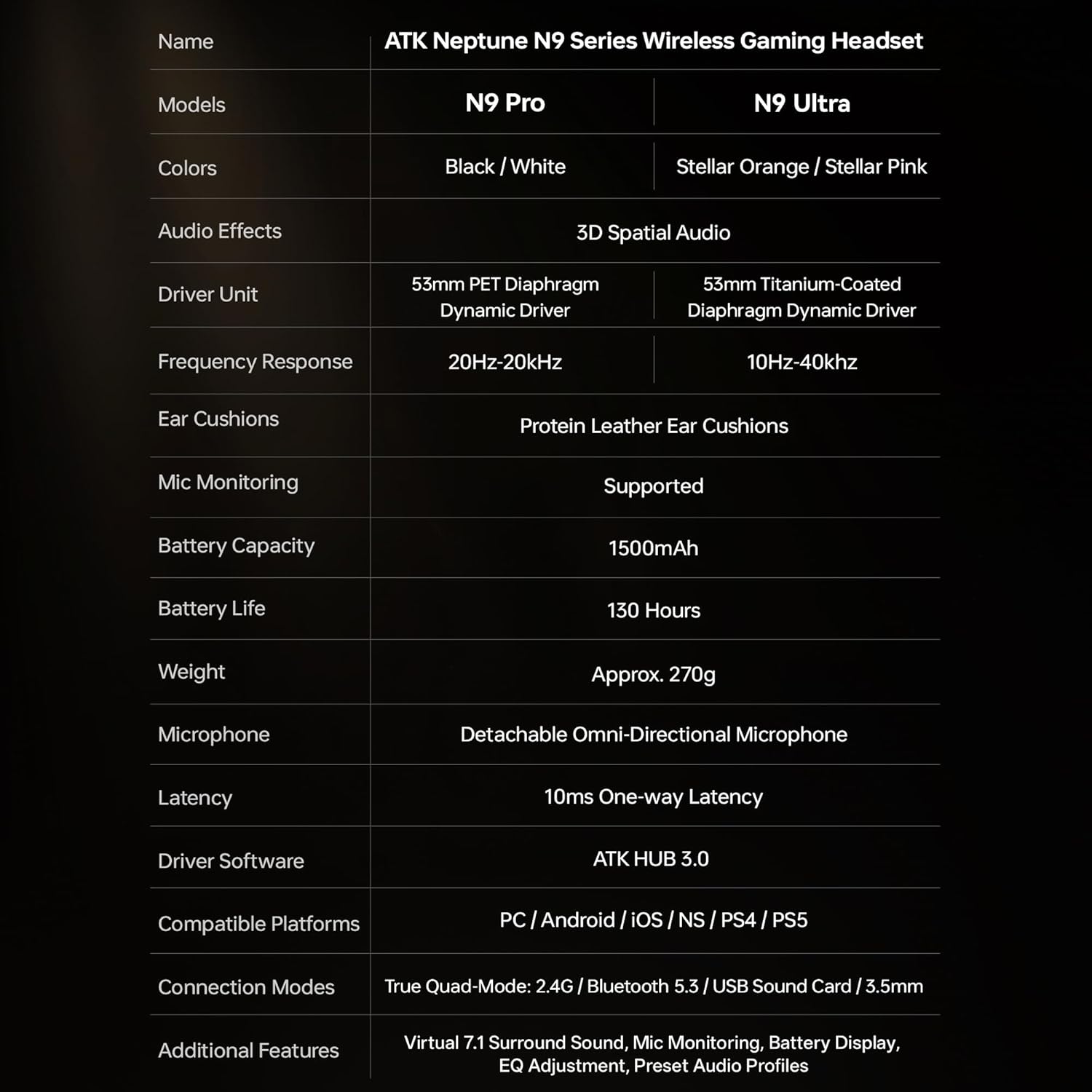
| Conectividade | 3.5mm Wired, 2.4G Wireless, Bluetooth 5.3 |
| Tipo de controlador | Driver dinámico |
| Tamaño do controlador | 53 mm |
| Rango de frecuencias | 20 Hz - 20,000 Hz |
| Impedancia | 64 ohmios |
| Micrófono | Detachable Noise-Canceling Omni-Directional |
| Capacidade da batería | 1500 mAh |
| Duración da batería | Ata 130 horas |
| Latency (2.4G) | 10 Milliseconds (one-way) |
| Peso | 270 gramos |
| Colocación do oído | Sobre orella |
| Dispositivos compatibles | PS5, PS4, PC, Nintendo Switch, Mobile Devices, Xbox Series X|S (wired) |
| Características adicionais | 3D Spatial Audio, Mic Monitoring, Volume Control |

6. Coidados e mantemento
- Limpeza: Usa un pano suave e seco para limpar os auriculares. Evita o uso de produtos químicos agresivos ou materiais abrasivos.
- Almacenamento: Garde os auriculares nun lugar fresco e seco, lonxe da luz solar directa e de temperaturas extremas.
- Coidado da batería: Para prolongar a duración da batería, evite descargar completamente os auriculares con frecuencia. Cárgueos regularmente, mesmo se non os usa durante períodos prolongados.
- Resistencia á auga: Os auriculares non son resistentes á auga. Evita a exposición a líquidos.
7 Solución de problemas
7.1. No Audio / Low Volume
- Ensure the headset is powered on and connected in the correct mode (2.4G, Bluetooth, or 3.5mm wired).
- Comproba a roda de volume dos auriculares e a configuración de volume do teu dispositivo.
- For wireless modes, ensure the headset is paired correctly and selected as the audio output device in your system settings.
- If using 3.5mm wired, ensure the cable is fully inserted into both the headset and the device.
7.2. O micrófono non funciona
- Asegúrate de que o micrófono estea ben conectado aos auriculares.
- Comprobe se o botón de silenciar o micrófono dos auriculares está activado.
- Verify that the headset microphone is selected as the input device in your device's sound settings.
- For Xbox Series X|S, ensure you are using the 3.5mm wired connection for microphone support.
7.3. Problemas de conectividade
- Sen fíos 2.4G: Ensure the USB adapter is firmly plugged in. Try a different USB port.
- Bluetooth: Ensure the headset is in pairing mode. Forget the device on your phone/PC and re-pair. Keep the headset within the 5-meter Bluetooth range.
- Xeral: Power cycle both the headset and your connected device.
8. Garantía e soporte
8.1. Información da garantía
The ATK N9 Pro/White Gaming Headset comes with a Garantía de 6 meses desde a data de compra. Esta garantía cobre defectos de fabricación e man de obra en condicións de uso normal. Non cobre danos causados por mal uso, accidentes, modificacións non autorizadas ou desgaste normal.
8.2. Atención ao cliente
For further assistance, technical support, or warranty claims, please contact ATK customer service through the retailer where the product was purchased or visit the official ATK websitio para obter información de contacto de soporte.