
1. Introdución
This manual provides essential information for setting up, operating, maintaining, and troubleshooting your Xiaomi Redmi Note 15 Pro 5G smartphone. Please read this manual carefully before using your device to ensure optimal performance and longevity.
The Xiaomi Redmi Note 15 Pro 5G features a 200MP main camera with optical stabilization, a 6580mAh battery, a 1.5K CrystalRes AMOLED display with 120Hz refresh rate, and is powered by the Mediatek Dimensity 7400-Ultra processor. It also boasts advanced water and dust resistance (IP66, IP68, IP69, and IP69K ratings).
2. Dispositivo rematadoview
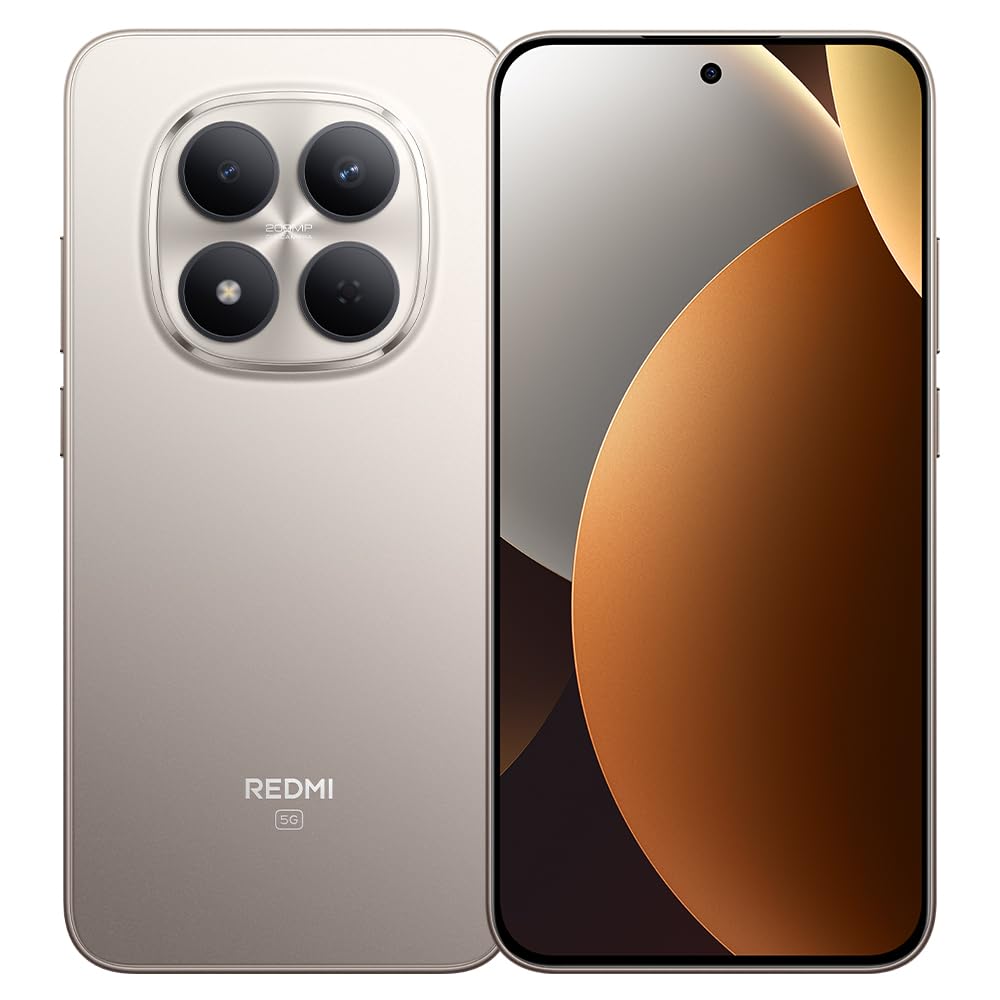
Figura 1: Xiaomi Redmi Note 15 Pro 5G Smartphone. This image displays the front and back of the device, highlighting its sleek design and camera module.
Contido do paquete
- Smartphone Xiaomi Redmi Note 15 Pro 5G
- Adaptador de alimentación
- Cable USB Tipo-C
- Ferramenta de expulsión da tarxeta SIM (pode variar segundo a rexión)
- Guía de inicio rápido (este manual)
3. Configuración
3.1. Inserir a tarxeta SIM
- Localiza a bandexa da tarxeta SIM no lateral do teu dispositivo.
- Insira a ferramenta de expulsión da tarxeta SIM no pequeno orificio que hai xunto á bandexa e prema firmemente ata que a bandexa saia.
- Place your Nano-SIM card(s) into the tray with the gold contacts facing down. Ensure proper orientation. This device supports Dual SIM functionality.
- Volva inserir a bandexa no teléfono con coidado.
3.2. Acendido e configuración iniciais
- Mantén premido o botón de acendido/apagado ata que apareza o logotipo de Xiaomi.
- Segue as instrucións en pantalla para seleccionar o teu idioma, rexión, conectarte á wifi e configurar a túa conta de Google.
- Configure biometric security features such as facial recognition for enhanced security.
3.3. Cargando o dispositivo
Connect the USB Type-C cable to the phone's charging port and the other end to the provided power adapter. Plug the adapter into a power outlet. The device supports fast charging. Ensure the power adapter is suitable for your region.
4. Instrucións de funcionamento
4.1. Pantalla e navegación
- The device features a 6.83-inch CrystalRes AMOLED display with a 120Hz refresh rate for smooth visuals.
- Navigate using gestures or on-screen navigation buttons (configurable in settings).
- Adjust display brightness and color settings in the 'Display' section of the Settings app.
4.2. Uso da cámara
Your Redmi Note 15 Pro 5G is equipped with a 200MP main rear camera with optical stabilization and a 20MP front camera.
- Abre a aplicación Cámara.
- Selecciona o modo desexado (Foto, Retrato, Vídeo, Profesional, etc.).
- Toca o botón do obturador para capturar fotos ou iniciar/deter a gravación de vídeo.
- Utilize the 200MP mode for high-resolution images and 4K video recording for detailed videos.
4.3. Rendemento e conectividade
- The Mediatek Dimensity 7400-Ultra processor and 8GB RAM ensure smooth multitasking and gaming.
- Connect to 5G networks for high-speed internet access.
- Manage Wi-Fi, Bluetooth, and mobile data connections through the Quick Settings panel or the 'Network & Internet' section in Settings.
5. Mantemento
5.1. Coidado da batería
- The 6580mAh battery provides extended usage. For optimal battery life, avoid extreme temperatures.
- Use the provided charger for efficient and safe charging.
- Regularly check battery usage in Settings to identify and manage power-consuming apps.
5.2. Resistencia á auga e ao po
Your device is rated IP66, IP68, IP69, and IP69K for water and dust resistance. This means it is protected against strong jets of water, immersion up to certain depths, and high-pressure/high-temperature water jets. However, resistance is not permanent and may decrease over time with normal wear. Avoid exposing the device to seawater, chlorinated water, or liquids other than fresh water. If the device gets wet, dry it thoroughly before charging or using the USB port.
5.3. Actualizacións de software
Regularly check for and install software updates to ensure your device has the latest features, security patches, and performance improvements. Go to 'Settings' > 'About phone' > 'MIUI version' to check for updates.
6 Solución de problemas
6.1. Problemas comúns e solucións
- O dispositivo non se acende: Asegúrate de que a batería estea cargada. Conéctaa ao cargador durante polo menos 15 minutos e despois tenta acenderla.
- Escasa duración da batería: Reduce screen brightness, disable unnecessary background apps, turn off GPS/Bluetooth when not in use. Check 'Battery' settings for detailed usage.
- Problemas de conectividade (Wi-Fi/5G): Restart your device. Toggle Wi-Fi/Mobile Data off and on. Reset network settings if the issue persists.
- Aplicacións que fallan: Borra a caché da aplicación problemática (Configuración > Aplicacións > [Nome da aplicación] > Almacenamento > Borrar caché). Se o problema persiste, reinstala a aplicación.
- O dispositivo non responde: Mantén premido o botón de acendido/apagado durante uns 10-15 segundos para forzar un reinicio.
7. Especificacións
| Característica | Especificación |
|---|---|
| Marca | XIAOMI |
| Modelo | Redmi Note 15 Pro 5G |
| Sistema Operativo | Android |
| Modelo CPU | Mediatek Dimensity 7400-Ultra |
| Capacidade de almacenamento | 256 GB |
| RAM | 8 GB |
| Tamaño da pantalla | 6.83 polgadas |
| Tipo de visualización | AMOLED |
| Resolución máxima de pantalla | 2772 x 1280 píxeles |
| Taxa de actualización | 120 Hz |
| Resolución da cámara traseira | 200 MP |
| Resolución cámara frontal | 20 MP |
| Resolución de captura de vídeo | 4K (4096 píxeles) |
| Capacidade da batería | 6580 mAh |
| Duración da batería | 24 Hours (typical usage) |
| Tecnoloxía de conectividade | 5G, 2G |
| Tecnoloxía de redes sen fíos | GSM |
| Tipo de conector | USB tipo C |
| Tipo de tarxeta SIM | Nano-SIM (Dual SIM) |
| Seguridade biométrica | Recoñecemento facial |
| Nivel de resistencia á auga | IP66, IP68, IP69, IP69K |
| Conector para auriculares | Ningún |
| Compoñentes incluídos | Adaptador de alimentación |
| External Test Certification | Anatel: 062732509185 / Model: 25080RABDG |
8. Garantía e soporte
8.1. Información da garantía
Este produto vén cun Garantía de 90 días against manufacturing defects. Please retain your proof of purchase for warranty claims. The warranty does not cover damage caused by misuse, accidents, unauthorized repairs, or normal wear and tear.
8.2. Atención ao cliente
For further assistance, technical support, or warranty inquiries, please refer to the official Xiaomi support website or contact their customer service. You can find contact details on the official Xiaomi websitio web ou na documentación que se inclúe co dispositivo.
For product homologation details, please visit: sistemas.anatel.gov.br/sch