
Introdución
Thank you for choosing the Severin S-Power Olymp HV 7175 Cordless Vacuum Cleaner. This powerful and versatile appliance is designed to provide efficient cleaning for various surfaces in your home. With its 19,000 Pa suction power, 2-in-1 functionality, and convenient features like LED lighting and vertical parking, it offers a comprehensive cleaning solution. Please read this manual carefully before first use to ensure proper operation, maintenance, and safety.

Image: The Severin S-Power Olymp HV 7175 cordless vacuum cleaner, fully assembled with the floor nozzle, shown in its upright position.
Instrucións de seguridade importantes
Siga sempre as precaucións básicas de seguridade ao usar electrodomésticos para reducir o risco de incendio, descarga eléctrica ou lesións. Garde este manual para futuras consultas.
- Este electrodoméstico está destinado unicamente ao uso doméstico. Non o empregue no exterior nin en superficies molladas.
- Non permita que os nenos manexen o aspirador. É necesaria unha supervisión atenta cando se usa preto de nenos.
- Non colle líquidos inflamables ou combustibles, como gasolina, nin o use en zonas onde poidan estar presentes.
- Non coller nada que arde ou fume, como cigarros, mistos ou cinzas quentes.
- Non o use sen o vaso de po e o filtro no seu lugar.
- Turn off the appliance before connecting or disconnecting the battery pack, or before performing any maintenance.
- Use só o cargador fornecido polo fabricante para recargar.
- Garde o aparello no interior nun lugar seco.
Contido do paquete
Please check the package contents upon unpacking. If any parts are missing or damaged, contact customer support immediately.
- Severin S-Power Olymp HV 7175 Main Unit (Motor and Dustbin)
- Tubo de extensión
- Motorized Floor Nozzle with LED Lights
- Wall Mount Docking Station
- Adaptador de carga
- Ferramenta de fendas
- Pincel de estofado
- Manual de usuario
Configuración e carga inicial
Asemblea
- Insira o tubo de extensión na unidade principal ata que encaixe firmemente no seu lugar.
- Fixe a boquilla de chan motorizada ao outro extremo do tubo de extensión, asegurándote de que faga clic firmemente.
- For handheld use, attach desired accessories (crevice tool, upholstery brush) directly to the main unit.
Cargando a batería
Before first use, fully charge the vacuum cleaner. The battery indicator on the main unit will show the charging status.
- Mount the wall dock in a convenient location near a power outlet.
- Connect the charging adapter to the wall dock and plug it into a power outlet.
- Place the vacuum cleaner onto the wall dock. Ensure the charging contacts align.
- The LED display will indicate charging progress. A full charge takes approximately 4-5 hours.

Image: The Severin S-Power Olymp HV 7175 vacuum cleaner mounted on its wall charging dock, connected to a power outlet.
Instrucións de funcionamento
Modos de acendido/apagado e succión
- To turn on the vacuum cleaner, press the POTENCIA botón no panel de control.
- The vacuum will start in Eco mode (Min suction).
- To switch to Max suction mode, press the MAX botón. Prema MIN to return to Eco mode.
- To turn off the vacuum cleaner, press the POTENCIA botón de novo.
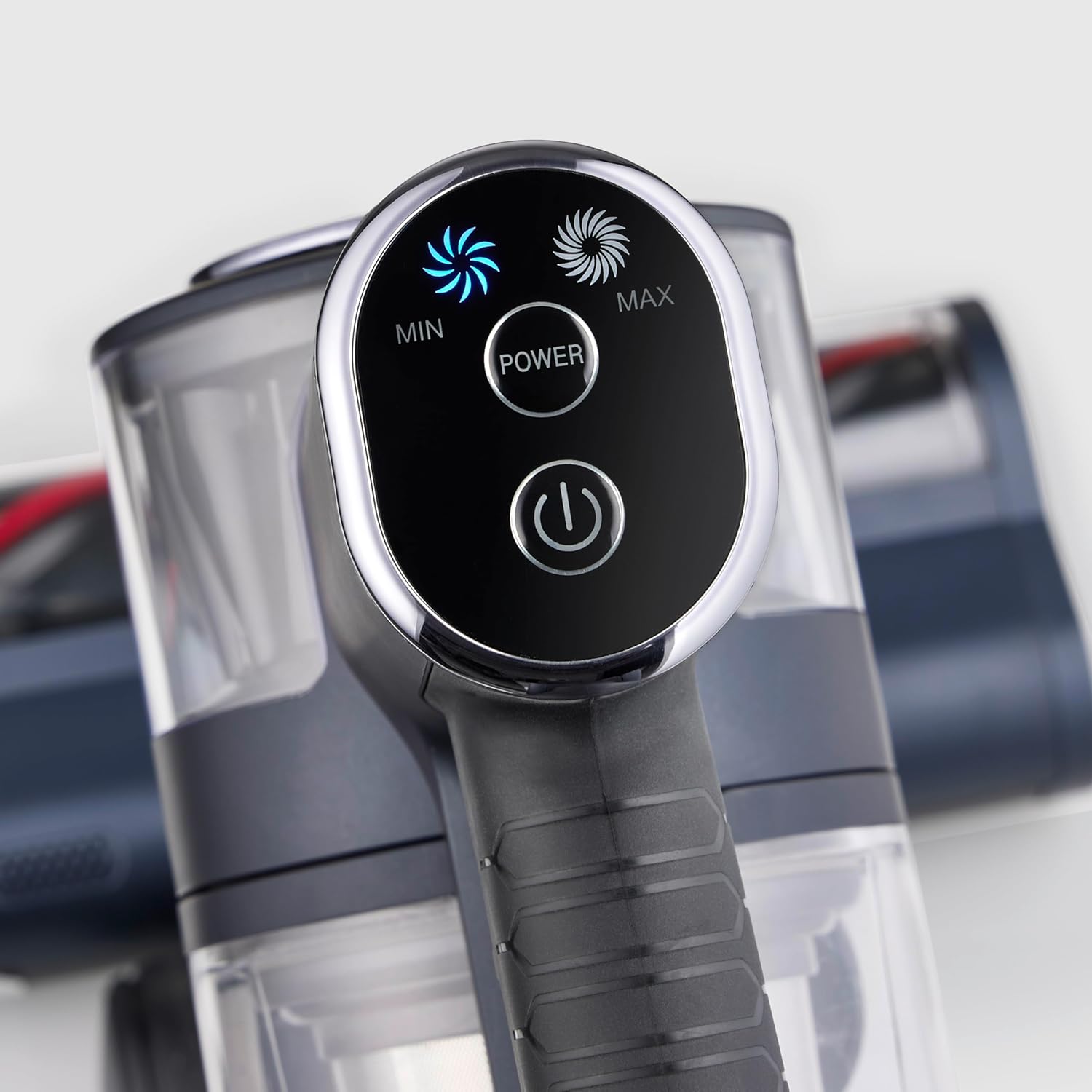
Imaxe: Primeiro plano view of the vacuum cleaner's control panel, featuring illuminated buttons for Min, Max, and Power settings.
2-in-1 Functionality (Handheld Mode)
The S-Power Olymp can be easily converted into a handheld vacuum for versatile cleaning.
- Press the release button on the extension tube to detach it from the main unit.
- Attach the desired accessory (crevice tool or upholstery brush) directly to the main unit's suction opening.
- Use the handheld unit for cleaning car interiors, upholstery, stairs, or hard-to-reach areas.

Image: The Severin S-Power Olymp HV 7175 in handheld configuration, equipped with a crevice tool, being used to clean the interior of a car seat.
Características ergonómicas
- Adjustable Suction Tube: The height of the suction tube can be adjusted for comfortable use by users of different heights.
- Iluminación LED: The motorized floor nozzle features integrated LED lights to illuminate dark areas, ensuring no dust or debris is missed.
- Vertical Parking Function: The vacuum cleaner can stand upright independently when the handheld unit is removed, allowing for convenient temporary storage during cleaning breaks.
Mantemento e Limpeza
Un mantemento regular garante un rendemento óptimo e prolonga a vida útil do teu aspirador.
Baleirando o lixo
Empty the dustbin regularly, ideally after each use, to maintain strong suction.
- Asegúrese de que a aspiradora estea apagada.
- Prema o botón de liberación do depósito de po para separalo da unidade principal.
- Hold the dustbin over a waste bin and press the bottom release latch to open the dustbin flap and empty its contents.
- Peche a solapa e volva colocar o colector de po na unidade principal ata que faga clic.

Imaxe: Unha detallada view of the Severin S-Power Olymp HV 7175's transparent dustbin and internal filter components, ready for emptying or cleaning.
Limpeza dos filtros
The HEPA filter and pre-filter should be cleaned periodically to prevent clogging and maintain suction power.
- Retire o colector de po como se describe arriba.
- Xire e tire o conxunto do filtro do colector de po.
- Separate the HEPA filter and the metal mesh pre-filter.
- Tap the filters gently over a waste bin to remove loose dust. For a more thorough clean, rinse them under cold running water.
- Allow all filter components to air dry completely for at least 24 hours before reassembling and placing them back into the vacuum cleaner. Do not use the vacuum with wet filters.
Limpeza do rolo do cepillo
Hair and debris can get tangled in the brush roll. Clean it regularly for effective cleaning.
- Apague o aspirador e retire a boquilla do chan.
- Locate the brush roll access cover on the bottom of the nozzle. Open it using a coin or screwdriver if necessary.
- Retire o rolo de pincel.
- Usa tesoiras para cortar calquera pelo ou fío enredado.
- Limpa calquera residuo da carcasa do rolo do cepillo.
- Volva inserir o rolo de cepillo e peche a tapa de acceso de forma segura.
Resolución de problemas
| Problema | Causa posible | Solución |
|---|---|---|
| O baleiro non se acende | A batería está descargada O botón de acendido non se preme correctamente | Cargue a batería completamente Press the POWER button firmly |
| Potencia de succión reducida | O lixo está cheo Os filtros están obstruídos Nozzle or tube is blocked O rolo de cepillo está enredado | Baleirar o colector de lixo Limpar ou substituír os filtros Comproba e elimina calquera bloqueo Limpar o rolo de pincel |
| A batería non se está cargando | O cargador non está conectado correctamente Cargador ou batería defectuosos | Ensure charger is securely plugged in Póñase en contacto co servizo de atención ao cliente |
| O rolo de pincel non xira | O rolo de cepillo está enredado Obstrución na boquilla | Limpar o rolo de pincel Elimina os obstáculos |
Especificacións
- Modelo: HV 7175
- Marca: Severin
- Potencia de succión: 19,000 Pa
- Potencia: 200 vatios
- Voltage: 220 voltios
- Tipo de batería: Ion de litio
- Runtime (Eco Mode): Ata 35 minutos
- Tempo de carga: 4-5 horas
- Tipo de filtro: Filtro HEPA
- Nivel de ruído: 80 decibeis
- Peso: 2 quilogramos
- Dimensións (L x W x H): 105L x 12l x 15H cm
- Superficies recomendadas: Todos os tipos de pisos
- Características especiais: Cordless, High Power, Lightweight, Front Light, Spot Cleaning, 2-in-1 Handheld Function, Vertical Parking
Garantía e Soporte
Severin products are manufactured to high-quality standards and come with a manufacturer's warranty. Please refer to the warranty card included in your package for specific terms and conditions, including the warranty period and coverage details.
For technical support, spare parts, or warranty claims, please contact Severin customer service. You can find contact information on the official Severin websitio web ou na documentación da súa garantía.
When contacting support, please have your model number (HV 7175) and proof of purchase readily available.