
Introdución
This manual provides detailed instructions for setting up, operating, and maintaining your Bmax Mini PC B1 Pro. The B1 Pro is a compact and efficient mini desktop computer powered by an Intel Celeron N4000 processor, designed for various applications including office work, web browsing, and e-learning. It features 8GB LPDDR4 RAM, 128GB eMMC storage, 4K dual display support, and comes pre-installed with Windows 11 Pro.
O que hai na caixa
Comprobe o contido do seu paquete para asegurarse de que estean presentes todos os elementos:
- 1x B1 Pro Intel Celeron N4000 Mini PC
- 1x HDMI Cable (1.5m)
- 1x Power Adapter (US Plug)
- 1x User Guide (Multi-language)
- 1x VESA Mount (with Screws)

Image: Contents of the Bmax B1 Pro package, including the mini PC, HDMI cable, power adapter, user guide, and VESA mount with screws.
Produto rematadoview
Front and Side Ports
The Bmax B1 Pro Mini PC is equipped with a variety of ports for connectivity and expansion:
- Portos USB 3.0: 2x for high-speed data transfer.
- Portos USB 2.0: 2x for connecting peripherals.
- Porto HDMI: 1x for video output, supporting up to 4K UHD resolution.
- Porto VGA: 1x for video output, supporting up to 1080P HD resolution.
- Porto Ethernet: 1x Gigabit Ethernet (1000Mbps) for wired network connection.
- Conector para auriculares de 3.5 mm: 1x for audio input/output.
- Ranura para tarxeta Micro SD: 1x for additional storage expansion.
- Entrada de alimentación: Entrada de alimentación DC.
- Botón de encendido: Para acender/apagar o dispositivo.
- Borrar CMOS: Button for resetting BIOS settings.

Imaxe: Detallada view of the Bmax B1 Pro Mini PC, highlighting the location and type of each port, including USB 3.0, USB 2.0, Micro SD card slot, Power In, Power Button, HDMI, Ethernet, 3.5mm Headset Jack, VGA, and Clear CMOS button.
Características clave
- Procesador: Intel Celeron N4000 (Dual-Core, up to 2.6GHz).
- Sistema operativo: Pre-installed Windows 11 Pro.
- Memoria: 8 GB de memoria RAM LPDDR4.
- Almacenamento: 128GB eMMC internal storage, expandable via M.2 2280 SATA SSD (up to 1TB) and Micro SD card.
- Gráficos: Intel UHD Graphics 600, supporting 4K UHD via HDMI and 1080P HD via VGA.
- Conectividade: Dual-Band Wi-Fi (2.4G/5G), Bluetooth 4.2, Gigabit Ethernet.
- Soporte de visualización: Dual display output via HDMI and VGA ports.
- Refrixeración: Fanless passive cooling design for silent operation.
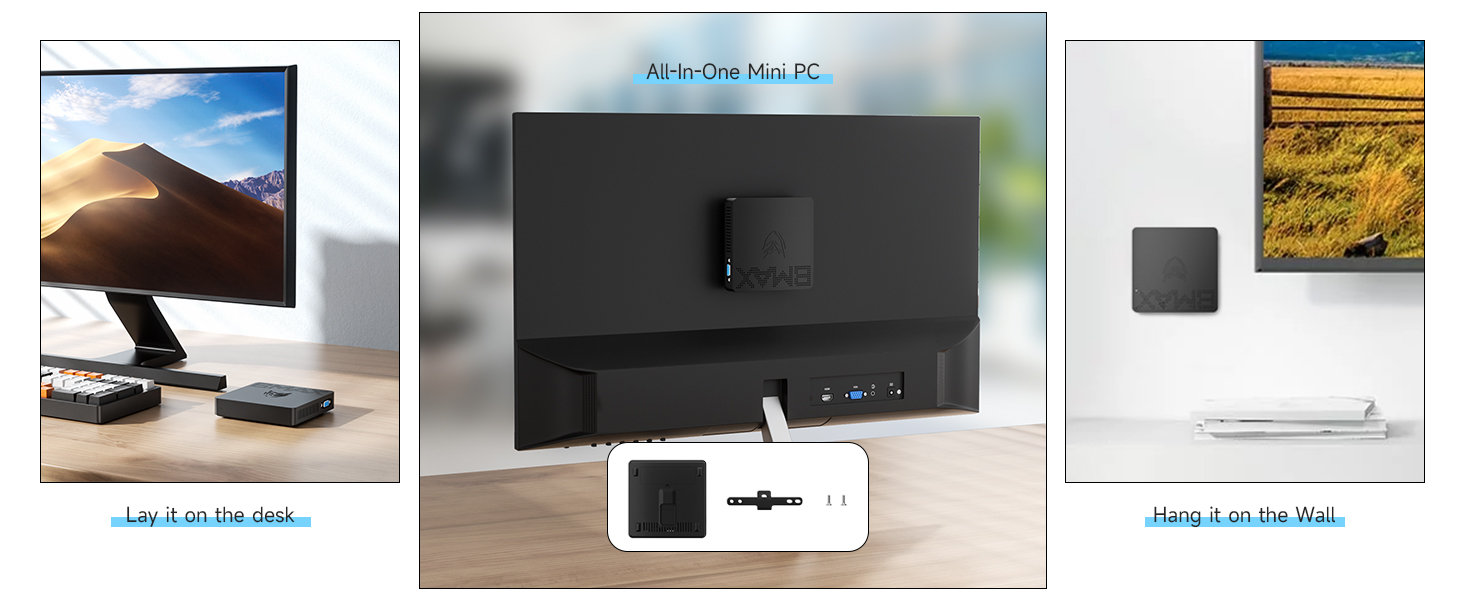
Image: Diagram illustrating the Intel Gemini Lake N4000 processor with specifications including 2 Cores, 2 Threads, 14nm Nanometre, 4MB Cache, 6W Power Consumption, and 2.6 GHz Burst Frequency.

Image: The Bmax B1 Pro Mini PC set up with two monitors, demonstrating its dual screen display capability via HDMI and VGA, alongside Wi-Fi 2.4GHz/5GHz and Bluetooth 4.2 icons.
Instrucións de configuración
- Conectar a unha pantalla: Connect your monitor or TV to the Mini PC using the provided HDMI cable or a VGA cable (not included). The HDMI port supports 4K UHD, and the VGA port supports 1080P HD. For dual display, connect both ports to separate monitors.
- Conectar periféricos: Conecta o teclado e o rato USB aos portos USB dispoñibles.
- Conectar á enerxía: Connect the power adapter to the DC-in port on the Mini PC, then plug the adapter into a power outlet.
- Encendido: Press the power button on the Mini PC. The device will boot up automatically.
- Configuración inicial de Windows: Follow the on-screen instructions to complete the initial setup of Windows 11 Pro, including language, region, network connection, and user account creation.
Instrucións de funcionamento
Operación básica
- Encendido/apagado: Press the power button to turn the Mini PC on. To turn off, use the Windows shutdown option or press and hold the power button for a few seconds.
- Reiniciar: Use the Windows restart option.
- Modo de suspensión: Use the Windows sleep option or briefly press the power button.
Conectividade de rede
- Wi-Fi: The Mini PC supports Dual-Band Wi-Fi (2.4G/5G). To connect, go to Windows Settings > Network & Internet > Wi-Fi, select your network, and enter the password.
- Ethernet: For a wired connection, plug an Ethernet cable into the Gigabit Ethernet port.
- Bluetooth: The device supports Bluetooth 4.2. To pair devices, go to Windows Settings > Bluetooth & devices.
Image: The Bmax B1 Pro Mini PC on a desk next to a keyboard and mouse, with icons indicating 2.4GHz/5GHz Wi-Fi and Bluetooth 4.2 connectivity.
Configuración de pantalla dual
To utilize the dual display feature:
- Connect your primary monitor to the HDMI port.
- Connect your secondary monitor to the VGA port.
- Once both monitors are connected and powered on, Windows should automatically detect them.
- Right-click on the desktop, select "Display settings," and configure your display preferences (e.g., extend, duplicate).
Ampliación de almacenamento
The Bmax B1 Pro comes with 128GB eMMC storage. For additional storage, you can install an M.2 2280 SATA SSD (up to 1TB, sold separately) or use a Micro SD card.
M.2 SSD Installation Steps:
- Ensure the Mini PC is powered off and disconnected from the power adapter.
- Locate the bottom cover of the Mini PC.
- Carefully remove the screws securing the bottom cover.
- Gently open the cover to access the internal components.
- Locate the M.2 2280 slot. Insert your M.2 SATA SSD into the slot and secure it with the provided screw (if applicable, or use one from the SSD package).
- Replace the bottom cover and secure it with the screws.
- Power on the Mini PC. You may need to initialize and format the new SSD in Windows Disk Management before use.

Image: A sequence of five images demonstrating the process of installing an M.2 2280 SATA SSD into the Bmax B1 Pro Mini PC, showing how to open the case and insert the drive.
Instalación de montaxe VESA
The included VESA bracket allows you to mount the Bmax B1 Pro behind a monitor or TV, creating a clutter-free workspace.
- Attach the VESA bracket to the back of your monitor or TV using the provided screws. Ensure it is securely fastened to the VESA mounting holes.
- Slide the Bmax B1 Pro Mini PC onto the VESA bracket until it clicks into place.
- Connect all necessary cables (power, HDMI, peripherals) to the Mini PC.

Image: Three-step diagram showing how to install the Bmax B1 Pro Mini PC onto the back of a monitor using the VESA mount, illustrating the bracket attachment and PC sliding into place.
Mantemento
- Limpeza: Use a soft, dry cloth to clean the exterior of the Mini PC. Do not use liquid cleaners or aerosols.
- Ventilación: Ensure the ventilation holes are not obstructed to maintain proper airflow for the fanless cooling system.
- Actualizacións de software: Regularly update Windows and drivers to ensure optimal performance and security.
- Xestión de almacenamento: Limpar periodicamente o innecesario files e aplicacións para liberar espazo de almacenamento.
- Condicións ambientais: Operate the Mini PC in a well-ventilated area, away from direct sunlight, heat sources, and excessive moisture.
Resolución de problemas
| Problema | Causa posible | Solución |
|---|---|---|
| Sen alimentación / O dispositivo non se acende. | O adaptador de corrente non está conectado ou está avariado; problema coa toma de corrente. | Ensure the power adapter is securely connected to the Mini PC and a working power outlet. Try a different outlet. |
| Sen visualización no monitor. | Monitor not connected or turned on; incorrect input source; faulty cable. | Check HDMI/VGA cable connections. Ensure monitor is powered on and set to the correct input source. Try a different cable or monitor if possible. |
| Non hai conexión Wi-Fi. | Wi-Fi disabled; incorrect password; router issue. | Check Wi-Fi settings in Windows. Ensure Wi-Fi is enabled and the password is correct. Restart your router. |
| Rendemento lento. | Too many applications running; low storage space; outdated drivers. | Close unnecessary applications. Free up disk space. Update Windows and drivers. Consider adding an M.2 SSD for faster storage. |
| Dispositivos USB non recoñecidos. | Faulty USB port; driver issue; device malfunction. | Try a different USB port. Update USB drivers. Test the device on another computer. |
Especificacións
| Marca | Bmáx |
| Nome do modelo | B1 Pro |
| Sistema Operativo | Windows 11 Pro |
| Modelo CPU | Intel Celeron N4000 |
| Velocidade da CPU | Ata 2.6 GHz |
| Coprocesador gráfico | Gráficos Intel UHD 600 |
| Memoria RAM instalada | 8 GB LPDDR4 |
| Capacidade de almacenamento da memoria | 128 GB eMMC |
| Almacenamento ampliable | M.2 2280 SATA SSD (up to 1TB), Micro SD Card |
| Conectividade sen fíos | 2.4G/5G Wi-Fi, Bluetooth 4.2 |
| Conectividade por cable | Gigabit Ethernet (1000 Mbps) |
| Saída de vídeo | 1x HDMI (4K UHD), 1x VGA (1080P HD) |
| Portos USB | 2x USB 3.0, 2x USB 2.0 |
| Interface de audio | Conector para auriculares de 3.5 mm |
| Método de arrefriamento | Refrixeración pasiva sen fan |
| Dimensións | 4.7 cm x 4.7 cm x 0.9 cm (aprox.) |
| Peso | 8.5 onzas (aprox.) |
| Características adicionais | VESA Mount Support, Wake-on-LAN, RTC Wake, Auto Power On |

Image: The Bmax B1 Pro Mini PC next to a smartphone, illustrating its compact size with dimensions of 4.72 inches (L) x 4.72 inches (W) x 1.02 inches (H) and a weight of 220g.
Garantía e Soporte
Bmax provides comprehensive support for your Mini PC B1 Pro:
- Garantía: Este produto vén cunha garantía de 12 meses desde a data de compra.
- Garantía de satisfacción: A 30-day satisfaction guarantee is offered.
- Soporte técnico: Hai dispoñible soporte técnico de por vida.
- Atención ao cliente: Our customer service team is available 24/7 to assist with any inquiries or issues you may encounter. Please refer to the contact information provided in the included User Guide or visit the official Bmax websitio de apoio.