
1. Introdución
Thank you for choosing the SmallRig RF 05B Portable LED Photography Flashlight. This compact and versatile lighting tool is designed for content creators, offering a wide color temperature range, adjustable beam angle, and various creative effects. This manual provides essential information for safe and effective use of your device.
2. Que hai na caixa
Carefully unpack your SmallRig RF 05B and ensure all items are present:
- RF 05B Portable LED Flashlight (x1)
- Difusor (x1)
- Four-leaf Barndoor (x1)
- Snoot (x1)
- Spotlight (x1)
- Gobo (x10)
- Film Slide (x10)
- RGB Filter (x3)
- Cable de carga USB-C (x1)
- Bolsa de transporte (x1)
- Manual de usuario (x1)
3. Características do produto
- Pro-Grade Lighting Performance: Features a 1900K-8000K ultra-wide color temperature range (CCT) and smooth dimming. With CRI 96+ and TLCI 97+, it ensures accurate and vivid color reproduction.
- Complete Lighting Control System: Includes a diffuser, snoot, and 4-leaf barndoors for light shaping. Expand creativity with included film slides, gobos, and RGB filters.
- Creative Effects & Atmosphere: Offers 12 dynamic lighting effects (SOS, paparazzi, lightning, party, broken bulb, TV, flame, fireworks, pulse, cold and warm light cycle, brightness cycle, explode). Comes with 10 galaxy film slides, 10 gobos, and red, green, blue color gels.
- Ángulo de luz axustable: Flexibly zoom from 17° to 65° to focus light or spread it wide, suitable for highlighting subjects or illuminating backgrounds.
- Long-Lasting Power & OLED Display: Built-in 2600mAh rechargeable battery provides up to 125 minutes of runtime at 5W. An 8W overclocking mode is available for urgent brighter needs. The clear OLED screen displays color temperature, brightness, battery level, and runtime.
- IP65 Rating for Outdoor Durability: Constructed from aluminum alloy and silicone, offering resistance to rain, dust, and harsh outdoor conditions.
- Deseño portátil: Weighs only 215g (7.6oz) and includes a storage bag for easy transport and organization.
4. Configuración
4.1 Carga inicial
Before first use, fully charge the device using the provided USB-C charging cable. Connect the cable to the USB-C port on the flashlight and to a 5V/1A or 5V/3A power adapter (not included).
Note: The device supports charging while in use at 5W output.
4.2 Instalación de accesorios
The RF 05B is designed for quick attachment of various light shaping accessories. Align the accessory with the front of the flashlight and secure it as needed.
5. Instrucións de funcionamento
5.1 Encendido/apagado
Manteña premido o botón de acendido para acender ou apagar a lanterna.
5.2 Adjusting CCT and Brightness

This image illustrates the adjustable color temperature range from 1900K (warm light) to 8000K (cool white) and brightness control from 1% to 100%. It also highlights the high Color Rendering Index (CRI) of 96+, ensuring accurate color reproduction.
- Use the control buttons (usually marked with arrows or +/-) to adjust the color temperature (CCT) between 1900K and 8000K.
- Press the mode button to switch to brightness adjustment. Use the control buttons to set the desired brightness from 1% to 100%.
5.3 Zoom Function (Beam Angle Adjustment)

This image demonstrates the flexible lighting control, including the 17° to 65° stepless beam focus adjustment. It also shows the curved diffuser for softening light and the snoot with 4-leaf barndoors for shaping light and reducing scatter.
The RF 05B features an adjustable beam angle from 17° to 65°. Rotate the front section of the flashlight to zoom the light beam, allowing you to focus light for a spotlight effect or spread it wide for broader illumination.
5.4 Efectos de iluminación especiais

This image illustrates the three included RGB color filters (red, green, blue) and lists the 12 dynamic lighting effects available: SOS, paparazzi, lightning, party, broken bulb, TV, flame, fireworks, pulse, cold and warm light cycle, brightness cycle, and explode.
Access the special effects mode via the mode button. Cycle through the 12 dynamic lighting effects: SOS, paparazzi, lightning, party, broken bulb, TV, flame, fireworks, pulse, cold and warm light cycle, brightness cycle, and explode. Adjust parameters for each effect as needed using the control buttons.
5.5 8W Boost Mode

This image visually compares the light output at 5W and 8W, demonstrating the increased brightness in 8W Boost Mode. It also provides runtime information for both modes: 125 minutes at 5W and 23 minutes at 8W.
For situations requiring maximum brightness, short-press the Increase and Power buttons simultaneously while in CCT mode to activate the 8W overclocking boost mode. Be aware that this mode will reduce battery runtime.
Pantalla OLED 5.6

This image highlights the intuitive OLED screen, which provides real-time information such as color temperature (e.g., 5600K), brightness (e.g., 100%), and battery level. It also shows the minimalist control buttons for adjusting these parameters and effects.
The integrated OLED screen provides real-time information on color temperature, brightness level, current battery status, and estimated remaining runtime. This allows for intuitive control and monitoring of your light settings.
6. Uso de accesorios
6.1 Difusor
Attach the curved diffuser to soften the light output, creating a more even and less harsh illumination, ideal for portraits or close-up subjects.
6.2 Snoot & Four-leaf Barndoor
Use the snoot to create a concentrated beam of light, highlighting specific areas. The four-leaf barndoor attaches to the snoot, allowing precise control over the light spill and shaping the beam.
6.3 Gobos & Film Slides

This image displays the variety of creative accessories, including 10 film slides featuring celestial and space-related imagery, and 10 gobos with diverse patterns such as architectural elements, abstract designs, and celebratory text, used to project shapes and textures with light.
Insert gobos or film slides into the designated slot (typically with the snoot or spotlight attachment) to project patterns, textures, or scenes onto your background or subject, adding creative flair to your photography or video.
6.4 RGB Filters
Place the red, green, or blue RGB filters in front of the light source to add color to your illumination, useful for mood lighting or creative color effects.
7. Mantemento
7.1 Limpeza
Wipe the device with a soft, dry cloth. For stubborn dirt, use a slightly damp un pano e logo seque ben. Non empregue produtos químicos agresivos nin produtos de limpeza abrasivos.
7.2 Almacenamento
When not in use, store the flashlight and its accessories in the provided carrying bag in a cool, dry place, away from direct sunlight and extreme temperatures.
8 Solución de problemas
- A luz non se acende: Asegúrate de que a batería estea cargada. Conéctaa a unha fonte de alimentación e inténtao de novo.
- Light output is weak: Check brightness settings on the OLED screen. Ensure the battery is sufficiently charged.
- Os controis non responden: Tenta apagar o dispositivo e volvelo acender. Se o problema persiste, ponte en contacto co servizo de atención ao cliente.
- Sobrequecemento do dispositivo: Discontinue use immediately. Allow the device to cool down. Ensure proper ventilation during operation.
9. Especificacións
| Parámetro | Valor |
|---|---|
| Nome do modelo | RF 05B |
| Número de modelo | 6137 |
| Potencia (máx.) | 8W |
| Entrada | 5V/1A, 5V/3A |
| Gama CCT | 1900K-8000K |
| CRI | 96+ |
| TLCI | 97+ |
| Capacidade da batería | 3.7 V/2600 mAh/9.62 Wh |
| Battery Life (5W) | Ata 125 minutos |
| Battery Life (8W) | Aprox. 23 minutos |
| Ángulo do feixe | 17° to 65° (Adjustable) |
| Material | aleación de aluminio, silicona |
| Clasificación IP | IP65 (resistente á auga) |
| Peso do produto | 215 g (7.6 onzas) |
| Dimensións do produto | 130.0 × Φ40.0mm (5.1 × Φ1.6in) |
| Tecnoloxía de conectividade | USB tipo C |

This image provides a visual representation of the internal 2600mAh rechargeable battery, emphasizing its capacity for extended use.
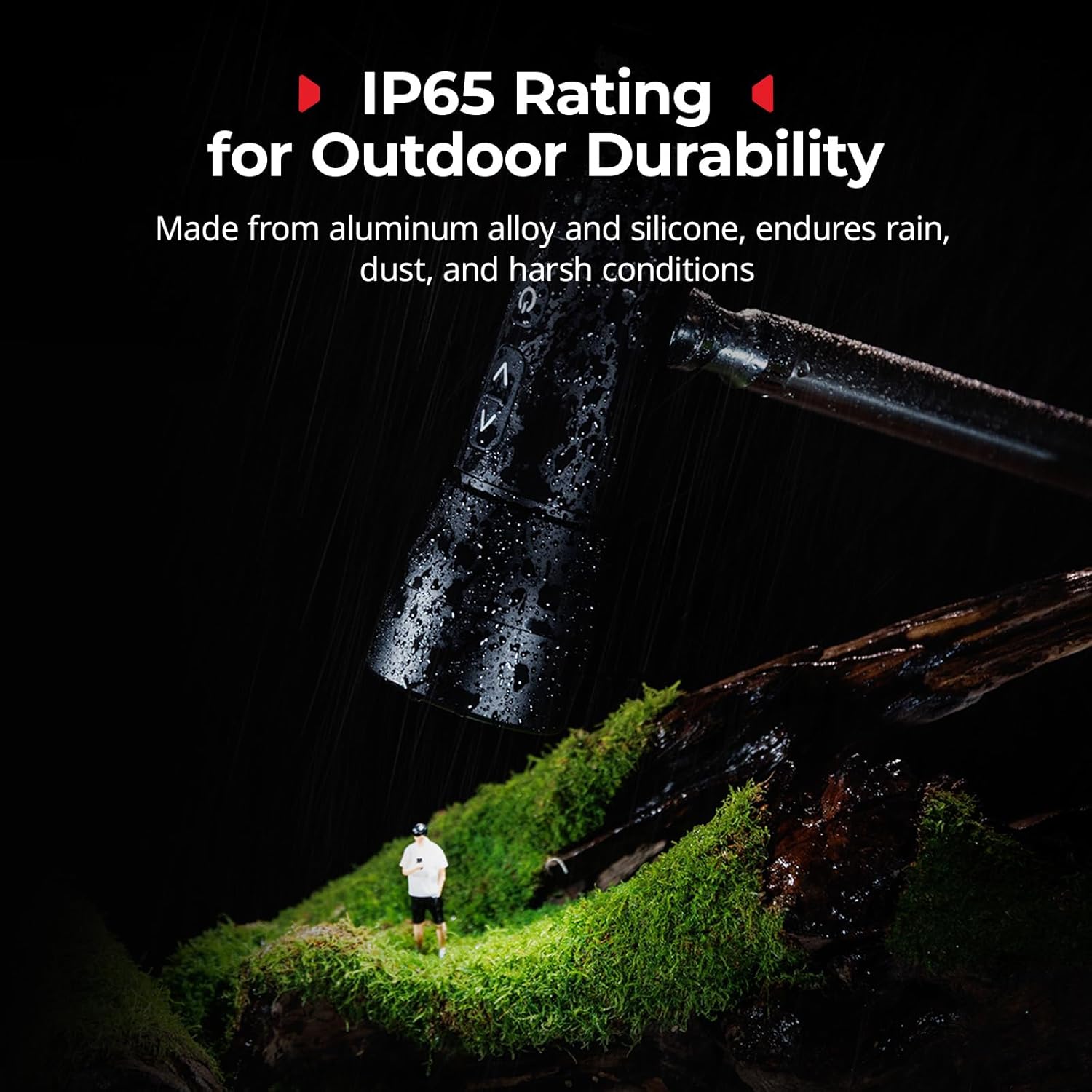
This image illustrates the IP65 rating of the flashlight, showing it enduring water splashes in an outdoor setting, signifying its durability against rain and dust.
10. Garantía e soporte
SmallRig products come with a standard manufacturer's warranty. For detailed warranty information, product support, or service inquiries, please visit the official SmallRig websitio web ou póñase en contacto co seu distribuidor local. Garde o comprobante de compra para reclamacións de garantía.