
Produto rematadoview
The AT&T EL2131-11 is a DECT 6.0 cordless landline phone designed for reliable communication. It features a powerful call blocker, caller ID, a full-duplex speakerphone, and a backlit display and keypad for enhanced visibility. This model includes one handset.
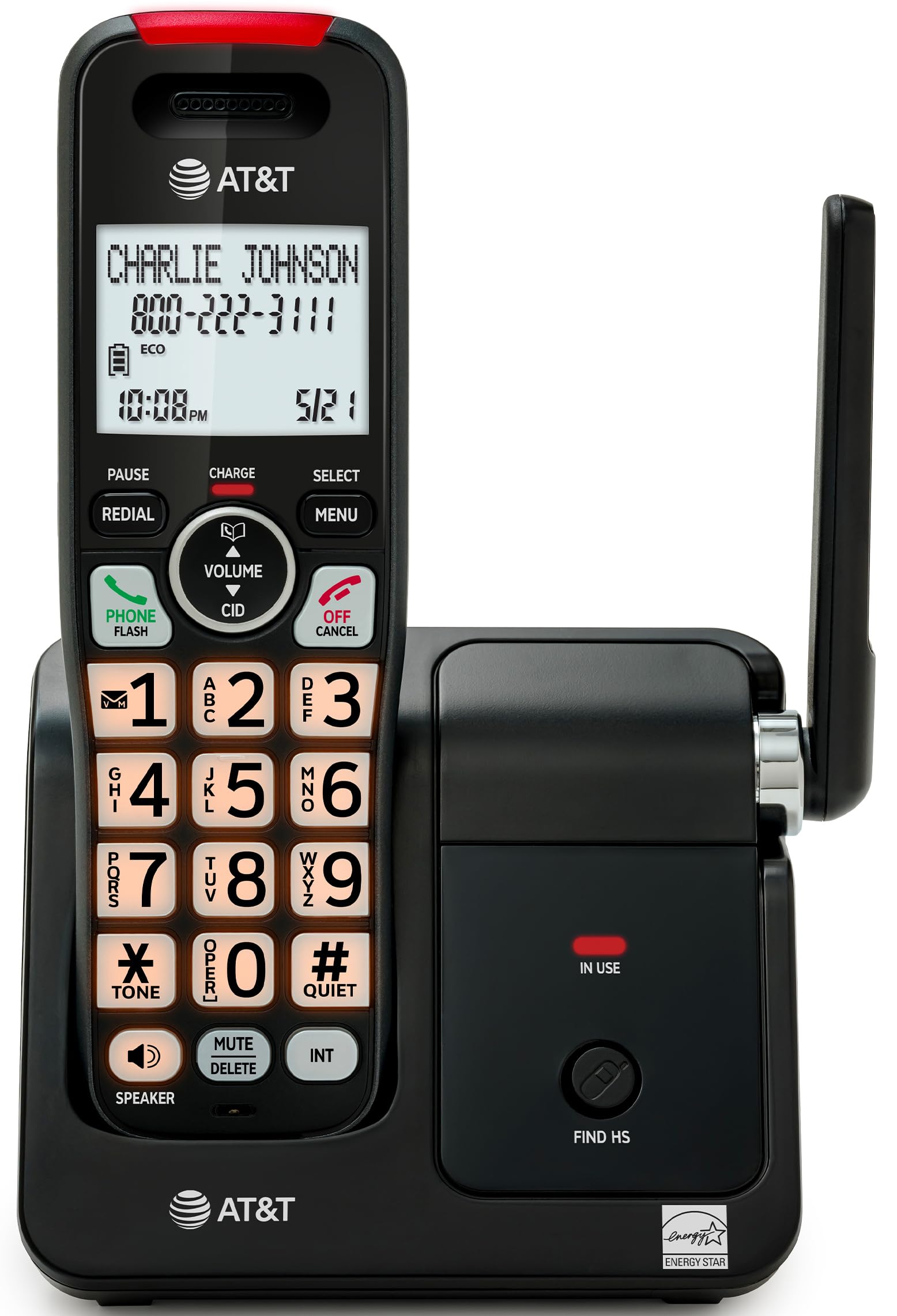
Image: The AT&T EL2131-11 cordless phone, showing the handset docked in its base unit.
Características principais:
- Call Blocker: Blocks up to 50 unwanted numbers.
- Identificador de chamada: Stores up to 50 calls, displaying name, number, time, and date.
- Altavoz dúplex completo: Allows both parties to speak and listen simultaneously.
- Pantalla e teclado retroiluminados: Ofrece unha visibilidade clara en condicións de pouca luz.
- Modo silencioso: Silences the ringer instantly.
- Modo ECO: Reduces power consumption and extends battery life.
- Tecnoloxía DECT 6.0: Ensures interference-free communication and extended range.
Configuración
Que hai na caixa:
- Unidade base
- 1 auricular sen fíos
- 1 adaptador de enerxía
- Cable de Liña Telefónica
- 2 pilas de batería
- Guía de inicio rápido
- Soporte de montaxe na parede
1. Instalación da batería
- Localice o compartimento da batería na parte traseira do teléfono.
- Insert the two supplied battery cells, ensuring correct polarity (+ and -).
- Pecha a tapa do compartimento da batería de forma segura.
2. Conexión da unidade base
- Connect the small end of the power adapter to the power jack on the back of the base unit.
- Conecta o extremo grande do adaptador de corrente a unha toma de corrente estándar.
- Connect one end of the telephone line cord to the TEL LINE jack on the back of the base unit.
- Conecte o outro extremo do cable da liña telefónica a unha toma de teléfono da parede.
3. Carga inicial
Place the handset in the base unit with the display facing forward. The handset will begin charging. Allow the handset to charge for at least 16 hours before initial use to ensure optimal battery performance.

Image: The handset charging in its base, with an overlay indicating a 5-day battery life on a single charge.
Instrucións de funcionamento
Realización e recepción de chamadas
- Para facer unha chamada: Preme TELÉFONO / FLASHe, a seguir, marque o número.
- Para responder unha chamada: Cando soa o teléfono, prema TELÉFONO / FLASH ou calquera tecla de marcación (0-9, * ou #).
- Para finalizar unha chamada: Preme OFF/CANCELAR or place the handset back in the base unit.
Usando o altofalante
Durante unha chamada, prema o botón ORADOR button to activate the full-duplex speakerphone. Press it again to switch back to the handset earpiece.

Image: A man holding a small dog, speaking hands-free using the phone's speakerphone function. The phone's base unit is visible on a table.
Identificador de chamada
When a call comes in, the caller's information (name and number) will appear on the handset display if you subscribe to Caller ID service. The phone stores up to 50 caller ID records.

Image: A close-up of the phone's display showing a caller's name and number, along with the time and date.
Bloqueador de chamadas
The call blocker feature allows you to block up to 50 unwanted numbers. To block a number:
- During a call or from the Caller ID log, press MENÚ.
- Scroll to 'Call Blocker' and press SELECCIONAR.
- Follow the on-screen prompts to add the number to the block list.

Image: A visual representation of the call blocker feature, showing a list of blocked numbers on the phone's display.
Modo silencioso
Para silenciar temporalmente o timbre, manteña premido o botón #tranquilo button on the handset. The ringer will be silenced for a set period, typically 1 to 12 hours, which can be adjusted in the settings.

Image: A close-up of the phone's display indicating that 'Quiet mode' is active.
Modo ECO
The ECO mode automatically adjusts power consumption to conserve battery life. This mode is typically active by default and indicated by an 'ECO' icon on the display.

Image: The phone's display showing the 'ECO' icon, indicating power-saving mode is active.
Volver marcar de novo
Para volver marcar o último número chamado, prema o REMARCA botón.

Image: The phone's display showing the 'Redial' function with a previously dialed number.
Pantalla e teclado retroiluminados
The handset features a backlit LCD display and illuminated keypad for easy readability and operation in various lighting conditions.

Image: A hand holding the phone, demonstrating its bright backlit screen and illuminated keypad in a low-light environment.
Mantemento
Limpeza do teléfono
- Use un suave, lixeiramente damp cloth to clean the surfaces of the phone and base unit.
- Do not use cleaning sprays or harsh chemicals, as they may damage the finish or electronic components.
- Ensure the phone is unplugged from the power outlet before cleaning.
Coidado da batería
- For optimal battery life, keep the handset in the base unit when not in use.
- If the phone will be unused for an extended period, remove the batteries to prevent leakage.
- Replace batteries when they no longer hold a charge effectively. Use only the specified battery type.
Resolución de problemas
If you experience issues with your AT&T EL2131-11 phone, refer to the following common troubleshooting steps:
| Problema | Solución |
|---|---|
| Sen ton de marcación |
|
| O teléfono non carga |
|
| Non se poden facer/recibir chamadas |
|
| Mala calidade de son/estática |
|
Especificacións
| Característica | Detalle |
|---|---|
| Marca | AT&T |
| Número de modelo | EL2131-11 |
| Tipo de teléfono | Sen fíos |
| Tecnoloxía | DECT 6.0 |
| Cor | Negro e prata |
| Material | Plástico |
| Fonte de enerxía | Alimentado por batería |
| Dimensións do artigo (L x W x H) | 5.06 x 4.65 x 7.23 polgadas (unidade base) |
| Tempo de conversación telefónica | 10 horas |
| Tempo de espera do teléfono | 5 días |
| Identificación do chamador | Si |
| Operación multilínea | Operación en liña única |
| Tipo de contestador automático | Non |
| UPC | 650530034510 |

Image: The AT&T EL2131-11 base unit with handset, showing its height (7.23 inches), length (5.06 inches), and width (4.65 inches).
Información da garantía
This AT&T EL2131-11 Cordless Landline Phone comes with a Garantía limitada de 1 ano from the manufacturer. Please retain your proof of purchase for warranty claims. For specific terms and conditions, refer to the warranty card included in your product packaging or visit the official AT&T support websitio.
Atención ao cliente
For further assistance, technical support, or to inquire about replacement parts, please contact AT&T customer service. You can typically find contact information on the official AT&T website or in the quick start guide provided with your phone.
Online resources may include FAQs, detailed user manuals, and support forums.