
Introdución
Grazas pola compraasing the Aiwa 14-inch Portable Media Player Travel Kit. This device is designed to provide versatile entertainment on the go, allowing you to enjoy DVDs, CDs, and other media without relying on internet connectivity. This manual provides essential information for setting up, operating, and maintaining your portable media player.
Información de seguridade
Lea atentamente todas as instrucións de seguridade antes de usar este produto. Garde este manual para futuras consultas.
- Non expoñas o dispositivo á choiva, á humidade nin a temperaturas extremas.
- Evite colocar o dispositivo preto de fontes de calor ou baixo a luz solar directa.
- Use only the provided power adapters (AC/DC and car adapter) to charge the device.
- Non intente desmontar nin modificar o dispositivo. Encargue calquera mantemento a persoal cualificado.
- Handle discs carefully to prevent scratches or damage.
- Asegúrese de que haxa unha ventilación axeitada ao usar o dispositivo.
Contido do paquete
Verifica que todos os elementos estean presentes no teu paquete:
- Aiwa 14-inch Portable Media Player (Main Unit)
- Control remoto
- Auriculares con cable
- Bolsa de transporte protectora
- Adaptador de alimentación AC/DC
- Car Power Adapter (12V)
- Manual de usuario
Produto rematadoview
Familiarize yourself with the components and controls of your portable media player.
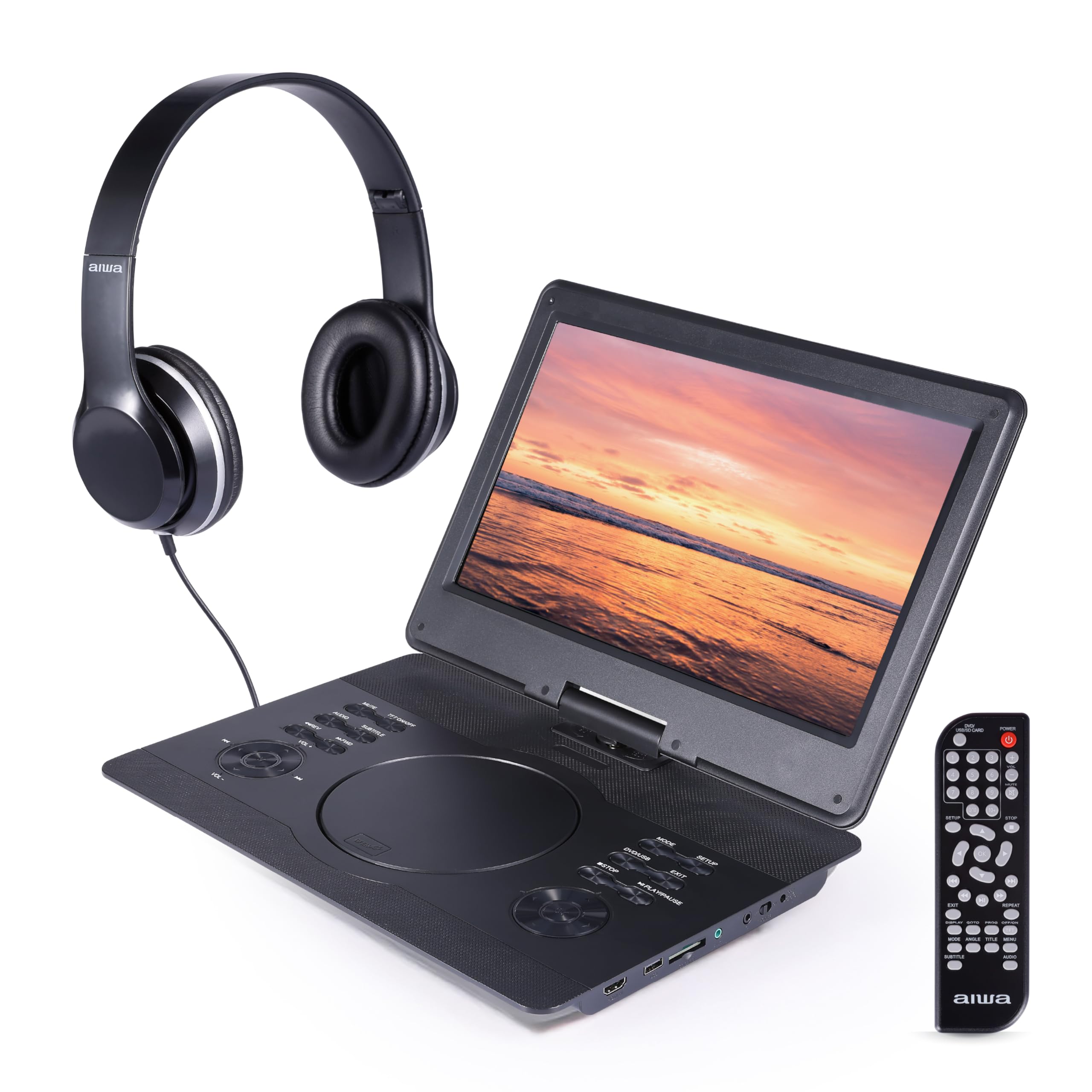
Figura 1: Fronte view of the Aiwa Portable Media Player with included remote control.

Figura 2: Lado view showing the open disc tray and headphone connection.
Características da unidade principal:
- 14-inch Swiveling LCD Screen: Ofrece flexibilidade viewing angles and can fold flat.
- Bandexa de discos: Para inserir DVD e CD.
- Botóns de control: Play/Pause, Stop, Skip, Volume, Menu, Setup, Mode, etc.
- Altofalantes estéreo incorporados: For audio playback without headphones.
- Entrada HDMI: Connect external devices like gaming consoles or streaming sticks.
- Porto USB: Para reproducir contido multimedia desde unidades flash USB.
- Ranura para tarxetas SD: For playing media from SD memory cards.
- Jack para auriculares: Para escoita privada.
- Entrada de enerxía: For connecting AC/DC or car adapters.

Figura 3: The screen can swivel and fold flat for compact use.
Configuración
1. Cargando a batería
- Connect the AC/DC power adapter to the DC IN port on the player and then to a wall outlet.
- A luz indicadora de carga acenderase. Unha carga completa adoita tardar de 2 a 3 horas.
- Alternatively, use the car power adapter to charge the device in a vehicle.
2. Acendido/apagado
- Para acender, manteña premido o botón POTENCIA button on the unit or remote control.
- Para apagalo, manteña premido o botón POTENCIA botón de novo.
3. Conectando auriculares
- Plug the included wired headphones into the AURICULAR jack on the side of the player.
- Os altofalantes integrados silenciaranse automaticamente cando se conecten uns auriculares.
4. Using the Carrying Bag

Figura 4: The included carrying bag for transport and protection.
- Place the media player and its accessories into the protective carrying bag for safe transport.
En funcionamento
1. Reprodución de discos (DVD/CD)
- Abra a tapa da bandexa do disco.
- Carefully place a DVD or CD onto the spindle with the label side facing up.
- Peche firmemente a tapa da bandexa do disco.
- O reprodutor detectará automaticamente o disco e comezará a reprodución ou mostrará o menú do disco.
- Use the control buttons on the unit or remote (Play/Pause, Stop, Skip, Menu, etc.) to navigate and control playback.
2. Reprodución mediante USB/tarxeta SD
- Insira unha unidade flash USB no porto USB ou unha tarxeta SD na ranura para tarxetas SD.
- Preme o MODO button on the unit or remote to select USB or SD mode.
- Navega polo teu files using the directional buttons and press PLAY/ENTER to select and play media.
3. Entrada HDMI
- Connect an external device (e.g., gaming console, streaming stick) to the ENTRADA HDMI port on the player using an HDMI cable (not included).
- Preme o MODO button on the unit or remote to select HDMI input.
- The player's screen will display the content from the connected HDMI device.
4. Axuste da pantalla

Figura 5: The screen can be swiveled and tilted for optimal viewing.
- The screen can swivel up to 180 degrees and tilt for various viewángulos de inflexión.
- It can also be folded flat against the base unit, transforming the device into a tablet-like form factor.
5. Control de volume
- Axuste o volume empregando o VOL+ e VOL- buttons on the unit or the remote control.
Mantemento
Limpeza do dispositivo
- Wipe the screen and exterior surfaces with a soft, dry, lint-free cloth.
- Para marcas difíciles, d lixeiramenteampgl o pano con auga ou un limpador suave e non abrasivo.
- Non empregues produtos químicos agresivos nin materiais abrasivos, xa que poden danar o acabado.
- Keep the disc tray and ports free of dust and debris.
Almacenamento
- When not in use, store the player in its protective carrying bag in a cool, dry place.
- Evitar o almacenamento en zonas con temperaturas extremas ou alta humidade.
Resolución de problemas
Se tes algún problema, consulta os seguintes problemas e solucións comúns:
| Problema | Causa posible | Solución |
|---|---|---|
| Sen poder | Battery depleted; Power adapter not connected or faulty. | Charge the battery using the AC/DC or car adapter. Ensure connections are secure. |
| O disco non se reproduce / Erro "Sen disco" | Disco inserido incorrectamente; Disco sucio ou raiado; Formato de disco incompatible. | Ensure disc is inserted label-side up. Clean the disc. Try a different disc. Verify disc is DVD/CD/VCD format. |
| Sen son | Volume demasiado baixo; Auriculares conectados; Función de silencio activa. | Increase volume. Disconnect headphones if using speakers. Check if mute is active on remote. |
| Mala calidade de imaxe | Disc quality; Screen viewing angle; Low resolution content. | Ensure disc is clean and undamaged. Adjust screen angle. Note that native resolution is 800x480. |
| O control remoto non funciona | Batteries depleted; Obstruction between remote and player; Remote sensor blocked. | Replace remote batteries. Ensure clear line of sight to the player's IR sensor. |
Especificacións
| Característica | Detalle |
|---|---|
| Marca | Aiwa |
| Número de modelo | AI7017-BLK-T37-6 |
| Tamaño da pantalla | 14 polgadas |
| Tipo de visualización | LCD |
| Resolución nativa | 800x480 |
| Compatibilidade cos tipos de soporte | DVD, CD, CD-R, DVD-R, VCD, USB, SD Card |
| Conectividade | HDMI Input, USB Port, SD Card Slot, Headphone Jack |
| Audio | Built-in Stereo Speakers, Headphone Output |
| Fonte de enerxía | Rechargeable Battery, AC/DC Adapter, Car Adapter (12V) |
| UPC | 021331134455 |
Información da garantía
This product is covered by a limited manufacturer's warranty. Please refer to the warranty card included in your package or contact customer support for details regarding warranty terms and conditions.
Atención ao cliente
For technical assistance, troubleshooting, or warranty inquiries, please contact Aiwa customer support. Contact information can typically be found on the product packaging or the official Aiwa websitio.