
1. Produto rematadoview
The Edifier CC300 is a professional Bluetooth 6.0 communicator headset designed for reliable and high-quality audio communication in various professional environments. It features AI-enhanced dual-microphone noise filtering, a 30mm dynamic driver for clear sound, and multiple connectivity options for versatile use.
2. Contido do paquete
- Edifier CC300 Headset
- Dongle USB-C
- Cable de carga USB-A a USB-C
- Manual de usuario
3. Características do produto
The Edifier CC300 headset is engineered for comfort and performance, featuring a lightweight design and a flexible microphone arm.

Figura 3.1: Edifier CC300 Headset with included USB-C dongle and charging cable.

Figura 3.2: Lado view of the Edifier CC300 Headset with the microphone arm extended.

Figura 3.3: The microphone arm can rotate 240 degrees for flexible positioning on either the left or right side.
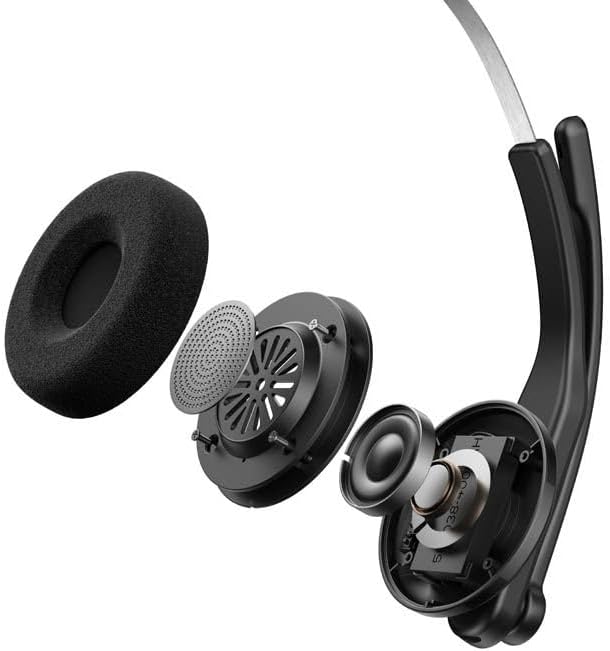
Figura 3.4: Explotou view showing the internal components of the earcup, including the 30mm dynamic driver.
4. Configuración
4.1 Carga inicial
Before first use, fully charge the headset using the provided USB-A to USB-C cable. Connect the USB-C end to the headset and the USB-A end to a power source (e.g., computer USB port or wall adapter). The charging indicator light will show the charging status.
4.2 Acendido/Apagado
- Para acender: Manteña premido o botón de acendido ata que se acenda o indicador luminoso.
- Para apagar: Manteña premido o botón de acendido/apagado ata que o indicador luminoso se apague.
4.3 Como usar os auriculares
Adjust the headband for a comfortable fit. The microphone arm can be rotated 240 degrees to be positioned on either the left or right side of your face. Position the microphone approximately 2-3 cm from your mouth for optimal voice pickup.
5. Instrucións de funcionamento
The Edifier CC300 features intuitive controls for managing calls and audio playback.

Figura 5.1: Diagram illustrating the control buttons and their functions on the Edifier CC300 Headset.
5.1 Funcións dos botóns
| Acción | Función |
|---|---|
| Press and hold (Power Button) | Encendido/apagado |
| Press 1x (Mute Button) | Activate/Deactivate Mute (during calls) |
| Press 1x (Volume Up) | Aumentar o volume |
| Press and hold (Volume Up) | Próxima pista |
| Press and hold (Volume Down) | Diminuír o volume |
| Press 1x (Volume Down) | Pista anterior |
| Press 1x (Call Button) | Play/Pause Audio; Answer/End Call |
| Press and hold (Call Button) | Rexeitar a chamada |
| Press 2x (Call Button) | Volver a marcar o último número |
6. Opcións de conectividade
The Edifier CC300 offers three versatile connection methods:
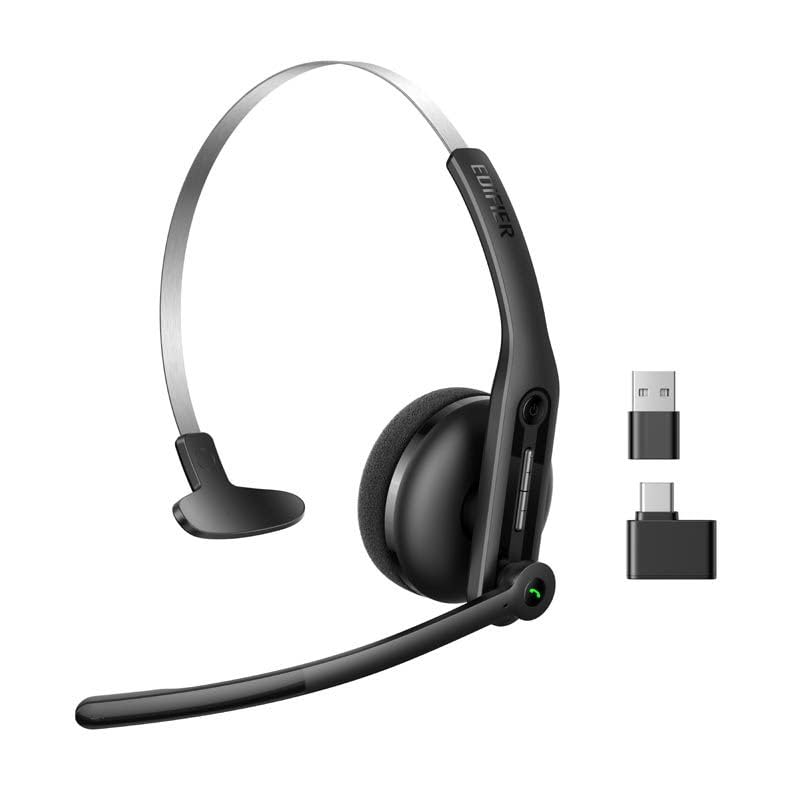
Figura 6.1: Visual representation of the three connectivity options: Bluetooth, USB-C dongle, and wired USB-A.
6.1 Conexión Bluetooth
- Ensure the headset is powered on and in pairing mode (indicator light flashing).
- On your device (smartphone, laptop), enable Bluetooth and search for "EDIFIER CC300".
- Select the headset to pair. Once connected, the indicator light will turn solid blue.
6.2 USB-C Dongle Connection
- Plug the provided USB-C dongle into an available USB-C port on your computer.
- Power on the headset. It will automatically connect to the dongle for a stable, low-latency connection.
6.3 Wired USB-A Connection
- Connect the headset to your computer using the provided USB-A to USB-C cable.
- The headset will function as a wired audio device, providing zero interference.
7. Batería e carga
The CC300 headset is designed for extended use with a long-lasting battery.
- Duración da batería: Up to 72 hours for audio playback, or 36 hours for talk time.
- Tempo de carga: Aproximadamente 1.5 horas para unha carga completa.
- Indicador de carga: Refer to the LED indicator on the headset for charging status.
To charge, connect the headset to a power source using the USB-A to USB-C cable.
8. Mantemento
- Limpeza: Usa un pano suave e seco para limpar os auriculares. Non empregues produtos de limpeza líquidos nin aerosois.
- Almacenamento: Garde os auriculares nun lugar fresco e seco, lonxe da luz solar directa e de temperaturas extremas.
- Evitar a humidade: Keep the headset away from water and high humidity to prevent damage.
- Manipular con coidado: Evite deixar caer os auriculares nin someterlos a impactos fortes.
9 Solución de problemas
9.1 Sen son ou mala calidade de son
- Ensure the headset is powered on and properly connected (Bluetooth, dongle, or wired).
- Comprobe os niveis de volume tanto nos auriculares como no dispositivo conectado.
- If using Bluetooth, ensure the headset is within range of your device.
- Tenta reiniciar tanto os auriculares como o dispositivo conectado.
9.2 O micrófono non funciona
- Ensure the microphone is not muted (check the mute button).
- Verify that the headset is selected as the input device in your computer's or device's sound settings.
- Ensure the microphone arm is positioned correctly near your mouth.
9.3 Headset Not Pairing via Bluetooth
- Ensure the headset is in pairing mode (indicator light flashing).
- Desactiva o Bluetooth noutros dispositivos próximos para evitar interferencias.
- Esquece o dispositivo da lista de Bluetooth do teu dispositivo e tenta emparellalo de novo.
10. Especificacións
| Característica | Detalle |
|---|---|
| Marca | Edificador |
| Nome do modelo | CC300 |
| Cor | Negro |
| Tecnoloxía de conectividade | Wireless (Bluetooth), Wired (USB-A), USB-C Dongle |
| Versión Bluetooth | 6.0 |
| Protocolos Bluetooth | A2DP, AVRCP, HFP |
| Codec de audio | SBC |
| Tipo de controlador | Controlador dinámico de 30 mm |
| Resposta en frecuencia | 20Hz - 20KHz |
| Nivel de presión sonora | 94 ± 3 dB(A) |
| Capacidade da batería | 400 mAh |
| Tempo de reprodución de música | Aprox. 72 horas |
| Tempo de conversa | Aprox. 36 horas |
| Tempo de carga | Aprox. 1.5 horas |
| Entrada de enerxía | 5 V/500 mAh |
| Peso | 70 gramos |
| Características especiais | AI-enhanced Dual-Mic Noise Cancellation |
| Dispositivos compatibles | Mobile Phones, Desktops, Laptops |
11. Garantía e soporte
11.1 Información da garantía
The Edifier CC300 Headset comes with a 1 ano de garantía from the date of purchase, covering manufacturing defects. Please retain your proof of purchase for warranty claims. The warranty does not cover damage caused by misuse, accidents, unauthorized modifications, or normal wear and tear.
11.2 Atención ao cliente
For technical assistance, troubleshooting, or warranty inquiries, please contact Edifier customer support through their official website or the contact information provided with your product packaging. You may also visit the Tenda Edifier en Amazon para máis información.