
1. Introdución
Grazas pola compraasing the Audizio Laredo Bluetooth Turntable. This manual provides essential information for the safe and correct operation of your device. Please read it thoroughly before use and keep it for future reference.
Características principais:
- Integrated HiFi speakers with 160W total power output.
- Bidirectional Bluetooth for wireless audio streaming (in and out).
- High-quality Audio Technica cartridge for precise playback.
- Supports 7, 10, and 12-inch vinyl records at 33 and 45 RPM.
- Adjustable counterweight on the aluminum tonearm.
- RCA Line Out for external amplifier/altofalantes.
- AUX Input for connecting external audio sources.
- Elegant bamboo finish.
Que hai na caixa:
- Audizio Laredo Turntable Unit
- Manual de instrucións
- Adaptador de alimentación
- 45 RPM Adapter for singles
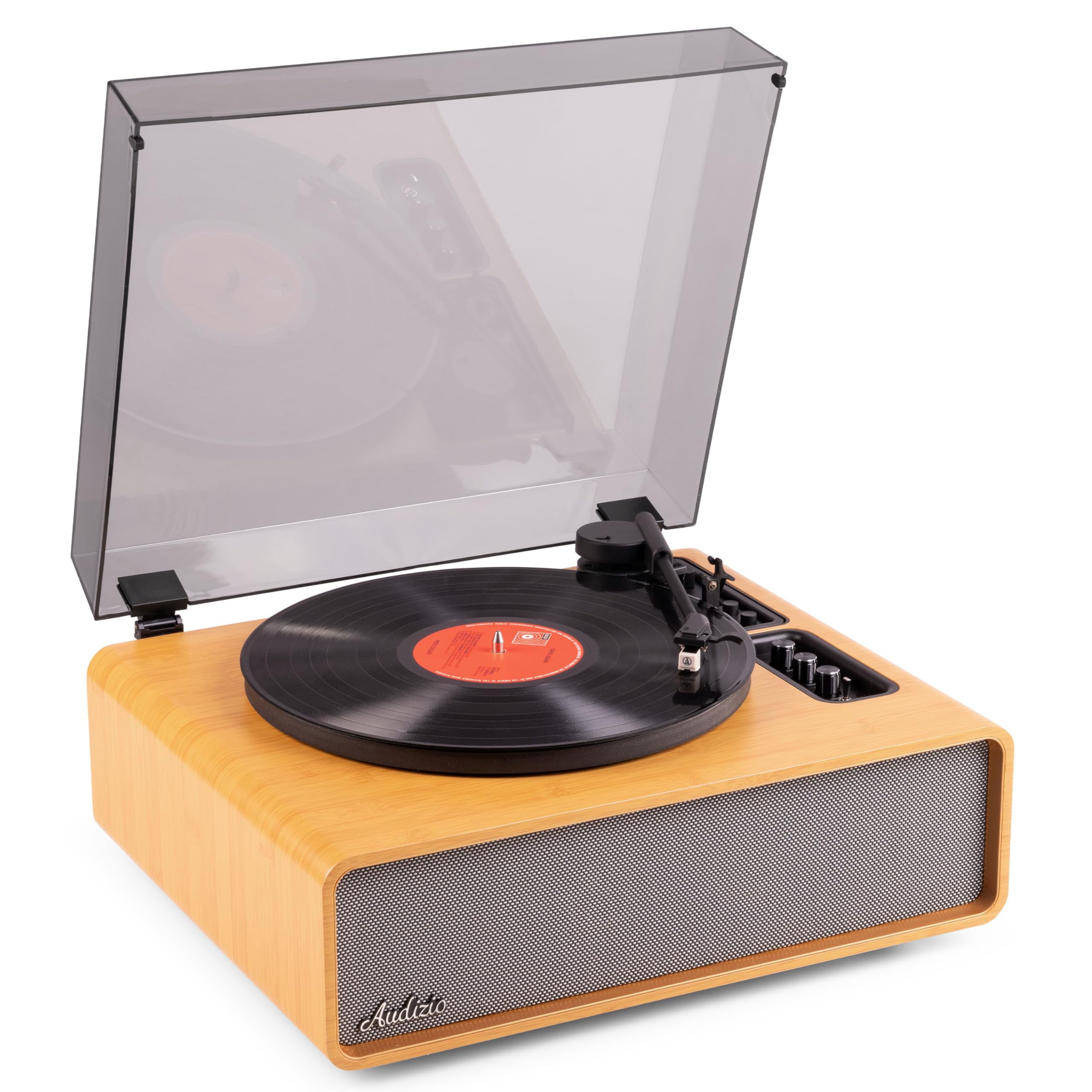
Figure 1.1: Audizio Laredo Turntable, overall view.
2. Instrucións de seguridade
Please read and follow these safety instructions carefully to prevent damage to the unit and ensure your safety.
- Non expoña a unidade á choiva nin á humidade para evitar incendios ou descargas eléctricas.
- Non abras a c.asing. Non hai pezas que o usuario poida reparar no interior. Encomende calquera mantemento a persoal cualificado.
- Coloque a unidade sobre unha superficie estable e nivelada para evitar que caia.
- Manteña a unidade lonxe da luz solar directa, de fontes de calor e do exceso de po.
- Asegúrese de que haxa unha ventilación axeitada arredor da unidade. Non bloquee as aberturas de ventilación.
- Use só o adaptador de alimentación proporcionado.
- Desenchufe a unidade durante as tormentas eléctricas ou cando non se use durante longos períodos.
3. Produto rematadoview
Familiarize yourself with the components and controls of your Audizio Laredo turntable.
Compoñentes principais:
- Prato: Supports the vinyl record.
- Arma: Sostén o cartucho e o estilete.
- Cartucho e punteiro: Reads the grooves of the record. (Audio Technica ATN-3600)
- Funda antipolvo: Protexe o prato e o brazo do po.
- Altofalantes integrados: Para reprodución directa de audio.
- Panel de control: For power, volume, tone, and mode selection.
- Conexións traseiras: RCA Line Out, AUX In, Power Input.

Figura 3.1: Arriba view of the turntable with key components visible.

Figure 3.2: Control Panel for volume, bass, and treble adjustments.

Figure 3.3: Audio Technica ATN-3600 Cartridge and Stylus.

Figure 3.4: Tonearm base with speed and auto-stop controls.

Figure 3.5: Rear connection panel.
4. Configuración
4.1 Desembalaxe
- Retire con coidado o prato xiratorio da súa embalaxe.
- Remove all protective materials, including the stylus guard.
- Garde a embalaxe para futuros transportes ou almacenamentos.
4.2 Colocación
- Place the turntable on a stable, level surface to prevent vibrations and ensure proper playback.
- Avoid placing the unit near strong magnetic fields, heat sources, or areas with high humidity.
4.3 Instalación da cuberta antipo
- Align the hinges of the dust cover with the slots on the back of the turntable.
- Gently push down until the cover is securely in place.
- The dust cover can be removed for playback if desired.

Figure 4.1: Turntable with dust cover.
4.4 Conexión de alimentación
- Connect the power adapter to the DC IN port on the rear of the turntable.
- Plug the adapter into a suitable wall outlet (220V).
4.5 Configuración do brazo e do cartucho
- The Audio Technica cartridge is pre-installed.
- The tonearm features an adjustable counterweight. Refer to the detailed instructions in the included manual for precise counterweight adjustment to optimize tracking force.
5. Instrucións de funcionamento
5.1 Reproducindo un disco
- Place a vinyl record on the platter. If playing a 7-inch single, use the included 45 RPM adapter.
- Select the appropriate speed (33 or 45 RPM) using the speed selector switch near the tonearm base.
- Levante suavemente o brazo usando a palanca de sinalización.
- Position the tonearm over the desired track of the record.
- Slowly lower the tonearm using the cueing lever. The stylus will make contact with the record, and playback will begin.
- At the end of the record, the auto-stop function will automatically stop the platter rotation. Lift the tonearm and return it to its rest.

Figure 5.1: Playing a vinyl record.
5.2 Bluetooth Operation (Bidirectional)
The Laredo turntable supports both Bluetooth input (receiving audio from a device) and Bluetooth output (sending audio to a Bluetooth speaker/headphones).
Entrada Bluetooth (BT IN):
- Press the MODE/POWER button to select Bluetooth mode. The LED indicator will flash.
- On your smartphone or tablet, enable Bluetooth and search for 'Audizio Laredo'.
- Select the turntable to pair. Once connected, the LED will glow solid.
- You can now stream audio from your device to the turntable's integrated speakers.
Bluetooth Output (BT OUT):
- Asegúrate de que os teus auriculares ou altofalante Bluetooth estean en modo de emparellamento.
- Set the BT OUT switch (located near the tonearm base) to 'ON'.
- The turntable will automatically search for and connect to the nearest Bluetooth audio device.
- Once connected, the audio from your vinyl record will be transmitted to your Bluetooth device.

Figure 5.2: Bidirectional Bluetooth functionality.
5.3 Entrada AUX
- Connect an external audio device (e.g., MP3 player, CD player) to the AUX IN port on the rear of the turntable using a 3.5mm audio cable.
- Press the MODE/POWER button to select AUX mode.
- Audio from the external device will play through the turntable's speakers.
5.4 RCA Line Out
- To connect the turntable to an external amplifier or powered speakers, use an RCA cable (not included) to connect the LINE OUT ports on the rear of the turntable to the corresponding input on your audio system.
- Ensure the 'Speaker ON/OFF' switch on the rear is set to 'OFF' if you only want sound from external speakers.
5.5 Control de volume e ton
- Use the VOLUME knob on the control panel to adjust the overall playback volume.
- Adjust the BASS and TREBLE knobs to fine-tune the audio output to your preference.
6. Mantemento
6.1 Limpeza da unidade
- Wipe the dust cover and cabinet with a soft, dry cloth.
- Non empregue produtos de limpeza abrasivos, ceras nin solventes.
- For the platter, use a slightly damp pano e seca ben.
6.2 Stylus Care and Replacement
- The stylus is a delicate component. Handle it with care.
- Clean the stylus regularly using a soft brush designed for stylus cleaning, brushing from back to front.
- A stylus typically lasts for approximately 300-500 hours of playback. If you notice a decrease in sound quality or increased skipping, it may be time to replace the stylus.
- Replacement styli (e.g., Audio Technica ATN-3600L or compatible) can be purchased from authorized dealers. Refer to the detailed instructions provided with the replacement stylus for installation.
7 Solución de problemas
If you encounter issues with your turntable, please consult the following table before contacting support.
| Problema | Causa posible | Solución |
|---|---|---|
| Sen poder | Adaptador de corrente non conectado; toma de corrente non funciona. | Ensure power adapter is securely connected to the unit and a working outlet. |
| Non hai son dos altofalantes | Volume too low; Speaker ON/OFF switch is OFF; Incorrect mode selected. | Increase volume; Set 'Speaker ON/OFF' switch to ON; Select correct input mode (Phono, BT IN, AUX). |
| Omitir rexistros | Record is dirty or damaged; Stylus is worn or dirty; Turntable not level; Tracking force incorrect. | Clean record; Clean or replace stylus; Place turntable on a level surface; Adjust tonearm counterweight. |
| Problemas de vinculación Bluetooth | Device too far; Turntable not in pairing mode; Interference. | Ensure devices are within range; Re-enter pairing mode; Turn off other Bluetooth devices. |
| Distorsión do son | Volume too high; Stylus worn; Record damaged. | Reduce volume; Replace stylus; Try a different record. |
8. Especificacións
Technical specifications for the Audizio Laredo Turntable.
| Característica | Especificación |
|---|---|
| Nome do modelo | Laredo (101.537) |
| Dimensións (L x W x H) | 43.2 x 43.2 x 21 cm (17 x 17 x 8.3 polgadas) |
| Peso do produto | 7.65 kg (16.86 lb) |
| Material | Wood (Bamboo finish) |
| Velocidades de rotación | 33 RPM, 45 RPM |
| Tipo de cartucho | Audio Technica (ATN-3600) |
| Tipo de motor | Unidade de correas |
| Formato de sinal | Analóxico |
| Altofalantes integrados | Yes, 160W total output |
| Versión Bluetooth | 5.4 (Bidirectional) |
| Conectividade | Bluetooth (In/Out), RCA Line Out, AUX In |
| Fonte de enerxía | Eléctrico con cable |
| Voltage | 220 voltios |
| Dispositivos compatibles | Speakers, Headphones, Smartphone, Tablet |
9. Garantía e soporte
9.1 Información da garantía
This Audizio Laredo Turntable comes with a 2 ano de garantía from the date of purchase. This warranty covers manufacturing defects and faults under normal use. It does not cover damage caused by misuse, accidents, unauthorized modifications, or normal wear and tear (e.g., stylus wear).
Conserve o comprobante de compra para reclamacións de garantía.
9.2 Atención ao cliente
If you have any questions, require technical assistance, or need to make a warranty claim, please contact your retailer or visit the official Audizio websitio web con recursos de asistencia e información de contacto.
Official Audizio Websitio: www.audizio.com