
1. Introdución
Thank you for choosing the CHIVALZ A10a Thermal Printer. This compact and inkless portable printer is designed for convenient printing from your phone or laptop, supporting both 8.5'' x 11'' and A4 thermal paper. This manual provides essential information for the safe and efficient operation of your device. Please read it thoroughly before use and retain it for future reference.
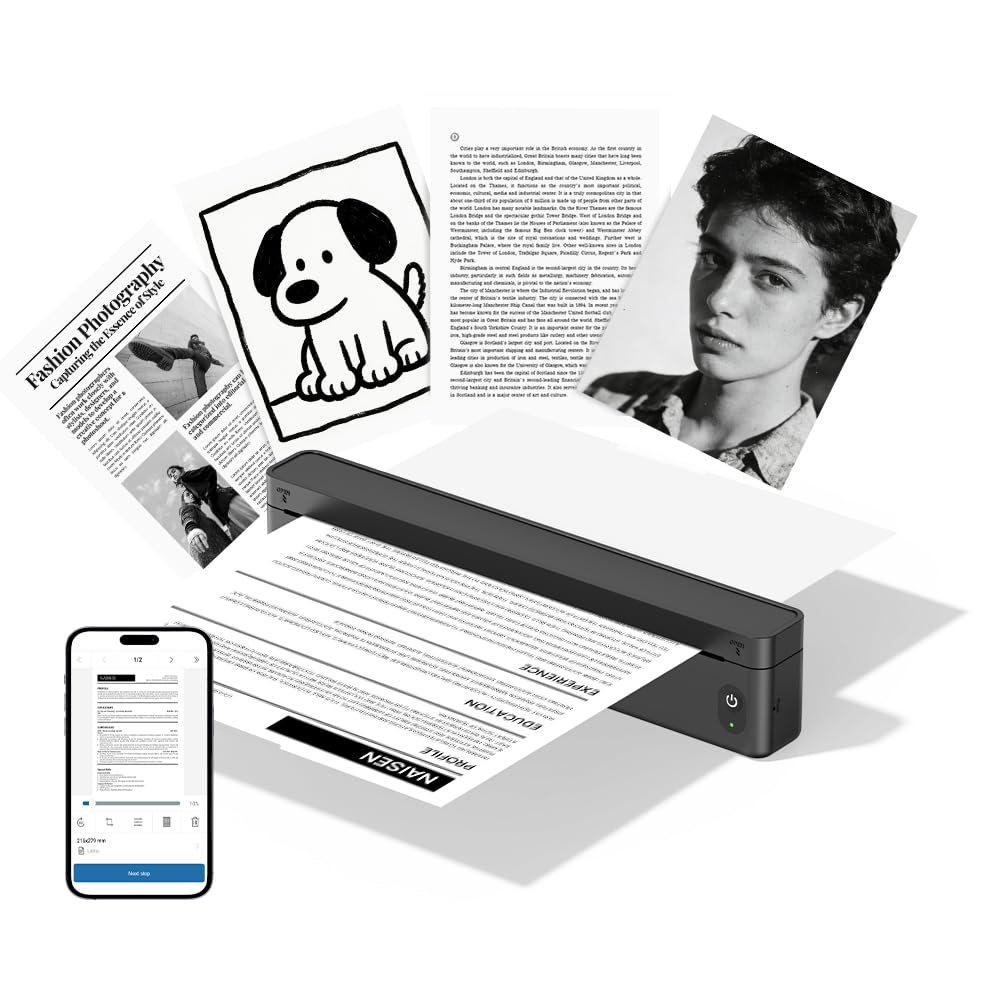
Figura 1.1: The CHIVALZ A10a Thermal Printer. This image displays the compact, black thermal printer, highlighting its portable design suitable for various environments.
2. Contido do paquete
Please check the package contents upon unpacking. If any items are missing or damaged, contact customer support immediately.
- CHIVALZ A10a Thermal Printer
- Cable de carga USB
- Rolo inicial de papel térmico
- Manual de usuario (este documento)
3. Información de seguridade
To ensure safe operation and prevent damage to the printer, please observe the following safety precautions:
- Non expoña a impresora á auga, á humidade nin a temperaturas extremas.
- Evite deixar caer a impresora nin someterla a impactos fortes.
- Use só o cable de carga fornecido ou recomendado.
- Non intente desmontar nin reparar a impresora vostede mesmo. Póñase en contacto co persoal de servizo cualificado.
- Manteña a impresora lonxe dos nenos.
- Use only approved thermal paper to prevent damage to the print head.
4. Guía de configuración
4.1. Cargando a impresora
- Connect the USB charging cable to the printer's charging port.
- Conecta o outro extremo do cable USB a un adaptador de corrente USB compatible (non incluído) ou a un porto USB dun ordenador.
- The indicator light will show charging status (e.g., red for charging, green for fully charged). Allow approximately 2-3 hours for a full charge.
4.2. Cargar papel térmico
- Abra con coidado a tapa do compartimento de papel.
- Insert the thermal paper roll with the printing side facing up. Ensure the paper is aligned correctly and smoothly.
- Pull a small amount of paper out beyond the cutting edge.
- Peche firmemente a tapa do compartimento de papel ata que encaixe no seu lugar.
4.3. Installing the Printing Application
For optimal performance and features, download the dedicated printing application for your CHIVALZ A10a printer. Refer to the packaging or a quick start guide for the specific app name and download instructions (usually available on app stores for iOS/Android or a website for Windows/macOS).
4.4. Conectando a través de Bluetooth
- Ensure the printer is charged and powered on. The Bluetooth indicator light should be blinking, indicating it's ready for pairing.
- On your phone or laptop, enable Bluetooth.
- Busca available devices. The printer should appear as "CHIVALZ A10a" or a similar name.
- Selecciona a impresora que queres emparellar. Se che solicita un PIN, introduce "0000" ou "1234".
- Once paired, the Bluetooth indicator light on the printer will become solid.
5. Instrucións de funcionamento
5.1. Acendido/apagado
- Encendido: Press and hold the power button for approximately 3 seconds until the indicator lights illuminate.
- Apagado: Manteña premido o botón de acendido durante aproximadamente 3 segundos ata que as luces indicadoras se apaguen.
5.2. Printing from Your Device
- Ensure the printer is powered on and successfully connected via Bluetooth to your phone or laptop.
- Open the document, image, or content you wish to print in your dedicated printing application or standard print dialogue.
- Select the print option.
- Choose "CHIVALZ A10a" from the list of available printers.
- Adjust print settings (e.g., paper size, orientation) as needed within the application.
- Confirm and initiate the print job.
6. Mantemento
6.1. Limpeza do cabezal de impresión
Regular cleaning of the print head ensures optimal print quality. Clean the print head if print quality deteriorates or after every few paper roll changes.
- Apague a impresora e desconéctea da corrente.
- Abra a tapa do compartimento do papel.
- Gently wipe the print head (the dark strip inside the compartment) with a soft, lint-free cloth lightly dampcon alcohol isopropílico.
- Deixe que o cabezal de impresión seque completamente antes de pechar a tapa e acender a impresora.
6.2. Manipulación e almacenamento de papel
- Use only high-quality thermal paper recommended for your printer.
- Store thermal paper in a cool, dry place away from direct sunlight and heat to preserve its printability.
- Avoid touching the thermal paper's surface excessively, as oils from your skin can affect print quality.
7 Solución de problemas
If you encounter issues with your CHIVALZ A10a printer, refer to the following common problems and solutions:
| Problema | Causa posible | Solución |
|---|---|---|
| A impresora non se acende. | Batería baixa ou sen enerxía. | Charge the printer fully. Ensure the charging cable is securely connected. |
| Mala calidade de impresión (liñas tenues e en branco). | Dirty print head; incorrect paper loading; old/damaged thermal paper. | Clean the print head (see Section 6.1). Ensure thermal paper is loaded correctly with the printing side up. Try a new roll of thermal paper. |
| Non se pode conectar por Bluetooth. | Printer not in pairing mode; Bluetooth off on device; interference. | Ensure printer is on and Bluetooth indicator is blinking. Turn Bluetooth off and on again on your device. Move closer to the printer. Forget and re-pair the device. |
| Atasco de papel. | Carga incorrecta do papel; obxecto estraño. | Turn off the printer. Open the paper compartment and carefully remove any jammed paper or obstructions. Reload paper correctly. |
| Printer stops printing mid-job. | Out of paper; low battery; connection lost. | Check paper supply and reload if necessary. Charge the printer. Verify Bluetooth connection. |
8. Especificacións
Below are the technical specifications for the CHIVALZ A10a Thermal Printer:
| Característica | Detalle |
|---|---|
| Nome do modelo | A10a |
| Marca | CHIVALZ |
| Dimensións do produto (P x A x A) | 27.5 centímetros de profundidade x 7.6 ancho x 6.4 alto |
| Tecnoloxía de conectividade | Bluetooth |
| Tecnoloxía de impresión | Térmica |
| Cor | Negro |
| Saída da impresora | Monocromo |
| Max Print Speed (B&W Pages per Minute) | 203 |
| Tamaño máximo do soporte | A4, 8.5'' X 11'' |
| Compoñentes incluídos | Impresora |
9. Garantía e soporte
9.1. Garantía do produto
The CHIVALZ A10a Thermal Printer comes with a 1 ano de garantía limitada from the date of purchase. This warranty covers manufacturing defects and workmanship under normal use. It does not cover damage caused by misuse, accidents, unauthorized modifications, or failure to follow the instructions in this manual.
9.2. Atención ao cliente
For technical assistance, warranty claims, or any questions regarding your CHIVALZ A10a printer, please contact our customer support team:
- Correo electrónico: support@chivalz.net
- Please provide your model number (A10a) and a detailed description of your issue when contacting support.