
Introdución
This manual provides essential information for the safe and efficient use of your Samsung 43-Inch Class U8000H Series Crystal UHD 4K Smart TV. Please read all instructions carefully before using the product and retain this manual for future reference.
O que hai na caixa
Comprobe que todos os compoñentes estean presentes na embalaxe:
- Samsung 43-Inch U8000H Series Crystal UHD 4K Smart TV
- Cable de alimentación
- Control remoto
- Stand
- Manual de usuario (este documento)
- Tarxeta de garantía

Image: Included components for the Samsung U8000H Series TV.
Configuración
1. Configuración física (soporte ou montaxe na parede)
Before proceeding, ensure the TV is placed on a stable, level surface or securely mounted to a wall. Refer to the separate wall mount instructions if applicable.
- Colocación do soporte: Carefully place the TV screen-down on a soft, clean cloth. Align the stand with the designated slots on the bottom of the TV. Secure the stand using the provided screws.
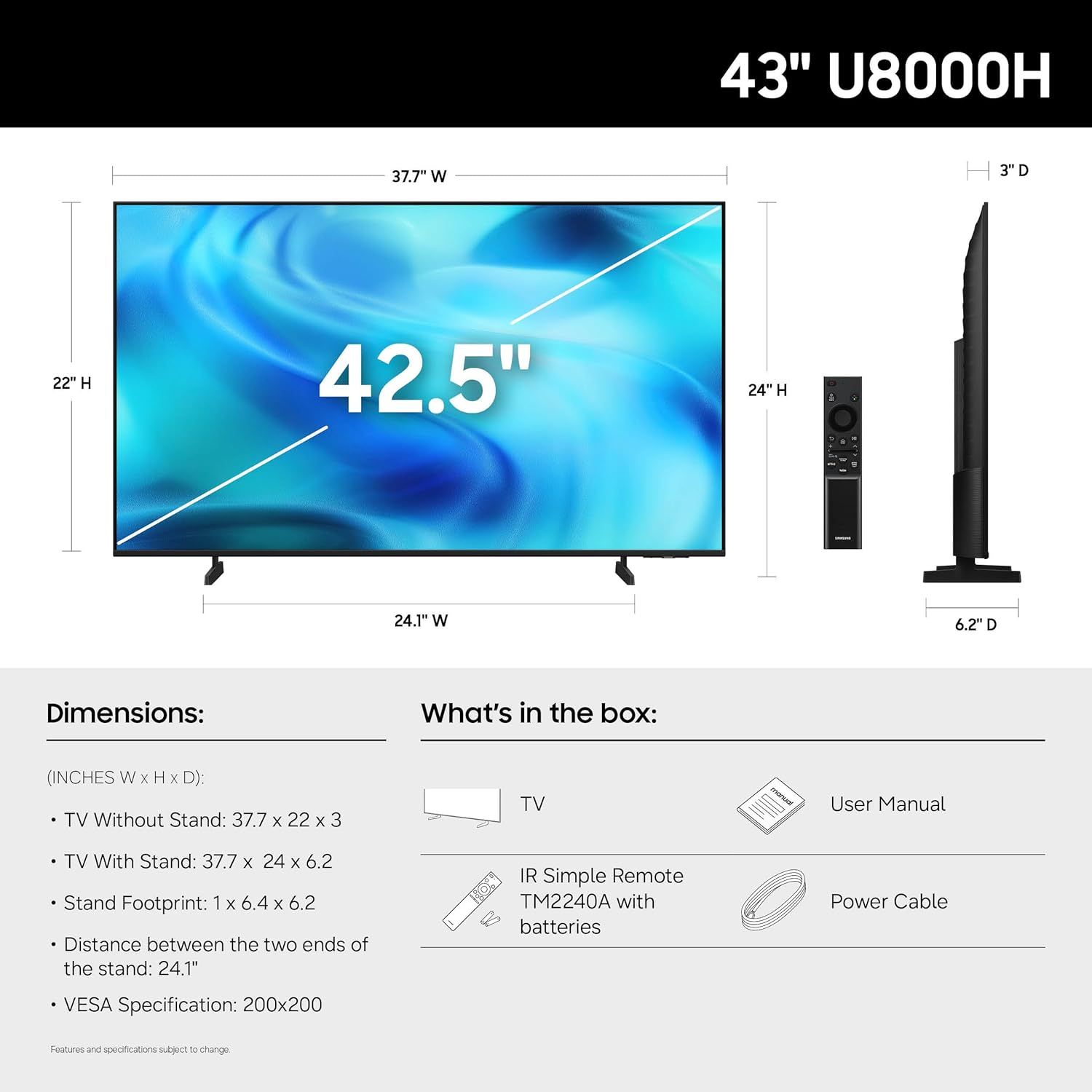
- Montaxe na parede: If wall mounting, ensure you use a VESA-compatible mount (200 x 200 mm) and follow the mount manufacturer's instructions. Disconnect the stand if already attached.
Imaxe: Traseira view of the TV, highlighting VESA mounting points and input panel.
2. Dispositivos de conexión
Connect your external devices (cable box, Blu-ray player, gaming console, etc.) to the TV's input ports.
- HDMI: Use HDMI cables for high-definition video and audio. The TV has 3 HDMI ports. HDMI 1 supports eARC for enhanced audio return.
- USB: Connect USB devices for media playback or power. The TV has 1 USB port.
- Ethernet (LAN): Para unha conexión estable a internet por cable.
- Antena/Cable: Connect an antenna or cable TV signal for over-the-air or cable channels.

Imaxe: Detallada view of the TV's connectivity panel.
3. Acendido inicial e configuración da rede
- Conecta o cable de alimentación ao televisor e despois a unha toma de corrente.
- Prema o botón de acendido/apagado do mando a distancia ou do televisor.
- Siga as instrucións en pantalla para completar a configuración inicial, incluíndo a selección do idioma, a conexión de rede (Wi-Fi ou Ethernet) e a busca de canles.
- For smart features, you may be prompted to log in to or create a Samsung Account.
Funcionamento da TV
Control remoto
O mando a distancia incluído permíteche navegar pola interface do televisor, axustar a configuración e acceder ás funcións intelixentes. Familiarízate coa disposición dos botóns para un uso óptimo.

Image: The standard remote control for the Samsung U8000H Series TV.
Características e funcións principais
-
Procesador de cristal 4K: This powerful processor enhances colors and sharpens details, providing a vibrant 4K viewing experience. It also performs 4K upscaling for lower-resolution content.

Image: Visual representation of the Crystal Processor 4K technology.
-
Motion Xcelerator: Enjoy clear picture and smooth motion, especially in fast-paced scenes like sports and games. This technology estimates and adjusts frame transitions in real-time.

Image: Motion Xcelerator in action, demonstrating smooth visuals.
-
Potenciador da cor: This feature enhances color intensity, making reds fiery and blues sparkling, transforming content into a visually rich experience.

Image: Demonstrating the enhanced colors with Color Booster.
-
Ampliación de escala 4K: Upgrade your favorite shows and movies to crisp 4K clarity. This advanced technology enhances details and clarity even from lower-quality sources.

Image: Illustration of 4K Upscaling improving image detail.
-
Endless Free Content (Samsung TV Plus): Access over 2,700 free streaming options, including 750+ subscription-free channels. Content includes news, sports, movies, and more.

Image: Samsung TV Plus interface with free streaming options.
-
Centro de xogos de Samsung: Play thousands of video games without a console. This central hub brings together games from consoles, cloud services, and gaming apps.

Image: Samsung Gaming Hub interface.
-
Vision AI Companion: Ask your TV questions and access powerful AI features. Get personalized answers with Bixby, and utilize AI agents like Microsoft Copilot for enhanced viewing.

Image: Vision AI Companion features.
-
One UI Tizen: The TV's operating system provides an intuitive smart TV platform tailored to you, with personal data secured by Samsung Knox. It also receives 7 years of automatic OS updates.

Image: One UI Tizen smart TV interface.
-
Seguridade de Samsung Knox: Enjoy peace of mind with built-in triple-layer data protection. Your TV experiences are secured against harmful apps and phishing sites.

Image: Samsung Knox Security features.
Mantemento
- Limpeza da pantalla: Limpe a pantalla con suavidade cun pano de microfibra suave e seco. Para marcas difíciles, limpe lixeiramenteampEnxágüe o pano con auga ou cun limpador de pantallas especializado. Evite produtos químicos agresivos ou materiais abrasivos.
- Limpeza do cadro: Use un pano suave e seco para limpar a estrutura e o soporte do televisor.
- Ventilación: Asegúrese de que haxa unha ventilación axeitada arredor do televisor para evitar o sobrequecemento. Non bloquee as aberturas de ventilación.
- Cable de alimentación: Comprobe regularmente o cable de alimentación para ver se está danado. Se está danado, substitúao inmediatamente por unha peza autorizada de Samsung.
Resolución de problemas
| Problema | Posible Solución |
|---|---|
| Sen Poder |
|
| Sen imaxe / Imaxe distorsionada |
|
| Sen son / Son baixo |
|
| O control remoto non funciona |
|
| Smart Features Not Working / Network Issues |
|
Especificacións
| Característica | Detalle |
|---|---|
| Nome do modelo | U8000H |
| Número de modelo | UN43U8000HFXZA |
| Tamaño da pantalla | 43 polgadas |
| Tecnoloxía de visualización | LED |
| Resolución | 4K UHD (3840 x 2160) |
| Taxa de actualización | 60 Hz |
| Procesador | Procesador Crystal 4K |
| Formato HDR compatible | HDR10+ |
| Conectividade | 3x HDMI, 1x USB, Ethernet (LAN), Wi-Fi, Bluetooth 5.3 |
| Sistema Operativo | Tizen |
| Método de control | Aplicación, control remoto, voz |
| Saída de audio | Altavoz incorporado |
| Estándar de montaxe VESA | 200 x 200 mm |
| Dimensións do produto (P x A x A) | 6.2" de profundidade x 37.7" de ancho x 24" de alto (con soporte) |
| Peso do elemento | 14.8 libras (con soporte) |
| Cor | Negro |

Image: Dimensional diagram of the Samsung 43-inch U8000H TV.
Garantía e Soporte
Your Samsung 43-Inch U8000H Series Crystal UHD 4K Smart TV comes with a 1 anos de garantía do fabricante. For warranty claims, technical support, or service inquiries, please contact Samsung Customer Service.
You can find additional support resources, FAQs, and contact information on the official Samsung support websitio.
Soporte en liña: www.samsung.com/us/support/