
Introdución
This manual provides detailed instructions for the operation and maintenance of your RadioShack Portable CD Player Boombox. Please read this manual thoroughly before using the device to ensure proper function and to maximize your listening experience. This boombox combines classic CD playback with modern connectivity options including Bluetooth, FM radio, USB, and AUX input.
O que hai na caixa

Figure 1: Box Contents. This image displays the items included with your purchase: the boombox unit, AC power cord, remote control, and telescopic antenna.
- 1x RadioShack Portable CD Player Boombox Unit
- 1x cable de alimentación de CA.
- 1 x mando a distancia
- 1x Telescopic Antenna (pre-attached)
- 1x Manual de usuario (este documento)
Note: 4 C batteries are required for portable operation and are not included.
Produto rematadoview e Características
The RadioShack Portable CD Player Boombox offers multiple audio playback options and user-friendly controls.

Figura 2: Características principais. This diagram highlights the boombox's main functionalities including Bluetooth 5.0, various CD formats, USB MP3 playback, FM radio, AUX input, and playback modes.
- Reprodución de CD: Admite os formatos CD, CD-R, CD-RW e CD-MP3.
- Conectividade Bluetooth: Transmite audio sen fíos desde dispositivos compatibles.
- Radio FM: Built-in tuner with telescopic antenna and 18 preset stations.
- Reprodución USB: Reproducir MP3 files directamente desde unha unidade USB.
- Entrada AUX: Connect external audio devices via a 3.5mm cable.
- Modos de reprodución: Includes random, repeat, and program play functions.
- Control remoto: Para unha operación cómoda a distancia.
Configuración
1. Alimentando o dispositivo

Figure 3: Power Options. The boombox can be powered by the included AC cord or by 4 C batteries for portable use.
Your boombox can be powered in two ways:
- Potencia CA: Connect the included AC power cord to the AC input jack on the back of the boombox and then plug it into a standard wall outlet (110V-240V).
- Potencia da batería: For portable use, open the battery compartment on the bottom of the unit and insert 4 "C" size batteries (not included), ensuring correct polarity (+/-). Close the compartment securely.
2. Antenna Setup (FM Radio)
Para unha recepción óptima da radio FM, estenda completamente a antena telescópica situada na parte traseira da unidade. Axuste a súa posición para obter o mellor sinal.
Instrucións de funcionamento
Controis xerais
- Botón de encendido (⏻): Prema para encender ou apagar a unidade.
- Botón de volume: Xire no sentido das agullas do reloxo para aumentar o volume, no sentido contrario para diminuír.
- Botón de función (FUNC): Press to cycle through playback modes: CD, Bluetooth, FM, USB, AUX.
- Reproducir/Pausa (⏸/⏸) Botón: Inicia ou pon en pausa a reprodución.
- Deter (⏹) Botón: Detén a reprodución.
- Skip/Search (⏮ / ⏭) Buttons: Press briefly to skip tracks. Press and hold to search within a track.
Reprodución de CD
- Abra a tapa do compartimento do CD.
- Place a CD (CD, CD-R, CD-RW, or CD-MP3) onto the spindle with the label side facing up.
- Peche ben a tapa do compartimento do CD.
- Preme o FUNC botón ata que se seleccione o modo "CD".
- O CD comezará a reproducirse automaticamente. Se non, prema o botón Reproducir/Pausa botón.
Emparejamento Bluetooth

Figure 4: Bluetooth Streaming. Easily stream audio from your smartphone or tablet to the boombox.
- Preme o FUNC button until "BT" (Bluetooth) mode is selected. The display will show "BT" and flash, indicating it's in pairing mode.
- On your Bluetooth-enabled device (smartphone, tablet), go to its Bluetooth settings and search for available devices.
- Select "RadioShack Boombox" from the list.
- Once paired, the "BT" indicator on the boombox display will stop flashing and remain solid.
- Agora podes reproducir audio desde o teu dispositivo a través do boombox.
Funcionamento da radio FM

Figure 5: FM Presets and Programmed Playback. Use the SCAN button to automatically save FM stations and REP/PROG for custom playback sequences.
- Preme o FUNC botón ata que se seleccione o modo "FM".
- Auto Scan and Save Presets: Manteña premido o ESCANEAR button (often combined with Play/Pause). The radio will automatically scan for and save up to 18 available FM stations.
- Sintonización manual: Prema brevemente o Saltar / Buscar botóns (⏮ / ⏭) to fine-tune the frequency.
- Seleccionando predefinicións: Prema brevemente o PROG button (often combined with Repeat) to cycle through saved preset stations.
Reproducción USB
- Insira unha unidade flash USB que conteña MP3 files no porto USB.
- Preme o FUNC botón ata que se seleccione o modo "USB".
- The boombox will automatically detect and begin playing MP3 files da unidade USB.
- Usa o Reproducir/Pausa, Pare, e Saltar / Buscar botóns para controlar a reprodución.
Entrada AUX
- Conecta un extremo dun cable de audio de 3.5 mm (non incluído) á toma AUX IN do boombox.
- Conecta o outro extremo do cable á toma de auriculares ou á saída de son do teu dispositivo de son externo (por exemplo, reprodutor de MP3, teléfono intelixente).
- Preme o FUNC botón ata que se seleccione o modo "AUX".
- Controla a reprodución e o volume desde o teu dispositivo de son externo.
Uso do control remoto
The included remote control allows for convenient operation of most functions from a distance. Ensure the remote has working batteries (typically 2x AAA, not included) and point it towards the front of the boombox.
- Potencia: Encender/apagar a unidade.
- FUNCIÓN: Select input mode (CD, BT, FM, USB, AUX).
- Volume +/-: Axuste o nivel de volume.
- Play/Pause, Stop, Skip/Search: Controla a reprodución.
- REP/PROG: Access repeat and program functions.
- ESCANEAR: Auto-scan FM stations.
- EQ/SLEEP: Adjust equalizer settings or set sleep timer (refer to specific remote markings for details).
Playback Modes (CD/USB)
- Repeat (REP): Preme o REP button (on unit or remote) to cycle through repeat modes:
- Repeat One: Repeats the current track.
- Repeat All: Repeats all tracks on the CD/USB.
- Repeat Folder (for MP3 CDs/USB): Repeats all tracks in the current folder.
- Programa (PROG): Allows you to program a specific order of tracks for CD or USB playback.
- In CD or USB mode, with playback stopped, press the PROG botón.
- Usa o Saltar / Buscar buttons to select your desired track.
- Preme PROG de novo para confirmar e engadir a pista á lista de programas.
- Repeat steps 2-3 to add more tracks.
- Preme Reproducir/Pausa para iniciar a reprodución programada.
- Random/Shuffle: Some models may have a dedicated shuffle button (often labeled "RDM" or "SHUF") or it may be part of the REP/PROG cycle. This plays tracks in a random order.
Mantemento
- Limpeza: Use a soft, dry cloth to clean the exterior of the boombox. Do not use abrasive cleaners or solvents. For the CD lens, use a specialized CD lens cleaner disc.
- Almacenamento: When not in use for extended periods, remove batteries to prevent leakage. Store the unit in a cool, dry place away from direct sunlight and extreme temperatures.
- Substitución da batería: Replace all 4 "C" batteries simultaneously when they are depleted. Do not mix old and new batteries or different types of batteries.
- CD Care: Manipula os CD polos bordos. Mantelos limpos e sen rabuñaduras. Gardaos nas súas fundas cando non os uses.
Resolución de problemas
| Problema | Causa posible | Solución |
|---|---|---|
| Sen poder | Cable de CA non conectado; Pilas esgotadas ou inseridas incorrectamente. | Ensure AC cord is securely plugged in. Replace batteries with new ones, checking polarity. |
| Sen son | Volume too low; Incorrect input mode; Headphones connected. | Increase volume. Press FUNC to select correct mode. Disconnect headphones. |
| O CD salta ou non se reproduce | CD dirty or scratched; CD inserted incorrectly; CD compartment not closed. | Clean CD. Reinsert CD correctly. Close lid firmly. Try another CD. |
| Bluetooth non se sincroniza | Boombox not in BT mode; Device too far; Device already paired to another unit. | Ensure boombox is in BT mode and flashing. Move device closer. Disconnect from other devices. |
| Mala recepción FM | Antena non estendida ou colocada correctamente; Zona de sinal débil. | Fully extend and adjust the telescopic antenna. Try moving the unit to a different location. |
| Non se reproduce o USB | Unidade USB non inserida correctamente; Files not MP3 format; USB drive corrupted. | Reinsert USB drive. Ensure files are MP3. Try a different USB drive. |
Especificacións
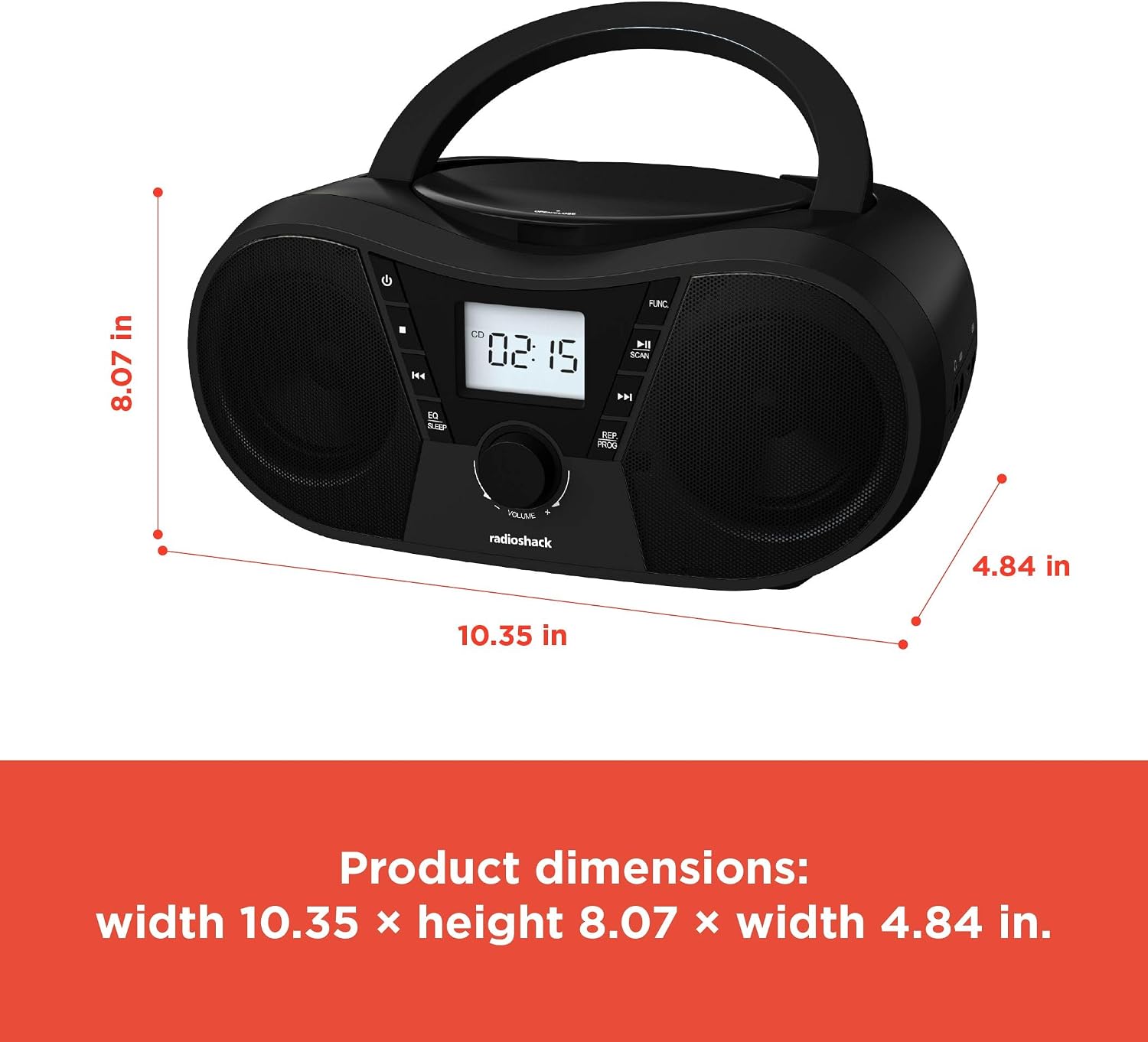
Figura 6: Dimensións do produto. The boombox measures approximately 10.35 inches wide, 8.07 inches high, and 4.84 inches deep.
| Característica | Detalle |
|---|---|
| Número de modelo | 1402010 |
| Fonte de enerxía | AC 110V-240V ~ 50/60Hz or 4 x "C" Batteries (DC 6V) |
| Medios compatibles | CD, CD-R, CD-RW, CD-MP3, USB (MP3), Bluetooth, FM Radio, AUX Input |
| Versión Bluetooth | 5.0 (Compatible) |
| Rango de frecuencia FM | 87.5 - 108 MHz |
| Modo de saída de audio | Estéreo |
| Número de falantes | 2 (Built-in Stereo Speakers) |
| Wattage | 10 vatios |
| Resposta en frecuencia | 20 Hz - 20000 Hz |
| Dimensións (W x H x D) | Aproximadamente 10.35 x 8.07 x 4.84 polgadas |
| Cor | Negro |
Garantía e Soporte
This RadioShack Portable CD Player Boombox (Model 1402010) comes with a Garantía limitada de 1 anos desde a data de compra. Esta garantía cobre defectos de fabricación nos materiais e na man de obra en condicións de uso normal.
For warranty claims, technical support, or customer service inquiries, please contact RadioShack customer support through their official websitio web ou a información de contacto proporcionada coa documentación da compra.
Conserve o comprobante de compra para efectos da garantía.