
Introdución
The DAYTECH Wireless Care Call Bell system is designed to provide peace of mind and immediate assistance for individuals requiring care. This user-friendly system ensures reliable communication within homes and facilities, making caregiving easier and more efficient.
- Peace of Mind Design: Instantly notifies the receiver when the button is pressed, ensuring caregivers are alerted even when not constantly nearby. Ideal for elderly, pregnant women, children, and individuals with physical disabilities.
- Optimal for Caregiving: Activates with a simple press, immediately alerting family members or caregivers in different locations. LED lights and sound clearly indicate the situation.
- Long-Range Wireless Communication: Supports a communication range of approximately 100-150m (line of sight), covering the entire home or facility without needing smartphone linkage for stable communication.
- Immediate Notification with Sound and Light: Notifies with loud sound and LED lights. Offers 20 types of chime sounds and adjustable volume to adapt to various living environments, providing strong visual and auditory support.
- Notificación de batería baixa: The receiver uses AAA batteries and does not require an outlet. It alerts with a sound when the battery is low, reducing anxiety from sudden power loss.
- Deseño impermeable: The transmitter is IP55 waterproof, allowing use in bathrooms and kitchens, adapting to various daily life scenarios.
- Wide Range of Usage Scenarios: Designed for monitoring the elderly, children, pregnant women, and individuals with physical disabilities. Supports daily peace of mind in homes, small facilities, and clinics.
Produto rematadoview
The DAYTECH Wireless Care Call Bell system includes a receiver and a transmitter button, designed for ease of use and reliability.

Image: DAYTECH Wireless Care Call Bell System Components, showing the receiver unit and the call button.

Image: Key features of the DAYTECH Wireless Call Bell, including portability, IP55 waterproof rating, low battery notification, 150m communication range, and expansion capability.

Image: Illustrations of the call bell being used in various locations such as a bathroom, bedroom, hospital, and care facility, highlighting its versatility.
Configuración
1. Instalación da batería
- Open the battery cover on the receiver unit.
- Insert 3 AAA batteries (included) into the receiver, ensuring correct polarity.
- Pecha a tapa da batería de forma segura.
- For the transmitter button, use the included small screwdriver to open the back cover. Replace the 12V 23A battery, ensuring correct polarity, then close the cover.
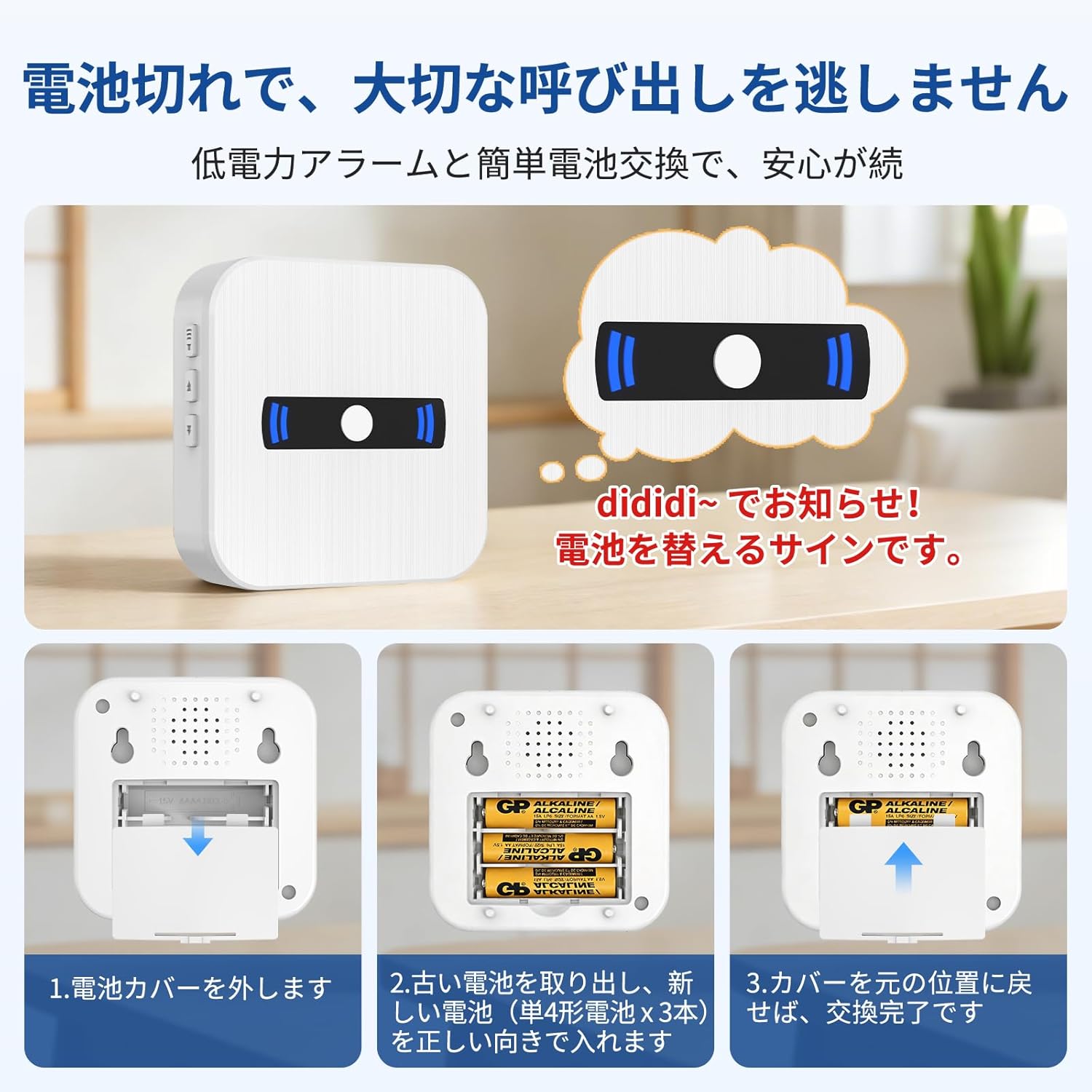
Image: Step-by-step guide on how to replace the batteries in the receiver and transmitter, showing opening the cover, inserting batteries, and closing the cover.
2. Pairing Receiver with Transmitter Button
The units are typically pre-paired from the factory. If re-pairing is needed or adding new buttons:
- Conecta o receptor.
- Press and hold the 'Mode' button on the receiver for 3-5 seconds until it enters pairing mode (indicator light flashes).
- Quickly press the transmitter button. The receiver will chime to confirm successful pairing.
- Repeat for any additional transmitter buttons.
3. App Connection (Optional for Smart Features)
To connect the receiver to the Tuya app for shared mode settings and smartphone notifications:
- Download and register for the Tuya app.
- Ensure your smartphone's Wi-Fi (2.4GHz network only) and Bluetooth are turned on.
- Open the Tuya app and tap the '+' icon to add a device.
- Follow the in-app instructions to connect the receiver. You may need to long-press the 'Return' button on the receiver for 5-10 seconds to enter pairing mode.
Video: Instructions on how to set up shared mode for the device, allowing multiple users to access and control it via the app.
Video: Demonstrates the process of pairing a receiver with a button, showing the steps to establish communication between the two units.
Video: Guide on how to set up smartphone notifications for the call bell system, ensuring alerts are received on your mobile device.
Instrucións de funcionamento
1. Facer unha chamada
- To make a call, simply press the button on the transmitter.
- The receiver will immediately sound an alarm and flash its LED lights.
2. Adjusting Volume and Chime Sound
- The receiver offers 5 levels of volume adjustment. Use the volume buttons on the side of the receiver to cycle through the levels.
- Choose from 20 different chime sounds. Use the chime selection button on the receiver to change the melody.
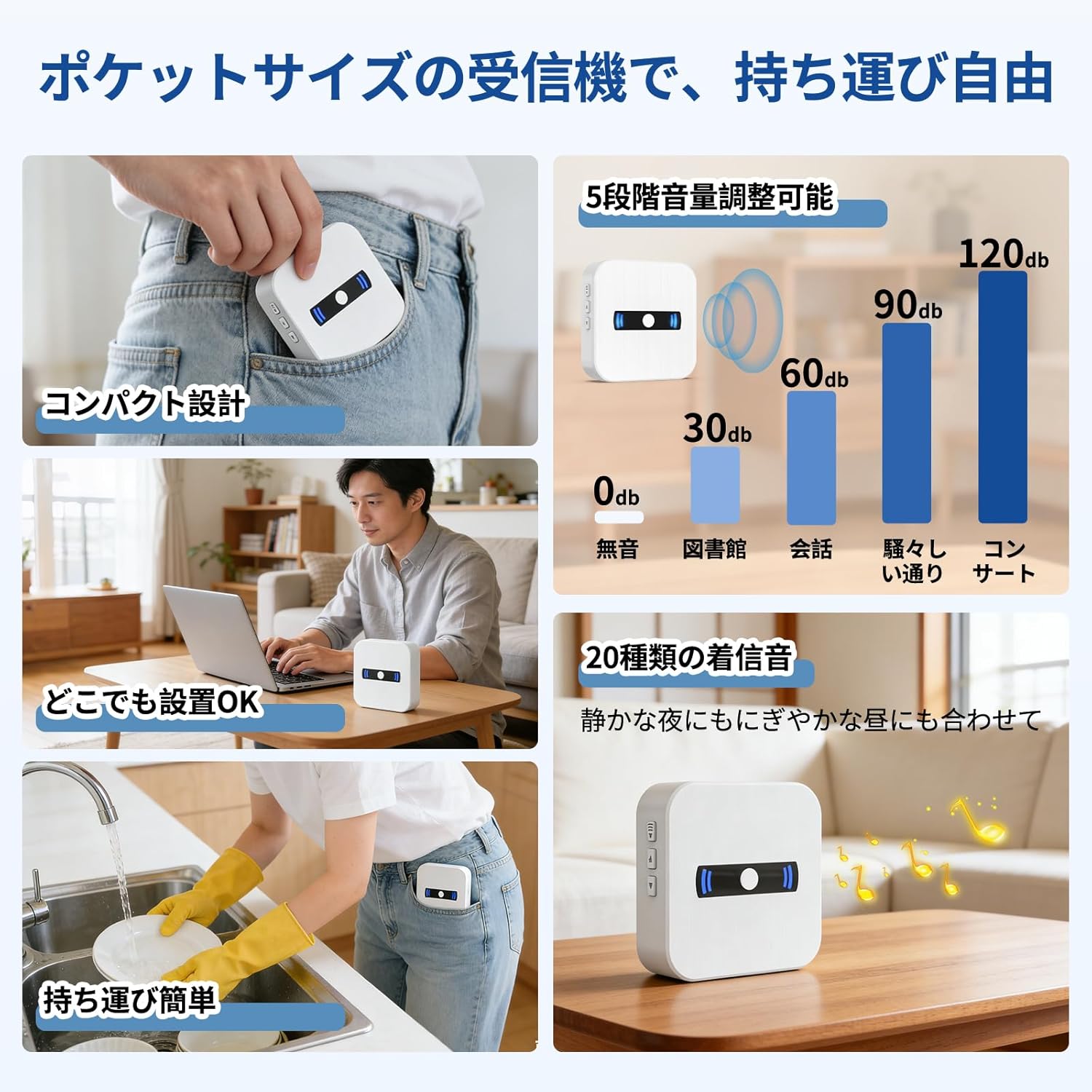
Image: The portable receiver displaying its compact design, showing the 5-level volume adjustment from 0dB to 120dB, and the option to select from 20 types of chime sounds.
3. Alcance sen fíos
- The system supports a wireless communication range of approximately 100-150 meters (line of sight).
- Signal can pass through walls and floors, ensuring reliable alerts throughout your home or facility.

Image: An illustration showing the wireless communication range of the call bell system within a two-story house, demonstrating how signals reach from different rooms and floors.
Mantemento
1. Substitución da batería
- The receiver will emit a sound to notify you when its batteries are low. Replace the 3 AAA batteries as described in the Setup section.
- For the transmitter button, replace the 12V 23A battery when its indicator light becomes dim or it fails to transmit signals reliably.
2. Limpeza
- Wipe the surfaces of the receiver and transmitter with a soft, dry cloth.
- Non use produtos de limpeza ou disolventes abrasivos.
Resolución de problemas
- No Signal/No Sound:
- Check if the receiver is powered on and has fresh batteries.
- Ensure the transmitter button has a working battery.
- Re-pair the transmitter with the receiver as described in the Setup section.
- Ensure the distance between the transmitter and receiver is within the specified range (100-150m line of sight) and there are no excessive obstructions.
- Alerta de batería baixa:
- Replace the batteries in the receiver (3 AAA) or transmitter (12V 23A) immediately when the low battery alert sounds.
- Incorrect Chime Sound/Volume:
- Adjust the volume using the dedicated buttons on the receiver.
- Change the chime sound using the chime selection button on the receiver.
Especificacións
| Característica | Especificación |
|---|---|
| Marca | DAYTECH |
| Número de modelo | CC02 1-1 JIU |
| Cor | Branco |
| Rango máximo | 150 metros |
| Tipo de batería (receptor) | Alkaline AAA |
| Number of Batteries (Receiver) | 3 (AAA) |
| Tipo de batería (transmisor) | Alkaline 12V 23A |
| Nivel de ruído | 110 dB |
| Tecnoloxía de sensores | Sensor táctil |
| Clasificación de impermeabilidade (transmisor) | IP55 |
| GTIN | 791261632900 |
| ASIN | B07Q2WZX5L |
Garantía e Soporte
This product comes with a 1-year quality guarantee from the date of purchase. If you encounter any issues or have questions during use, please feel free to contact us at any time. We will respond promptly and courteously, doing our utmost to ensure your satisfaction.
For support, please refer to the contact information provided with your purchase or visit the DAYTECH brand store on Amazon.


