
1. Aviso importante
Please carefully check the store name and ensure you are purchasing products sold by "LUZHAN." We have received customer feedback stating that products received did not match the description and were of poor quality. Upon investigation, we found that these customers did not purchase the products from us. To prevent such incidents from happening again in the future and to avoid unnecessary misunderstandings, please carefully verify the store name LUZHAN.

Image: Important notice to verify seller name LUZHAN for authentic products.
2. Rematadoview
The XIAOMI POCO X8 Pro Max 5G is a high-performance smartphone designed for advanced users. It features a powerful Mediatek Dimensity 9500s processor, a vibrant 1.5K 120Hz AMOLED display, a large 8500mAh battery with 100W HyperCharge, and a 50 MP Light Fusion 600 camera system with OIS. This manual provides essential information for setting up and operating your device.

Imaxe: Anverso e reverso view of the POCO X8 Pro Max 5G smartphone.
Vídeo: Un overview of the POCO X8 Pro Series, highlighting key features and design.
3. Configuración
3.1 Que hai na caixa
- XIAOMI POCO X8 Pro Max 5G Smartphone
- Cargador
- Protector de pantalla (preaplicado ou incluído)
3.2 Configuración inicial do dispositivo
- Encendido: Press and hold the power button located on the side of the device until the XIAOMI logo appears.
- Idioma e rexión: Siga as instrucións na pantalla para seleccionar o idioma e a rexión que prefira.
- Conectar a wifi: Select your Wi-Fi network and enter the password to connect to the internet. This is necessary for initial setup and software updates.
- Conta de Google: Inicia sesión coa túa conta de Google ou crea unha nova. Isto é esencial para acceder a Google Play Store e outros servizos de Google.
- Transferencia de datos: If you are upgrading from another device, you may have the option to transfer your data (apps, photos, contacts) during this stage.
- Configuración de seguranza: Set up your preferred security method, such as a PIN, pattern, password, or fingerprint. The device supports an ultrasonic fingerprint sensor.
- Configuración completa: Siga as instrucións restantes para finalizar o proceso de configuración.
3.3 SIM Card and eSIM Setup
The POCO X8 Pro Max 5G supports physical SIM cards and eSIM functionality.
- Physical SIM: Use the provided SIM ejector tool to open the SIM tray. Insert your Nano-SIM card(s) into the tray, ensuring proper orientation. Close the tray securely.
- eSIM: For eSIM activation, navigate to Settings > Network & internet > SIMs and follow the instructions to add an eSIM profile provided by your carrier.
4. Instrucións de funcionamento
4.1 Características de visualización
Your device features a 6.83-inch 1.5K ultra-bright AMOLED display with a 120Hz refresh rate for smooth visuals and a 24x super resolution touch for enhanced responsiveness. It also includes eye protection features and Corning Gorilla Glass 7i for durability.
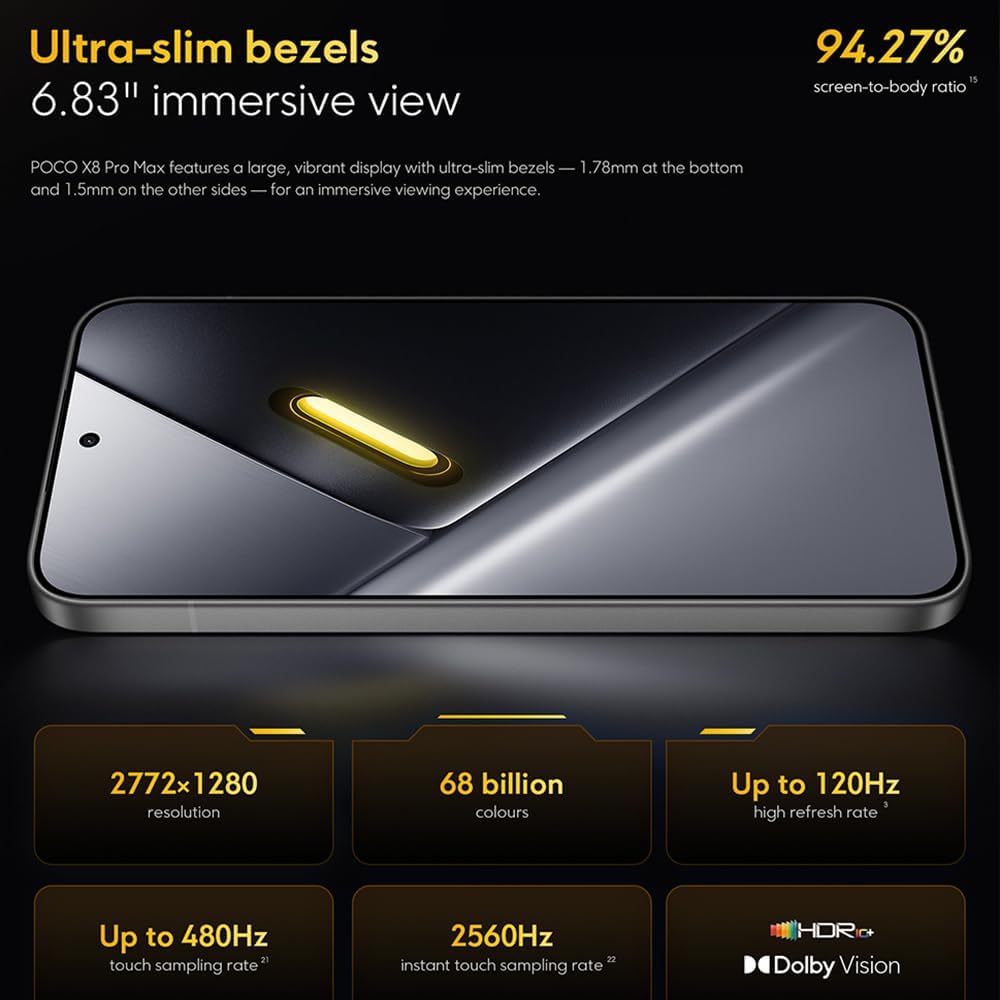
Image: The 6.83-inch 1.5K ultra-bright AMOLED display with minimal bezels.
4.2 Rendemento
Powered by the Mediatek Dimensity 9500s chipset (3nm, 4+4 All Big Core architecture, NPU890 AI processor), the POCO X8 Pro Max 5G delivers high performance. The POCO 3D IceLoop cooling system ensures efficient heat dissipation, maintaining optimal performance during intensive tasks like gaming.

Image: Diagram illustrating the Mediatek Dimensity 9500s flagship platform.

Image: Illustration of the 5800mm² ultra-large LHP area for cooling.
Sistema de cámara 4.3
The device features a 50 MP Light Fusion 600 main camera with OIS (Optical Image Stabilization) and an 8 MP ultra-wide camera. It supports portrait mode with bokeh + HDR and dynamic video-to-still conversion.

Image: Close-up of the 50 MP main camera and 8 MP ultra-wide camera system.
4.4 Batería e carga
Equipped with a massive 8500 mAh (typical) battery, the POCO X8 Pro Max 5G offers extended usage. It supports 100W HyperCharge, allowing for rapid recharging. A 16% ultra-high carbon-silicon content contributes to its high energy density.

Image: Illustration highlighting the massive 8500mAh battery capacity.

Image: Visual representation of the 100W HyperCharge technology.
Audio 4.5
The device features symmetrical dual stereo speakers (1115F) for a balanced and immersive audio experience.
Software 4.6
The POCO X8 Pro Max 5G comes with Xiaomi HyperOS 3 installed, offering an optimized and user-friendly interface based on Android 16.
5. Mantemento
5.1 Limpeza do dispositivo
- Usa un pano suave e sen fiapos para limpar a pantalla e o panel traseiro.
- Evite o uso de produtos químicos agresivos, materiais abrasivos ou aerosois.
- Para manchas difíciles, lixeiramente dampEnxágüe o pano con auga ou cun limpador de pantallas deseñado para dispositivos electrónicos.
5.2 Resistencia ao po e á auga
The device is certified for IP68 dust and water resistance. This means it can withstand immersion in up to 2 meters of water for 30 minutes under specific laboratory conditions. However, water and dust resistance may deteriorate over time with normal wear and tear. The warranty does not cover liquid damage. Avoid exposing the device to hot water, saltwater, or other liquids.

Image: Visual representation of the IP68 dust and water resistance.
5.3 Actualizacións de software
Comprobe e instale actualizacións de software regularmente para garantir que o seu dispositivo teña as últimas funcións, parches de seguridade e melloras de rendemento. Normalmente pode atopar esta opción en Configuración > Acerca do teléfono > Actualización do sistema.
6 Solución de problemas
6.1 Problemas comúns e solucións
- O dispositivo non se acende: Ensure the battery is charged. Connect the device to the charger and wait a few minutes before attempting to power it on again.
- A pantalla non responde: Try restarting the device by holding the power button for an extended period (e.g., 10-15 seconds) until it reboots.
- Aplicacións que fallan: Limpar a caché da aplicación problemática (Configuración > Aplicacións > [Nome da aplicación] > Almacenamento > Borrar caché) ou reinstala a aplicación. Asegúrate de que o software do teu dispositivo estea actualizado.
- Escasa duración da batería: Check background app usage, reduce screen brightness, disable unnecessary features like GPS or Bluetooth when not in use, and ensure your software is updated.
- Problemas de conectividade de rede: Restart your device. Check if your SIM card is properly inserted. Toggle Airplane Mode on and off. Reset network settings (Configuración > Sistema > Opcións de restablecemento > Restablecer Wi-Fi, móbil e Bluetooth).
6.2 Restablecemento de fábrica
If you encounter persistent issues, a factory reset may be necessary. Aviso: Isto borrará todos os datos do teu dispositivo. Fai unha copia de seguridade dos datos importantes antes de continuar. Vai a Configuración > Sistema > Opcións de restablecemento > Borrar todos os datos (restablecemento de fábrica) e siga as instrucións que aparecen na pantalla.
7. Especificacións
| Característica | Especificación |
|---|---|
| Marca | XIAOMI |
| Nome do modelo | POCO X8 Pro Max 5G |
| Sistema Operativo | Android 16 (with Xiaomi HyperOS 3) |
| Capacidade de almacenamento da memoria | 512 GB |
| Tamaño da pantalla | 6.83 polgadas |
| Tipo de visualización | AMOLED, 1.5K, 120Hz refresh rate |
| Tecnoloxía Celular | 5G |
| Cor | Noir (Black) |
| Tipo de conector | USB tipo C |
| Seguridade biométrica | Fingerprint Recognition (Ultrasonic) |
| Capacidade da batería | 8500 mAh (polímero de litio) |
| Cargando | Hipercarga de 100 W |
| Cámara principal | 50 MP Light Fusion 600 with OIS |
| Cámara ultra gran angular | 8 MP |
| Procesador | Mediatek Dimensity 9500s |
| Resistencia ao po e á auga | IP68 |
| Ano do modelo | 2025 |
| País de Orixe | China |
8. Garantía e soporte
For detailed warranty information and customer support, please refer to the warranty card included with your product or visit the official XIAOMI websitio. Garda o comprobante de compra para reclamacións de garantía.
Online resources and FAQs may also be available on the XIAOMI support portal.