
1. Introdución
This manual provides essential instructions for setting up and operating your CASCHO Smartwatch P125. Please read this guide thoroughly to ensure proper use and to maximize the features of your device. The CASCHO Smartwatch P125 is designed to enhance your daily life with smart notifications, health monitoring, and fitness tracking capabilities.
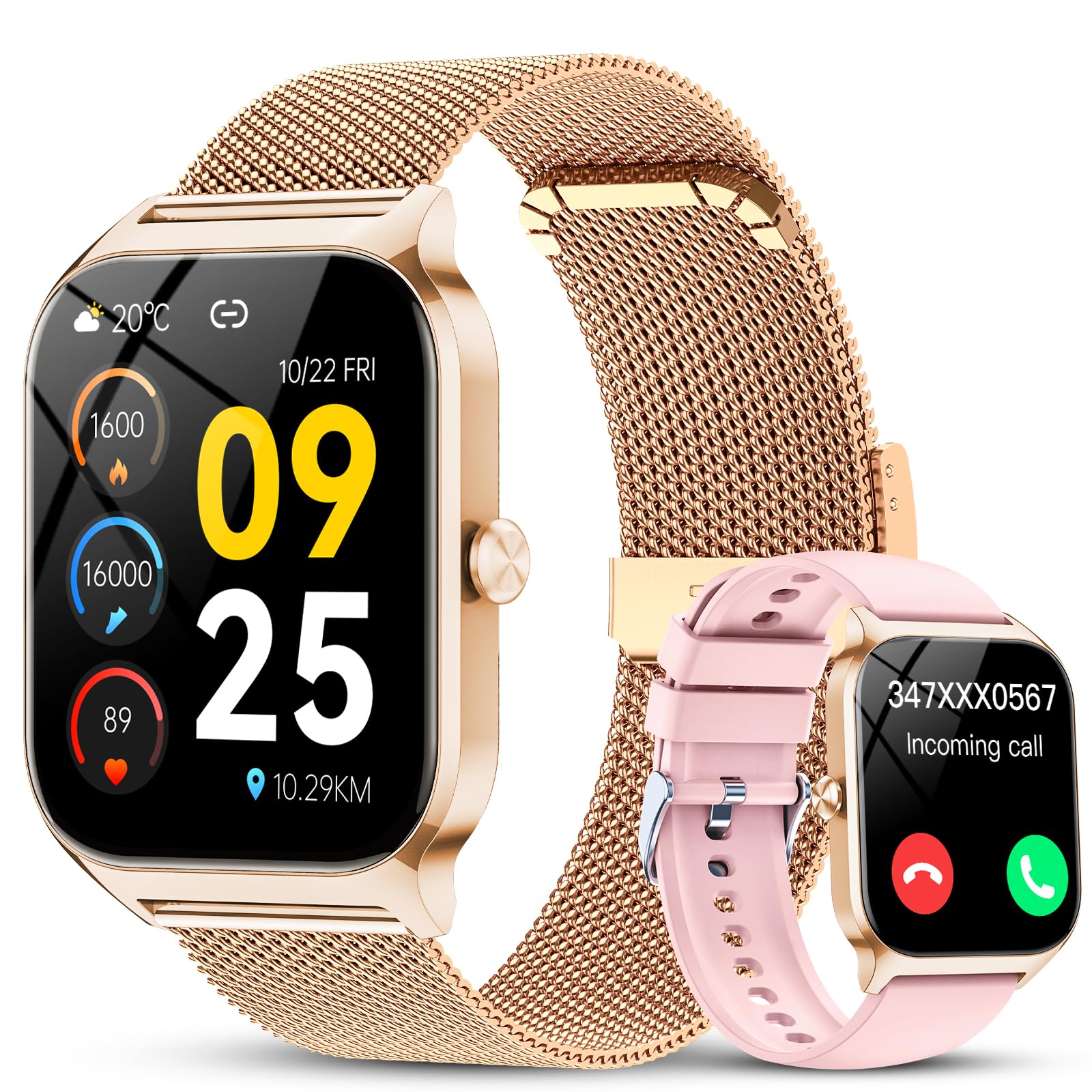
Image: The CASCHO Smartwatch P125, showcasing its elegant rose gold finish and digital display.
2. Contido do paquete
Verifica que todos os elementos estean presentes no teu paquete:
- CASCHO Smartwatch (P125) x 1
- Gold Mesh Strap x 1
- Pink Silicone Strap x 1
- Cable de carga magnético x 1
- Manual de usuario x 1

Image: A visual representation of the smartwatch, two interchangeable straps, magnetic charging cable, and user manual included in the box.
3. Guía de configuración
3.1. Carga do reloxo intelixente
Before first use, fully charge your smartwatch. Connect the magnetic charging cable to the charging points on the back of the watch and plug the USB end into a power adapter (not included) or a computer USB port.
- Tempo de carga: Aproximadamente 1.5 horas para unha carga completa.
- Duración da batería: Ata 7 días de uso típico.
- Tempo de espera: Ata 30 días.

Image: The smartwatch being charged via its magnetic charging cable.
3.2. Instalación e emparellamento da aplicación
To unlock all features, connect your smartwatch to your smartphone via the 'Da Fit' application.
- Activar Bluetooth: Asegúrate de que o Bluetooth estea activado no teu smartphone.
- Descarga a aplicación: Busca 'Da Fit' in the Google Play Store (for Android) or Apple App Store (for iOS), or scan the QR code provided in the physical manual.
- Instalar e abrir: Instala a aplicación "Da Fit" e ábrea.
- Parear dispositivo: In the app, navigate to 'Add Device', select 'P125' from the list, and follow the on-screen prompts to complete the pairing process.

Image: A visual guide demonstrating the steps to connect the smartwatch to your phone via the Da Fit app.
4. Funcionamento do reloxo intelixente
4.1. Navegación básica
The smartwatch features a 1.85-inch HD touchscreen for intuitive navigation. Swipe left, right, up, or down to access different functions and menus. Press the side button to return to the main watch face or to power on/off the device.

Imaxe: A pantalla do reloxo intelixenteasing its high-definition display and vibrant colors.
4.2. Bluetooth Calls and AI Assistant
With the built-in microphone and speaker, you can make and answer calls directly from your wrist when connected to your phone via Bluetooth.
- Facer chamadas: Access contacts or use the dial pad on the watch.
- Responder chamadas: Toca a icona verde na pantalla do reloxo cando recibas unha chamada.
- Asistente de voz AI: Activate the AI assistant to check weather, control music, set alarms, and access other functions using voice commands.

Image: The smartwatch displaying Bluetooth call functions, message notifications, and the voice assistant feature.
4.3. Notificacións intelixentes
Receive real-time notifications from various applications directly on your smartwatch. This includes messages from WhatsApp, Instagram, Facebook, SMS, and other social media apps.
- Nota: The smartwatch can receive messages but does not support replying to them.
- Ensure app permissions are granted in the 'Da Fit' app for notifications to function correctly.

Image: The smartwatch screen showing icons for various smart notifications.
4.4. Esferas de reloxo personalizables
Personalize your smartwatch with over 200 available watch faces. You can also upload your own photos through the 'Da Fit' app to create custom watch faces.

Image: A selection of customizable watch faces available for the smartwatch.
4.5. Outras funcións
- Control de música: Controla a reprodución de música no teu teléfono intelixente (reproducir, pausar, saltar pistas).
- Control da cámara: Usa o teu reloxo intelixente como obturador remoto para a cámara do teu teléfono.
- Informe meteorolóxico: View condicións meteorolóxicas actuais e previsións.
- Recordatorio de sedentarismo: Recibe alertas para moverte despois de períodos de inactividade.
- Buscar teléfono: Localiza o teu teléfono intelixente emparellado facéndoo soar.
- Exercicios de respiración: Sesións de respiración guiada para a relaxación.

Image: The smartwatch interface showing icons for various additional functions.
5. Monitorización da saúde
The CASCHO Smartwatch P125 is equipped with advanced sensors to monitor key health metrics.
- Monitorización da frecuencia cardíaca: The PPG heart rate sensor provides 24/7 heart rate tracking. View your current heart rate and historical data in the 'Da Fit' app.
- Monitorización de osíxeno no sangue (SpO2): Monitorea os teus niveis de saturación de osíxeno no sangue.
- Seguimento do sono: The watch automatically tracks your sleep patterns overnight, providing analysis of deep sleep, light sleep, and wakefulness periods.
- Detección de estrés: The smartwatch can detect stress levels.
- Seguimento do ciclo menstrual feminino: Seguimento e predicción dos ciclos menstruais.
Nota importante: Este dispositivo non é un dispositivo médico. Os datos sanitarios proporcionados son só de referencia e non se deben usar para diagnósticos ou tratamentos médicos.

Image: The smartwatch showing real-time data for heart rate, SpO2, and sleep duration.
6. Seguimento da actividade física
The smartwatch supports over 120 activity modes to help you track your fitness progress.
- Modos de actividade: Includes walking, running, cycling, swimming, yoga, basketball, and more.
- Seguimento de datos: Accurately records steps, calories burned, and distance covered during your workouts.
- Sincronización da aplicación: Synchronize your workout data from the watch to the 'Da Fit' app for comprehensive analysis and progress tracking.

Image: A display of various sports mode icons and a smartphone screen showing detailed activity tracking data.
7. Battery Life and Water Resistance
7.1. Duración da batería
A batería de 450 mAh proporciona un uso prolongado:
- Up to 7 days of daily use.
- Ata 30 días en modo de espera.
- Fast magnetic charging, approximately 1.5 hours for a full charge.
7.2. Resistencia á auga
The smartwatch has an IP68 water resistance rating, meaning it can withstand sweat, rain, and daily splashes. It is suitable for everyday use and light water exposure.
- Nota: Do not use the smartwatch while swimming in saltwater or during hot showers/saunas, as steam and high temperatures can affect its water resistance.

Image: The smartwatch on its magnetic charger, highlighting its long battery life and efficient charging.
8. Especificacións
| Característica | Detalle |
|---|---|
| Número de modelo | P125 |
| Tamaño da pantalla | 1.85 polgadas |
| Tipo de pantalla | AMOLED |
| Resolución | 240 x 284 |
| Capacidade da batería | 450 mAh |
| Tempo de carga | 1.5 horas |
| Duración da batería de uso diario | Ata 7 días |
| Duración da batería en modo de espera | Ata 30 días |
| Conectividade | Bluetooth 5.3 |
| Resistencia á auga | IP68 |
| OS compatible | Android (7.0 e superior), iOS (9.0 e superior) |
| Sensores | Heart Rate, SpO2, Sleep Sensor, G-sensor |
| Funcións especiais | Bluetooth Calls, AI Voice Control, Music Player, Camera Remote, Activity Tracker, Calendar |
| Dimensións | 27.6 x 8.7 x 1.9 cm (Package); 38mm (Width), 53mm (Height), 11.2mm (Thickness) |
| Peso | 90 g |
| Material da correa | Gold Silicone (also includes Pink Silicone) |
9. Mantemento
Proper care will extend the life of your smartwatch:
- Limpeza: Wipe the watch and straps regularly with a soft, dry cloth. For silicone straps, a damp pódese usar un pano con xabón suave e, a seguir, enxágüe e seque ben.
- Evitar produtos químicos: Non empregues produtos químicos agresivos, disolventes de limpeza nin deterxentes fortes, xa que poden danar o acabado e os selos do reloxo.
- Temperatura: Evite expoñer o reloxo a temperaturas extremas (moi quente ou moi frío) ou a cambios bruscos de temperatura.
- Impacto: Protexa o reloxo de impactos ou caídas fortes.
- Cargando: Usa só o cable de carga magnético incluído. Asegúrate de que os contactos de carga estean limpos e secos antes de cargalo.
10 Solución de problemas
Se tes problemas co teu reloxo intelixente, consulta as seguintes solucións habituais:
- O reloxo non se acende:
Ensure the watch is fully charged. Connect it to the charger for at least 10-15 minutes before attempting to power it on again. - Non se pode emparellar co teléfono:
a. Ensure Bluetooth is enabled on your phone.
b. Make sure the 'Da Fit' app is installed and running.
c. Check that the watch is within Bluetooth range (typically 10 meters/33 feet).
d. Restart both your phone and the smartwatch.
e. Forget the device in your phone's Bluetooth settings and try pairing again through the 'Da Fit' app. - Notificacións non recibidas:
a. Verify that the smartwatch is successfully paired with the 'Da Fit' app.
b. Check notification permissions for the 'Da Fit' app in your phone's settings.
c. Ensure that app notifications are enabled within the 'Da Fit' app itself.
d. Make sure your phone's notification bar is receiving messages (if your phone doesn't receive them, the watch won't either). - Inaccurate health data (Heart Rate/SpO2/Sleep):
a. Ensure the watch is worn snugly on your wrist, not too tight or too loose.
b. Keep the sensor area on the back of the watch clean.
c. Avoid excessive movement during measurements.
d. Remember that these are not medical devices; readings are for reference. - A batería esgótase rapidamente:
a. Reduce screen brightness.
b. Limit the number of active notifications.
c. Turn off continuous heart rate monitoring if not needed 24/7.
d. Ensure no background apps are excessively consuming power on the watch.
11. Garantía e soporte
11.1. Garantía do produto
The CASCHO Smartwatch P125 comes with a 1 ano de garantía desde a data de compra, que cobre defectos de fabricación. Esta garantía non cobre danos causados por mal uso, accidentes, modificacións non autorizadas ou desgaste normal.
11.2. Atención ao cliente
For any questions, technical assistance, or warranty claims, please contact CASCHO customer support through the platform where you purchased the product or refer to the contact information provided in the original packaging.