
1. Introdución
Thank you for choosing the Thomson 24HQG3S15C Smart TV. This manual provides essential information for the safe and efficient operation of your new television. Please read these instructions thoroughly before using the product and retain them for future reference.
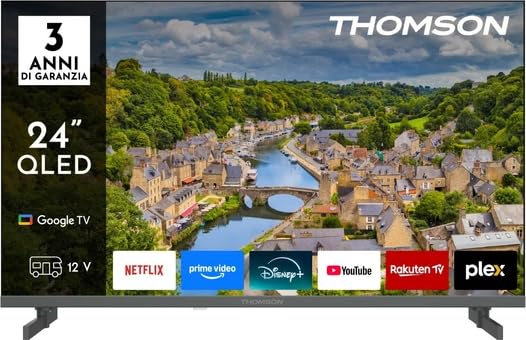
Figura 1: Fronte view of the Thomson 24HQG3S15C Smart TV.
2. Información de seguridade
Observe sempre as seguintes precaucións de seguridade para evitar descargas eléctricas, incendios ou danos no televisor.
- Fonte de enerxía: Asegúrese de que a fonte de alimentación voltage matches the rating label on the TV.
- Ventilación: Non bloquee as aberturas de ventilación. Deixe espazo suficiente arredor do televisor para unha correcta circulación do aire.
- Auga e humidade: Non expoñas o televisor á choiva nin á humidade. Non coloques obxectos cheos de líquidos, como vasos, enriba do televisor.
- Limpeza: Desconecte o televisor antes de limpalo. Use un pano suave e seco. Non empregue produtos de limpeza líquidos nin produtos de limpeza en aerosol.
- Colocación: Coloque o televisor sobre unha superficie estable e nivelada. Evite colocalo baixo a luz solar directa ou preto de fontes de calor.
- Nenos: Vixía os nenos para asegurarte de que non suban ao televisor nin xoguen con el.
- Servizo: Non intente reparar o televisor vostede mesmo. Encargue calquera reparación a persoal de servizo cualificado.
3. Contido do paquete
Carefully unpack your Thomson 24HQG3S15C Smart TV and check that all the following items are included:
- Thomson 24HQG3S15C Smart TV
- Control remoto
- Cable de alimentación
- Manual de usuario (este documento)
- TV Stand (if applicable, check packaging)
- Tornillos para o soporte da TV (se corresponde)
Se falta algún artigo ou está danado, póñase en contacto co seu vendedor inmediatamente.
4. Configuración
4.1 Fixación do soporte (opcional)
If you are not wall-mounting the TV, you will need to attach the included stand. Follow these steps:
- Coloque o televisor boca abaixo sobre unha superficie suave e limpa para evitar danar a pantalla.
- Aliñe o soporte cos orificios de montaxe na parte inferior do televisor.
- Fixa o soporte cos parafusos fornecidos. Asegúrate de que estean ben axustados.
4.2 Montaxe na parede (opcional)
The TV supports VESA standard mounting (100 x 100 mm). Use a compatible wall-mount bracket (not included) and follow the instructions provided with the bracket. Ensure the wall can support the weight of the TV.
Note: Remove the stand before wall mounting.
4.3 Conexión de dispositivos externos
Refer to the following connection options:
- HDMI (x3): Connect Blu-ray players, game consoles, or set-top boxes. The TV supports HDMI 1.4 and Audio Return Channel (ARC) on one port.
- USB 2.0 (x2): Conecta dispositivos de almacenamento USB para a reprodución multimedia.
- Entrada de antena/cable: Connect an antenna for DVB-T/T2 or a cable for DVB-C.
- Entrada de satélite: Connect a satellite dish for DVB-S/S2.
- Ethernet (LAN): Conecta un cable Ethernet para unha conexión a internet por cable.
- Slot CI+: Insert a Common Interface Plus module for encrypted channels.
4.4 Acendido inicial e primeira configuración
- Conecta o cable de alimentación ao televisor e despois a unha toma de corrente.
- Prema o botón de acendido/apagado do mando a distancia ou do televisor.
- The TV will guide you through the initial setup process, including language selection, network connection (Wi-Fi or Ethernet), channel scanning, and Google TV account setup.
5. Funcionamento da túa Smart TV
5.1 Control remotoview
The included remote control allows you to access all functions of your TV. Familiarize yourself with the buttons for power, volume, channel, input selection, and Smart TV navigation.
Note: Insert two AAA batteries (not included) into the remote control, observing polarity.
5.2 Funcións básicas da televisión
- Encendido/apagado: Preme o Poder botón.
- Control de volume: Usa o VOL +/- botóns.
- Selección de canles: Usa o CH +/- botóns ou o teclado numérico.
- Fonte de entrada: Preme o Fonte button to switch between HDMI, TV, USB, etc.
- Menú: Accede ao menú de configuración do televisor.
5.3 Funcións da Smart TV (Google TV)
Your Thomson 24HQG3S15C runs on Google TV, offering a personalized entertainment experience.
- Pantalla de inicio: Access recommended content, installed apps (e.g., Disney+), and settings.
- Control de voz: Use the Google Assistant feature (if available on your remote) to search for content, control smart home devices, and more.
- App Store: Download additional apps from the Google Play Store.
- HbbTV: Access interactive services from broadcasters (if supported in your region).
- Modos intelixentes: Select from various picture and sound modes like Energy Saving, Game, Movie, Sport, Standard, and Vivid.
6. Conectividade
O televisor ofrece varias opcións de conectividade para unha integración perfecta coa rede e os dispositivos da túa casa.
- Wi-Fi: Built-in Wi-Fi allows wireless connection to your home network for internet access and streaming.
- Bluetooth 5.1: Conecta auriculares sen fíos, barras de son ou outros dispositivos con Bluetooth.
- LAN Ethernet: Provides a stable wired internet connection.
- HDMI (x3): High-Definition Multimedia Interface for digital audio and video. One port supports ARC (Audio Return Channel) for simplified audio connections to compatible sound systems.
- USB 2.0 (x2): Universal Serial Bus ports for connecting external storage devices to play media files (3GP, AVI, FLV, MKV, MOV, MP4, MPG, WEBM for video; AAC, FLAC, MP3, WAV for audio; BMP, GIF, JPG, PNG for images).
- Digital Tuners: Supports DVB-C, DVB-S, DVB-S2, DVB-T, DVB-T2 for various digital broadcast standards.
7. Mantemento
7.1 Limpeza do televisor
- Pantalla: Limpe a pantalla con suavidade cun pano suave e sen pelusa. Para marcas difíciles, d lixeiramenteampLimpe o pano con auga ou cun limpador de pantallas especializado (nunca pulverice directamente sobre a pantalla).
- Gabinete: Use un pano suave e seco para limpar o moble do televisor.
- NON usar: Abrasive cleaners, waxes, or solvents like alcohol, benzene, or thinners, as these can damage the TV's finish or screen.
- Desconecte sempre o televisor antes de limpalo.
7.2 Actualizacións de software
Your Smart TV may receive software updates to improve performance and add new features. Ensure your TV is connected to the internet. Updates can usually be checked and installed via the TV's settings menu (System > About > System update).
8 Solución de problemas
Se tes problemas co teu televisor, consulta os seguintes problemas e solucións comúns:
| Problema | Posible causa/solución |
|---|---|
| Sen poder |
|
| Sen imaxe, pero hai son |
|
| Sen son, pero si imaxe |
|
| O control remoto non funciona |
|
| Non se pode conectar á wifi |
|
Se o problema persiste, póñase en contacto co servizo de atención ao cliente.
9. Especificacións
| Característica | Detalle |
|---|---|
| Modelo | Thomson 24HQG3S15C |
| Tamaño de visualización | 24 polgadas (61 cm en diagonal) |
| Resolución | 1366 x 768 píxeles (HD) |
| Tecnoloxía de visualización | QLED |
| Taxa de actualización | 60 Hz |
| Plataforma Smart TV | Google TV |
| Sintonizador dixital | DVB-C, DVB-S, DVB-S2, DVB-T, DVB-T2 |
| Wi-Fi | Si |
| Bluetooth | Versión 5.1 |
| LAN Ethernet | Si |
| Portos HDMI | 3 (HDMI 1.4, one with ARC) |
| Portos USB 2.0 | 2 |
| Saída de audio (RMS) | 6 W (2 speakers) |
| Soporte HDR | HDR10 |
| Montaxe VESA | 100 x 100 mm |
| Dimensións (con soporte) | 53.5 cm (ancho) x 15.1 cm (fondo) x 35.3 cm (alto) |
| Peso (con soporte) | 2.4 kg |
| Clase de eficiencia enerxética (SDR) | E |
| Consumo de enerxía (SDR) | 17 kWh/1000h |
10. Garantía e soporte
For warranty information, please refer to the warranty card included in your product packaging or contact your retailer. Thomson provides customer support for technical assistance and service inquiries.
Please visit the official Thomson website or refer to your purchase documentation for contact details and further support resources.