Introdución
This manual provides detailed instructions for the setup, operation, and maintenance of your Audiovox CE-122 Personal CD Player with Car Kit. Please read this manual thoroughly before using your device to ensure proper functionality and to maximize your listening experience.
The Audiovox CE-122 is a portable CD player designed for versatile use, featuring a Digital Anti-Shock System (DASS) for uninterrupted playback during movement, a 22-track programmable memory, and a bass boost function. It includes a complete car kit for in-vehicle use.
Contido do paquete
Verifique que todos os elementos que se indican a continuación estean incluídos no seu paquete:
- Audiovox CE-122 Portable CD Player
- Auriculares
- Adaptador de CA
- Adaptador de coche
- Adaptador de casete
- Manual do usuario (este documento)
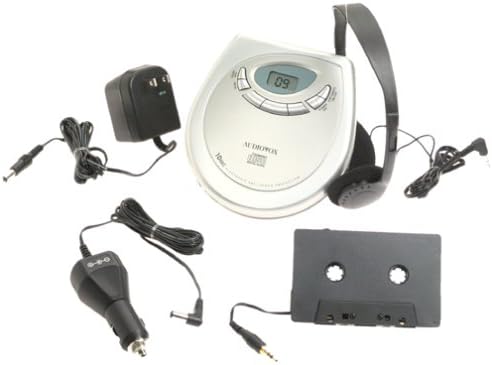
Imaxe: The Audiovox CE-122 portable CD player shown with all its accessories, including headphones, AC adapter, car adapter, and cassette adapter.
Características do produto
- Plays audio CD and CD-R/RW discs.
- AC/DC operation for home and portable use.
- Complete car kit included for in-vehicle audio.
- Digital Anti-Shock System (DASS) provides up to 20 seconds of skip protection.
- 22-track programmable memory for custom playback sequences.
- Bass boost feature for enhanced audio.
- Forward and reverse search functions.
- Repeat and pause functions.
- Key hold switch to prevent accidental button presses.
- Line out jack for connecting to external audio systems.
- Auto power off function to conserve battery life.
- Dual stereo headphone jack for shared listening.
- Built-in charger for rechargeable batteries (rechargeable batteries not included).
Configuración
1. Inserción das pilas
The CD player operates on 4 AA batteries (included). For rechargeable batteries (not included), ensure they are inserted correctly for charging.
- Abra a tapa do compartimento da batería situada na parte inferior da unidade.
- Insira 4 pilas AA, respectando a polaridade correcta (+/-) tal como se indica no interior do compartimento.
- Pecha a tapa do compartimento da batería de forma segura.
2. Connecting Power (AC Adapter)
For home use or to charge rechargeable batteries:
- Plug the small end of the AC adapter into the DC IN 4.5V jack on the CD player.
- Conecte o outro extremo do adaptador de CA a unha toma de corrente estándar.
- If using rechargeable batteries, select the 'charge' function (if available on your model) to begin charging.
3. Conectando auriculares
Plug the headphones into one of the two headphone jacks on the side of the CD player.

Imaxe: Un primeiro plano view of the headphones included with the Audiovox CE-122 CD player.
4. Car Kit Setup
To use the CD player in your vehicle:
- Plug the car adapter into your vehicle's cigarette lighter or 12V power outlet.
- Connect the small end of the car adapter to the DC IN 4.5V jack on the CD player.
- Insert the cassette adapter into your vehicle's cassette player.
- Connect the audio cable from the cassette adapter to the LINE OUT jack on the CD player.
- Ensure your car stereo is set to the cassette function to hear the CD player's audio.
Instrucións de funcionamento
1. Inserción dun CD
- Prema o botón OPEN para abrir a tapa do compartimento do CD.
- Place a CD (audio CD or CD-R/RW) onto the center spindle with the label side facing up.
- Prema suavemente o CD cara abaixo ata que encaixe no seu lugar.
- Peche firmemente a tapa do compartimento do CD ata que encaixe.

Imaxe: The Audiovox CE-122 portable CD player with its lid open, revealing the disc compartment where a CD is placed.
2. Reprodución básica
- Xogar: Preme o REPRODUCIR/PAUSA button to start playback. The track number will appear on the display.
- Pausa: Preme o REPRODUCIR/PAUSA button during playback to pause. Press again to resume.
- Parar: Preme o PARA botón para deter a reprodución.
3. Track Navigation
- Saltar pista: Preme o SALTA ADIANTE (►►) or SALTAR ATRÁS (◄◄) buttons to move to the next or previous track.
- Busca: Manteña premido o SALTA ADIANTE (►►) or SALTAR ATRÁS (◄◄) buttons during playback to fast forward or rewind within a track.
4. Función de repetición
Preme o REPETIR button to cycle through repeat modes:
- Repetir 1: Repite a pista actual.
- Repetir todo: Repite todas as pistas do disco.
- Repetir desactivado: Disables repeat function.
5. Programmable Memory
Podes programar ata 22 pistas para reproducir nunha orde específica:
- Co CD parado, prema o botón PROGRAMA botón.
- Usa o SALTA ADIANTE (►►) or SALTAR ATRÁS (◄◄) buttons to select the desired track.
- Preme PROGRAMA again to add the track to the memory.
- Repita os pasos 2 e 3 para un máximo de 22 pistas.
- Preme REPRODUCIR/PAUSA to start playback of the programmed sequence.
6. Reforzo de graves
Preme o BASS BOOST botón para activar ou desactivar a función de mellora dos graves.
7. Key Hold Switch
Desliza o ATENCIÓN switch to the ON position to disable all buttons, preventing accidental operation during transport.
8. Digital Anti-Shock System (DASS)
The DASS provides up to 20 seconds of skip protection. This feature is automatically active during playback to ensure smooth audio even during movement.
9. Apagado automático
The unit will automatically power off after a period of inactivity or when a CD finishes playing to conserve battery life.

Imaxe: The Audiovox CE-122 portable CD player, a silver-colored device with a digital display and control buttons, shown alongside its black over-ear headphones.
Mantemento
1. Cleaning the CD Player
- Limpe o exterior da unidade cun pano suave e seco. Non empregue produtos de limpeza abrasivos nin solventes.
- To clean the lens, use a specialized CD lens cleaner disc. Do not touch the lens directly.
2. Coidado da batería
- Retire as pilas se non vai usar a unidade durante un período prolongado para evitar fugas.
- Replace all batteries at the same time; do not mix old and new batteries or different types of batteries.
3. Almacenamento
Garde o reprodutor de CD nun lugar fresco e seco, lonxe da luz solar directa e de temperaturas extremas.
Resolución de problemas
If you encounter issues with your Audiovox CE-122, please refer to the following common problems and solutions:
- Sen enerxía:
• Check if batteries are inserted correctly and are not depleted. Replace if necessary.
• Ensure the AC adapter or car adapter is securely connected and the power source is active. - CD Not Playing / Disc Error:
• Ensure the CD is inserted correctly with the label side up.
• Check if the CD is scratched or dirty. Clean the CD with a soft, lint-free cloth.
• Make sure the CD compartment lid is fully closed.
• The disc format may not be supported (e.g., data CD instead of audio CD or CD-R/RW). - Skipping During Playback:
• While the DASS provides protection, severe shocks or vibrations can still cause skipping. Try to keep the player stable.
• Ensure the CD is clean and free of scratches.
• Low battery power can sometimes affect anti-shock performance. Replace or recharge batteries. - Sen son:
• Check headphone connection and ensure they are fully plugged in.
• Axuste o nivel de volume.
• If using the car kit, ensure the car stereo is set to the correct input (cassette function) and volume is up. - Botóns que non responden:
• Comprobe se o ATENCIÓN switch is in the ON position. Slide it to OFF to enable buttons.
Especificacións
| Número de modelo | CE-122 |
| Formatos de disco admitidos | Audio CD, CD-R/RW (MP3 compatible) |
| Protección antichoque | 20 seconds (Digital Anti-Shock System) |
| Memoria programable | 22 pistas |
| Fonte de enerxía | 4 x AA batteries, AC adapter (4.5V DC), Car adapter (12V DC) |
| Conectividade | Auxiliary (Line Out), Dual Headphone Jacks |
| Dimensións (aprox.) | 11.1 x 7.8 x 3.2 polgadas (embalaxe) |
| Peso (aprox.) | 1.5 libras |
Garantía e Soporte
For warranty information and customer support, please refer to the documentation provided at the time of purchase or contact Audiovox customer service. Keep your proof of purchase for warranty claims.


