1. Produto rematadoview
The Sitecom CN-019 is a 4-port USB 2.0 hub designed to expand the USB connectivity of your computer or notebook. It provides four additional USB ports, allowing you to connect multiple USB devices simultaneously. This hub is self-powered, meaning it includes its own power adapter to ensure stable power delivery to connected devices, especially those with higher power requirements like external hard drives.
It supports USB 2.0 for high-speed data transfer up to 480 Mbps and is backward compatible with USB 1.1 devices. The hub is compatible with various operating systems, including Windows 98/ME/2000/XP and Mac OS.
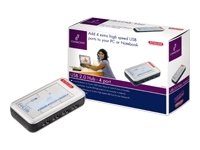
Image 1.1: The Sitecom CN-019 4-Port USB 2.0 Powered Hub, showing its compact design and multiple USB ports.
2. Contido do paquete
Please check the package contents. If any items are missing or damaged, contact your retailer.
- Sitecom CN-019 4-Port USB 2.0 Hub
- 110/220 V AC Power Adapter
- USB Cable (for connecting the hub to your computer)
- Manual de usuario (este documento)
3. Configuración
Follow these steps to set up your Sitecom CN-019 USB hub:
- Conecte o adaptador de alimentación: Plug the included 110/220 V AC power adapter into the power input port on the Sitecom CN-019 hub. Then, plug the power adapter into a standard electrical outlet. This provides external power to the hub and connected devices.
- Conéctate ao teu ordenador: Use the provided USB cable to connect the upstream USB port on the Sitecom CN-019 hub to an available USB port on your computer or notebook.
- Instalar controladores (se é necesario): The Sitecom CN-019 is typically plug-and-play. Your operating system (Windows 98/ME/2000/XP, Mac OS) should automatically detect and install the necessary drivers. If prompted, follow the on-screen instructions.
- Conectar dispositivos USB: Once the hub is recognized, you can connect your USB devices (e.g., mouse, keyboard, printer, external hard drive) to the four available downstream USB ports on the hub.
The hub's status indicator (if present) should illuminate, indicating it is powered and ready for use.
4. Instrucións de funcionamento
The Sitecom CN-019 USB hub operates as a standard USB 2.0 hub, extending your computer's USB capabilities.
- Transferencia de datos: The hub supports USB 2.0 specifications, allowing data transfer speeds of up to 480 Mbps. This is suitable for most peripherals and data storage devices.
- Compatibilidade cara atrás: It is fully backward compatible with USB 1.1 devices, though data transfer speeds will be limited to USB 1.1 rates (up to 12 Mbps) when such devices are connected.
- Powered Ports: The external power adapter ensures that each of the four ports can provide sufficient power to connected devices, which is crucial for devices like external hard drives that require more power than a bus-powered hub can typically supply.
- Intercambio en quente: USB devices can be connected and disconnected from the hub while your computer is running, without needing to restart.
5. Mantemento
To ensure the longevity and optimal performance of your Sitecom CN-019 USB hub, follow these simple maintenance guidelines:
- Limpeza: Use a soft, dry cloth to clean the exterior of the hub. Do not use liquid cleaners or aerosols, as they may damage the device.
- Almacenamento: Cando non o use durante períodos prolongados, garde o hub nun lugar fresco e seco, lonxe da luz solar directa e de temperaturas extremas.
- Manexo: Avoid dropping the hub or subjecting it to strong impacts. Do not attempt to open the casing, xa que isto anulará a garantía.
- Ventilación: Ensure the hub is placed in an area with adequate ventilation to prevent overheating.
6 Solución de problemas
If you encounter issues with your Sitecom CN-019 USB hub, refer to the following common problems and solutions:
| Problema | Posible causa/solución |
|---|---|
| Hub or connected device is not recognized by the computer. |
|
| Connected device is not receiving enough power or is unstable. |
|
| Velocidades lentas de transferencia de datos. |
|
7. Especificacións
| Característica | Detalle |
|---|---|
| Número de modelo | NC-019 |
| Marca | Sitecom |
| Número de portos | 4 x USB 2.0 Downstream Ports |
| Interface de hardware | USB 2.0, USB 1.1 (backward compatible) |
| Taxa de transferencia de datos | Ata 480 Mbps (USB 2.0) |
| Fonte de enerxía | 110/220 V AC Adapter (included) |
| Compatibilidade do sistema operativo | Windows 98/ME/2000/XP, Mac OS |
| Características especiais | Multi-platform compatible, Powered Hub |
| Material | Plástico |
| Dimensións (paquete) | 21.2 x 15 x 7.2 cm; 300 g (approx.) |
8. Garantía e soporte
Sitecom products are designed for reliability and performance. For information regarding warranty terms and conditions, please refer to the warranty card included with your product or visit the official Sitecom website. For technical support or further assistance, please contact Sitecom customer service through their official channels.
Garda o teu recibo de compra como xustificante de compra para reclamacións de garantía.


