Introdución
This manual provides comprehensive instructions for the setup, operation, and maintenance of your Hughes HBH-SA Satellite Receiver. This receiver is designed to provide access to a wide range of digital quality channels, offering a rich entertainment experience.
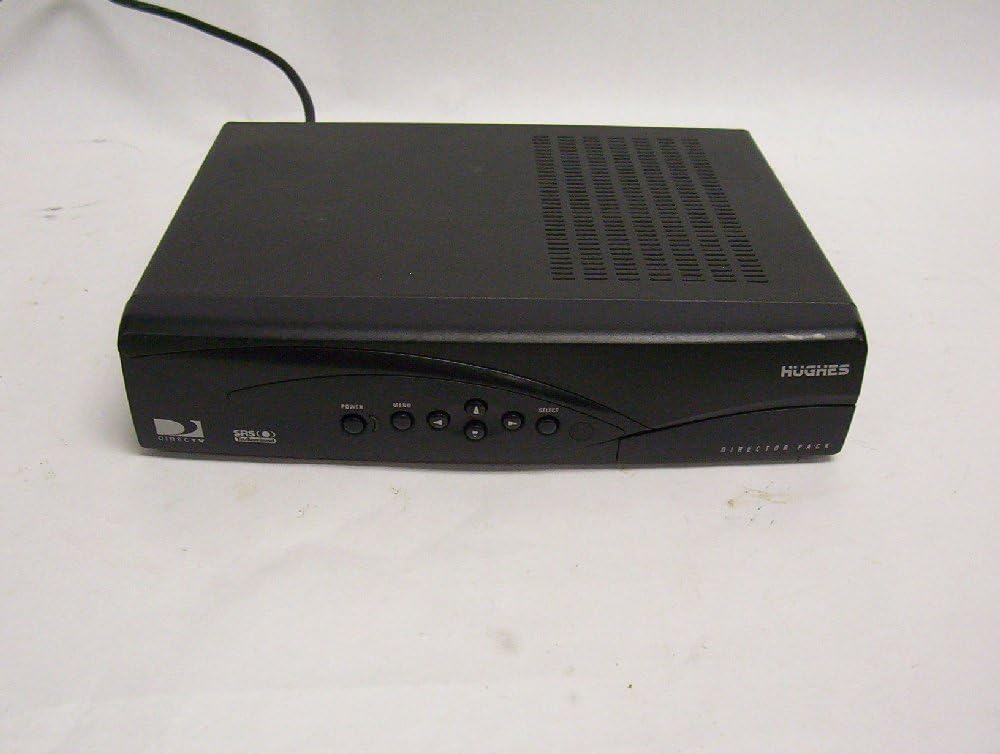
Figura 1: Fronte view of the Hughes HBH-SA Satellite Receiver.
Key features of the HBH-SA receiver include:
- Full theatre sound with TruSurround technology.
- Robust Parental Controls for managing content access.
- Equipped with a 166 MHz Processor for efficient performance.
- Caller ID compatibility (requires service through your phone company).
- Zoom picture-in-picture Guide for continuous viewing of two programs simultaneously.
Guía de configuración
Follow these steps to properly set up your Hughes HBH-SA Satellite Receiver:
- Desembalaxe: Carefully remove the receiver from its packaging. Ensure all components, including the receiver and power cord, are present.
- Colocación: Place the receiver on a flat, stable surface with adequate ventilation. Avoid placing it near heat sources or in enclosed spaces.
- Conectar a entrada de satélite: Connect the satellite coaxial cable from your satellite dish to the "SAT IN" port on the back of the receiver.
- Conectar á televisión:
- For standard definition video and stereo audio, connect RCA composite video (yellow) and audio (red/white) cables from the receiver's "VIDEO OUT" and "AUDIO OUT" ports to the corresponding input ports on your television.
- Alternatively, use an S-Video cable for improved video quality, connecting from the receiver's "S-VIDEO" port to your TV's S-Video input.
- Connect Phone Line (Optional): If you wish to use the Caller ID feature or order Pay-Per-View, connect a standard phone line to the "PHONE JACK" port on the back of the receiver.
- Conexión de alimentación: Plug the receiver's power cord into a standard electrical outlet.
- Encendido inicial: Turn on your television and select the correct input source (e.g., Video 1, AV, S-Video). Then, press the POWER button on the receiver's front panel or remote control.
- Configuración en pantalla: Follow the on-screen prompts to complete the initial setup, including satellite signal acquisition and channel scanning.

Figure 2: Rear panel connections for the Hughes HBH-SA Satellite Receiver.
Instrucións de funcionamento
This section details the basic operation of your satellite receiver.

Figure 3: Front panel controls including Power, Menu, and Navigation buttons.
- Encendido/apagado: Preme o POTENCIA button on the front panel or remote control to turn the receiver on or off.
- Selección de canles: Usa o CANAL ARRIBA / ABAIXO buttons on the remote or front panel to navigate through channels. You can also enter channel numbers directly using the remote's numeric keypad.
- Navegación do menú: Preme o MENÚ button to access the on-screen menu. Use the arrow buttons (ARRIBA, ABAIXO, ESQUERDA, DEREITA) para navegar polas opcións e o SELECCIONAR botón para confirmar as seleccións.
- Control de volume: Axuste o volume empregando o SUBIR/BAIXAR VOLUME buttons on your television remote or the receiver's remote if it controls TV volume.
- Controis parentais: Access the Parental Controls menu via the main menu to set viewing restrictions based on ratings or specific channels. A PIN is required to enable or disable these controls.
- Imaxe en imaxe (PIP): The receiver supports a Zoom PIP Guide. Consult the on-screen menu for options to activate and manage the PIP feature, allowing you to view two programs simultaneously.
- TruSurround Sound: The receiver automatically processes audio for TruSurround sound. Ensure your audio system is configured to receive multi-channel audio for the best experience.
Mantemento
Un mantemento axeitado garante a lonxevidade e o rendemento óptimo do seu receptor.
- Limpeza: Disconnect the power cord before cleaning. Use a soft, dry cloth to wipe the exterior of the receiver. Do not use liquid cleaners, aerosols, or abrasive materials.
- Ventilación: Ensure that the ventilation slots on the receiver are not blocked. Proper airflow prevents overheating and extends the life of the unit.
- Condicións ambientais: Avoid exposing the receiver to extreme temperatures, high humidity, or direct sunlight.
Resolución de problemas
This section addresses common issues you might encounter with your Hughes HBH-SA Satellite Receiver.
| Problema | Causa posible | Solución |
|---|---|---|
| Sen Poder | Power cord disconnected; Power outlet malfunction. | Ensure the power cord is securely plugged into the receiver and a working electrical outlet. Test the outlet with another device. |
| Sen sinal / Pantalla negra | Incorrect TV input selected; Satellite cable disconnected; Satellite dish alignment issue. | Verify your TV is on the correct input (e.g., AV1, S-Video). Check that the satellite coaxial cable is securely connected to the "SAT IN" port. If the issue persists, your satellite dish may require realignment by a professional. |
| Sen son | Audio cables disconnected; TV volume muted or too low; Incorrect audio settings. | Check that the red and white audio RCA cables are securely connected. Ensure your TV's volume is up and not muted. Check the receiver's audio settings in the menu. |
| Mala calidade de imaxe | Loose video connection; Interference; Low signal strength. | Ensure video cables (yellow RCA or S-Video) are firmly connected. Minimize interference from other electronic devices. Check signal strength in the receiver's menu. |
| O control remoto non funciona | Dead batteries; Obstruction between remote and receiver; Remote not paired (if applicable). | Replace batteries. Remove any obstructions. Ensure you are pointing the remote directly at the receiver's IR sensor. |
Especificacións
Technical specifications for the Hughes HBH-SA Satellite Receiver:
| Característica | Detalle |
|---|---|
| Número de modelo | HBH-SA |
| Marca | Hughes |
| Dimensións do produto | 4.72 x 3.15 x 0.98 polgadas |
| Peso do elemento | 4 libras |
| Cor | Negro |
| Tecnoloxía de conectividade | UNK (Likely Composite Video, S-Video, RCA Audio, Coaxial Satellite In, Phone Jack) |
| Modo de saída de audio | Surround (TruSurround) |
| Procesador | 166 MHz |
Información da garantía
Specific warranty details for the Hughes HBH-SA Satellite Receiver are typically provided with the original product packaging or can be obtained directly from the manufacturer. Please refer to any documentation included with your purchase or visit the official Hughes websitio web para coñecer os termos e condicións de garantía máis actuais.
Atención ao cliente
For technical assistance, troubleshooting beyond this guide, or service inquiries, please contact Hughes customer support. Contact information is usually available on the manufacturer's official website or through your service provider (e.g., DirecTV). Have your model number (HBH-SA) and any relevant purchase information ready when contacting support.


