1. Introdución
Grazas pola compraasing the GPX BCD2004 Boombox. This portable audio system features a top-loading CD player and an AM/FM tuner, designed for versatile audio playback. This manual provides essential information for setting up, operating, and maintaining your device to ensure optimal performance and longevity.
2. Información de seguridade
- Ler as instrucións: Carefully read all operating instructions before using the unit.
- Instrucións para conservar: Conserve este manual para futuras consultas.
- Auga e humidade: Non expoña este aparello a goteos ou salpicaduras de auga. Non coloque obxectos cheos de líquidos, como vasos, enriba do aparello.
- Ventilación: Asegúrese de que haxa unha ventilación axeitada. Non bloquee ningunha das aberturas de ventilación.
- Calor: Non o coloque preto de fontes de calor como radiadores, reixas de calor, estufas ou outros aparellos (incluídos amplificadores) que producen calor.
- Fontes de enerxía: Use only the power source indicated on the appliance.
- Baterías: Follow battery safety guidelines. Do not mix old and new batteries, or different types of batteries. Remove batteries if the unit is not used for extended periods.
- Servizo: Encargue toda a reparación a persoal de servizo cualificado.
3. Contido do paquete
Comprobe que o seu paquete inclúe os seguintes elementos:
- GPX BCD2004 Boombox Unit
- Cable de alimentación de CA
- Manual de usuario
4. Controis e funcións adicionaisview
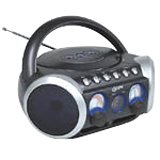
Figura 1: Fronte view of the GPX BCD2004 Boombox. This image shows the overall design of the boombox, including the speaker grilles and the general layout of the front panel.
Familiarize yourself with the main controls and features of your boombox:
- Compartimento de CD: Top-loading bay for inserting CDs.
- Interruptor de función: Selects between CD, AM, FM, and OFF modes.
- Control de volume: Rotary dial to adjust the audio output level.
- Dial de axuste: Rotary dial for selecting AM or FM radio frequencies.
- Botón Reproducir/Pausa: Starts or temporarily stops CD playback.
- Botón de parada: Detén a reprodución de CD.
- Botóns de saltar/buscar (◀◀ / ▶▶): Salta á pista anterior/seguinte ou busca dentro dunha pista.
- Botón de programa: Used to program a sequence of tracks for CD playback.
- Botón de repetición: Repeats the current track or the entire CD.
- Antena AM/FM: Telescopic antenna for FM reception, internal antenna for AM.
- Entrada de enerxía CA: Jack for connecting the AC power cord.
- Compartimento de batería: Located on the bottom or rear for 'C' batteries.
- Fold-down Carrying Handle: Para unha fácil portabilidade.
5. Configuración
5.1 Alimentación da unidade
Your GPX BCD2004 Boombox can be powered by either AC power or batteries.
Funcionamento de enerxía CA.
- Ensure the Function Switch is in the OFF position.
- Insert the small end of the AC power cord into the AC power input jack on the back of the unit.
- Conecte o outro extremo do cable de alimentación CA a unha toma de corrente CA estándar (120 V ~ 60 Hz).
Funcionamento da batería
For portable use, the boombox requires 8 'C' size batteries (not included).
- Ensure the Function Switch is in the OFF position.
- Open the battery compartment cover located on the bottom or rear of the unit.
- Insira 8 pilas de tamaño 'C', respectando a polaridade correcta (+ e -) tal como se indica no interior do compartimento.
- Pecha a tapa do compartimento da batería de forma segura.
- Nota: When operating on battery power, disconnect the AC power cord from the unit.
6. Funcionamento do reprodutor de CD
The GPX BCD2004 is compatible with standard audio CDs, CD-R, and CD-RW discs.
6.1 Cargar un CD
- Lift the CD compartment door located on the top of the unit.
- Coloque un CD no eixo central coa etiqueta cara arriba.
- Gently close the CD compartment door until it clicks shut.
6.2 Reprodución básica de CD
- Coloque o interruptor de función na posición CD.
- The CD player will begin to read the disc. The track number will typically display.
- Press the PLAY/PAUSE (▶/██) button to start playback.
- Axuste o control de volume ao nivel de escoita desexado.
- To pause playback, press the PLAY/PAUSE (▶/██) button. Press it again to resume.
- To stop playback, press the STOP (■) button.
6.3 Skipping and Searching Tracks
- Saltar pista: During playback, press the SKIP/SEARCH FORWARD (▶▶) button to go to the next track. Press the SKIP/SEARCH BACKWARD (◀◀) button to go to the beginning of the current track, or press it twice to go to the previous track.
- Search Within Track: During playback, press and hold the SKIP/SEARCH FORWARD (▶▶) or SKIP/SEARCH BACKWARD (◀◀) button to fast forward or rewind through the current track. Release the button to resume normal playback.
6.4 Program Play
Podes programar ata 16 pistas para reproducir nunha orde específica.
- In STOP mode, press the PROGRAM button. The program indicator will flash.
- Use the SKIP/SEARCH buttons (◀◀ / ▶▶) to select your desired first track.
- Press the PROGRAM button again to confirm the selection.
- Repita os pasos 2 e 3 para engadir ata 16 pistas á súa lista de programas.
- After programming all desired tracks, press the PLAY/PAUSE (▶/██) button to start programmed playback.
- To clear the program, press the STOP (■) button twice.
6.5 Repeat Play
During CD playback, press the REPEAT button:
- Prema unha vez para Repetir 1 (repeats the current track).
- Prema dúas veces para Repetir todo (repeats the entire CD or programmed tracks).
- Press a third time to cancel repeat function.
7. Operating the AM/FM Radio
7.1 Tuning to Radio Stations
- Set the Function Switch to either the AM or FM position.
- Adjust the Tuning Dial to select your desired radio station.
- Axuste o control de volume ao nivel de escoita desexado.
7.2 Improving Radio Reception
- Recepción FM: Extend the telescopic antenna fully and adjust its position for the best reception.
- Recepción AM: The unit has a built-in AM antenna. Rotate the entire boombox for optimal AM reception.
8. Mantemento
8.1 Limpeza da unidade
- Limpe o exterior da unidade cun suave, damp pano. Non use produtos de limpeza ou disolventes abrasivos.
- Para a lente do CD, use un disco limpador de lentes de CD especializado ou un pano suave e sen fiapos deseñado especificamente para lentes ópticas.
8.2 Coidado coa batería
- Retire as pilas se non vai usar a unidade durante un período prolongado para evitar fugas.
- Elimina as baterías usadas de forma responsable segundo a normativa local.
9 Solución de problemas
If you experience issues with your boombox, please refer to the following common problems and solutions:
| Problema | Causa posible | Solución |
|---|---|---|
| Sen poder | AC cord not connected; Batteries dead or incorrectly inserted; Function switch OFF. | Check AC cord connection; Replace batteries or check polarity; Set Function switch to CD, AM, or FM. |
| Non se reproduce o CD | CD inserted incorrectly; CD dirty or scratched; CD compartment door open; Function switch not on CD. | Insert CD with label side up; Clean or replace CD; Close CD door securely; Set Function switch to CD. |
| Mala recepción de radio | Antena non estendida/axustada; sinal débil. | Extend and adjust FM antenna; Rotate unit for AM reception; Try a different location. |
| Sen son nin baixo volume | Volume too low; Unit in pause mode. | Increase volume; Press Play/Pause button to resume playback. |
10. Especificacións
- Modelo: BCD2004
- Marca: GPX
- Compatibilidade con CD: CD, CD-R, CD-RW
- Sintonizador de radio: AM/FM
- Fonte de enerxía: AC 120V ~ 60Hz or 8 x 'C' Batteries (not included)
- Relatores: 2 Full-range speakers
- Dimensións (aprox.): 33.02 x 27.94 x 17.02 cm (L x W x H)
- Peso (aprox.): 2.18 kg
- Características: 16-track programming, Repeat play, Song skip/search, Fold-down carrying handle
11. Garantía e soporte
This GPX BCD2004 Boombox comes with a Garantía de 90 días from the date of original purchase. This warranty covers defects in materials and workmanship under normal use.
For warranty service or technical support, please refer to the contact information provided with your purchase documentation or visit the official GPX website. Please have your model number (BCD2004) and proof of purchase ready when contacting support.