1. Introdución
The Extech EX330 is a compact, autoranging digital multimeter designed for a wide range of electrical and electronic measurements. Its robust design and comprehensive features make it an essential tool for professionals and hobbyists alike. This manual provides detailed instructions for the safe and effective use of your EX330 multimeter.
Key features of the EX330 include:
- Vol. AC integrada sin contactotage detector (NCV) for enhanced safety.
- Large 4000-count LCD display for clear readings.
- Automatic ranging for simplified operation.
- Medidas AC/DC Voltage, AC/DC Current, Resistance, Capacitance, Frequency, Duty Cycle, and Temperature.
- Diode test and Continuity check functions.
- Data Hold and Max Hold features.
- Durable rubber holster for protection.
- UL listed Cat III 600V safety rating.

2. Iniciación
2.1. Instalación da batería
The EX330 multimeter requires two AAA batteries for operation. To install or replace batteries:
- Asegúrate de que o multímetro estea apagado.
- Localice o compartimento da batería na parte traseira da unidade.
- Use un desaparafusador para abrir a tapa do compartimento da batería.
- Insira dúas pilas AAA, respectando a polaridade correcta (+ e -) tal como se indica no interior do compartimento.
- Coloque a tapa do compartimento da batería e fíxaa co parafuso.
2.2. Conexión dos cables de proba
The multimeter comes with a set of red and black test leads. Proper connection is crucial for accurate and safe measurements.
- Conecte sempre o cable de proba negro ao COM Toma de entrada (común).
- Para a maioría dos volumestage, resistance, and continuity measurements, connect the red test lead to the V/Ω/µA/CAP/Hz/Temp toma de entrada.
- For current measurements up to 400mA, connect the red test lead to the mA toma de entrada.
- For high current measurements up to 10A, connect the red test lead to the 10A toma de entrada.

3. Instrucións de funcionamento
3.1. Acendido/apagado
To turn the multimeter on, rotate the function switch from the DESACTIVADO position to any desired measurement function. To turn the multimeter off, rotate the function switch back to the DESACTIVADO posición.
3.2. Function Selection (Rotary Dial)
The large rotary dial on the front of the multimeter allows you to select the desired measurement function. The EX330 features automatic ranging, which simplifies operation by automatically selecting the correct measurement range.
- VAC / VDC: Measures AC or DC Voltage.
- mA / 10A: Measures AC or DC Current (milliampere ou ampere).
- Ω: Measures Resistance.
- CAP: Measures Capacitance.
- Hz /%: Measures Frequency and Duty Cycle.
- ° F / ° C: Measures Temperature in Fahrenheit or Celsius.
- Diodo / Continuidade: Tests diodes and checks for circuit continuity.
3.3. Vol. sen contactotagDetección e (NCV).
The NCV feature allows for quick detection of AC voltage without direct contact, enhancing safety when working with electrical systems. To use the NCV function, press and hold the NCV button. The top of the meter will illuminate and an audible tone will sound if AC voltage é detectado.

3.4. VootagMedición (CA/CC)
Para medir voltage:
- Establece o dial rotativo para VAC or VDC segundo corresponda.
- Conecte o cable de proba negro ao COM conector e o cable de proba vermello para o V/Ω/µA/CAP/Hz/Temp jack.
- Connect the test probes in parallel across the circuit or component to be measured.
- Le o voltago valor da pantalla LCD.

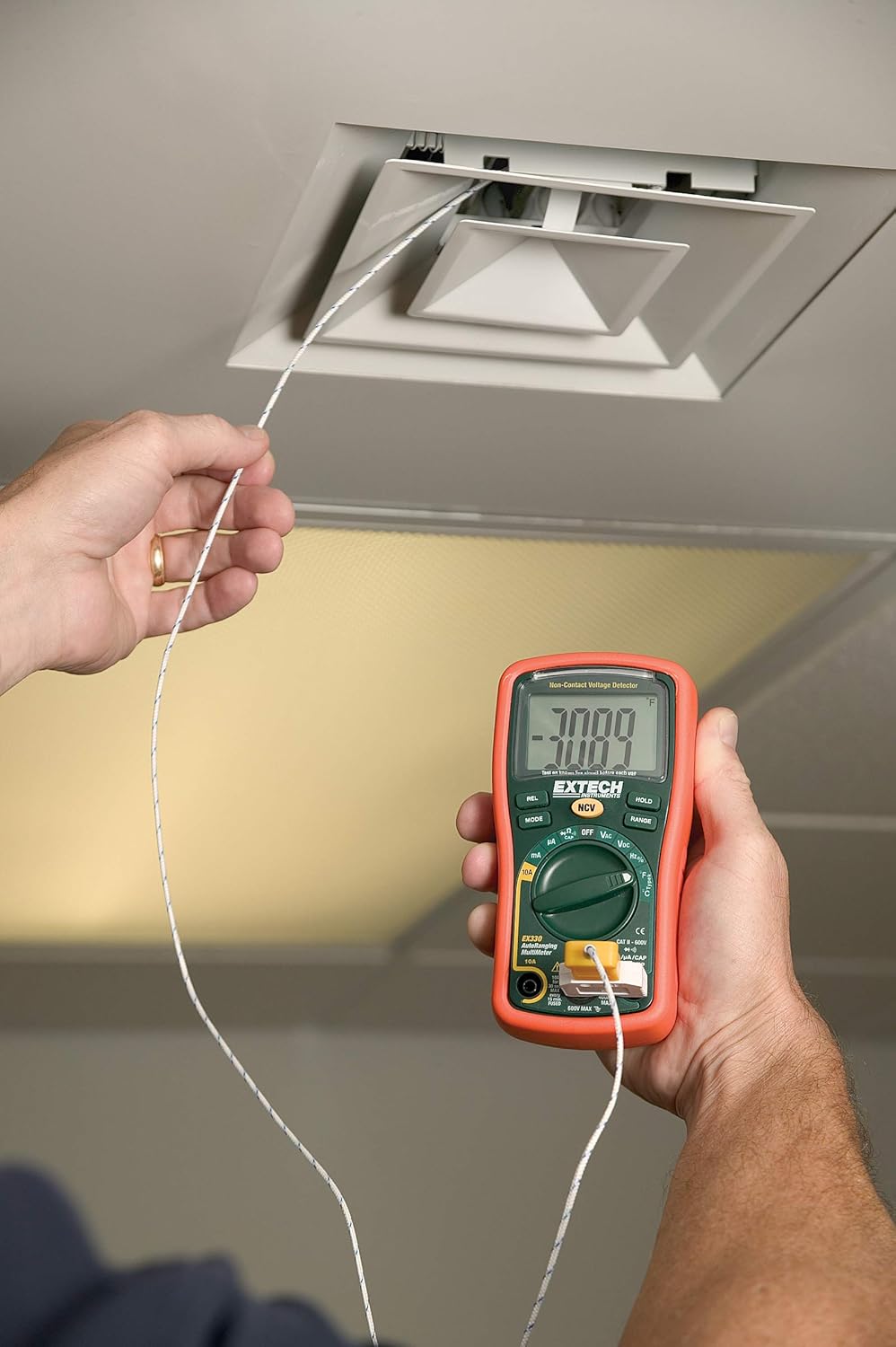
3.5. Temperature Measurement (Type K)
The EX330 includes a Type K temperature probe for accurate temperature readings.
- Establece o dial rotativo para °F or °C.
- Plug the Type K temperature probe into the V/Ω/µA/CAP/Hz/Temp e COM input jacks, observing polarity.
- Coloque a punta da sonda de temperatura sobre ou preto do obxecto cuxa temperatura se vai medir.
- Allow time for the reading to stabilize on the display.
3.6. Data Hold and Max Hold
- Preme o ATENCIÓN botón para conxelar a lectura actual na pantalla. Prema de novo para soltala.
- Preme o MODO button repeatedly while in certain functions to cycle through sub-functions or to activate ATENCIÓN MÁXIMA, which captures and displays the maximum measured value.
3.7. Características do produtoview
Mira este vídeo para unha rápida análiseview of the Extech EX330's key features and applications.
Vídeo 3.1: Rematadoview of Extech EX330 Multimeter features, including AC/DC voltage measurement, 4000-count display, built-in non-contact voltage detector, and Type K temperature measurement.
3.8. Accuracy Demonstration
This video demonstrates the accuracy and reliability of Extech multimeters, showcasing two units providing consistent readings when measuring voltage from a power supply.
Video 3.2: Demonstration of two Extech multimeters measuring voltage from a power supply, highlighting their consistent and accurate readings over time.
4. Mantemento e coidados
4.1. Limpeza
Para limpar o multímetro, use un pano suave eamp cloth. Do not use abrasives or solvents. Ensure the unit is off and disconnected from any circuits before cleaning.
4.2. Substitución da batería
When the battery indicator appears on the display, replace the batteries as described in Section 2.1. Prompt battery replacement ensures continued accuracy and proper operation.
4.3. Substitución de fusibles
If the multimeter fails to measure current, the fuse may need replacement. Refer to the specifications for the correct fuse type and rating. Fuse replacement should only be performed by qualified personnel.
5 Solución de problemas
This section addresses common issues you might encounter with your EX330 multimeter.
| Problema | Causa posible | Solución |
|---|---|---|
| Sen pantalla ou pantalla escura | Pilas esgotas ou baixas | Substituír as baterías (Sección 2.1) |
| Lecturas incorrectas | Incorrect function selected, poor test lead connection, damaged test leads | Verify function, check connections, replace test leads if damaged |
| No current measurement | Fusible fundido | Replace fuse (Section 4.3) |
| NCV non detecta volumetage | Voltage too low, interference, or incorrect usage | Garantir voltage is within detectable range, minimize interference, follow NCV instructions (Section 3.3) |
6. Especificacións técnicas
| Especificación | Valor |
|---|---|
| Mostrar | 4000 Count LCD |
| AC / DC Voltage | Ata 600V |
| Corrente CA / CC | Ata 10A |
| Resistencia | Ata 40 MΩ |
| Capacitancia | Up to 100µF |
| Frecuencia | Ata 10 MHz |
| Temperatura (Tipo K) | -4 a 1382 °F (-20 a 750 °C) |
| Vol. Sen contactotage (NCV) | 100 a 600 VCA |
| Fonte de enerxía | 2 pilas AAA (incluídas) |
| Dimensións (L x W x H) | 5.7 x 2.9 x 1.6 polgadas |
| Peso | 9.9 onzas (0.28 kg) |
| Valoración de seguridade | UL listed Cat III - 600V |
| País de Orixe | China |

7. Garantía e soporte
7.1. Información da garantía
The Extech EX330 Autoranging Mini Multimeter is covered by a Garantía de pezas e man de obra de 1 anos from the date of purchase. This warranty covers defects in materials and workmanship under normal use. It does not cover damage resulting from misuse, unauthorized modifications, accidents, or neglect.
7.2. Atención ao cliente
For technical assistance, troubleshooting, or warranty claims, please contact Extech customer support. Refer to the official Extech websitio web ou na embalaxe do produto para obter a información de contacto máis actualizada.


