1. Introdución
This manual provides essential information for the safe and efficient operation of your Roline DesignSecure 525 Uninterruptible Power Supply (UPS). Please read this manual thoroughly before installation and use to ensure proper functionality and to prevent damage to the unit or connected equipment.
The Roline DesignSecure 525 UPS is designed to provide reliable emergency power for workstations and communication technology, protecting against power fluctuations, blackouts, and surges.
2. Información de seguridade
ADVERTENCIA: O incumprimento destas instrucións de seguridade pode provocar descargas eléctricas, incendios ou lesións graves.
- Non abra o SAI casing. Non hai pezas que o usuario poida reparar no interior. Encomende calquera mantemento a persoal de servizo cualificado.
- Do not connect appliances that could overload the UPS, such as laser printers or vacuum cleaners.
- Asegúrese de que o SAI estea conectado a unha toma de corrente con conexión a terra.
- Do not expose the UPS to water or excessive humidity.
- Position the UPS in a well-ventilated area, away from direct sunlight and heat sources.
- Disconnect the UPS from the power outlet before cleaning. Use a dry cloth for cleaning.
3. Produto rematadoview
The Roline DesignSecure 525 UPS provides uninterruptible power and protection for your electronic devices. Key features include:
- Fonte de alimentación fiable: Provides emergency power and protection against spikes, voltage variations, blackouts, interference, and overvoltage.
- Duración prolongada da batería: Features a battery management system for efficient charging and a digital display for battery status.
- Capacidade de potencia: Supports 2000 VA / 1200 W, offering a full power runtime of 2 minutes and 4 minutes at mid-power.
- Built-in AVR: Vol. Automáticotage Regulation protects against surges and undervoltages, regulating voltage variations via Buck and Boost technology.
- Software de monitorización: Includes built-in software for communication between the inverter microprocessor and a PC, compatible with common operating systems.
3.1 Compoñentes
Below is an image of the Roline DesignSecure 525 UPS, highlighting its general appearance.
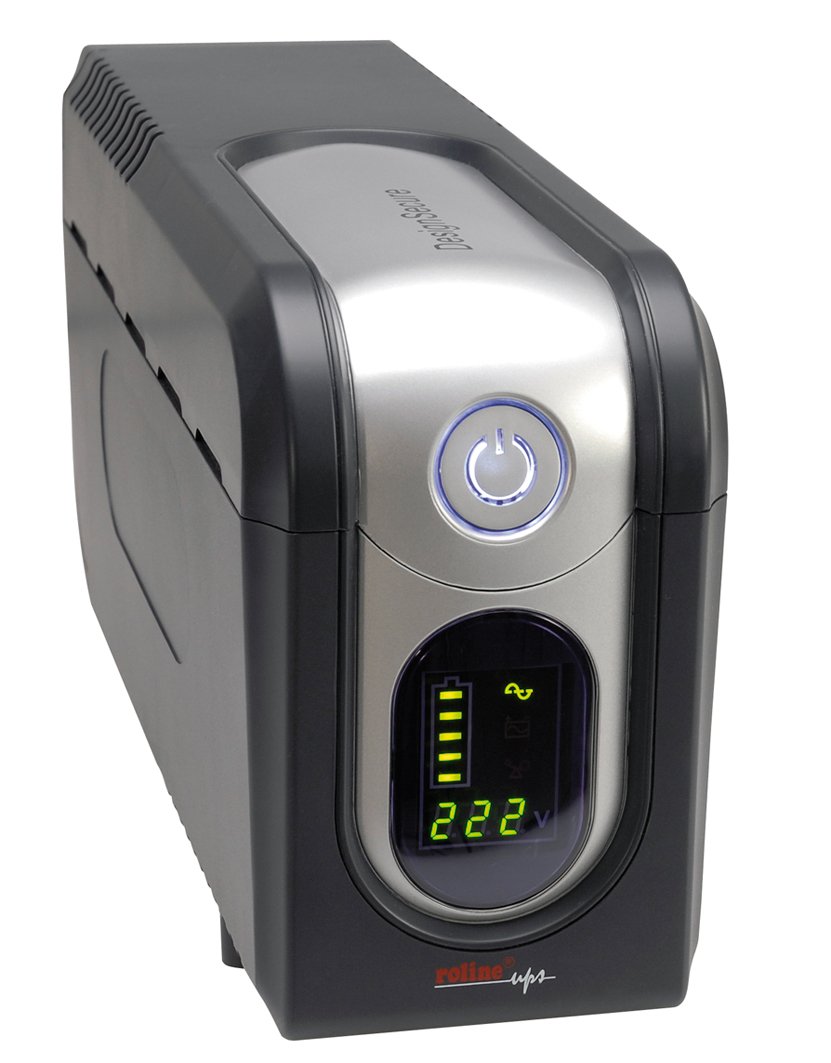
Figura 1: Fronte view of the Roline DesignSecure 525 UPS. This image shows the main unit, including the display panel and power outlets.
The UPS typically includes:
- Porto de entrada de enerxía
- Output Power Outlets (Type B - 3 pin North American)
- Panel de control / Pantalla LCD
- Porto de comunicación USB
- Telephone/Modem Protection Ports (RJ11)
4. Configuración
4.1. Desembalaxe
Carefully unpack the UPS and inspect it for any shipping damage. Retain the packaging for future transport or storage.
4.2 Colocación
Place the UPS on a flat, stable surface in a clean, dry, and well-ventilated area. Ensure there is adequate space around the unit for proper airflow. Avoid placing it near heat sources or in direct sunlight.
4.3. Conectando ao poder
- Asegúrese de que o UPS estea apagado.
- Connect the UPS power input cable to a grounded Type B (3-pin North American) wall outlet.
- Allow the UPS to charge for at least 8 hours before initial use to ensure optimal battery performance.
4.4. Connecting Equipment
- Connect your computer, monitor, and other critical devices to the UPS output receptacles.
- For telephone/modem line protection, connect your incoming telephone/modem line to the "IN" port on the UPS, and then connect a cable from the "OUT" port to your telephone/modem device.
- Do not connect surge strips or extension cords to the UPS output.
4.5. Instalación do software (opcional)
For advanced monitoring and management, install the provided smart monitoring software on your computer. Connect the UPS to your computer using a USB cable. Refer to the software's specific instructions for installation and configuration.
5. Instrucións de funcionamento
5.1. Turning On the UPS
Press and hold the power button on the front panel for approximately 2-3 seconds until you hear a beep and the display illuminates. The UPS will perform a self-test and then enter online mode.
5.2. Turning Off the UPS
To turn off the UPS, press and hold the power button for approximately 2-3 seconds until you hear a beep and the display turns off. Ensure all connected devices are properly shut down before turning off the UPS.
5.3. Indicadores de visualización
The digital display provides real-time information about the UPS status, including:
- Vol. De entradatage
- Vol. De saídatage
- Nivel de carga da batería
- Nivel de carga
- Operating Mode (Online, Battery, Bypass)
- Códigos de erro (se os houber)
Refer to the software manual for detailed explanations of all display indicators and error codes.
5.4. Automático Voltage Regulación (AVR)
The built-in AVR automatically corrects minor voltage fluctuations without switching to battery power, preserving battery life. If the input voltage goes too high or too low, the AVR will adjust it to a safe level for your connected devices.
5.5. Modo de batería
No caso dunha alimentación outage, the UPS will automatically switch to battery power. An audible alarm will sound, and the display will indicate battery mode. The duration of battery backup depends on the load connected. The UPS will automatically shut down when the battery is depleted to prevent deep discharge.
6. Mantemento
6.1. Coidado da batería
- To maintain optimal battery life, ensure the UPS is connected to a power source and charging when not in use.
- Evitar descargas profundas frecuentes.
- If storing the UPS for an extended period, fully charge it every three months to prevent battery degradation.
- Battery replacement should only be performed by qualified personnel.
6.2. Limpeza
Ensure the UPS is turned off and disconnected from the power outlet before cleaning. Use a soft, dry cloth to wipe the exterior. Do not use liquid or aerosol cleaners.
6.3. Condicións ambientais
Maintain the UPS in an environment with stable temperature and humidity. Extreme conditions can shorten battery life and affect performance.
7 Solución de problemas
This section provides solutions to common issues you might encounter with your Roline DesignSecure 525 UPS.
| Problema | Causa posible | Solución |
|---|---|---|
| O SAI non se acende. | No input power; Low battery; Power button not pressed long enough. | Check power cord connection; Allow UPS to charge for several hours; Press and hold power button for 2-3 seconds. |
| UPS beeps continuously in online mode. | Condición de sobrecarga; Fallo interno. | Reduce connected load; Disconnect non-essential devices; If problem persists, contact support. |
| Tempo de reserva da batería curto. | Overload; Battery nearing end of life; Battery not fully charged. | Reduce connected load; Allow UPS to charge fully; Consider battery replacement if old. |
| Connected devices not receiving power. | UPS is off; UPS is in fault mode; Output receptacles are not active. | Turn on UPS; Check display for error codes; Ensure devices are connected to battery-backed outlets. |
If the problem persists after attempting these solutions, please contact Roline customer support.
8. Especificacións
| Característica | Detalle |
|---|---|
| Número de modelo | 19401205 |
| Dimensións do produto | 4.13 x 6.61 x 13.15 polgadas |
| Peso do elemento | 12.79 libras |
| Vol. De saídatage | 120 voltios (CA) |
| Tipo de enchufe de alimentación | Tipo B - 3 pines (norteamericano) |
| Cor | Negro / Prata |
| Fabricante | ROLINE |
| Data de primeira dispoñibilidade | 20 de agosto de 2012 |
9. Garantía e soporte
9.1. Información da garantía
Roline products are manufactured to high quality standards. For specific warranty terms and conditions, please refer to the warranty card included with your product or visit the official Roline websitio. Garda o comprobante de compra para reclamacións de garantía.
9.2. Atención ao cliente
If you require technical assistance or have questions not covered in this manual, please contact Roline customer support. Contact information can typically be found on the Roline websitio web ou na embalaxe do produto.
When contacting support, please have your model number (19401205) and purchase date ready.


