1. Introdución
The Raymarine A50D is a compact, waterproof marine GPS chartplotter and fishfinder designed for reliable navigation and fish detection. This unit features a 5-inch sunlight-viewable display, an integrated 12-channel GPS receiver with WAAS, and a powerful 500-watt HD Digital fishfinder. It comes preloaded with Navionics US Coastal charts, offering comprehensive mapping for coastal waters.
2. Características clave
- 5-inch high-resolution VGA (640x480) LCD display, sunlight viewcapaz.
- Integrated 500 Watt HD Digital Fishfinder for superior fish detection and bottom discrimination.
- Built-in 12 Channel GPS Receiver with WAAS for accurate positioning.
- Preloaded with Navionics US Coastal charts, with upgrade options for Navionics Gold or Platinum.
- Fully waterproof enclosure for marine environments.
- Tilt swivel mount with cable management and quick release for easy installation and removal.
- Includes a dual frequency 50/200 kHz transom mount transducer for depth, speed, and temperature readings.
3. Configuración e instalación
3.1 Desembalaxe e inspección
Carefully unpack all components and verify that all items listed in the packing contents are present and undamaged. Contact your dealer immediately if any items are missing or damaged.
3.2 Mounting the Display Unit
The A50D unit is designed for bracket mounting using the supplied tilt swivel mount. This mount allows for flexible positioning and easy removal. Ensure the mounting location provides clear visibility, is protected from excessive vibration, and allows for proper cable routing.
- Secure the mounting bracket to a flat surface using appropriate fasteners.
- Attach the A50D display unit to the bracket. The quick-release mechanism allows for easy attachment and detachment.
- Adjust the tilt and swivel to achieve the optimal viewángulo de ing.
3.3 Power and Transducer Connections
Connect the power cable to a 12V DC power source, ensuring correct polarity. Connect the transducer cable to the designated port on the A50D unit. Ensure all connections are secure and waterproof.
Nota: Professional installation is recommended for transducer placement to optimize fishfinder performance.
4. Instrucións de funcionamento
The Raymarine A50D features an intuitive button layout for easy operation. Refer to the image below for button identification.
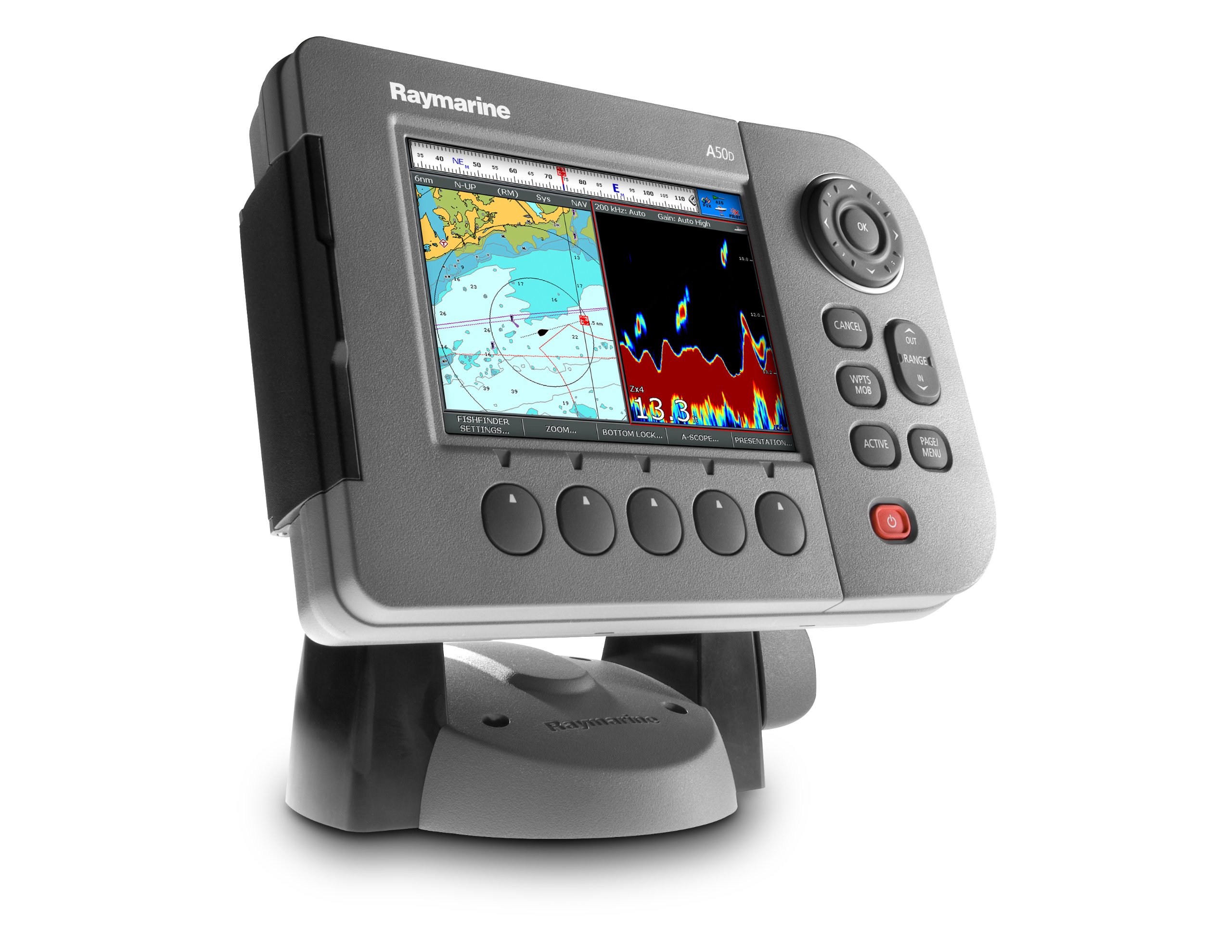
4.1 Encendido/apagado
To power on the unit, press and hold the botón de acendido vermello located at the bottom right of the control panel until the Raymarine logo appears. To power off, press and hold the same button until the shutdown prompt appears, then confirm.
4.2 Basic Navigation and Menu Access
- Teclado direccional e botón OK: Use the circular directional pad (up, down, left, right arrows) to navigate through menus, move the cursor on the chart, or adjust settings. Press the central OK button to confirm selections or open context menus.
- Botón CANCELAR: Preme CANCELAR to exit a menu, close a dialog box, or return to the previous screen.
- PAGE/MENU Button: Preme PAGE/MENU to cycle through available display pages (e.g., Chart, Fishfinder, Combo) or to access the main system menu.
4.3 Chartplotter Functions
- ViewGráficos de ing: Select the Chart page using the PAGE/MENU button. The screen will display your current position on the preloaded Navionics charts.
- Zoom: Usa o FÓRA e IN RANGE buttons to adjust the chart's zoom level.
- Waypoints and MOB: Preme WPTS/MOB to mark your current position as a waypoint or to activate a Man Overboard (MOB) function, which creates a waypoint at the MOB location and initiates navigation to it.
4.4 Fishfinder Functions
- Viewing Sonar: Select the Fishfinder page or a Combo page that includes sonar using the PAGE/MENU button. The screen will display real-time sonar returns.
- Axuste de configuración: Use the soft keys below the screen to access specific fishfinder settings:
- FISHFINDER SETTINGS: Access advanced sonar configuration options.
- ZOOM: Magnify a specific depth range.
- BOTTOM LOCK: Stabilizes the bottom display, useful for fishing over structure.
- A-SCOPE: Provides a real-time display of sonar returns directly under the boat.
- PRESENTACIÓN: Adjust color palettes and display modes.
- Control de Ganancia: The unit often features an automatic gain setting (e.g., "Gain: Auto High" as seen in Figure 1). Manual adjustment may be available through the Fishfinder Settings menu to optimize sensitivity for different water conditions.
5. Mantemento
- Limpeza: Clean the display and unit casing cun suave, damp pano. Evite produtos de limpeza abrasivos ou solventes que poidan danar a pantalla ou a carcasa.
- Conexións: Periodically check all cable connections (power, transducer) for corrosion or damage. Ensure they are securely fastened.
- Actualizacións de software: Consulta o Raymarine website for available software updates to ensure optimal performance and access to new features. Follow the instructions provided by Raymarine for any update procedures.
- Almacenamento: When not in use for extended periods, especially in harsh conditions, consider removing the unit from its mount and storing it in a dry, protected environment.
6 Solución de problemas
- A unidade non se acende:
- Check power cable connections at both the unit and the power source.
- Verify the power source (e.g., boat battery) is charged and supplying 12V DC.
- Inspect the fuse in the power cable or boat's electrical system. - No GPS Position / Poor Accuracy:
- Ensure the unit has a clear view of the sky, unobstructed by metal structures or other electronics.
- Allow sufficient time for the GPS receiver to acquire satellites (cold start may take longer).
- Check for any external GPS antenna connections if applicable. - No Sonar Data / Incorrect Depth Readings:
- Verify the transducer cable is securely connected to the A50D unit.
- Ensure the transducer is properly installed in the water and free from marine growth or obstructions.
- Check transducer settings in the Fishfinder menu (e.g., frequency, gain). - A pantalla conxélase ou funciona mal:
- Try performing a soft reset by powering the unit off and then on again.
- If the issue persists, consult the Raymarine support website for advanced troubleshooting or factory reset procedures.
7. Especificacións
| Característica | Especificación |
|---|---|
| Número de modelo | E62186-US |
| Tamaño da pantalla | 5 polgadas |
| Tipo de visualización | LCD, VGA (640x480) |
| Receptor GPS | Built-in 12 Channel with WAAS |
| Fishfinder Power | 500 Watt HD Digital |
| Transducer Frequencies | 50/200 kHz (dual frequency) |
| Preloaded Charts | Navionics US Coastal Charts |
| Clasificación impermeable | Fully waterproof enclosure |
| Dimensións do produto | 15 x 12 x 5 polgadas |
| Peso do elemento | 7.4 libras |
| UPC | 091975001321 |
8. Garantía e soporte
For detailed warranty information, product registration, and technical support, please visit the official Raymarine website or contact your authorized Raymarine dealer. Keep your purchase receipt as proof of purchase for warranty claims.


