1. Introdución
This manual provides essential information for the safe and effective use of your Leica D-Lux 4 Safari Special Edition Digital Camera. Please read it thoroughly before using your camera and keep it for future reference. The Leica D-Lux 4 Safari is a limited edition digital camera featuring a distinctive Safari Green color and a special case, designed for high-quality digital photography.
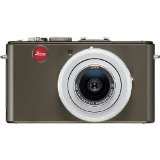
Figure 1: Leica D-Lux 4 Safari Special Edition Digital Camera. This image displays the compact digital camera with its distinctive green finish and lens.
2. Configuración
2.1. Instalación da batería
- Asegúrese de que a cámara estea apagada.
- Localiza a tapa do compartimento da batería na parte inferior da cámara.
- Deslice o pestillo para abrir a tapa.
- Insert the provided battery, ensuring the correct orientation as indicated inside the compartment.
- Peche a tapa do compartimento da batería firmemente ata que encaixe no seu lugar.
2.2. Inserción da tarxeta de memoria
The camera supports SD and SDXC memory cards for storing photos and videos.
- With the camera powered off, open the battery/memory card compartment cover.
- Insert the memory card into the designated slot with the label facing the correct direction (usually towards the front of the camera). Push until it clicks into place.
- Peche a tapa do compartimento.
2.3. Acendido inicial
Press the power button to turn on the camera. Follow any on-screen prompts to set the date, time, and language.
3. Instrucións de funcionamento
3.1. Basic Photography (Point & Shoot)
- Encendido: Preme o botón de acendido.
- Seleccionar modo: Use the mode dial to select "Automatic" for general use.
- Foco: Point the camera at your subject. The camera will automatically focus using contrast detection.
- Captura: Press the shutter button halfway to focus, then press fully to take a picture.
3.2. Gravación de vídeo
- Seleccionar modo: Turn the mode dial to "Movie" mode.
- Iniciar/Deter a gravación: Press the dedicated video record button to start and stop recording. The camera records in 1080p at 30 frames per second.
- Estabilización dixital da imaxe: The camera features digital image stabilization to reduce blur during video recording.
3.3. Zoom Functionality
The camera features 2.5x optical zoom. Use the zoom lever (typically around the shutter button) to zoom in or out. Digital zoom is also available up to 16x.
3.4. Modos de disparo avanzados
Explore various modes via the mode dial:
- Modo paisaxe: Optimized for wide scenic shots.
- Control manual da exposición: For experienced users to manually adjust aperture and shutter speed.
- Configuración do balance de brancos: Customize white balance for accurate color reproduction under different lighting conditions.
3.5. Conectividade
- Wi-Fi: Connect your camera to a Wi-Fi network for wireless transfer of images and remote control via a compatible smartphone app. Refer to the camera's on-screen menu for Wi-Fi setup.
4. Mantemento
4.1. Limpeza da cámara
- Corpo da cámara: Use un pano suave e seco para limpar o corpo da cámara. Para a sucidade persistente, dóreo lixeiramenteampEnxágüe o pano con auga. Evite produtos químicos agresivos.
- Lente: Usa un cepillo para lentes para eliminar o po e, a seguir, limpa suavemente cun pano de microfibra para lentes. Para as manchas, usa unha solución especializada para limpar lentes.
- Pantalla: Limpe a pantalla LCD cun pano de microfibra suave e seco.
4.2. Coidado da batería
- Always use the original Leica charger and battery.
- Evite expor a batería a temperaturas extremas.
- Almacene a batería nun lugar fresco e seco cando non estea en uso.
5 Solución de problemas
5.1. A cámara non se acende
- Asegúrate de que a batería estea completamente cargada e inserida correctamente.
- Tenta usar unha batería diferente e completamente cargada se estás dispoñible.
5.2. Mala calidade de imaxe
- Comprobe se a lente está limpa e libre de manchas ou po.
- Ensure adequate lighting for your shot.
- Adjust shooting modes or exposure settings if necessary.
5.3. Problemas de conectividade wifi
- Verify that Wi-Fi is enabled on the camera and your smartphone.
- Ensure the camera is within range of the Wi-Fi network.
- Reinicia tanto a cámara como o teu teléfono intelixente.
6. Especificacións
| Característica | Detalle |
|---|---|
| Marca | Leica |
| Nome do modelo | D Lux4 Safari |
| Resolución total de fotografías | 12 MP |
| Tecnoloxía do sensor fotográfico | CMOS |
| Zoom óptico | 2.5x |
| Zoom dixital | 16x |
| Apertura máxima | 2.8 milímetros |
| Estabilización da imaxe | Dixital |
| Soportado File Formato | JPEG, RAW |
| Resolución de vídeo | 1080 p |
| Velocidade de cadros | 30 FPS |
| Tamaño da pantalla | 3 polgadas |
| Tecnoloxía sen fíos | Wi-Fi |
| Material do recinto | Metal |
| Cor | Verde |
| Pilas incluídas | Si |
7. Garantía e soporte
7.1. Información da garantía
The Leica D-Lux 4 Safari Special Edition Digital Camera comes with a 3 anos de garantía do fabricanteEsta garantía cobre defectos de materiais e fabricación en condicións normais de uso. Conserve o comprobante de compra para reclamacións de garantía.
7.2. Atención ao cliente
For technical assistance, troubleshooting, or service inquiries, please visit the official Leica website or contact their customer support. You can find detailed contact information on the Leica website or in the documentation included with your camera.


