1. Produto rematadoview
The Aluratek AUV200F USB 2.0 to VGA Adapter is designed to extend your desktop by adding an additional display via a USB port. This adapter enables dual monitor support, enhancing multitasking capabilities for various applications.
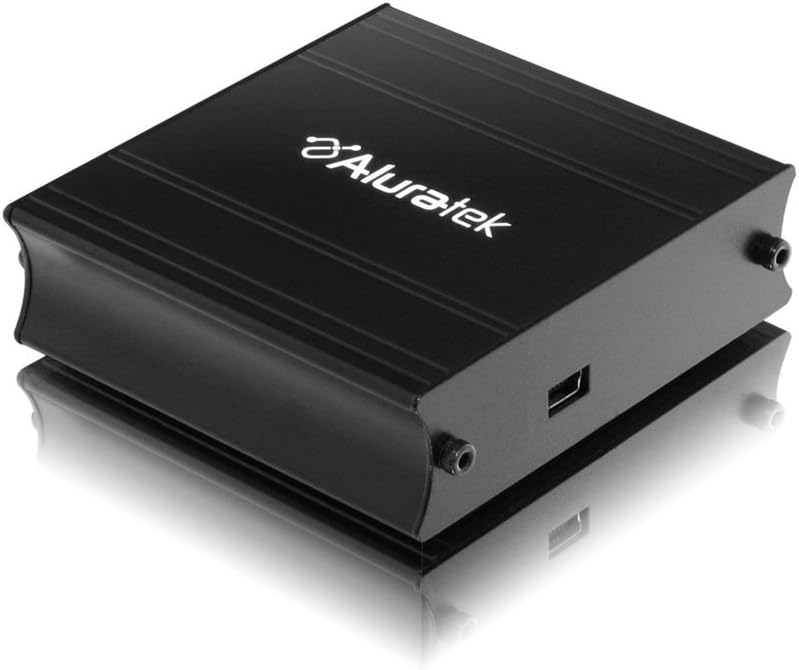
This image shows the Aluratek AUV200F USB to VGA Adapter. It is a compact, black rectangular device designed to connect a computer's USB port to a VGA monitor. The top surface displays the Aluratek logo, and one side features a USB input port, while the opposite side has screw holes for securing a VGA cable.
Características principais:
- Supports Primary, Extended, and Mirror display modes.
- Supports widescreen monitor resolutions up to 1680 x 1050.
- Supports standard monitor resolutions up to 1600 x 1200.
- Habilita viewing data across multiple screens or with display continuity.
- Facilitates more effective multitasking by reducing overlapping windows.
2. Contido do paquete
Before proceeding with the installation, please verify that your package contains the following items:
- Aluratek AUV200F USB to VGA Adapter
- Driver Installation CD (or download instructions)
- Guía de inicio rápido
3. Requisitos do sistema
To ensure proper functionality, your computer system must meet the following minimum requirements:
- Sistema operativo: Windows XP-SP2/3, Vista, Windows 7, or Mac OS 10.4.11 or later (Intel-based only).
- Portos dispoñibles: One available USB port and one available VGA port on the monitor.
- Procesador: Recommended 1.2 GHz or higher.
- RAM: Recommended 512 MB or higher.
4. Configuración e instalación
4.1 Instalación do controlador
- Inserir o CD do controlador: Place the provided driver installation CD into your computer's optical drive. If your computer does not have an optical drive, download the latest drivers from the official Aluratek websitio.
- Executar o instalador: Follow the on-screen instructions to install the necessary drivers. It is recommended to restart your computer after the driver installation is complete.
4.2 Conexión de hardware
- Connect VGA Cable: Connect one end of a VGA cable (not included) to the VGA port on your external monitor and the other end to the VGA port on the Aluratek AUV200F adapter. Secure the screws on the VGA connector for a stable connection.
- Conectar o cable USB: Plug the USB connector of the Aluratek AUV200F adapter into an available USB 2.0 port on your computer.
- Encendido: Ensure your external monitor is powered on.
5. Instrucións de funcionamento
Once the adapter is connected and drivers are installed, your operating system should detect the new display. You can configure the display settings through your computer's display control panel.
5.1 Configuring Display Modes (Windows)
- Acceder á configuración da pantalla: Right-click on an empty area of your desktop and select "Screen resolution" (Windows 7/Vista) or "Display settings" (Windows 10).
- Identify Displays: Click "Identify" to see which number corresponds to each monitor.
- Escolla o modo de visualización: In the "Multiple displays" dropdown menu, select one of the following options:
- Amplía estas pantallas: This creates an extended desktop, allowing you to drag windows between monitors.
- Duplica estas pantallas: This mirrors your primary display onto the second monitor.
- Show desktop only on 1/2: This disables one of the displays.
- Axustar a resolución: Select the desired resolution for each monitor. The Aluratek AUV200F supports up to 1680x1050 for widescreen and 1600x1200 for standard monitors.
- Aplicar configuración: Click "Apply" and then "OK" to save your changes.
5.2 Configuring Display Modes (Mac OS)
- Acceder ás Preferencias de visualización: Vaia a "Preferencias do sistema" > "Pantallas".
- Arrangement Tab: In the "Arrangement" tab, you can drag the monitor icons to arrange them as desired for an extended desktop. To mirror displays, check the "Mirror Displays" box.
- Resolution Tab: In the "Display" tab for each monitor, select the desired resolution.
6 Solución de problemas
If you encounter issues with your Aluratek AUV200F adapter, please refer to the following common solutions:
- No Display on Second Monitor:
- Ensure all cables (USB and VGA) are securely connected.
- Verify that the external monitor is powered on and set to the correct input source (VGA).
- Check your computer's display settings to ensure the second monitor is detected and configured for "Extend" or "Duplicate" mode.
- Reinstall the device drivers from the Aluratek websitio.
- Poor Display Quality or Lag:
- Asegúrate de que o teu ordenador cumpra os requisitos do sistema recomendados.
- Adjust the display resolution to a lower setting to see if performance improves.
- Note that USB-to-VGA adapters are generally not recommended for high-motion video playback or demanding graphic applications like gaming due to potential latency.
- Problemas de instalación do controlador:
- Download the latest drivers directly from the official Aluratek support websitio.
- Desactive temporalmente o software antivirus durante a instalación se interfire.
- Try installing the drivers in Safe Mode if standard installation fails.
- Adaptador non recoñecido:
- Tenta conectar o adaptador a un porto USB diferente do teu ordenador.
- Ensure the USB port is functional by testing it with another USB device.
7. Especificacións
| Modelo | AUV200F |
| Marca | Aluratek |
| Tipo de conector | USB 2.0 a VGA |
| Supported Resolutions (Widescreen) | Ata 1680 x 1050 |
| Supported Resolutions (Standard) | Ata 1600 x 1200 |
| Sistemas operativos compatibles | Windows XP-SP2/3, Vista, Windows 7, Mac OS 10.4.11 or later (Intel-based) |
| Dispositivos compatibles | Laptop, Desktop Computers |
| Dimensións do produto | 23.62 x 14.73 x 6.35 cm |
| Peso do elemento | 181.44 g |
8. Mantemento
To ensure the longevity and optimal performance of your Aluratek AUV200F adapter, follow these maintenance guidelines:
- Limpeza: Usa un pano suave e seco para limpar o adaptador. Evita o uso de produtos de limpeza líquidos ou solventes.
- Almacenamento: Garde o adaptador nun lugar fresco e seco, lonxe da luz solar directa e de temperaturas extremas.
- Manexo: Handle the adapter with care. Avoid dropping it or subjecting it to strong impacts. Do not force connectors.
9. Garantía e soporte
The Aluratek AUV200F USB to VGA Adapter comes with a 1 ano de garantía limitada desde a data de compra. Esta garantía cobre defectos de materiais e fabricación en condicións de uso normal.
For technical support, warranty claims, or further assistance, please visit the official Aluratek websitio web ou póñase en contacto co seu departamento de atención ao cliente. Garde o comprobante de compra para a validación da garantía.
Oficial de Aluratek Websitio: www.aluratek.com


