1. Produto rematadoview
The DEGEN DE1125 is a compact and versatile portable device that integrates multiple functionalities into a single unit. It serves as a world-band radio, an MP3 player, a digital recorder, and an ebook reader. Designed for portability, it features a slim profile and lightweight construction, making it ideal for travel and on-the-go use.
As características principais inclúen:
- Pocket-size world-band radio with built-in speaker and Digital Signal Processing (DSP) technology.
- 4 GB flash memory MP3 player for music playback.
- Digital recorder for radio programs and voice recording, offering up to 150 hours of recording time (at 32 kbps).
- 255 preset memories for radio stations.
- Built-in battery charger.
- LED back-lit display for clear visibility.
- Digital clock, sleep timer, key lock, and numeric volume indicator.
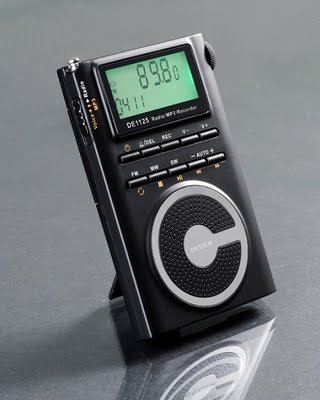
Figure 1.1: The DEGEN DE1125 portable radio and multimedia player, shown standing upright with its integrated kickstand.
2. Guía de configuración
2.1 Desembalaxe e inspección inicial
Retire con coidado todos os compoñentes da embalaxe. Comprobe que todos os elementos que se indican a continuación estean presentes e non estean danados:
- DEGEN DE1125 Unit
- Auriculares
- AC Wall Plug (Charger)
- Cable USB
- Bolsa de transporte
- Batería recargable
- Manual de usuario (este documento)
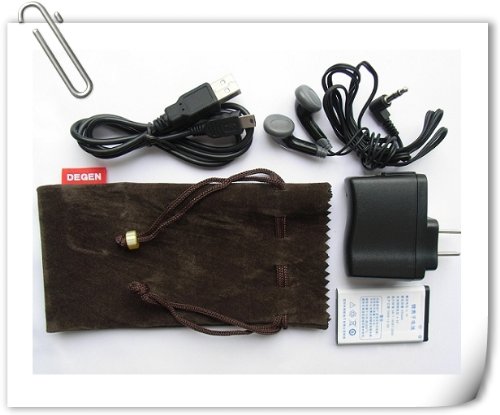
Figure 2.1: All included accessories for the DEGEN DE1125, including earphones, USB cable, AC adapter, carrying pouch, and rechargeable battery.
2.2 Instalación e carga da batería
The DE1125 is powered by a rechargeable lithium battery. Before first use, ensure the battery is properly installed and fully charged.
- Localice o compartimento da batería na parte traseira do dispositivo.
- Insert the rechargeable battery, ensuring correct polarity as indicated inside the compartment.
- Pecha a tapa do compartimento da batería de forma segura.
- Connect the small end of the USB cable to the mini-USB port on the side of the DE1125.
- Connect the standard USB end of the cable to the AC wall plug, then plug the AC wall plug into a standard electrical outlet. Alternatively, connect the standard USB end directly to a computer's USB port for charging.
- The display will indicate charging status. Allow the battery to fully charge before initial use.
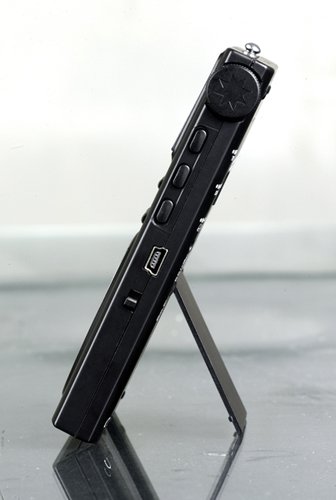
Figura 2.2: Lateral view of the DEGEN DE1125, highlighting the mini-USB port for charging and data transfer.
3. Instrucións de funcionamento
3.1 Controis xerais
Familiarize yourself with the buttons and display on the DE1125:
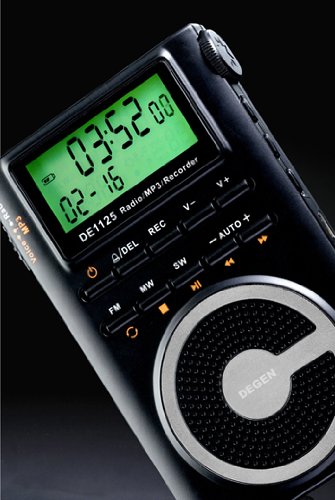
Imaxe 3.1: Primeiro plano view of the DEGEN DE1125's display and control panel, showing buttons for power, mode selection, tuning, and volume.
- Botón de encendido (): Mantén premido para acender ou apagar o dispositivo.
- Volume Buttons (V+, V-): Axusta o nivel de saída de son.
- Botón de menú: Access the main menu or settings within a mode.
- Botóns de navegación (, ): Navigate through menus or adjust frequencies/tracks.
- Mode Buttons (FM, MW, SW, MP3, REC): Seleccione o modo de funcionamento desexado.
- Botón Reproducir/Pausa (): Start or pause playback in MP3 mode, or confirm selections.
3.2 Radio Operation (FM, AM, SW)
The DE1125 supports FM (64.0 - 108.0 MHz), MW (520-1710 KHz), and SW (2.3-23.0 MHz) bands.
- Acende o dispositivo.
- Press the corresponding mode button (FM, MW, or SW) to select the desired radio band.
- Opcións de sintonía:
- Escaneado automático: Press and hold the 'AUTO' button to automatically scan and store available stations.
- Sintonización manual: Usa os botóns de navegación (, ) to fine-tune the frequency step-by-step.
- Sintonización dixital: Enter the desired frequency directly using the numeric keypad (if available, or through menu options).
- ATS (Auto Tuning Storage): Automatically scans and stores strong signals into memory presets.
- Estacións predefinidas: The device can store up to 255 preset stations. Use the 'M+' and 'M-' buttons to navigate through stored presets.
3.3 Función de reprodutor de MP3
The DE1125 features 4GB of internal flash memory for MP3 playback.

Figure 3.2: The DEGEN DE1125 display indicating the 'Music' mode, ready for MP3 playback.
- Press the 'MP3' button to enter MP3 player mode.
- Para transferir música files from your computer, connect the DE1125 to your computer using the provided USB cable. The device will appear as a removable disk drive. Drag and drop your MP3 files into the device's storage.
- Usa os botóns de navegación (, ) to select tracks.
- Preme o botón Reproducir / Pausa () para iniciar ou pausar a reprodución.
3.4 Digital Recorder Function
The DE1125 can record radio programs or function as a voice recorder.

Figure 3.3: The DEGEN DE1125 display showing the 'Record' mode, indicating readiness for audio capture.

Figure 3.4: The DEGEN DE1125 display showing the 'Voice' mode, used for voice recording functions.
- Press the 'REC' button to enter recording mode.
- Select either 'Radio Record' or 'Voice Record' from the menu.
- Press the 'REC' button again to start recording. The display will show recording time.
- Press the 'REC' button again to stop recording. Recorded files are saved to the internal memory.
- To play back recordings, navigate to the 'Recordings' folder in MP3 mode.
3.5 Ebook Reader Function
The DE1125 supports basic ebook reading functionality.

Figure 3.5: The DEGEN DE1125 display showing the 'Ebook' mode, indicating readiness to display text files.
- Connect the DE1125 to your computer via USB.
- Transferir texto compatible files (e.g., .TXT) to the device's internal memory.
- Desconecta o dispositivo do ordenador.
- Navigate to the 'Ebook' mode using the menu or mode selection.
- Select the desired ebook file para abrir e ler.
4. Coidados e mantemento
Proper care ensures the longevity and optimal performance of your DEGEN DE1125.
- Limpeza: Use a soft, dry cloth to clean the exterior of the device. Do not use liquid cleaners, aerosols, or abrasive materials.
- Almacenamento: Store the device in a cool, dry place away from direct sunlight, extreme temperatures, and high humidity. Use the provided carrying pouch for protection during transport.
- Coidado da batería: Para manter o bo estado da batería, evite descargala completamente con frecuencia. Se a garda durante un período prolongado, cárguea ata aproximadamente o 50 % e recárguea cada poucos meses.
- Exposición á auga: Este dispositivo non é impermeable. Evite a exposición á auga ou a outros líquidos.
- Impacto: Protect the device from drops and impacts, which can damage internal components or the screen.
5 Solución de problemas
If you encounter issues with your DEGEN DE1125, refer to the following common problems and solutions:
| Problema | Causa posible | Solución |
|---|---|---|
| O dispositivo non se acende. | A batería está esgotada ou non está instalada correctamente. | Cargue a batería. Asegúrese de que a batería estea inserida coa polaridade correcta. |
| No radio reception or poor signal. | Weak signal area, antenna not extended, interference. | Extend the telescopic antenna fully. Move to an area with better reception. Avoid sources of electronic interference. |
| MP3 filenon está xogando. | Non é compatible file formato, corrompido file, non files on device. | Garantir files are in MP3 format. Re-transfer files. Verificar files exist in the device's memory. |
| Non se pode gravar audio. | Insufficient storage space, incorrect mode. | Eliminar antigo files to free up space. Ensure you are in the correct recording mode (Radio Record or Voice Record). |
| A pantalla está en branco ou conxelada. | System error, low battery. | Press and hold the power button for 10 seconds to force a restart. Charge the battery. |
6. Especificacións técnicas
| Característica | Especificación |
|---|---|
| Marca | Degen |
| Modelo | DE1125 |
| Dimensións do produto | 11 x 1.5 x 6.7 cm |
| Peso do elemento | 113 g |
| Capacidade de almacenamento da memoria | 4 GB |
| Interface de hardware | USB |
| Tecnoloxía de sintonizador | AM, FM, SO |
| Rango de frecuencia FM | 64.0 - 108.0 MHz |
| MW Frequency Range | 520 - 1710 kHz |
| Rango de frecuencia SW | 2.3 - 23.0 MHz |
| Dispositivos compatibles | Auriculares |
| Tipo de visualización | LED |
| Tamaño da pantalla | 0.5 Inches (visible diagonal 1" / 2 cm) |
| Fonte de enerxía | Alimentado por batería |
| Tipo de batería | Litio recargable |
| Tipo de conector | USB |
| Compatible Media Type | MP3 |
| Material | Outros |
7. Garantía e soporte
7.1 Información da garantía
This product is covered by a manufacturer's warranty. Please refer to the warranty policy provided at the time of purchase or contact your retailer for specific details regarding warranty duration and terms. Keep your proof of purchase for warranty claims.
7.2 Atención ao cliente
For technical assistance, troubleshooting beyond this manual, or inquiries about your DEGEN DE1125, please contact the retailer or the manufacturer's customer support. Refer to the contact information provided with your purchase documentation.