Introdución
Grazas pola compraasing the Muse M-10 CR Clock Radio. This manual provides important information regarding the setup, operation, and maintenance of your new device. Please read it thoroughly before use and retain it for future reference.
Información importante de seguridade
- Non expoña este aparello a goteos ou salpicaduras de auga.
- Non coloque obxectos cheos de líquidos, como vasos, sobre o aparello.
- Asegúrese de que haxa unha ventilación axeitada arredor da unidade. Non bloquee as aberturas de ventilación.
- Use só o adaptador de alimentación que se proporciona coa unidade.
- Non intente desmontar nin modificar a unidade. Encargue calquera mantemento a persoal cualificado.
- Manteña a unidade lonxe da luz solar directa, de fontes de calor e de campos magnéticos fortes.
- Limpe a unidade só cun pano suave e seco.
Contido do paquete
Comprobe que estean presentes todos os elementos:
- Muse M-10 CR Clock Radio
- Adaptador de alimentación
- Manual de usuario
Produto rematadoview
Familiarize yourself with the controls and display of your Muse M-10 CR.

Imaxe: Fronte view of the Muse M-10 CR Clock Radio, showing the large white LED display and control buttons on top.

Imaxe: Arriba view of the Muse M-10 CR Clock Radio, highlighting the control buttons for power, alarm settings, hour/minute adjustment, radio tuning, and the large snooze button.
Controis e indicadores:
- Botón de encendido: Acende / apaga a unidade.
- Alarm 1 / Alarm 2 Buttons: Configurar e activar alarmas individuais.
- Botón HR (hora): Adjusts the hour.
- Botón MIN (Minuto): Adjusts the minute.
- Tuning Buttons (<< / >>): Axusta a frecuencia de radio.
- Botón de adiar: Temporarily silences the alarm and dims the display.
- Pantalla LED: Mostra a hora, o estado da alarma e a frecuencia de radio.
Configuración
1. Potencia de conexión
- Insert the DC plug of the power adapter into the DC IN jack on the back of the unit.
- Plug the power adapter into a standard wall outlet (AC 220V, 50Hz).
- The LED display will light up, indicating the unit is powered.
2. Axustar a hora
- Para axustar a hora, manteña premida a tecla HR botón para axustar a hora.
- Preme o MIN botón para axustar o minuto.
- Release the buttons to confirm the time. The time will be set in 24-hour format.
Instrucións de funcionamento
Operación de radio (FM)
- Preme o Poder botón para acender a radio.
- Preme o Tuning (<< / >>) buttons briefly to manually tune to your desired FM frequency.
- To auto-scan and store presets: Press and hold the Tuning (<< / >>) button for a few seconds. The radio will scan for available stations and store them automatically. The unit supports 20 preset FM stations.
- To recall a preset station: After auto-scanning, use the Tuning (<< / >>) buttons to cycle through the stored preset stations.
Nota: For optimal reception, ensure the FM wire antenna (located at the back of the unit) is fully extended.
Configuración de alarmas (alarma dual)
The Muse M-10 CR features a dual alarm system, allowing you to set two separate alarm times.
- Preme o Alarma 1 or Alarma 2 button once. The alarm time will flash on the display.
- While the alarm time is flashing, press the HR button to set the alarm hour.
- Preme o MIN button to set the alarm minute.
- Preme o Alarma 1 or Alarma 2 botón de novo para confirmar a hora da alarma.
- To select the alarm source (Buzzer or Radio), press the respective Alarma 1 or Alarma 2 button repeatedly until the desired icon (buzzer or radio wave) appears next to the alarm indicator on the display.
- Para desactivar unha alarma, prema o botón correspondente Alarma 1 or Alarma 2 button until the alarm indicator disappears from the display.
Función de repetición
Cando soe unha alarma, prema o botón grande AMORTAR button on top of the unit. The alarm will be temporarily silenced for approximately 9 minutes and will sound again after this period. The snooze function can be used multiple times.
Dimmer da pantalla
The 0.6-inch white LED display has adjustable intensity. Press the AMORTAR button while the unit is in standby mode to cycle through different brightness levels (High, Low, Off). This allows you to adjust the display brightness to your preference, especially for nighttime use.
Mantemento
Limpeza
- Desenchufe sempre a unidade da toma de corrente antes de limpala.
- Use a soft, dry cloth to wipe the exterior surfaces of the clock radio.
- Non empregues produtos de limpeza abrasivos, ceras ou disolventes, xa que poden danar o acabado.
Almacenamento
Se pensa gardar a unidade durante un período prolongado, desconéctea da fonte de alimentación e gárdea nun lugar fresco e seco, lonxe da luz solar directa e de temperaturas extremas.
Resolución de problemas
| Problema | Causa posible | Solución |
|---|---|---|
| A unidade non se acende. | O adaptador de corrente non está conectado ou está avariado. | Asegúrate de que o adaptador de corrente estea conectado correctamente á unidade e a unha toma de corrente que funcione. Proba cunha toma de corrente diferente. |
| Mala recepción de radio. | Weak signal; antenna not properly extended. | Extend the FM wire antenna fully. Reposition the unit for better reception. |
| Non soa a alarma. | Alarm not set or deactivated; volume too low (for radio alarm). | Verify that the alarm is set and activated (alarm icon visible). Ensure radio alarm volume is audible. |
| A pantalla é demasiado brillante/escura. | Display dimmer setting needs adjustment. | Press the SNOOZE button in standby mode to cycle through display brightness levels. |
Especificacións
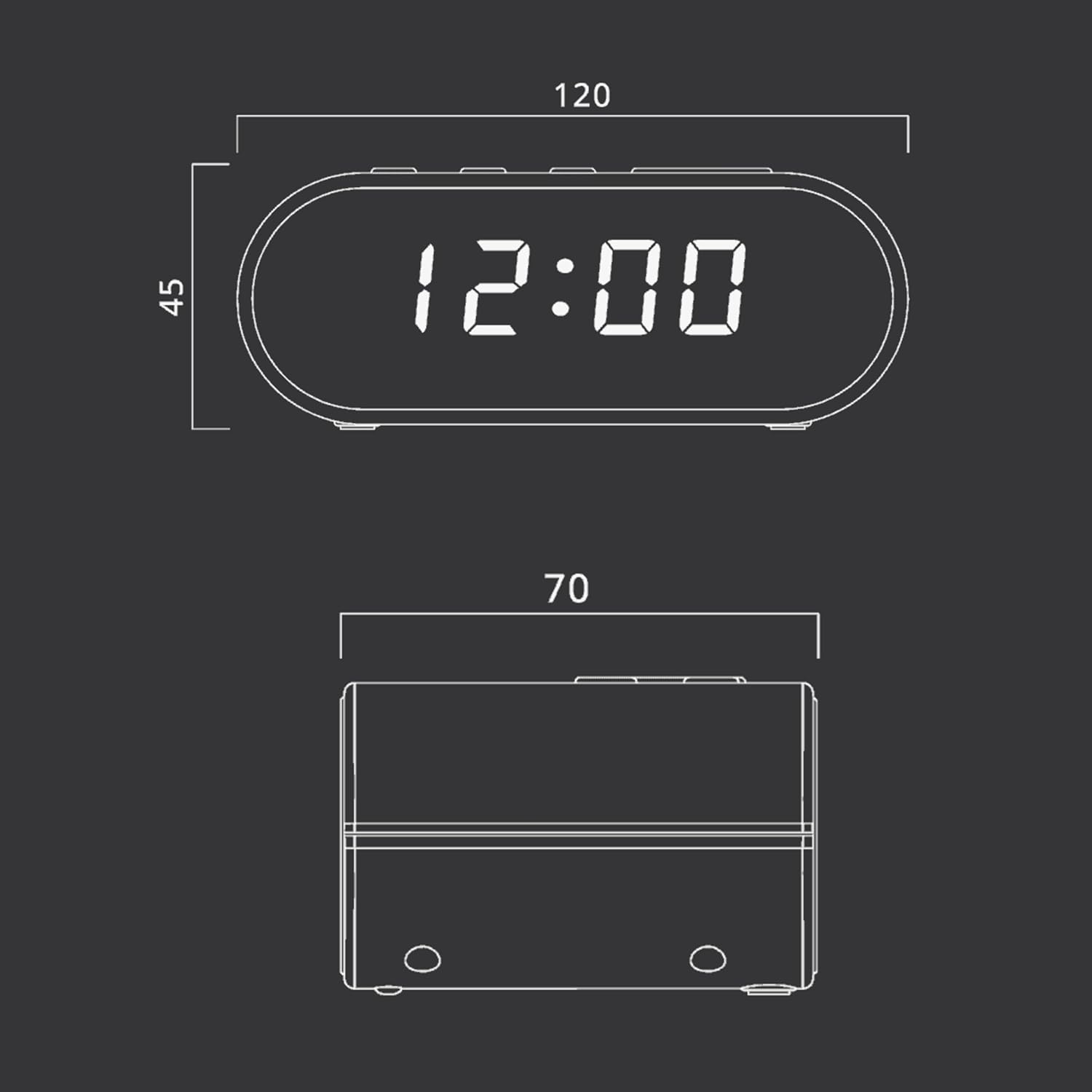
Imaxe: Technical drawing illustrating the dimensions of the Muse M-10 CR Clock Radio, with measurements in millimeters.
- Marca: Musa
- Número de modelo: 3700460200701
- Cor: Schwarz (negro)
- Dimensións do produto: 12 x 7 x 10.9 cm (L x W x H)
- Peso do artigo: 200 g
- Voltage: 220 voltios
- Material: Materiais de plástico (Kunststoff)
- Tipo de visualización: LED (0.6-inch white)
- Radio: FM PLL Radio with 20 preset stations
- Características especiais: Adjustable Brightness, Large Display, Radio, Snooze Function, Dual Alarm
Garantía e Soporte
For warranty information or technical support, please refer to the warranty card included with your purchase or contact your local Muse distributor or retailer. Keep your proof of purchase for any warranty claims.
You can also visit the official Muse websitio para obter máis axuda e información sobre o produto.


