Báscula de plataforma Kilotech - Manual do usuario KWS 1000
Model: KWS 1000 | Capacity: 300 Lb / 150 kg
1. Produto rematadoview
The Kilotech KWS 1000 Platform Scale is designed for accurate and reliable weighing of various items up to 300 pounds or 150 kilograms. It features a robust stainless steel platform and a clear, backlit digital display for easy readability. This scale is suitable for industrial, commercial, and general weighing applications requiring precision and durability.
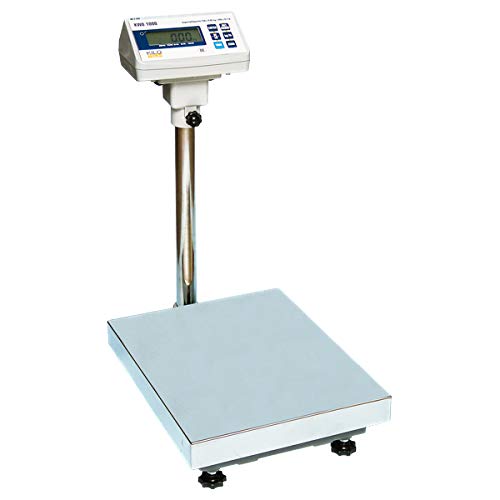
Image 1.1: The Kilotech KWS 1000 Platform Scale, showing the large weighing platform, the sturdy vertical support pole, and the digital display unit with a backlit screen and control buttons.
2. Instrucións de configuración
- Desembalaxe: Carefully remove all components from the packaging. Verify that all parts are present: weighing platform, display unit, support pole, and power adapter.
- Montaxe:
- Attach the support pole to the weighing platform using the provided fasteners. Ensure it is securely tightened.
- Mount the display unit onto the top of the support pole. Secure it in place with the locking mechanism or screws.
- Connect the cable from the weighing platform to the designated port on the display unit.
- Colocación: Place the scale on a firm, level, and stable surface to ensure accurate readings. Avoid locations with excessive vibrations, drafts, or extreme temperature fluctuations.
- Nivelación: Adjust the four adjustable feet located on the underside of the platform until the scale is perfectly level. Use a spirit level if available.
- Conexión de alimentación: Plug the power adapter into the DC input port on the display unit, then connect it to a suitable electrical outlet.
- Encendido inicial: Preme o ON/OFF button. The display should light up and perform a self-test before showing "0.00".
3. Instrucións de funcionamento
3.1 Pesaxe básica
- Ensure the scale is powered on and displays "0.00". If not, press the CERO botón.
- Coloque con coidado o elemento a pesar no centro da plataforma de pesaxe.
- Wait for the reading to stabilize. The weight will be displayed on the screen.
- Remove the item from the platform. The display should return to "0.00" or a negative value if the item was removed before stabilization.
3.2 Conversión de unidades
To switch between weighing units (e.g., pounds (lb) and kilograms (kg)):
- With the scale displaying "0.00", press the UNIDADE botón.
- The display will cycle through available units (e.g., lb, kg). Stop when the desired unit is shown.
3.3 Función de tara
The tare function allows you to weigh items in a container by subtracting the container's weight.
- Place the empty container on the weighing platform. The display will show its weight.
- Preme o TAREAR button. The display will reset to "0.00", effectively subtracting the container's weight.
- Place the items to be weighed into the container. The display will show only the net weight of the items.
- To clear the tare, remove both the container and the items, then press the TAREAR button again, or power cycle the scale.
4. Mantemento
- Limpeza: Wipe the scale's platform and display unit with a soft, damp pano. Non empregue produtos de limpeza abrasivos nin solventes, nin mergulle a unidade en auga.
- Almacenamento: When not in use for extended periods, store the scale in a dry, dust-free environment.
- Calibración: Regular calibration is recommended to maintain accuracy, especially after relocation or significant temperature changes. Refer to the advanced user manual or contact Kilotech support for calibration procedures.
- Batería (se corresponde): If your model uses internal rechargeable batteries, ensure it is charged regularly to prolong battery life. Avoid complete discharge.
5 Solución de problemas
| Problema | Causa posible | Solución |
|---|---|---|
| A escala non se acende. | No power, faulty power adapter, or discharged battery. | Check power connection. Ensure adapter is working. Charge battery if applicable. |
| Lecturas inexactas. | Scale not level, unstable surface, or needs calibration. | Adjust leveling feet. Place on a stable surface. Perform calibration. |
| Display shows "OVERLOAD" or "ERR". | O peso supera a capacidade máxima. | Remove excess weight. Do not exceed 300 lb / 150 kg. |
| Display does not return to zero. | Residual weight on platform or tare function active. | Ensure platform is clear. Press the CERO or TAREAR botón. |
6. Especificacións
| Característica | Detalle |
|---|---|
| Modelo | KWS 1000 |
| Marca | KILOTECH |
| Capacidade máxima | 300 Pounds (lb) / 150 Kilograms (kg) |
| Precisión de lectura | 100 g |
| Mostrar | Backlit Digital Display |
| Factor de forma | Mini Platform Scale |
| Referencia do fabricante | 851685 |
| ASIN | B003DWP28M |
7. Garantía e soporte
For warranty information, technical support, or service inquiries, please contact Kilotech customer service. Keep your purchase receipt and product serial number handy for faster assistance.
- Fabricante: Kilotech
- Política de devolución: 30-day refund/replacement (as per Amazon.ca policy at time of purchase)
- Contacto: Refer to the official Kilotech website or your product documentation for current contact details.