1. Produto rematadoview
The Cisco Catalyst 2960S-48LPS-L Ethernet Switch is a Layer 2 edge device designed to enhance network operations through improved ease of use, robust security, and sustainability. This model features 48 Power over Ethernet Plus (PoE+) ports, offering fast Ethernet access connectivity and PoE capabilities for various network devices. It also supports Cisco FlexStack switch stacking for scalable network solutions.
As características principais inclúen:
- 48 x POE+ ports for power and data transmission.
- 5 x Expansion Slots for flexible connectivity options.
- 10/100/1000Base-T Ethernet for high-speed data transfer.
- Manageable switch for comprehensive network control.
- Cisco FlexStack capability for simplified stacking and management.

Figura 1: Fronte view of the Cisco Catalyst WS-C2960S-48LPS-L Ethernet Switch.
2. Información de seguridade
Please read and understand all safety instructions before installing or operating this equipment. Failure to follow these instructions could result in injury or damage to the product.
- Seguridade eléctrica: Connect the switch only to a grounded power outlet. Do not operate the switch with a damaged power cord.
- Condicións ambientais: Ensure the operating environment is within the specified temperature (up to 40°C) and humidity ranges. Avoid exposure to direct sunlight, heat sources, or excessive moisture.
- Manexo: The switch weighs approximately 16.15 pounds (7.34 kg). Use proper lifting techniques to prevent injury.
- Ventilación: Asegúrate de que haxa un fluxo de aire axeitado arredor do interruptor para evitar o sobrequecemento. Non bloquees as aberturas de ventilación.
- Servizo: Refer all servicing to qualified service personnel. Do not attempt to open or repair the switch yourself.
3. Instalación e configuración
3.1 Desembalaxe e inspección
Carefully unpack the switch and inspect it for any damage during shipping. Report any damage to your vendor immediately.
3.2 Preparación do lugar
Before installation, ensure the installation site meets the environmental requirements. The switch dimensions are approximately 17.5 x 15.2 x 1.75 inches (44.45 x 38.61 x 4.45 cm) or 17.5"L x 17.5"W x 2.9"H (44.45 x 44.45 x 7.37 cm) depending on specific mounting. Allow sufficient space for cabling and ventilation.
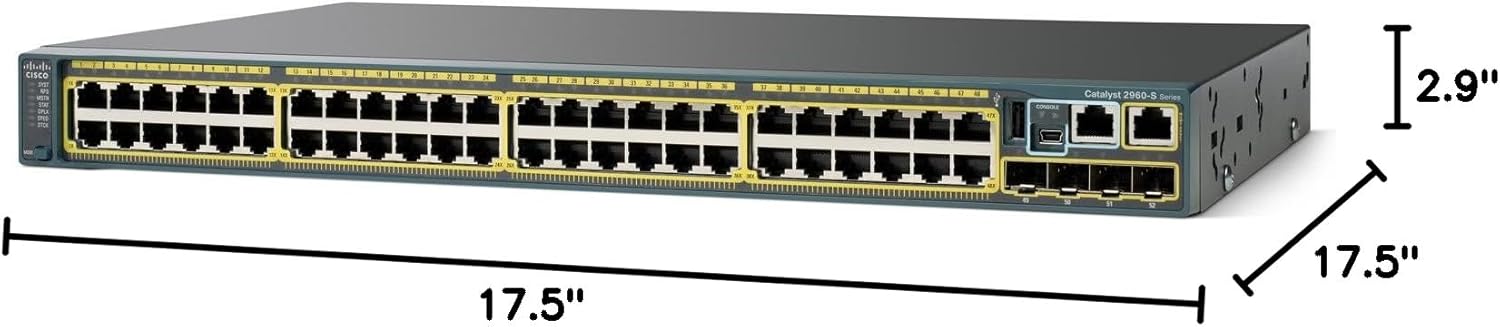
Figure 2: Cisco Catalyst WS-C2960S-48LPS-L switch with approximate dimensions.
3.3 Montaxe do interruptor
The switch can be mounted in a standard 19-inch equipment rack. Use the provided rack-mount brackets and screws to secure the switch. Ensure the switch is level and securely fastened.
3.4 Conexión de enerxía
- Conecte o cable de alimentación ao conector de alimentación CA no panel traseiro do interruptor.
- Conecte o outro extremo do cable de alimentación a unha toma de corrente alterna con conexión a terra.
- Verifique que o LED do sistema no panel frontal se acende, indicando que hai alimentación.
3.5 Conexión de dispositivos de rede
Connect network devices (computers, IP phones, wireless access points) to the 48 10/100/1000Base-T Ethernet ports using standard Ethernet cables. For devices requiring power, connect them to the PoE+ enabled ports. Use SFP modules in the expansion slots for fiber optic or other uplink connections.

Figura 3: detallada view of the Ethernet and SFP ports on the switch.
3.6 Acceso á configuración inicial
For initial configuration, connect a console cable from your management workstation to the console port on the switch. Use a terminal emulation program (e.g., PuTTY, Tera Term) with appropriate settings (typically 9600 baud, 8 data bits, no parity, 1 stop bit, no flow control) to access the command-line interface (CLI).
4. Funcionamento
4.1 Encendido/apagado
Once connected to a power source, the switch will automatically power on. There is no physical power button. To power off, disconnect the power cord. For proper shutdown, it is recommended to save configurations before disconnecting power.
4.2 Indicadores LED
The front panel of the switch features various LEDs to indicate system status and port activity:
- LED do sistema: Indicates overall system health (e.g., green for normal operation, amber for issues).
- LED RPS: Indicates the status of the Redundant Power System (if installed).
- Stack LED: Indicates the status of the FlexStack connection.
- LED de estado do porto: Each Ethernet port has an LED to indicate link status (on/off) and activity (blinking). Green typically indicates a 1000 Mbps link, amber for 10/100 Mbps.
- LED PoE: Indicates Power over Ethernet status for the respective port.
4.3 Power over Ethernet Plus (PoE+)
The switch supports PoE+ (802.3at) on all 48 Ethernet ports, providing up to 30W of power per port to compatible devices such as IP phones, wireless access points, and surveillance cameras. Ensure connected devices are PoE+ compliant for optimal performance.
4.4 Cisco FlexStack
The Cisco Catalyst 2960S-48LPS-L supports FlexStack technology, allowing multiple switches to be stacked together to operate as a single logical unit. This simplifies management and increases network scalability. Refer to the Cisco documentation for detailed FlexStack configuration and cabling instructions.

Figura 4: Example of multiple Cisco Catalyst switches configured in a stack.
5. Mantemento
5.1 Cleaning the Switch
Periodically clean the exterior of the switch with a soft, dry, lint-free cloth. Do not use liquid or aerosol cleaners, as they may contain flammable substances or cause electrical shock. Ensure ventilation openings are free from dust and debris.
5.2 Actualizacións de firmware
Revise regularmente o Cisco website for the latest firmware updates. Keeping the switch firmware up-to-date ensures optimal performance, security, and access to new features. Follow the instructions provided by Cisco for the update process.
5.3 Monitorización ambiental
Monitor the operating environment to ensure it remains within the specified temperature and humidity ranges. Excessive heat can reduce the lifespan of the device. The upper temperature rating is 40 degrees Celsius.
6 Solución de problemas
This section provides solutions to common issues you might encounter with your Cisco Catalyst switch.
6.1 Sen enerxía
- Verifique que o cable de alimentación estea conectado correctamente tanto ao interruptor como a unha toma de corrente que funcione.
- Comprobe a toma de corrente con outro dispositivo para asegurarse de que funciona.
- Inspeccione o cable de alimentación en busca de danos.
- Ensure the system LED on the front panel is illuminated.
6.2 No Link on a Port
- Ensure the Ethernet cable is securely connected to both the switch port and the network device.
- Check the cable for damage and try a different cable.
- Verify the network device is powered on and functioning correctly.
- Check the port status LED on the switch; if it's off, there's no link.
- Confirm that the port is not administratively shut down in the switch configuration.
6.3 Problemas de conectividade
- Verify IP addressing and subnet mask configurations on connected devices and the switch.
- Check for duplicate IP addresses on the network.
- Ensure VLAN configurations are correct if your network uses them.
- Test connectivity using ping or traceroute commands from the switch CLI.
6.4 PoE+ Device Not Receiving Power
- Ensure the connected device is PoE+ compliant.
- Check the PoE LED for the specific port; if it's off or amber, there might be an issue.
- Verifique que o conmutador teña suficiente enerxía para alimentar todos os dispositivos PoE+ conectados.
- Confirm that PoE is enabled on the port in the switch configuration.
7. Especificacións técnicas
| Característica | Especificación |
|---|---|
| Número de modelo | WS-C2960S-48LPS-L |
| Marca | Cisco |
| Número de portos | 48 x 10/100/1000Base-T Ethernet, 5 x Expansion Slots (SFP) |
| Tipo de interface | PoE+, SFP |
| Taxa de transferencia de datos | 1000 megabits por segundo (Gigabit Ethernet) |
| Alimentación a través de Ethernet | PoE+ (IEEE 802.3at) on all 48 ports |
| Dimensións do produto | 17.5 x 15.2 x 1.75 inches (44.45 x 38.61 x 4.45 cm) / 17.5"L x 17.5"W x 2.9"H (44.45 x 44.45 x 7.37 cm) |
| Peso do elemento | 16.15 libras (7.34 quilogramos) |
| Clasificación de temperatura superior | 40 graos centígrados |
| Fabricante | CISCO |
| UPC | 809185812183, 809385663752, 882658337451, 737069083629, 700253864892, 803982784254, 088021468511, 807030493242, 014445022268, 809186268798 |
8. Garantía e soporte
8.1 Garantía do fabricante
This Cisco product is covered by a manufacturer's warranty. For specific terms and conditions, including warranty period and coverage details, please refer to the official Cisco warranty documentation that accompanied your purchase or visit the official Cisco websitio.
8.2 Soporte técnico
For technical assistance, troubleshooting, or further information regarding your Cisco Catalyst WS-C2960S-48LPS-L switch, please contact Cisco Technical Support. You can find contact information and support resources on the official Cisco websitio: www.cisco.com/support.


