1. Introdución
This manual provides detailed instructions for the setup, operation, maintenance, and troubleshooting of your Inland Pro Bluetooth Optical Mouse (Model 07347). Please read this manual thoroughly before using the device to ensure proper functionality and to prevent damage.
The Inland Pro Bluetooth Optical Mouse offers wireless convenience and precise optical tracking for various computing tasks. Its ergonomic design aims to provide comfortable use.
2. Contido do paquete
Verifique que todos os elementos enumerados a continuación estean presentes na embalaxe do produto:
- Inland Pro Bluetooth Optical Mouse (Model 07347)
- Manual de usuario (este documento)
- Nota: Necesítanse 2 pilas AAA para o funcionamento e non están incluídas.
3. Produto rematadoview
The Inland Pro Bluetooth Optical Mouse is designed for ease of use and reliable performance. Key features include:
- Bluetooth Wireless Interface: Provides a cable-free connection to your compatible device.
- Optical Technology: Delivers accurate and responsive cursor control.
- Deseño ergonómico: Shaped for comfortable handling during extended use.
- Two Buttons and Scroll Wheel: Standard navigation controls for efficient interaction.
- 1000 DPI Sensor: Offers a fixed sensitivity for general computing tasks.
Compoñentes do rato
Refer to the image below for an illustration of the mouse components.
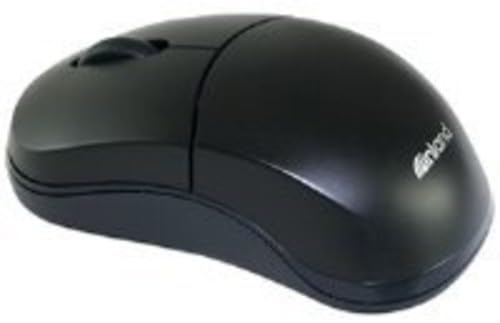
Figure 1: Inland Pro Bluetooth Optical Mouse (Model 07347). This image displays the top and side profile of the black optical mouse, highlighting its ergonomic shape and standard button layout.
- Botón de clic esquerdo
- Botón de clic dereito
- Roda de desprazamento
- Optical Sensor (located on the underside)
- Compartimento da batería (situado na parte inferior)
- Bluetooth Connection/Pairing Button (located on the underside)
- Power On/Off Switch (located on the underside)
4. Configuración
4.1. Instalación de baterías
- Turn the mouse over to access the underside.
- Locate the battery compartment cover. Slide or lift the cover to open it.
- Insira dúas (2) pilas AAA, asegurándose de que os terminais positivo (+) e negativo (-) estean aliñados correctamente coas marcas do interior do compartimento.
- Coloque a tapa do compartimento da batería de forma segura.
- Slide the Power On/Off switch to the 'On' position.
4.2. Emparellamento Bluetooth
Follow these steps to connect your mouse to a compatible device:
- Ensure the mouse has fresh batteries and is powered on.
- On your computer or device, enable Bluetooth and open the Bluetooth settings or device manager.
- Manteña premido o Bluetooth Connection/Pairing Button on the underside of the mouse for approximately 3-5 seconds. An indicator light on the mouse (if present) may flash to indicate pairing mode.
- On your device, search for new Bluetooth devices. The mouse should appear as "Inland Pro Mouse" or a similar identifier.
- Select the mouse from the list of available devices to initiate the connection.
- If prompted for a passkey, enter "0000" or consult your device's Bluetooth instructions. Some devices may not require a passkey.
- Once connected, the mouse indicator light may stop flashing or turn solid, and your device should confirm the successful pairing.
Nota de compatibilidade: This mouse is compatible with Windows 2000, Windows XP, Windows Vista, and Mac OS. Compatibility with other operating systems or specific Bluetooth adapters may vary.
5. Instrucións de funcionamento
After successful pairing, the mouse is ready for use.
- Mover o cursor: Move the mouse across a flat, non-reflective surface to control the cursor on your screen.
- Clic esquerdo: Preme o botón esquerdo para seleccionar elementos, abrir ligazóns ou activar funcións.
- Clic dereito: Prema o botón dereito para abrir menús contextuais ou acceder a opcións adicionais.
- Roda de desprazamento: Xire a roda de desprazamento cara arriba ou cara abaixo para navegar polos documentos e web pages. The scroll wheel can also be pressed as a middle click button for some functions.
6. Mantemento
6.1. Limpeza do rato
Para manter un rendemento e unha aparencia óptimos:
- Asegúrate de que o rato estea apagado antes de limpalo.
- Use un pano suave e sen pelusa lixeiramente dampmantelo con auga ou unha solución de limpeza suave.
- Wipe the exterior surfaces of the mouse gently.
- Evita o uso de produtos químicos agresivos, produtos de limpeza abrasivos ou humidade excesiva, xa que poden danar o rato.
- Non pulverices produtos de limpeza directamente sobre o rato.
6.2. Substitución da batería
When the mouse's performance degrades or it stops responding, it may be time to replace the batteries. Follow the steps in Section 4.1 to replace the two (2) AAA batteries.
Note: Dispose of used batteries responsibly according to local regulations.
7 Solución de problemas
Se tes problemas co teu rato óptico Bluetooth Inland Pro, consulta os seguintes problemas e solucións comúns:
- Mouse does not respond or cursor does not move:
- Ensure the mouse is powered on. Check the On/Off switch on the underside.
- Substitúe as pilas por pilas AAA novas.
- Ensure the mouse is within the effective range of your Bluetooth device (typically up to 10 meters).
- Verify that the mouse is properly paired with your device. If not, re-pair it following the steps in Section 4.2.
- Try connecting the mouse to a different Bluetooth-enabled device to rule out an issue with your primary device's Bluetooth adapter.
- Connection fails or mouse frequently disconnects:
- Ensure there are no other strong wireless signals or devices interfering with the Bluetooth connection.
- Turn the mouse off and then on again using the power switch on the underside. This can often re-establish the connection.
- Remove the mouse from your device's Bluetooth paired devices list and then re-pair it.
- Actualiza os controladores Bluetooth do teu ordenador.
- If your device requests a code during pairing and none was provided, try common codes like "0000" or "1234". If issues persist, consult your device's operating system documentation.
- O movemento do cursor é errático ou impreciso:
- Limpa o sensor óptico da parte inferior do rato cun pano suave e seco.
- Use the mouse on a clean, uniform, non-reflective surface. Avoid highly reflective or transparent surfaces.
8. Especificacións
| Marca | Terra adentro |
| Número de modelo | 07347 |
| Tecnoloxía de conectividade | Bluetooth, Wireless (2.4 GHz Radio Frequency, 802.11abg) |
| Tecnoloxía de detección de movemento | Óptica |
| DPI (puntos por polgada) | 1000 ppp |
| Número de botóns | 2 (plus scroll wheel click) |
| Cor | Negro |
| Compatibilidade do sistema operativo | Windows 2000, Windows XP, Windows Vista, Mac OS |
| Pilas necesarias | 2 x AAA (non incluído) |
| Peso do elemento | 109 g |
| Dimensións do produto (L x W x H) | 20.32 x 6.35 x 18.29 cm (dimensións aproximadas da embalaxe) |
9. Garantía e soporte
For warranty information, please refer to the documentation provided at the time of purchase or contact your retailer. Inland typically offers a limited warranty against defects in materials and workmanship.
For technical support or further assistance, please visit the official Inland website or contact their customer service department. Contact details are usually available on the product packaging or the manufacturer's websitio.


