1. Introdución
This manual provides essential information for the installation, operation, and maintenance of the Johnson Controls TEC2203-3 Non-Programmable Thermostat. This device is designed for controlling heating and cooling systems with 2 Heat and 2 Cool stages, and features a 1SPDFAN (Single Pole Double Throw Fan) control. It serves as a reliable replacement thermostat for compatible HVAC systems.
2. Produto rematadoview
2.1 Características principais
- Non-Programmable operation for straightforward temperature control.
- Supports 2 Heat and 2 Cool stages for versatile HVAC system compatibility.
- Integrated 1SPDFAN control.
- Clear digital display for room temperature.
2.2 Compoñentes e pantalla
The TEC2203-3 thermostat features a user-friendly interface with a digital display and intuitive buttons for control. Refer to the image below for a visual guide to the thermostat's components.
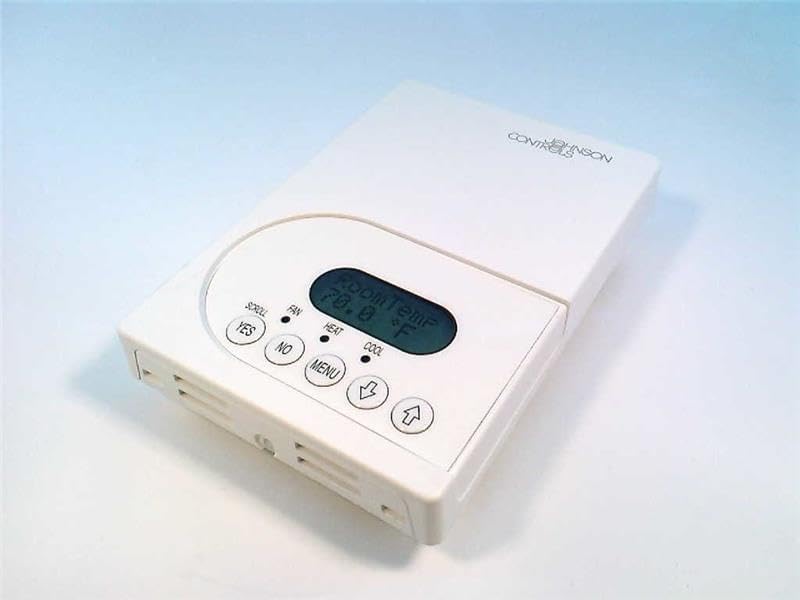
Figura 1: Fronte view of the Johnson Controls TEC2203-3 Thermostat. The image shows the white rectangular thermostat unit with a central digital display indicating "Room Temp 70.0 °F". Below the display are control buttons: "YES", "NO", "MENU", a down arrow, and an up arrow. Indicators for "SCROLL", "FAN", "HEAT", and "COOL" are also visible.
The display shows the current room temperature. Indicators for HEAT and COOL illuminate when the respective modes are active. The FAN indicator shows fan operation. Buttons include:
- YES / NO: Used for confirming or canceling selections in menu options.
- MENÚ: Accesses system settings and operational modes.
- Up Arrow / Down Arrow: Axusta os puntos de consigna de temperatura e navega polas opcións do menú.
3. Instalación
Installation of the Johnson Controls TEC2203-3 Thermostat should be performed by a qualified HVAC technician. Incorrect installation can lead to system malfunction, property damage, or personal injury. Always ensure power to the HVAC system is turned off at the circuit breaker before beginning any installation work.
3.1 Precaucións de seguridade
- Disconnect all power to the heating and cooling system before installation.
- Siga todos os códigos e ordenanzas eléctricas locais.
- Ensure wiring connections are secure and correct according to the wiring diagram provided with the product packaging (not included in this manual).
4. Instrucións de funcionamento
The TEC2203-3 is a non-programmable thermostat, meaning it maintains a set temperature until manually changed.
4.1 Axustar a temperatura
- A pantalla mostra a temperatura ambiente actual.
- Preme o Frecha cara arriba or Frecha abaixo button to adjust the desired temperature setpoint.
- The new setpoint will flash briefly and then be saved. The system will then work to reach and maintain this temperature.
4.2 Changing System Mode (Heat/Cool/Off)
- Preme o MENÚ botón.
- Usa o Frecha cara arriba or Frecha abaixo to navigate through the available system modes (e.g., HEAT, COOL, OFF).
- Preme SI para seleccionar o modo desexado.
- The corresponding indicator (HEAT or COOL) will illuminate when active.
4.3 Funcionamento do ventilador
The fan can typically be set to AUTO (runs only when heating or cooling) or ON (runs continuously).
- Preme o MENÚ botón.
- Navigate to the fan settings using the Frecha cara arriba or Frecha abaixo.
- Preme SI para seleccionar o modo de ventilador desexado.
5. Mantemento
The Johnson Controls TEC2203-3 Thermostat requires minimal maintenance to ensure optimal performance.
- Limpeza: Limpe periodicamente o exterior do termostato cun pano suave eamp pano. Non use produtos de limpeza ou disolventes abrasivos.
- Fluxo de aire: Asegúrate de que as aberturas de ventilación do termostato non estean obstruídas por po ou residuos, xa que isto pode afectar á precisión da detección da temperatura.
- Revisións profesionais: It is recommended to have your entire HVAC system, including the thermostat, inspected by a professional technician annually.
6 Solución de problemas
If you experience issues with your TEC2203-3 thermostat, consider the following common troubleshooting steps:
- Sen pantalla/alimentación: Check the circuit breaker for your HVAC system. Ensure the thermostat is properly seated on its base.
- Lectura de temperatura incorrecta: Ensure the thermostat's vents are clear of obstructions. Avoid placing the thermostat near heat sources (lamps, direct sunlight) or drafts.
- O sistema non responde: Verify the system mode (HEAT/COOL/OFF) is correctly selected. Check if the temperature setpoint is above (for heat) or below (for cool) the current room temperature.
- Ventilador non funciona: Check the fan mode setting (AUTO/ON). If set to AUTO, the fan will only run when heating or cooling is active.
Se os problemas persisten despois de intentar estes pasos, póñase en contacto cun técnico cualificado de climatización para obter axuda.
7. Especificacións
| Característica | Detalle |
|---|---|
| Modelo | TEC2203-3 |
| Marca | Johnson Controls |
| Tipo de control | Termostato non programable |
| Stages | 2 calor / 2 fresco |
| Control do ventilador | 1SPDFAN |
| Peso do elemento | 1 libra |
| ASIN | B004H2XCMU |
8. Garantía e soporte
For specific warranty information and technical support regarding your Johnson Controls TEC2203-3 Thermostat, please refer to the documentation included with your purchase or contact Johnson Controls directly. Warranty terms and support options may vary based on region and purchase location.


