Introdución
This manual provides comprehensive instructions for the setup, operation, and maintenance of your Sonic Alert SBJ525SS Digital Alarm Clock. Please read this manual thoroughly before using the device to ensure proper function and longevity. This alarm clock is designed to provide reliable timekeeping and alarm functions, including a powerful vibrating bed shaker, loud audible alarm, and visual alert features.
Información de seguridade
- Ensure the power adapter is connected to a standard electrical outlet.
- Non expoña a unidade á auga nin a humidade excesiva.
- Evite colocar a unidade preto de fontes de calor ou baixo a luz solar directa.
- Manter fóra do alcance dos nenos.
- Use only the provided power adapter and bed shaker.
Contido do paquete
Verifica que todos os elementos estean presentes no teu paquete:
- Sonic Alert SBJ525SS Digital Alarm Clock Unit
- 12-Volt Vibrating Bed Shaker
- Adaptador de alimentación
- Manual de instrucións
Produto rematadoview
Familiarízate coas distintas partes e controis do teu reloxo despertador.
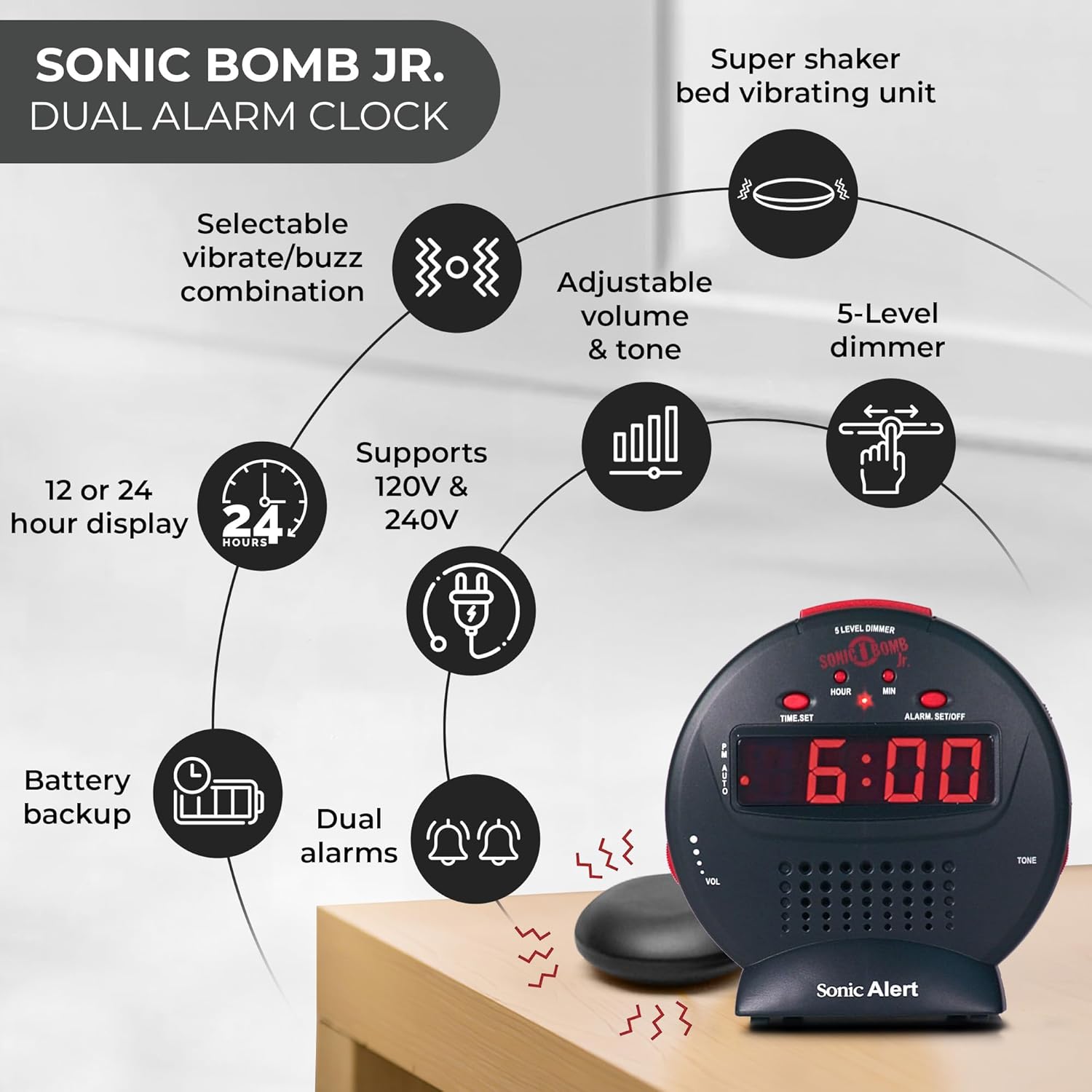
Descrición da imaxe: A diagram illustrating the Sonic Alert SBJ525SS Digital Alarm Clock. Key features highlighted include the 12 or 24-hour display, battery backup, dual alarms, selectable vibrate/buzz combination, adjustable volume and tone, 5-level dimmer, and the super shaker bed vibrating unit. The clock supports 120V & 240V power.
The clock features a large digital display, control buttons for time and alarm settings, and adjustment knobs for volume and tone. A dedicated port is available for the bed shaker connection.
Configuración
1. Conexión de alimentación
- Connect the power adapter to the DC IN jack on the back of the alarm clock.
- Plug the power adapter into a standard electrical wall outlet. The display will illuminate.
2. Instalación da batería de reserva
The alarm clock requires 2 AA batteries (not included) for battery backup functionality. This ensures your time and alarm settings are retained during a power outage.
- Localice o compartimento da batería na parte inferior da unidade.
- Abra a tapa do compartimento da batería.
- Insert 2 AA batteries, observing the correct polarity (+/-).
- Coloque a tapa do compartimento da batería.

Descrición da imaxe: A graphic illustrating the battery backup feature of the alarm clock. It shows the clock on a nightstand with a small circular battery icon (CR2032, 3V) next to it, indicating the type of battery used for backup. The text emphasizes that batteries are not included and are for retaining settings during power outages.
3. Configuración do tempo
- Manteña premido o HORARIO botón. Os díxitos das horas comezarán a parpadear.
- Preme o HORA repetidamente para axustar a hora. Observe o indicador PM para obter un axuste correcto de AM/PM.
- Preme o MIN botón repetidamente para axustar os minutos.
- Preme HORARIO de novo para confirmar a hora.
- Para cambiar entre o formato de 12 horas e o de 24 horas, prema o botón 12/24H button (if available, otherwise it might be part of time set cycle).
4. Bed Shaker Connection
The vibrating bed shaker is an integral part of the Sonic Alert system, designed for heavy sleepers or individuals with hearing impairments.
- Locate the jack labeled AXEITADORA on the back of the alarm clock.
- Insert the plug of the bed shaker into this jack.
- Place the bed shaker under your pillow, between your mattress and box spring, or under a fitted sheet for optimal vibration.

Descrición da imaxe: A composite image showing three different methods for placing the super bed shaker: under a pillow, under a fitted sheet, and under a mattress. The image also highlights the 6ft long cable of the shaker.
Instrucións de funcionamento
1. Configuración de alarmas (alarmas duplas)
The SBJ525SS features dual alarms, allowing you to set two independent wake-up times.
- Manteña premido o ALARM SET/OFF button once for Alarm 1. The hour digits for Alarm 1 will flash.
- Usa o HORA e MIN botóns para axustar a hora de alarma desexada.
- Preme ALARM SET/OFF again to confirm Alarm 1 and proceed to Alarm 2. The hour digits for Alarm 2 will flash.
- Usa o HORA e MIN buttons to set the desired time for Alarm 2.
- Preme ALARM SET/OFF a third time to confirm Alarm 2 and exit alarm setting mode.
- Para activar ou desactivar unha alarma, prema o botón ALARM SET/OFF button briefly (not held). Each press cycles through Alarm 1 ON, Alarm 2 ON, Both Alarms ON, Both Alarms OFF. An indicator light on the display will show which alarm(s) are active.

Descrición da imaxe: A bedroom scene with a couple sleeping, and the Sonic Alert alarm clock prominently displayed on a nightstand. The text overlay emphasizes the "Dual Alarm Clock" feature, allowing two different alarms to be set for reliable wake-up times.
2. Alarm Modes (Vibrate, Sound, Both)
The alarm clock offers various alert modes:
- Vibrate Only: The bed shaker will activate without an audible alarm.
- Só son: The audible alarm will sound without bed shaker activation.
- Ambos: Both the bed shaker and audible alarm will activate simultaneously.
To select the alarm mode, use the MODO DE ALARMA switch located on the side or back of the unit. Cycle through the options until your desired mode is selected.

Descrición da imaxe: A woman sleeping in bed with the Sonic Alert alarm clock and its bed shaker visible on the adjacent nightstand. The image highlights the clock's features: a powerful 6-volt bed shaker, 102dB loud alarm with adjustable tone and volume, alarm and bed shaker test mode, and built-in red flashing lights.
3. Función de repetición da alarma
Cando soe a alarma, prema o botón grande AMORTAR button on top of the unit to temporarily silence the alarm. The alarm will sound again after the set snooze duration.
- The snooze duration is adjustable from 1 to 30 minutes. Refer to the full instruction manual for specific steps on adjusting the snooze time.
Descrición da imaxe: A man sleeping in bed with the Sonic Alert alarm clock on his bedside table. An overlay graphic shows a slider indicating the adjustable snooze duration from 1 to 30 minutes.
4. Brightness Dimmer
Adjust the display brightness to your preference using the 5-level dimmer function.
- Localiza o DIMMER control (often a slider or button) on the unit.
- Adjust the control to cycle through the 5 brightness levels, from brightest (5) to dimmest (1).

Descrición da imaxe: A woman sleeping in a bedroom with the Sonic Alert alarm clock on her nightstand. Below, a series of five clock images illustrate the different brightness levels of the display, from level 5 (brightest) to level 1 (dimmest), demonstrating the five-level dimmer feature.
5. Volume and Tone Adjustment
Customize the audible alarm sound to your preference.
- Usa o VOL (Volume) knob/slider to increase or decrease the alarm's loudness.
- Usa o TONO knob/slider to adjust the pitch of the alarm sound.
Descrición da imaxe: Un primeiro plano view of the Sonic Alert alarm clock, specifically highlighting the volume control slider on its side. The accompanying text explains how to adjust the sound with ease using the knobs for volume and tone.

Descrición da imaxe: The Sonic Alert alarm clock on a white surface, with a graphic overlay demonstrating the adjustable tone feature. Sound waves emanate from the clock, and a slider indicates the range of tone adjustments available.
6. USB Charging Port Usage
The alarm clock includes a built-in USB port for charging compatible handheld devices.
- Locate the USB charging port on the side or back of the unit.
- Conecta o cable de carga USB do teu dispositivo ao porto.
- Ensure your device begins charging. Note that charging speed may vary depending on the device and cable.

Descrición da imaxe: A woman reaching for her smartphone, which is connected and charging via the built-in USB port on the Sonic Alert alarm clock, placed on a nightstand next to her bed.
Mantemento
- Limpeza: Limpe a unidade cun pano suave e seco. Non empregue produtos de limpeza líquidos nin materiais abrasivos.
- Substitución da batería: Replace backup batteries annually or when the battery low indicator appears to ensure continuous backup functionality.
- Almacenamento: If storing the unit for an extended period, remove the backup batteries to prevent leakage.
Resolución de problemas
| Problema | Causa posible | Solución |
|---|---|---|
| A pantalla do reloxo está apagada ou parpadea. | Power adapter not connected or faulty; power outage. | Ensure power adapter is securely plugged in. Check wall outlet. If power outage, battery backup should maintain time (display will be off). |
| A alarma non soa/vibra. | Alarm not activated; incorrect alarm mode selected; volume too low; bed shaker not connected. | Verify alarm is ON (indicator light). Check alarm mode switch. Increase volume. Ensure bed shaker is securely plugged in. |
| A configuración da hora/alarma pérdese despois de apagar a alimentacióntage. | As baterías de reserva están gastadas ou non están instaladas. | Install fresh AA batteries in the battery compartment. |
| A carga por USB é lenta ou non funciona. | Device incompatibility; faulty USB cable; device requires higher power output. | Try a different USB cable. Ensure your device is compatible with standard USB charging. The clock's USB port provides standard charging output. |
Especificacións
| Marca | Alerta sónica |
| Número de modelo | SBJ525SS |
| Tipo de visualización | Dixital |
| Características especiais | Alarm, Auto Dimmable, Snooze, Vibrating Bed Shaker, USB Charging Port, Red Flashing Alert Lights |
| Fonte de enerxía | Corded Electric with Battery Backup (2 AA batteries required, not included) |
| Dimensións do produto | 5" de ancho x 5" de alto |
| Material | Plástico |
| Alarma sonora | Up to 102dB (with bed shaker) |
Garantía e Soporte
The Sonic Alert SBJ525SS Digital Alarm Clock comes with a Limited Warranty. For specific warranty terms and conditions, please refer to the warranty card included with your product or visit the official Sonic Alert websitio.
For technical support, troubleshooting assistance, or to inquire about replacement parts, please contact Sonic Alert customer service:
- Websitio: www.sonicalert.com
- Información de contacto: Consulte o oficial websitio web ou a embalaxe do produto para obter os datos de contacto máis actuais.
Descrición da imaxe: An open instruction manual for the Sonic Bomb Jr. alarm clock, showing detailed operational instructions and diagrams. This image signifies that a manual is included with the product for user guidance.


