Produto rematadoview
The Technics ST-K55 is a Stereo Synthesizer Digital AM/FM Tuner designed for integration with digital amplifier systems. It offers precise radio reception and a range of features for convenient listening.

Figura 1: Fronte view of the Technics ST-K55 tuner, showing the display and control buttons.

Figura 2: Top-down perspective of the Technics ST-K55 tuner, highlighting its compact design.
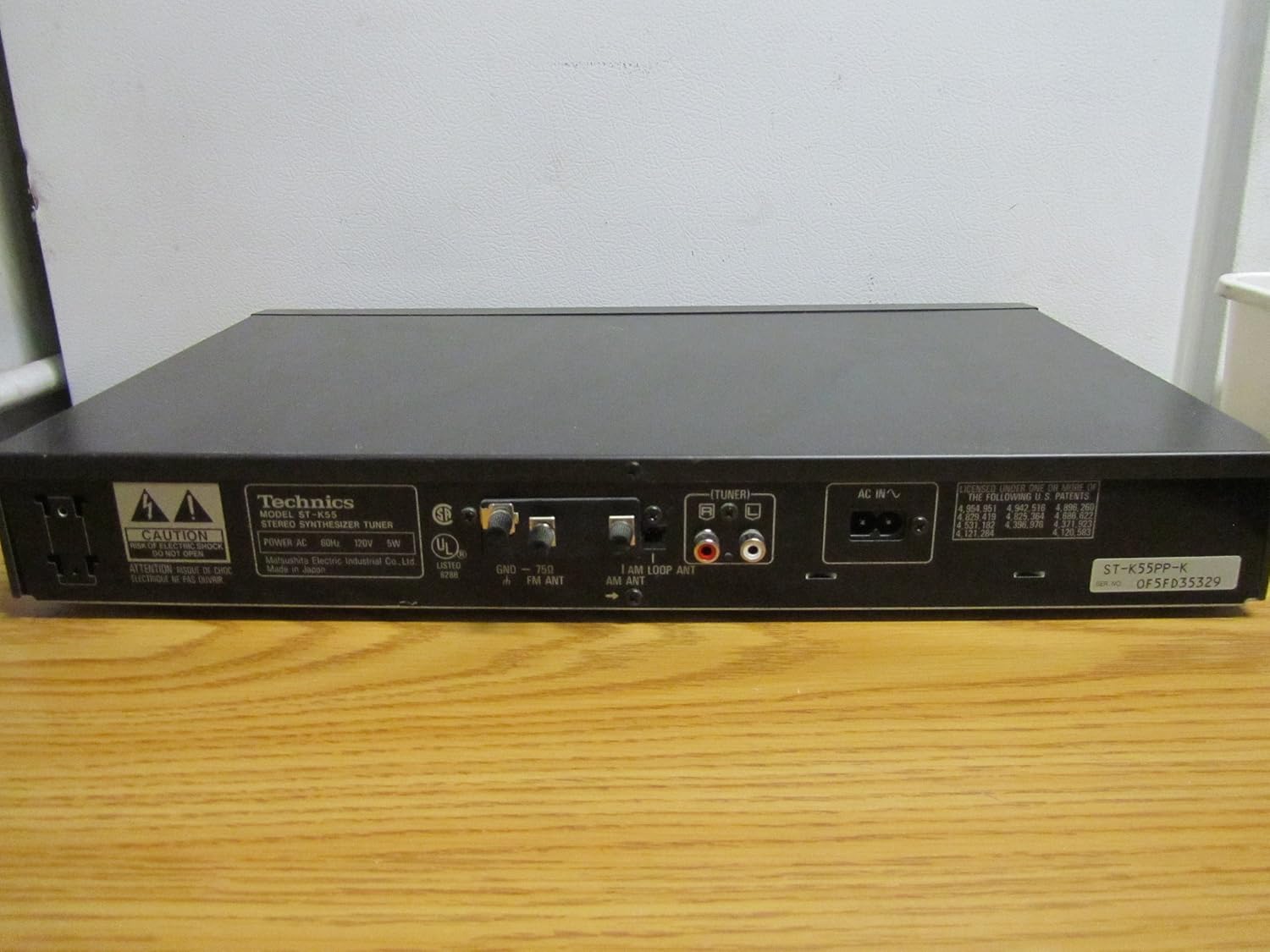
Figura 3: Rear panel of the Technics ST-K55 tuner, displaying audio output jacks and antenna connections.
Características clave
- 30 Programmable AM-FM Stereo Stations: Allows for quick access to your favorite radio frequencies.
- Automatic Radio Station Search and Programming: Simplifies the process of finding and storing available stations.
- Manual Radio Station Search and Programming: Provides precise control for tuning into specific frequencies.
Configuración
1. Desembalaxe
Carefully remove the ST-K55 tuner from its packaging. Ensure all components are present, including the main unit and any supplied accessories (e.g., AM loop antenna, FM wire antenna).
2 Colocación
Place the tuner on a stable, flat surface, away from direct sunlight, heat sources, and excessive dust. Ensure adequate ventilation around the unit.
3. Conexións
Consulte Figura 3 for a visual guide to the rear panel connections.
- Saída de audio: Connect the audio output jacks (RCA L/R) of the ST-K55 to an available audio input on your amplifier or receiver using appropriate RCA cables.
- Antena AM: Connect the supplied AM loop antenna to the AM antenna terminals. Position the loop antenna for optimal reception.
- Antena FM: Connect the supplied FM wire antenna to the FM antenna terminal. Extend the wire antenna fully and position it for best FM reception. For improved FM reception, a 75-ohm coaxial cable can be connected to the FM 75Ω coaxial terminal.
- Potencia: Conecte o cable de alimentación de CA a unha toma de parede estándar.
Instrucións de funcionamento
1. Acendido/apagado
Preme o POTENCIA button on the front panel to turn the tuner on or off.
2. Selección da banda (AM/FM)
Preme o MODO FM or MODO AM botón para cambiar entre as bandas FM e AM.
3. Modos de afinación
- Sintonización automática: Preme o AUTOTUNE button. The tuner will automatically scan and stop at the next available strong station.
- Sintonización manual: Usa o TUNING UP/DOWN buttons to manually adjust the frequency. Press briefly for step-by-step tuning, or hold down for continuous scanning.
4. Programming Stations (Presets)
The ST-K55 allows you to store up to 30 AM/FM stations as presets.
- Tune to the desired station using automatic or manual tuning.
- Preme o MEMORIA button. The preset number display will flash.
- Within a few seconds, use the PRESET UP/DOWN botóns para seleccionar o número predefinido desexado (1-30).
- Preme o MEMORIA button again to confirm and store the station.
5. Recuperación de emisoras predefinidas
Preme o PRESET UP/DOWN buttons to cycle through your stored stations.
Mantemento
1. Limpeza
To clean the exterior of the tuner, use a soft, dry cloth. For stubborn marks, slightly dampEnxágüe o pano con auga e un deterxente suave e, a seguir, séqueo inmediatamente. Non empregues produtos de limpeza abrasivos, solventes nin alcol, xa que poden danar o acabado.
2. Almacenamento
If storing the unit for an extended period, disconnect it from the power outlet and store it in a cool, dry place, away from direct sunlight and extreme temperatures.
Resolución de problemas
If you experience issues with your Technics ST-K55 tuner, consult the table below before seeking professional service.
| Problema | Causa posible | Solución |
|---|---|---|
| Sen poder | O cable de alimentación non está conectado correctamente. | Comprobe a conexión do cable de alimentación á unidade e á toma de corrente. |
| Sen son ou son débil | Conexión incorrecta do cable de son. Amplifier input not selected correctly. Antena non conectada ou colocada correctamente. | Ensure audio cables are securely connected to the correct input on your ampmáis vivo. Select the correct input source on your ampmáis vivo. Check antenna connections and adjust position for better reception. |
| Poor reception (static, weak signal) | Antenna issues. Interferencias doutros dispositivos electrónicos. Localización da unidade. | Adjust antenna position. Consider an external antenna for improved reception. Move the tuner away from other electronic devices. Relocate the unit to an area with better signal strength. |
| Cannot program stations | Pasos de programación incorrectos. | Review the "Programming Stations" section in this manual and follow the steps carefully. |
Especificacións
| Característica | Detalle |
|---|---|
| Marca | Técnicas |
| Modelo | ST-K55 |
| Tipo de sintonizador | Stereo Synthesizer Digital AM/FM Tuner |
| Programmable Stations | 30 (AM/FM) |
| Tecnoloxía de conectividade | Auxiliary, USB (Note: USB connectivity typically refers to modern devices. For this vintage tuner, it likely refers to compatibility with systems that might use USB for other components, not direct USB audio from the tuner itself. The primary audio output is RCA.) |
| Fonte de enerxía | Eléctrico con cable |
| Peso do elemento | 5 libras (aprox. 2.27 kg) |
| Dimensións do paquete | 18 x 11 x 2 polgadas (aprox. 45.7 x 27.9 x 5.1 cm) |
Nota: as especificacións están suxeitas a cambios sen previo aviso.
Garantía e Soporte
For information regarding warranty coverage and technical support for your Technics ST-K55 tuner, please refer to the original purchase documentation or contact Technics customer service directly.
Tamén podes visitar o sitio oficial Technics Store on Amazon para obter información e recursos adicionais sobre o produto.


