1. Introdución e finalview
This manual provides essential information for the proper setup, operation, and maintenance of your ViewSonic VA2231WM-LED 22-inch widescreen LED monitor. Please read these instructions carefully before using your monitor.

Figura 1.1: Fronte view da ViewSonic VA2231WM-LED monitor displaying an environmental message.
Características principais:
- 22-inch (21.5-inch viewable) Full HD 1080p widescreen display.
- Mercury-free LED backlight for energy efficiency.
- 10,000,000:1 Dynamic Contrast Ratio for enhanced image depth.
- Automatic Aspect Ratio Adjustment to prevent image stretching.
- Integrated stereo speakers for multimedia audio.
- DVI and VGA input options for versatile connectivity.
- VESA mountable (100mm x 100mm) for flexible installation.
- Eco-mode function for up to 35% energy savings.
- ENERGY STAR 5.0 and EPEAT Silver certified.
2. Instrucións de configuración
2.1 Desembalaxe do monitor
Carefully remove the monitor and all components from the packaging. Ensure all items listed in the packing list are present. Retain the original packaging for future transport or service needs.

Figura 2.1: Lateral view of the monitor, showcasing o seu deseño delgado.
2.2 Colocación do soporte
- Coloque o monitor boca abaixo sobre unha superficie suave e limpa para evitar rabuñaduras.
- Align the stand base with the monitor's neck and secure it according to the diagram provided in the quick start guide (not included in this document).
- Ensure the stand is firmly attached before placing the monitor upright.
2.3 Cables de conexión
Conecta os cables necesarios aos portos correspondentes na parte traseira do monitor e do teu ordenador.

Figure 2.2: Rear panel connections including power input, audio input, DVI, and VGA ports.
- Cable de alimentación: Conecte o cable de alimentación á entrada de alimentación do monitor e despois a unha toma de corrente con conexión a terra.
- Video Cable (DVI or VGA):
- For digital signal, connect a DVI cable from your computer's DVI output to the monitor's DVI input.
- For analog signal, connect a VGA cable from your computer's VGA output to the monitor's VGA input.
- Cable de audio: If using the integrated speakers, connect an audio cable from your computer's audio output to the monitor's audio input.
2.4 Montaxe VESA
The VA2231WM-LED monitor is VESA compliant (100mm x 100mm), allowing for alternative mounting solutions such as wall mounts or monitor arms.
- Asegúrese de que o monitor estea apagado e desconectado de todos os cables.
- Carefully detach the original stand by unscrewing the four screws located on the back of the monitor.
- Attach your VESA-compatible mount using the appropriate screws (typically M4 x 10mm, not included).
- Follow the instructions provided with your VESA mounting kit for secure installation.
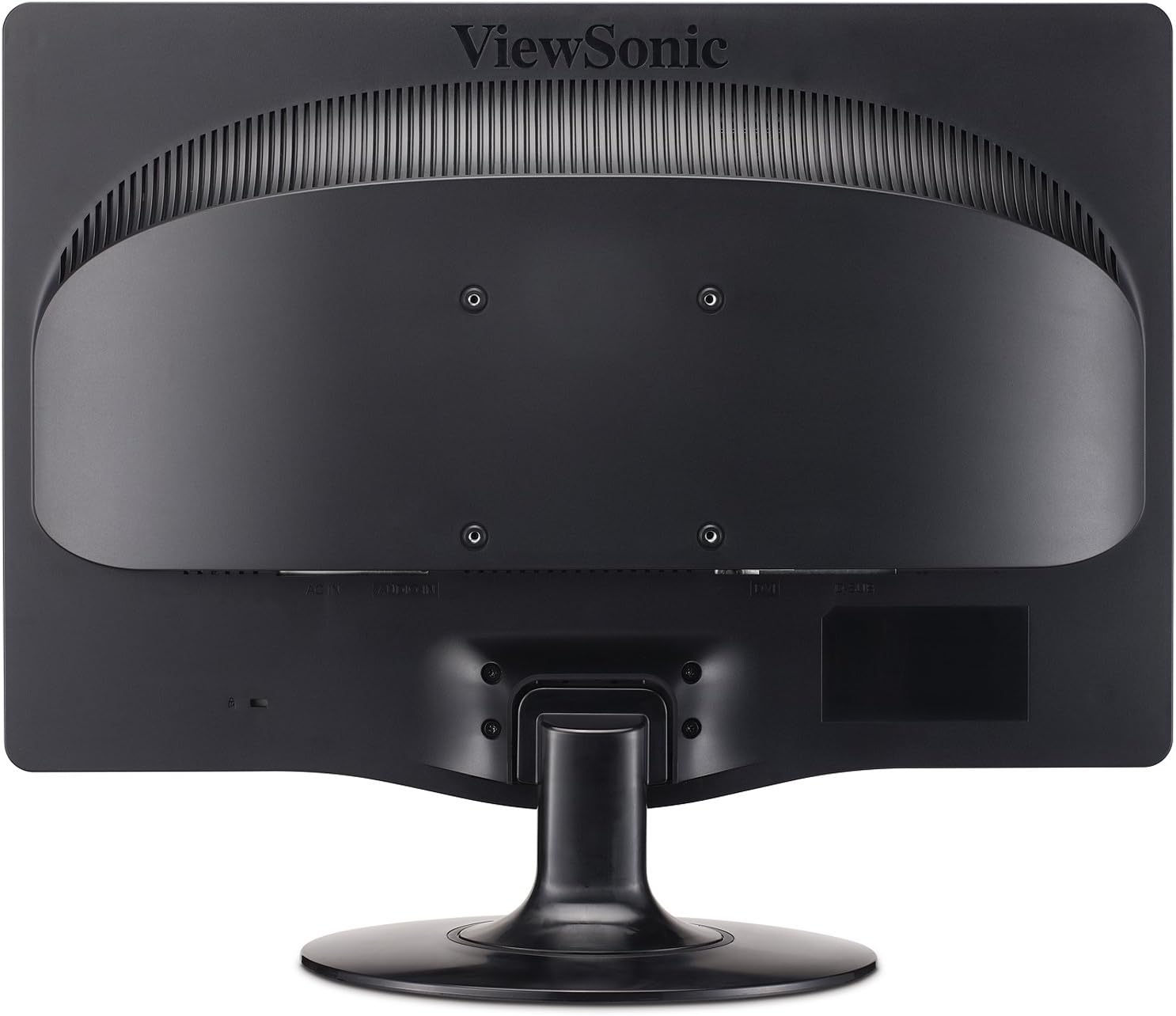
Figura 2.3: Traseira view highlighting the 100mm x 100mm VESA mounting pattern.
3. Instrucións de funcionamento
3.1 Acendido/Apagado
- Press the power button located on the front bezel of the monitor to turn it on or off.
- O indicador luminoso de acendido acenderase cando o monitor estea acendido.
3.2 Menú de visualización en pantalla (OSD).
The OSD menu allows you to adjust various display settings. Use the control buttons located on the front bezel to navigate and select options.
- Botón de menú: Abre o menú OSD.
- Frechas cara arriba/abaixo: Navega polas opcións do menú.
- Botón Seleccionar: Confirma unha selección ou accede a un submenú.
- Botón de saída: Sae do menú ou OSD actual.
3.3 Axustar a configuración da pantalla
- Brillo/Contraste: Axusta esta configuración para optimizar a visibilidade da imaxe para o teu entorno.
- Modo ecolóxico: Select "Optimize" or "Conserve" to reduce power consumption and prolong lamp life. This can save up to 35% energy.
- Relación de aspecto: The monitor features automatic aspect ratio adjustment. For 4:3 input signals, the image will be centered with sidebars, preventing stretching.
- Selección de entrada: Manually switch between DVI and VGA inputs if auto-detection does not select the correct source.
- Audio: Adjust the volume for the integrated stereo speakers.
4. Mantemento
4.1 Limpeza do monitor
- Apague sempre o monitor e desconecte o cable de alimentación antes de limpalo.
- Use un pano suave e sen pelusa damplimpas con auga ou cun limpador de pantallas suave e non abrasivo.
- Non pulverices o limpador directamente sobre a pantalla. Aplícao primeiro sobre o pano.
- Avoid using benzene, thinner, ammonia-based cleaners, or abrasive cleaning agents, as these can damage the display surface.
4.2 Coidados xerais
- Manteña o monitor lonxe da luz solar directa, da calor excesiva ou da humidade.
- Asegúrese de que haxa unha ventilación axeitada arredor do monitor para evitar o sobrequecemento.
- Evite colocar obxectos pesados sobre o monitor ou os seus cables.
- Do not attempt to disassemble the monitor; refer all servicing to qualified personnel.
5 Solución de problemas
If you encounter issues with your monitor, refer to the following common troubleshooting steps.
| Problema | Causa posible | Solución |
|---|---|---|
| Sen Poder | Power cable not connected; power outlet not active; monitor power button off. | Ensure power cable is securely connected. Check power outlet with another device. Press the monitor's power button. |
| Sen sinal | Video cable not connected; incorrect input source selected; computer not powered on. | Verify video cable (DVI/VGA) is securely connected to both monitor and computer. Use OSD to select correct input source. Ensure computer is powered on and outputting video. |
| A imaxe está borrosa ou distorsionada | Incorrect resolution; loose video cable; OSD settings incorrect. | Set computer's display resolution to 1920x1080. Check video cable connection. Adjust OSD settings like 'Auto Adjust' (for VGA) or 'Phase/Clock'. |
| Píxeles mortos | Manufacturing characteristic of LCD panels. | Consulte ViewSonic's pixel performance policy for warranty coverage regarding dead pixels. |
6. Especificacións
| Característica | Detalle |
|---|---|
| Número de modelo | VA2231WM-LED |
| Tamaño da pantalla | 22 polgadas (21.5 polgadas) viewcapaz) |
| Resolución | 1920 x 1080 (Full HD 1080p) |
| Relación de aspecto | 16:9 |
| Tipo de panel | LCD retroiluminado LED |
| Relación de contraste dinámico | 10,000,000:1 |
| Tempo de resposta | 5 ms (típico) |
| Conectividade | 1x DVI, 1x VGA |
| Audio | Integrated Stereo Speakers, Audio In |
| Compatible con soporte VESA | 100 mm x 100 mm |
| Dimensións (LxWxH) | 7.7 x 20.2 x 15.3 polgadas (con soporte) |
| Peso | 8.6 libras (con soporte) |
| Consumo de enerxía | Eco-mode for reduced consumption |
| Certificacións | ENERGY STAR 5.0, EPEAT Silver |
7. Garantía e soporte
7.1 Garantía limitada
O ViewSonic VA2231WM-LED monitor is backed by a 3 ano de garantía limitadaEsta garantía cobre defectos de materiais e fabricación en condicións normais de uso. Conserve o comprobante de compra para reclamacións de garantía.
7.2 Pixel Performance Policy
ViewSonic is committed to using high-grade panels and offers an industry-leading pixel performance policy. For detailed information regarding acceptable pixel anomalies and warranty coverage, please refer to the official ViewSonic websitio ou póñase en contacto co servizo de atención ao cliente.
7.3 Atención ao cliente
For technical assistance, warranty service, or further information, please visit the official ViewSonic website or contact their customer support department. Contact details can typically be found on the ViewSonic websitio web ou na documentación orixinal do produto.


