1. Rematadoview
The Roku 2 XS is a streaming player designed to deliver high-definition entertainment to your television. It supports 1080p HD streaming and includes features for motion-based gaming. This device provides access to a wide array of streaming channels, including popular services like Netflix, Hulu Plus, and Amazon Instant Video. It also offers a free mobile application for iOS and Android devices, enhancing control and content browsing. Connectivity options include Ethernet for wired connections and a USB port for playing local media.
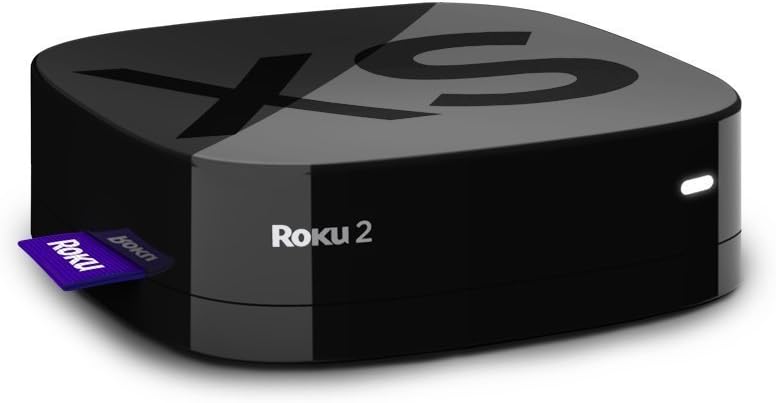
Image: The Roku 2 XS 1080p Streaming Player, a compact black device with the Roku logo, shown with a purple Roku tag do seu lado.
2. Que está incluído
- Enhanced remote with motion control for games
- Angry Birds game (pre-installed or included as a code)
- Dúas pilas AA
- Cable de A/V (vermello/branco/amarelo)
- Adaptador de alimentación
- Guía de inicio
3. O que necesitas
- Unha televisión
- High-speed Internet service (minimum 1.2 Mbps; 5 Mbps recommended for HD video)
- A wireless router (for Wi-Fi connectivity)
4. Configuración
Follow these steps to set up your Roku 2 XS streaming player:
- Conectar á televisión: Connect the Roku 2 XS to your television using the provided A/V cable or an HDMI cable (not included). For optimal 1080p HD quality, an HDMI connection is recommended.
- Conectar enerxía: Plug the power adapter into the Roku 2 XS and then into a wall outlet.
- Encendido: Turn on your television and select the correct input source (HDMI or A/V) where the Roku 2 XS is connected.
- Configuración inicial: Follow the on-screen instructions to connect to your Wi-Fi network and link your Roku account. If you do not have a Roku account, you will be prompted to create one.
- Emparejamento remoto: The enhanced remote should automatically pair with your device. If not, refer to the 'Remote Control' section for manual pairing instructions.
Configuración rematadaview Vídeo
Vídeo: Un curto remateview demonstrating the setup process and features of the Roku 2 XS streaming player.
5. Instrucións de funcionamento
Control remoto
The Roku 2 XS comes with an enhanced remote featuring motion control for gaming and dedicated buttons for popular streaming services. It also includes a voice search function for easier content discovery.
- Navegación: Use the directional pad (up, down, left, right) and the 'OK' button to navigate menus and select items.
- Busca por voz: Press and hold the microphone button on the remote and speak your search query. This allows for quick searching of movies, TV shows, and channels.
- Botóns dedicados: Utilize the dedicated buttons for direct access to services like Netflix, Hulu Plus, and Amazon Instant Video.
- Control de movemento: The remote's motion sensors enable interactive gameplay for compatible games.
Acceso a canles e contido
From the Roku home screen, you can browse and launch installed channels. To add new channels, navigate to the Roku Channel Store. Many channels offer free content, while others require a subscription.
6. Características
- 1080p HD Streaming: Enjoy high-definition video quality for a clear viewexperiencia ing.
- Motion-Based Gaming: Engage in interactive games using the remote's motion control capabilities.
- Extensive Channel Selection: Access over 600 streaming channels, including movies, TV shows, live sports, music, and news.
- One-Stop Search: Easily find movies and TV shows across multiple top channels.
- Free Mobile App: Control your Roku player, browse channels, and stream media from your iOS or Android device.
- Múltiples opcións de conectividade: Includes Ethernet for a stable wired connection and a USB port for playing local media files (MP4 video, AAC/MP3 audio, JPEG/PNG images).
- Deseño compacto: Small footprint, silent operation, and low power consumption.
7. Especificacións
| Marca | Roku |
| Nome do modelo | 3100R |
| Peso do elemento | 0.3 onzas |
| Dimensións do produto | 3.3 x 3.3 x 0.9 polgadas |
| Cor | Negro |
| Resolución | 1080 p |
| Tecnoloxía de conectividade | HDMI |
| Tipo de conector | USB |
| Servizos de Internet compatibles | Amazon Instant Video, Hulu Plus, Netflix, Pandora, YouTube |
8. Mantemento
The Roku 2 XS is designed for low maintenance. To ensure optimal performance and longevity:
- Manteña o dispositivo nunha zona ben ventilada para evitar o sobreenriquecido.
- Clean the device and remote periodically with a soft, dry cloth.
- Evite expoñer o dispositivo a temperaturas ou humidade extremas.
9 Solución de problemas
If you encounter issues with your Roku 2 XS, consider the following basic troubleshooting steps:
- Sen enerxía: Asegúrate de que o adaptador de corrente estea conectado correctamente tanto ao dispositivo como a unha toma de corrente que funcione.
- Sen imaxe/son: Verify that the Roku 2 XS is correctly connected to your TV and that your TV is set to the correct input source. Check all cable connections.
- O control remoto non responde: Replace the batteries in the remote. If the issue persists, try re-pairing the remote according to the 'Get Started guide'.
- Buffering/Connectivity Issues: Check your internet connection and Wi-Fi signal strength. Try restarting your wireless router and the Roku device.
- Problemas da aplicación: Try removing and re-adding the problematic channel from your Roku device.
Para unha resolución de problemas máis detallada ou para obter información sobre problemas persistentes, consulte o soporte oficial de Roku. website or the comprehensive 'Get Started guide' included with your product.
10. Garantía e soporte
The Roku 2 XS 1080p Streaming Player typically comes with a 90 días de garantía do fabricanteConserva o comprobante de compra para reclamacións de garantía.
For product support, including additional guides, FAQs, and contact information, please visit the official Roku support website. You can also find helpful resources and community forums online.
Exención de responsabilidade legal: This product is provided in excellent condition and functions perfectly. It comes in its original box with the manual and all contents.


