Introdución
This manual provides essential information for the safe and effective operation of your Laserliner SoundTest-Master 082.070A Noise Level Meter. Please read these instructions carefully before using the device and keep them for future reference. The SoundTest-Master 082.070A is designed for precise measurement of noise levels, featuring integrated long-term memory and PC connectivity for comprehensive documentation.
Instrucións de seguridade
- Always operate the device within its specified environmental conditions.
- Non expoña o dispositivo a temperaturas extremas, humidade ou luz solar directa.
- Evite deixar caer o dispositivo ou sometelo a fortes impactos.
- Non intente abrir nin modificar o dispositivo. As reparacións só deben ser realizadas por persoal autorizado.
- Manteña o dispositivo lonxe de campos magnéticos fortes.
- Ensure the microphone is clean and free from obstructions for accurate measurements.
Produto rematadoview
The Laserliner SoundTest-Master 082.070A is a handheld noise level meter equipped with a sensitive electret condenser microphone and a clear, illuminated display. It features various controls for measurement settings and data management.

Figura 1: Fronte view of the SoundTest-Master 082.070A, showing the display, microphone with windshield, and control buttons.
Compoñentes clave:
- Electret Condenser Microphone: For capturing sound. Includes a removable windshield.
- Pantalla iluminada: Shows measurement values, settings, and status.
- Botóns de control: Power, Setup, Max, Record, A/C weighting, Fast/Slow time weighting, Level adjustment, Data send.
- Saídas analóxicas: DC and AC outputs for external connections.
- Interface RS232: Optoisolated port for PC connection and data transfer.
Configuración
1. Instalación da batería
The device requires batteries for operation. Ensure correct polarity when inserting batteries into the compartment, typically located on the rear of the unit.
2. Acendido inicial
Preme o Poder button to turn on the device. The display will illuminate and show initial readings.
3. Windshield Attachment
Attach the removable windshield to the microphone to minimize wind noise interference during outdoor measurements.
Instrucións de funcionamento
1. Medición básica
- Acenda o dispositivo usando o Poder botón.
- Point the microphone towards the sound source.
- The current noise level will be displayed in decibels (dB).
2. Frequency Weighting (dB(A), dB(C))
Usa o A/C button to switch between frequency weighting curves:
- dB (A): Simulates the human ear's response to sound, commonly used for environmental noise measurements.
- dB(C): Provides a flatter response, suitable for measuring peak sound pressure levels or low-frequency noise.
3. Time Weighting (Fast/Slow)
Preme o RÁPIDO/LENTO button to select the desired time weighting:
- FAST (125 ms): For measuring rapidly changing noise levels.
- SLOW (1 second): For measuring average noise levels over a longer period, suitable for stable noise sources.
4. Data Logging and PC Connection
The device features a long-term recording function with 16,000 memory points and real-time logging capabilities when connected to a PC.
- Internal Data Logging: Preme o RECORDAR button to start/stop internal data recording. The device can store up to 16,000 measurement points.
- Conexión ao PC: Connect the device to a computer using the provided RS232 cable.
- Software: Install the provided software on your PC. This software allows for real-time data display, analysis, and download of recorded data.
- Envío de datos: Usa o ENVIAR DATOS button to initiate data transfer to the connected PC.
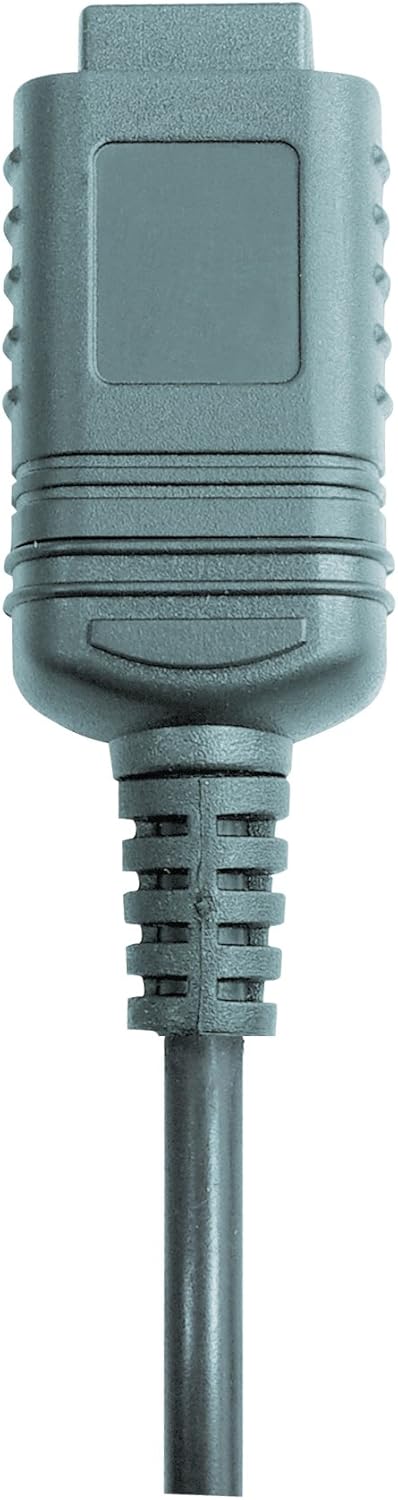

Figura 2: RS232 cable connectors used for connecting the SoundTest-Master to a PC.
5. Calibración
The device can be calibrated and adjusted using a standard noise level calibrator (94 dB / 1 kHz). Refer to the calibrator's instructions for the specific calibration procedure.
Mantemento
1. Limpeza
- Limpar o dispositivo casinlimpe cun pano suave e seco.
- Non use produtos de limpeza ou disolventes abrasivos.
- Ensure the microphone is kept clean and free of dust or debris.
2. Almacenamento
When not in use, store the SoundTest-Master in its protective case in a cool, dry place, away from direct sunlight and extreme temperatures. Remove batteries if storing for extended periods.
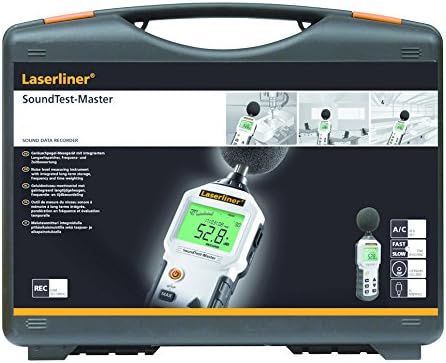
Figura 3: The SoundTest-Master 082.070A stored in its protective carrying case.
Resolución de problemas
| Problema | Causa posible | Solución |
|---|---|---|
| O dispositivo non se acende. | Baterías gastadas ou instaladas incorrectamente. | Substitúa as pilas, asegurándose de que a polaridade sexa correcta. |
| Lecturas inexactas. | Microphone obstructed or dirty; device needs calibration. | Clean microphone; perform calibration with a standard calibrator. |
| No data transfer to PC. | Incorrect cable connection; software not installed or configured. | Check RS232 cable connection; ensure PC software is correctly installed and running. |
| A pantalla está escura ou ilexible. | Low battery power; display backlight off. | Replace batteries; check device settings for backlight control. |
Especificacións
| Característica | Detalle |
|---|---|
| Nome do modelo | SoundTest-Master |
| Número de peza | 082.070A |
| Fabricante | Umarex |
| Marca | Laserliner |
| Ponderación de frecuencia | dB(A), dB(C) |
| Ponderación do tempo | FAST (125 ms), SLOW (1 second) |
| Memoria de datos | 16,000 puntos de medición |
| Interface | Optoisolated RS232 |
| Saídas analóxicas | DC e AC |
| Calibración | Adjustable with 94 dB / 1 kHz standard calibrator |
| Micrófono | Sensitive electret condenser with removable windshield |
| Mostrar | Illuminated, clear display |
| Peso do elemento | 1.18 quilogramos (2.6 libras) |
| Dimensións do produto | 10.33 x 5.51 x 13.78 polgadas |
| Material | Metal (Frame, Barrel) |
| Cor | Negro e Gris |
| Pilas necesarias | Yes (not included, type not specified in data) |
Garantía e Soporte
For warranty information and technical support, please refer to the documentation included with your purchase or visit the official Laserliner websitio.