
1. Introdución
This manual provides essential information for the proper setup, operation, and maintenance of your Paulmann 950.73 Remote Control. Please read these instructions carefully before using the device to ensure safe and efficient functionality. Keep this manual for future reference.
2. Produto rematadoview
The Paulmann 950.73 is a compact and modern remote control designed for wireless operation of compatible Paulmann lighting systems. It features a chrome finish and is constructed from durable plastic, offering a comfortable grip and intuitive control over your lighting.
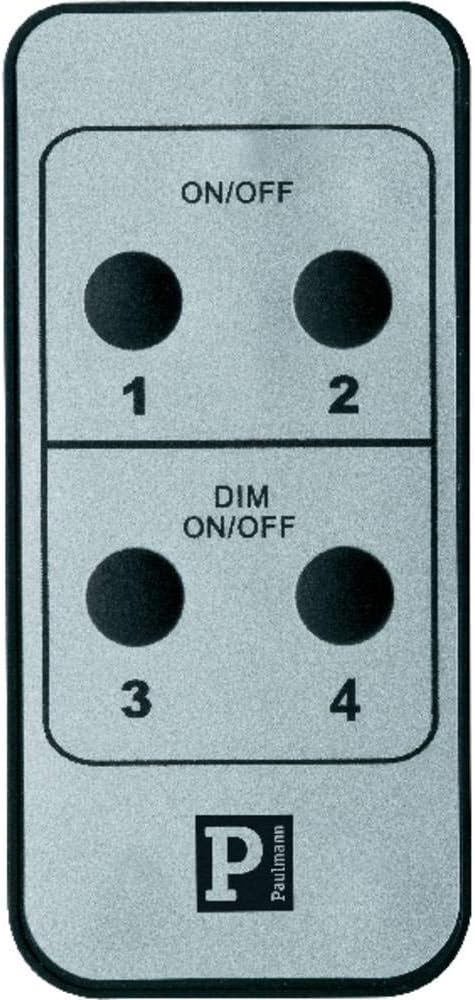
Imaxe 1: Fronte view of the Paulmann 950.73 Remote Control, showing the ON/OFF and DIM ON/OFF buttons for four channels.
Características principais:
- Wireless control for Paulmann lighting systems.
- Dedicated ON/OFF functionality.
- Dimming control (DIM ON/OFF) for compatible fixtures.
- Four independent control channels (1, 2, 3, 4).
- Modern chrome design.
3. Configuración
3.1 Instalación da batería
The Paulmann 950.73 Remote Control requires batteries for operation. Batteries are not included with the product. Please refer to the energy label for the correct battery type (typically AAA or similar, as indicated by the 'Battery / Accu' symbol).
- Localice a tapa do compartimento da batería na parte traseira do control remoto.
- Deslice ou solte a tapa para abrir o compartimento.
- Insert the required batteries, ensuring correct polarity (+ and -) as indicated inside the compartment.
- Coloque a tapa do compartimento da batería de forma segura.

Image 2: Energy label indicating battery or accumulator power source.
3.2 Pairing with Lighting System
Before first use, the remote control must be paired with your Paulmann lighting system. The exact pairing procedure may vary depending on your specific Paulmann receiver or light fixture. Generally, the steps involve:
- Ensure your Paulmann lighting system is powered on and in pairing mode (refer to your lighting system's manual for specific instructions).
- On the 950.73 remote, press and hold the desired channel button (1, 2, 3, or 4) for a few seconds until the light system responds (e.g., flashes or changes brightness).
- Release the button. The remote should now be paired with that channel.
- Repeat for other channels if you wish to control multiple lighting groups independently.
4. Funcionamento
The Paulmann 950.73 Remote Control offers straightforward operation for your connected lighting.
Funcións do botón:
- ON/OFF (Top Section): Press the respective channel button (1 or 2) in the top section to turn the connected light fixture ON or OFF.
- DIM ON/OFF (Bottom Section): Press the respective channel button (3 or 4) in the bottom section to turn the connected light fixture ON or OFF. For compatible dimmable fixtures, holding down the button may initiate dimming. Release the button at the desired brightness level.
Nota: The dimming function (DIM ON/OFF) will only work if the connected Paulmann lighting system and its light source are dimmable. If your system is not dimmable, these buttons will function as simple ON/OFF switches.
5. Mantemento
5.1 Limpeza
To clean the remote control, use a soft, dry cloth. For stubborn dirt, a slightly damp cloth with mild soap can be used, followed by immediate drying. Do not use abrasive cleaners, solvents, or harsh chemicals, as these can damage the surface.
5.2 Substitución da batería
Replace batteries when the remote's range decreases or it becomes unresponsive. Follow the battery installation steps in Section 3.1. Always dispose of used batteries responsibly according to local regulations.
6 Solución de problemas
Problemas comúns e solucións:
- O mando a distancia non responde:
- Comprobe se as pilas están inseridas correctamente e non están esgotadas. Substitúaas se é necesario.
- Ensure the remote is within range of the receiver.
- Re-pair the remote control with the lighting system (refer to Section 3.2).
- A función de atenuación non funciona:
- Verify that your Paulmann lighting system and the installed light source are dimmable.
- Ensure the remote is correctly paired to a dimmable channel.
- Interferencia:
- Avoid placing the remote near strong electromagnetic fields or other wireless devices that might cause interference.
7. Especificacións
| Atributo | Detalle |
|---|---|
| Número de modelo | 950.73 |
| Marca | Paulman |
| Cor | Chrome |
| Material | Plástico |
| Dimensións (ancho x fondo x alto) | 4 cm x 8.5 cm x 0.7 cm |
| Peso | 60 g |
| Estilo | Moderno |
| Tipo de cambio | Control remoto |
| Fonte de enerxía | Batería (non incluída) |
| Ambiente de uso | Só para uso en interiores |
8. Garantía e soporte
For information regarding warranty coverage, technical support, or spare parts availability for your Paulmann 950.73 Remote Control, please refer to the official Paulmann website or contact Paulmann customer service directly. This information is not provided within this manual.
Conserve o comprobante de compra para calquera reclamación de garantía.


