1. Introdución
This manual provides essential instructions for the safe and effective use of your Nikon Coolpix S9300 16.0 MP Digital Camera. Please read this manual thoroughly before using the camera and keep it accessible for future reference.
2. Información de seguridade
To prevent injury or damage to your camera, observe the following safety precautions:
- Non desmonte nin modifique a cámara.
- Keep the camera away from water and moisture.
- Use only Nikon-approved accessories and power sources.
- Evite expoñer a cámara a temperaturas extremas ou á luz solar directa durante períodos prolongados.
- Manter fóra do alcance dos nenos.
3. Contido do paquete
Verifica que todos os elementos estean presentes na caixa da cámara:
- Nikon Coolpix S9300 Digital Camera
- Rechargeable Li-ion Battery EN-EL12
- Charging AC Adapter EH-69P
- Cable USB UC-E6
- Audio Video Cable EG-CP16
- Strap AN-CP19
- ViewNX 2 CD-ROM
- Reference Manual CD-ROM
4. Cámara rematadaview
Familiarize yourself with the main components and controls of your Nikon Coolpix S9300 camera.
Fronte View (Lens Extended)

This image shows the front of the Nikon Coolpix S9300 camera with its 18x optical zoom lens fully extended, ready for capturing images. The flash unit is visible above the lens.
Fronte View (Lens Retracted)
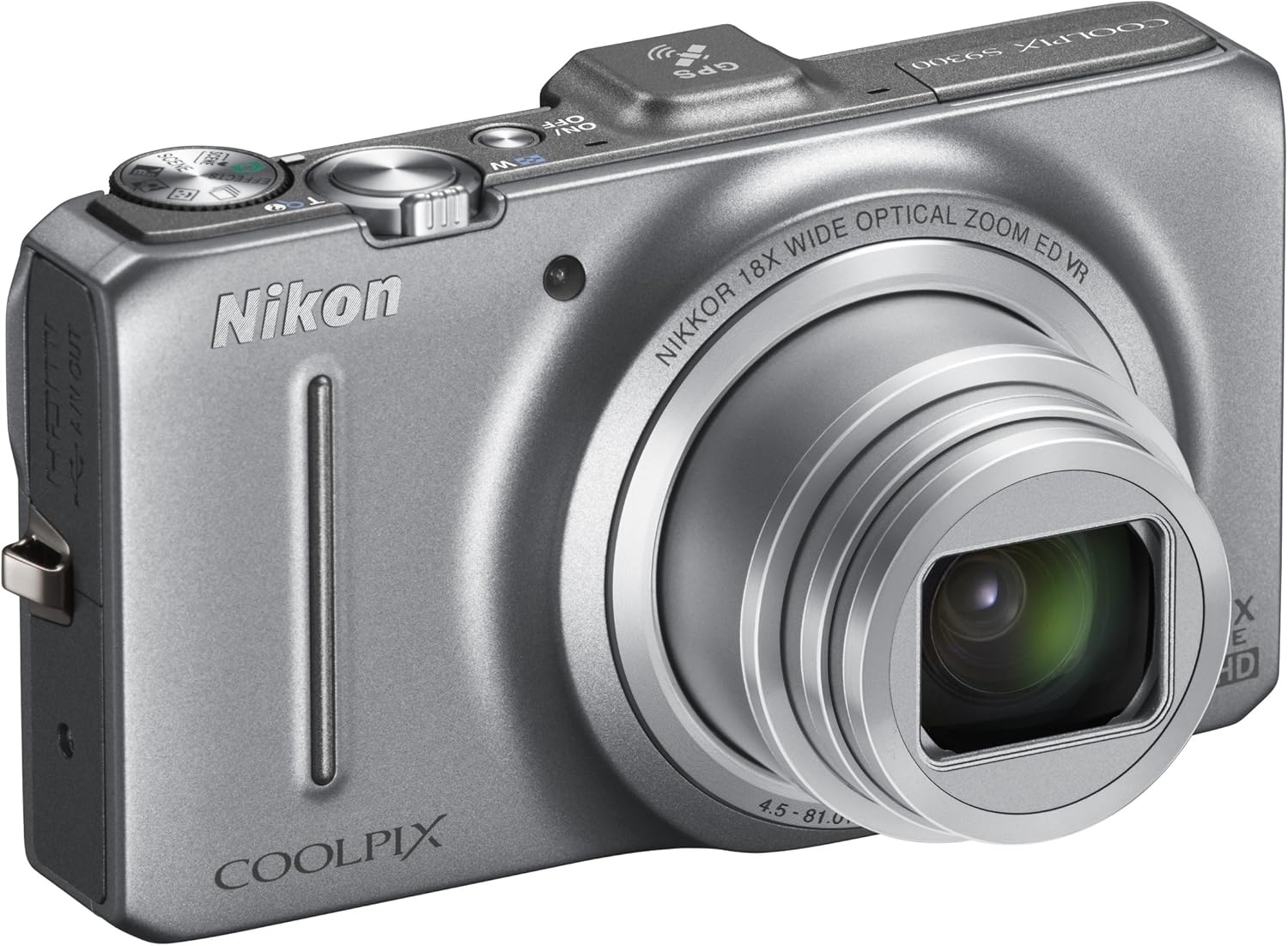
This image displays the Nikon Coolpix S9300 camera from the front, with the lens retracted into the body, indicating it is powered off or in a compact state for portability.
Arriba View

A parte superior view of the Nikon Coolpix S9300 camera highlights the power button, shutter button with zoom lever, mode dial, and GPS module. The COOLPIX S9300 branding is also visible.
Traseira View

This image shows the back of the Nikon Coolpix S9300 camera, featuring the 3.0-inch LCD monitor, a four-way multi-selector with 'OK' button, menu button, delete button, and dedicated video recording button.
5. Configuración
5.1. Inserción da batería e da tarxeta de memoria
- Open the battery-chamber cover on the bottom of the camera.
- Insert the battery with the correct orientation, ensuring the positive and negative terminals align.
- Insert a compatible SD/SDHC/SDXC memory card into the card slot until it clicks into place.
- Close the battery-chamber cover securely.
5.2. Cargando a batería
Connect the camera to the Charging AC Adapter EH-69P using the supplied USB cable. The charge lamp acenderase durante a carga e apagarase cando remate.
5.3. Acendido inicial
Press the power button to turn on the camera. Follow the on-screen instructions to set the language, date, and time.
6. Funcionamento da cámara
6.1. Fotografía básica
- Acende a cámara.
- Select your desired shooting mode using the mode dial (e.g., Auto, Scene, Effects).
- Encadra a túa foto usando o monitor LCD.
- Press the shutter button halfway to focus, then press it fully to take the picture.
6.2. Función de zoom
Use the zoom lever around the shutter button to zoom in (T) or zoom out (W) to adjust your focal length. The camera features an 18x optical zoom-NIKKOR ED glass lens.
6.3. Gravación de vídeo
Press the dedicated movie-record button to start recording Full HD (1080p) movies with stereo sound. Press it again to stop recording.
6.4. Funcionalidade do GPS
The built-in GPS provides location data for your photos and can log your movements. Enable GPS in the camera settings to geotag as túas imaxes e vídeos.
7. Integración de medios
7.1. Vídeo oficial do produto
Este vídeo ofrece un sobreview of the Nikon Coolpix S9300 16.0 MP Digital Camera, showcasing as súas características e capacidades.
8. Mantemento
8.1. Limpeza da cámara
- Use un pano suave e sen fiapos para limpar o corpo da cámara.
- For the lens, use a lens brush or a blower to remove dust, then gently wipe with a lens cleaning cloth.
- Do not use organic solvents like alcohol or thinner.
8.2. Almacenamento
When not in use for extended periods, remove the battery and store the camera in a cool, dry place away from direct sunlight and chemicals.
9 Solución de problemas
9.1. A cámara non se acende
- Asegúrate de que a batería estea completamente cargada e inserida correctamente.
- Comprobe se os terminais da batería están limpos.
9.2. As imaxes están borrosas
- Check focus settings (Autofocus Mode, AF Area Mode).
- Ensure sufficient lighting or use the flash if necessary.
- Hold the camera steady or use a tripod, especially when using high zoom or in low light.
9.3. A batería esgótase rapidamente
- Reduce LCD brightness.
- Turn off GPS when not needed.
- Limit continuous shooting or video recording.
10. Especificacións
| Característica | Detalle |
|---|---|
| Sensor de imaxe | 1/2.3 in. CMOS Sensor |
| Píxeles efectivos | 16.0 millóns |
| Lente | 18x Optical Zoom, NIKKOR ED glass lens |
| Distancia focal da lente | 4.5-81.0mm (equivalent to 25-450mm in 35mm format) |
| Redución de vibracións | Lens-shift VR |
| Monitor | 3.0-inch diagonal TFT LCD with Anti-reflection coating (approx. 921K dots) |
| File Formatos | Still - JPEG, Audio - WAV, Movie - MOV (H.264/MPEG-4 AVC) |
| GPS | Built-in with logging, POI, and Electronic compass |
| Dimensións (W x H x D) | 4.29 x 2.44 x 1.22 polgadas (aprox.) |
| Peso | 7.5 ounces (approx., with battery and memory card) |
| Fonte de enerxía | One Rechargeable Li-ion Battery EN-EL12 |
11. Garantía e soporte
For warranty information, please refer to the warranty card included in your product package. For technical support, visit the official Nikon website or contact Nikon customer service.
Os recursos en liña e as preguntas frecuentes están dispoñibles en Nikon USA.


